> ## Documentation Index
> Fetch the complete documentation index at: https://astronomer.io/docs/llms.txt
> Use this file to discover all available pages before exploring further.
# Orchestrate machine learning pipelines with Airflow datasets
Airflow can play a pivotal role in machine learning (ML) workflows. You can use Airflow DAGs to manage complex ML workflows, handle data dependencies, and ensure fault tolerance, making it easier for your data engineers to handle data inconsistencies, reprocess failed tasks, and maintain the integrity of your data pipelines.
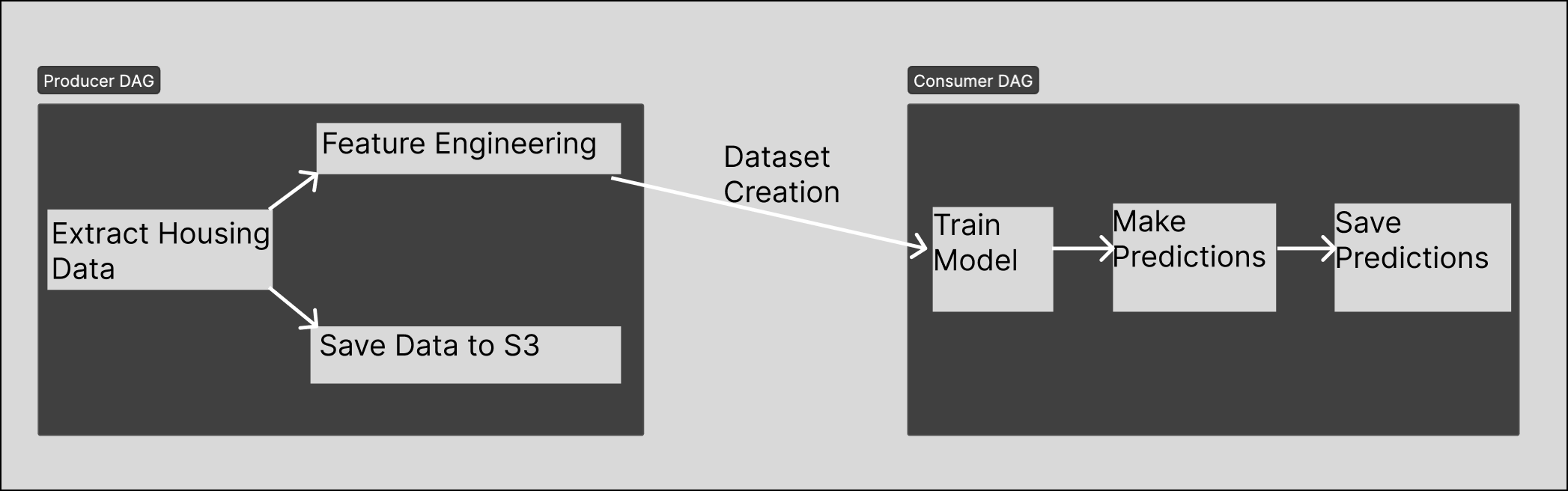
ML pipelines are sometimes run by two teams in a producer/consumer relationship. One team produces the clean data, while another team consumes the data in their ML models. This relationship can include friction when there's not a clear mechanism for delivering clean data to the producing team on a predictable, reliable basis. You can use Airflow datasets and data-driven scheduling to remove this friction by scheduling a consumer DAG to run only when its related producer DAG has completed.
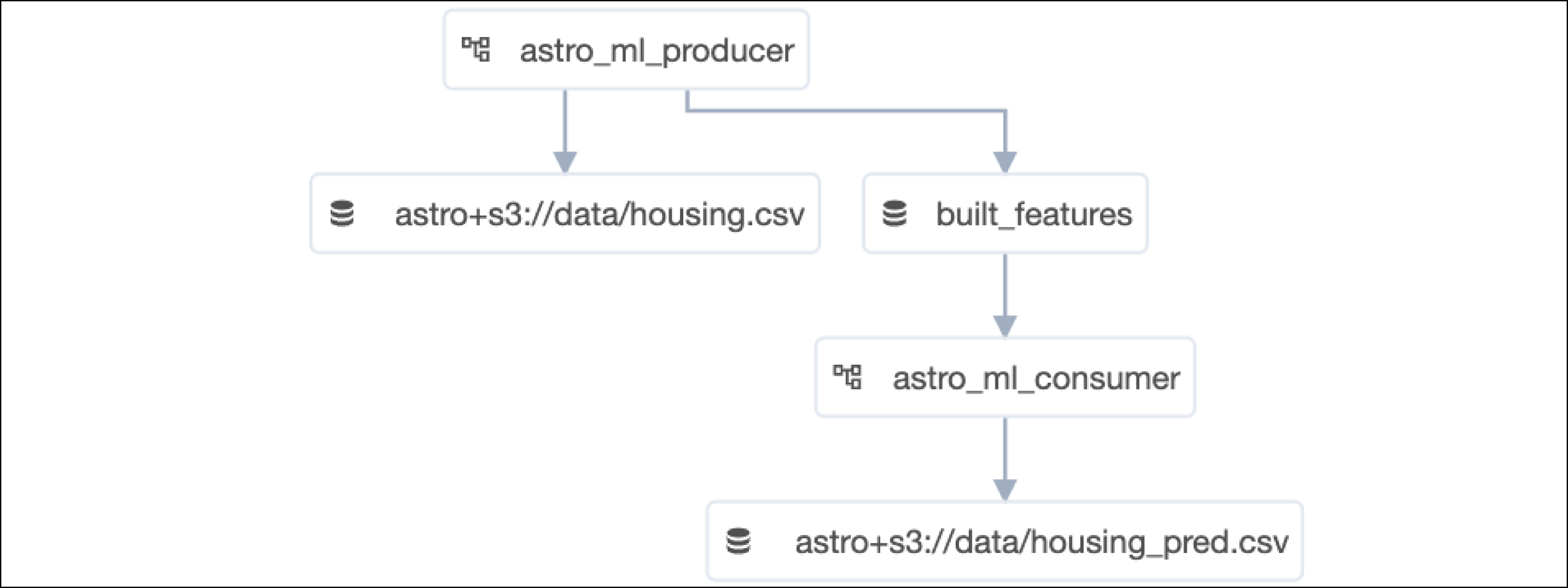
This example project includes two DAGs with a producer/consumer relationship. One DAG extracts and loads housing data into a local S3FileSystem using [MinIO](https://min.io/). The DAG's load task includes a dataset that triggers a second consumer DAG when the task completes. The second DAG then takes the data from the first DAG and uses it to train and run a predictive model using [Scikit Learn](https://scikit-learn.org/stable/).
This setup has two main advantages:
* Two teams can work independently on their specific sections of the pipeline without needing to coordinate with each other outside of the initial set up.
* Because the consumer DAG only triggers after the data arrives, you can avoid situations where the producer DAG takes longer than expected to complete, or where the consumer DAG runs on incomplete data.
 When you run the project locally, you can see the project's datasets and their relationships to each DAG in the Airflow UI **Datasets** page:
 ## Before you start
Before you try this example, make sure you have:
* The [Astro CLI](/docs/cli/v1.43/overview).
## Clone the project
Clone the example project from the [Astronomer GitHub](https://github.com/astronomer/use-case-produce-consume-ml/tree/main/astromlfinal).
## Run the project
To run the example project, open your project directory and run:
```sh wrap theme={null}
astro dev start
```
This command builds your Astro project into a Docker image and spins up Podman containers on your machine to run it. This project requires containers for your scheduler, webserver, executor, and workers, as well as a container for a local MinIO S3Filesystem and one for an ML flow instance.
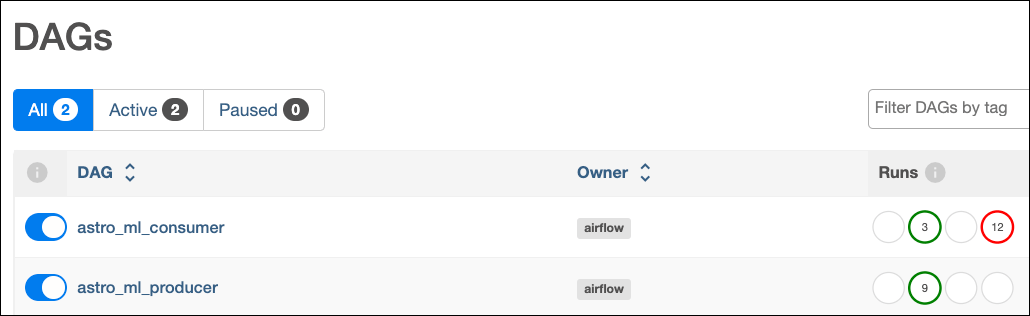
After the command finishes, open the Airflow UI at `https://localhost:8080/` and toggle on the `astro_ml_producer` and `astro_ml_consumer` DAGs. Then trigger the `astro_ml_producer` DAG using the **Play** button. You'll see that the `astro_ml_consumer` DAG starts after `astro_ml_producer` completes.
## Before you start
Before you try this example, make sure you have:
* The [Astro CLI](/docs/cli/v1.43/overview).
## Clone the project
Clone the example project from the [Astronomer GitHub](https://github.com/astronomer/use-case-produce-consume-ml/tree/main/astromlfinal).
## Run the project
To run the example project, open your project directory and run:
```sh wrap theme={null}
astro dev start
```
This command builds your Astro project into a Docker image and spins up Podman containers on your machine to run it. This project requires containers for your scheduler, webserver, executor, and workers, as well as a container for a local MinIO S3Filesystem and one for an ML flow instance.
After the command finishes, open the Airflow UI at `https://localhost:8080/` and toggle on the `astro_ml_producer` and `astro_ml_consumer` DAGs. Then trigger the `astro_ml_producer` DAG using the **Play** button. You'll see that the `astro_ml_consumer` DAG starts after `astro_ml_producer` completes.
 ## Project contents
### Data source
This project uses a [Scikit learn dataset](https://scikit-learn.org/stable/modules/generated/sklearn.datasets.fetch_california_housing.html#sklearn.datasets.fetch_california_housing) that contains information on the California housing market. The data is automatically retrieved as part of the DAG and doesn't need to be downloaded separately.
### Project code
This project consists of two DAGs. The [astro\_ml\_producer\_DAG](https://github.com/astronomer/use-case-produce-consume-ml/blob/main/astromlfinal/dags/astro_ml_producer.py) is the producer DAG that provides the data. It extracts the California Housing dataset from Scikit Learn and builds a model. The [astro\_ml\_consumer\_DAG](https://github.com/astronomer/use-case-produce-consume-ml/blob/main/astromlfinal/dags/astro_ml_consumer.py) is the consumer DAG that uses the data to train a model and generate predictions.
#### Producer DAG
The producer DAG, `astro_ml_producer`, has three tasks.
The `extract_housing_data` task imports data from Scikit learn using the `fetch_california_housing` module, and returns it as a dataframe for the next tasks to use using the Astro SDK [@`aql.dataframe`](https://astro-sdk-python.readthedocs.io/en/stable/astro/sql/operators/dataframe.html) decorator.
```python wrap theme={null}
@aql.dataframe(task_id="extract")
def extract_housing_data() -> DataFrame:
from sklearn.datasets import fetch_california_housing
return fetch_california_housing(download_if_missing=True, as_frame=True).frame
```
Then, the `build_features` task uses the Astro SDK [`@aql.dataframe`](https://astro-sdk-python.readthedocs.io/en/stable/astro/sql/operators/dataframe.html) decorator to implement a custom Python function that completes the following:
* Imports necessary libraries including `StandardScaler` from scikit-learn, `pandas` for DataFrame operations, dump from joblib for serialization, and `S3FileSystem` from s3fs for interacting with an S3-compatible object storage system.
* Creates an instance of an `S3FileSystem` as FS by specifying the access key, secret key, and the endpoint URL of the S3-compatible local storage system.
* Performs feature engineering by normalizing the input features using a StandardScaler, calculates metrics based on the scaler mean values, saves the scaler object for later monitoring and evaluation, and returns the normalized feature DataFrame `X` with the target column included.
* Creates an Airflow dataset object called `built_features` with `Dataset(dataset_uri))`. This tells Airflow that this dataset is produced by this task.
```python wrap theme={null}
@aql.dataframe(task_id="featurize", outlets=Dataset(dataset_uri))
def build_features(raw_df: DataFrame, model_dir: str) -> DataFrame:
from sklearn.preprocessing import StandardScaler
from joblib import dump
from s3fs import S3FileSystem
fs = S3FileSystem(
key="minioadmin",
secret="minioadmin",
client_kwargs={"endpoint_url": "http://host.docker.internal:9000/"},
)
target = "MedHouseVal"
X = raw_df.drop(target, axis=1)
y = raw_df[target]
scaler = StandardScaler()
X = pd.DataFrame(scaler.fit_transform(X), columns=X.columns)
metrics_df = pd.DataFrame(scaler.mean_, index=X.columns)[0].to_dict()
# Save scalar for later monitoring and eval
with fs.open(model_dir + "/scalar.joblib", "wb") as f:
dump([metrics_df, scaler], f)
X[target] = y
return X
```
Finally, the `save_data_to_s3` task uses the Astro SDK [@aql.`export_file`](https://astro-sdk-python.readthedocs.io/en/stable/astro/sql/operators/export.html) decorator to save the raw California Housing Dataset as `housing.csv` to the local S3Filesystem. It runs in parallel to the `build_features` task, both a clean dataset and a feature engineered dataset are saved.
```python wrap theme={null}
loaded_data = aql.export_file(
task_id="save_data_to_s3",
input_data=extract_df,
output_file=File(os.path.join(data_bucket, "housing.csv")),
if_exists="replace",
)
```
#### Consumer DAG
The [`astro_ml_consumer_DAG`](https://github.com/astronomer/use-case-produce-consume-ml/blob/main/astromlfinal/dags/astro_ml_consumer.py) takes data from the local S3Filesystem and uses it to train a Scikit linear model. It then uses this model to generate a prediction which is saved to the local S3Filesystem.
First, the `built_features` Dataset from the previous DAG is instantiated so that it can be used as a scheduling parameter. This DAG will start when the `built_features` Dataset is updated by the [astro\_ml\_producer\_DAG](https://github.com/astronomer/use-case-produce-consume-ml/blob/main/astromlfinal/dags/astro_ml_producer.py).
```python wrap theme={null}
dataset_uri = "built_features"
ingestion_dataset = Dataset(dataset_uri)
@dag(
dag_id="astro_ml_consumer",
schedule=[Dataset(dataset_uri)],
start_date=datetime(2023, 1, 1),
catchup=False,
)
def astro_ml_consumer():
```
Then, the `train_model` task uses the Astro SDK [@`aql.dataframe`](https://astro-sdk-python.readthedocs.io/en/stable/astro/sql/operators/dataframe.html) decorator to do the following:
* Import necessary libraries, including RidgeCV from scikit-learn for ridge regression, numpy for numerical operations, dump from joblib for serialization, and S3FileSystem from s3fs for interacting with an S3-compatible object storage system.
* Create an instance of S3FileSystem by specifying the access key, secret key, and the endpoint URL of the S3-compatible storage system.
* Open the file containing the feature DataFrame created by the consumer DAG using the S3 file system (`fs.open`) and train a ridge regression model on the features.
* Serialize and save the trained model to the specified `model_dir` using the dump function from joblib. The file name for the model is set as '`ridgecv.joblib`'. The function returns the URI of the saved model file `(model_file_uri)`, which is the concatenation of `model_dir` and '`ridgecv.joblib`'.
```python wrap theme={null}
@aql.dataframe(task_id="train")
def train_model(feature_df: ingestion_dataset, model_dir: str) -> str:
from sklearn.linear_model import RidgeCV
from joblib import dump
from s3fs import S3FileSystem
fs = S3FileSystem(
key="minioadmin",
secret="minioadmin",
client_kwargs={"endpoint_url": "http://host.docker.internal:9000/"},
)
target = "MedHouseVal"
pandasfeature = fs.open(
"s3://local-xcom/wgizkzybxwtzqffq9oo56ubb5nk1pjjwmp06ehcv2cyij7vte315r9apha22xvfd7.parquet"
)
cleanpanda = pd.read_parquet(pandasfeature)
model = RidgeCV(alphas=np.logspace(-3, 1, num=30))
reg = model.fit(cleanpanda.drop(target, axis=1), cleanpanda[target])
model_file_uri = model_dir + "/ridgecv.joblib"
with fs.open(model_file_uri, "wb") as f:
dump(model, f)
return model_file_uri
```
Then, the `predict_housing` task uses the Astro SDK [`@aql.dataframe`](https://astro-sdk-python.readthedocs.io/en/stable/astro/sql/operators/dataframe.html) decorator to load the trained model and feature DataFrame from the local S3FileSystem, make predictions on the features DataFrame, add the predicted values to the feature DataFrame, and return the feature DataFrame with the predicted values included.
```python wrap theme={null}
@aql.dataframe(task_id="predict")
def predict_housing(feature_df: DataFrame, model_file_uri: str) -> DataFrame:
from joblib import load
from s3fs import S3FileSystem
fs = S3FileSystem(
key="minioadmin",
secret="minioadmin",
client_kwargs={"endpoint_url": "http://host.docker.internal:9000/"},
)
with fs.open(model_file_uri, "rb") as f:
loaded_model = load(f)
featdf = fs.open(
"s3://local-xcom/wgizkzybxwtzqffq9oo56ubb5nk1pjjwmp06ehcv2cyij7vte315r9apha22xvfd7.parquet"
)
cleandf = pd.read_parquet(featdf)
target = "MedHouseVal"
cleandf["preds"] = loaded_model.predict(cleandf.drop(target, axis=1))
return cleandf
```
Finally, the `save_predictions` task uses the Astro SDK [`@aql.export_file`](https://astro-sdk-python.readthedocs.io/en/stable/astro/sql/operators/export.html) decorator to save the predictions dataframe in the local S3FileSystem.
```python wrap theme={null}
pred_file = aql.export_file(
task_id="save_predictions",
input_data=pred_df,
output_file=File(os.path.join(data_bucket, "housing_pred.csv")),
if_exists="replace",
)
```
## See also
* Tutorial: [Astro Python SDK documentation](https://astro-sdk-python.readthedocs.io/en/stable/).
* Documentation: [Airflow Datasets Guide](/docs/learn/airflow-datasets).
* Webinar: [How to Orchestrate Machine Learning Workflows With Airflow](https://www.astronomer.io/events/webinars/how-to-orchestrate-machine-learning-workflows-with-airflow/).
## Project contents
### Data source
This project uses a [Scikit learn dataset](https://scikit-learn.org/stable/modules/generated/sklearn.datasets.fetch_california_housing.html#sklearn.datasets.fetch_california_housing) that contains information on the California housing market. The data is automatically retrieved as part of the DAG and doesn't need to be downloaded separately.
### Project code
This project consists of two DAGs. The [astro\_ml\_producer\_DAG](https://github.com/astronomer/use-case-produce-consume-ml/blob/main/astromlfinal/dags/astro_ml_producer.py) is the producer DAG that provides the data. It extracts the California Housing dataset from Scikit Learn and builds a model. The [astro\_ml\_consumer\_DAG](https://github.com/astronomer/use-case-produce-consume-ml/blob/main/astromlfinal/dags/astro_ml_consumer.py) is the consumer DAG that uses the data to train a model and generate predictions.
#### Producer DAG
The producer DAG, `astro_ml_producer`, has three tasks.
The `extract_housing_data` task imports data from Scikit learn using the `fetch_california_housing` module, and returns it as a dataframe for the next tasks to use using the Astro SDK [@`aql.dataframe`](https://astro-sdk-python.readthedocs.io/en/stable/astro/sql/operators/dataframe.html) decorator.
```python wrap theme={null}
@aql.dataframe(task_id="extract")
def extract_housing_data() -> DataFrame:
from sklearn.datasets import fetch_california_housing
return fetch_california_housing(download_if_missing=True, as_frame=True).frame
```
Then, the `build_features` task uses the Astro SDK [`@aql.dataframe`](https://astro-sdk-python.readthedocs.io/en/stable/astro/sql/operators/dataframe.html) decorator to implement a custom Python function that completes the following:
* Imports necessary libraries including `StandardScaler` from scikit-learn, `pandas` for DataFrame operations, dump from joblib for serialization, and `S3FileSystem` from s3fs for interacting with an S3-compatible object storage system.
* Creates an instance of an `S3FileSystem` as FS by specifying the access key, secret key, and the endpoint URL of the S3-compatible local storage system.
* Performs feature engineering by normalizing the input features using a StandardScaler, calculates metrics based on the scaler mean values, saves the scaler object for later monitoring and evaluation, and returns the normalized feature DataFrame `X` with the target column included.
* Creates an Airflow dataset object called `built_features` with `Dataset(dataset_uri))`. This tells Airflow that this dataset is produced by this task.
```python wrap theme={null}
@aql.dataframe(task_id="featurize", outlets=Dataset(dataset_uri))
def build_features(raw_df: DataFrame, model_dir: str) -> DataFrame:
from sklearn.preprocessing import StandardScaler
from joblib import dump
from s3fs import S3FileSystem
fs = S3FileSystem(
key="minioadmin",
secret="minioadmin",
client_kwargs={"endpoint_url": "http://host.docker.internal:9000/"},
)
target = "MedHouseVal"
X = raw_df.drop(target, axis=1)
y = raw_df[target]
scaler = StandardScaler()
X = pd.DataFrame(scaler.fit_transform(X), columns=X.columns)
metrics_df = pd.DataFrame(scaler.mean_, index=X.columns)[0].to_dict()
# Save scalar for later monitoring and eval
with fs.open(model_dir + "/scalar.joblib", "wb") as f:
dump([metrics_df, scaler], f)
X[target] = y
return X
```
Finally, the `save_data_to_s3` task uses the Astro SDK [@aql.`export_file`](https://astro-sdk-python.readthedocs.io/en/stable/astro/sql/operators/export.html) decorator to save the raw California Housing Dataset as `housing.csv` to the local S3Filesystem. It runs in parallel to the `build_features` task, both a clean dataset and a feature engineered dataset are saved.
```python wrap theme={null}
loaded_data = aql.export_file(
task_id="save_data_to_s3",
input_data=extract_df,
output_file=File(os.path.join(data_bucket, "housing.csv")),
if_exists="replace",
)
```
#### Consumer DAG
The [`astro_ml_consumer_DAG`](https://github.com/astronomer/use-case-produce-consume-ml/blob/main/astromlfinal/dags/astro_ml_consumer.py) takes data from the local S3Filesystem and uses it to train a Scikit linear model. It then uses this model to generate a prediction which is saved to the local S3Filesystem.
First, the `built_features` Dataset from the previous DAG is instantiated so that it can be used as a scheduling parameter. This DAG will start when the `built_features` Dataset is updated by the [astro\_ml\_producer\_DAG](https://github.com/astronomer/use-case-produce-consume-ml/blob/main/astromlfinal/dags/astro_ml_producer.py).
```python wrap theme={null}
dataset_uri = "built_features"
ingestion_dataset = Dataset(dataset_uri)
@dag(
dag_id="astro_ml_consumer",
schedule=[Dataset(dataset_uri)],
start_date=datetime(2023, 1, 1),
catchup=False,
)
def astro_ml_consumer():
```
Then, the `train_model` task uses the Astro SDK [@`aql.dataframe`](https://astro-sdk-python.readthedocs.io/en/stable/astro/sql/operators/dataframe.html) decorator to do the following:
* Import necessary libraries, including RidgeCV from scikit-learn for ridge regression, numpy for numerical operations, dump from joblib for serialization, and S3FileSystem from s3fs for interacting with an S3-compatible object storage system.
* Create an instance of S3FileSystem by specifying the access key, secret key, and the endpoint URL of the S3-compatible storage system.
* Open the file containing the feature DataFrame created by the consumer DAG using the S3 file system (`fs.open`) and train a ridge regression model on the features.
* Serialize and save the trained model to the specified `model_dir` using the dump function from joblib. The file name for the model is set as '`ridgecv.joblib`'. The function returns the URI of the saved model file `(model_file_uri)`, which is the concatenation of `model_dir` and '`ridgecv.joblib`'.
```python wrap theme={null}
@aql.dataframe(task_id="train")
def train_model(feature_df: ingestion_dataset, model_dir: str) -> str:
from sklearn.linear_model import RidgeCV
from joblib import dump
from s3fs import S3FileSystem
fs = S3FileSystem(
key="minioadmin",
secret="minioadmin",
client_kwargs={"endpoint_url": "http://host.docker.internal:9000/"},
)
target = "MedHouseVal"
pandasfeature = fs.open(
"s3://local-xcom/wgizkzybxwtzqffq9oo56ubb5nk1pjjwmp06ehcv2cyij7vte315r9apha22xvfd7.parquet"
)
cleanpanda = pd.read_parquet(pandasfeature)
model = RidgeCV(alphas=np.logspace(-3, 1, num=30))
reg = model.fit(cleanpanda.drop(target, axis=1), cleanpanda[target])
model_file_uri = model_dir + "/ridgecv.joblib"
with fs.open(model_file_uri, "wb") as f:
dump(model, f)
return model_file_uri
```
Then, the `predict_housing` task uses the Astro SDK [`@aql.dataframe`](https://astro-sdk-python.readthedocs.io/en/stable/astro/sql/operators/dataframe.html) decorator to load the trained model and feature DataFrame from the local S3FileSystem, make predictions on the features DataFrame, add the predicted values to the feature DataFrame, and return the feature DataFrame with the predicted values included.
```python wrap theme={null}
@aql.dataframe(task_id="predict")
def predict_housing(feature_df: DataFrame, model_file_uri: str) -> DataFrame:
from joblib import load
from s3fs import S3FileSystem
fs = S3FileSystem(
key="minioadmin",
secret="minioadmin",
client_kwargs={"endpoint_url": "http://host.docker.internal:9000/"},
)
with fs.open(model_file_uri, "rb") as f:
loaded_model = load(f)
featdf = fs.open(
"s3://local-xcom/wgizkzybxwtzqffq9oo56ubb5nk1pjjwmp06ehcv2cyij7vte315r9apha22xvfd7.parquet"
)
cleandf = pd.read_parquet(featdf)
target = "MedHouseVal"
cleandf["preds"] = loaded_model.predict(cleandf.drop(target, axis=1))
return cleandf
```
Finally, the `save_predictions` task uses the Astro SDK [`@aql.export_file`](https://astro-sdk-python.readthedocs.io/en/stable/astro/sql/operators/export.html) decorator to save the predictions dataframe in the local S3FileSystem.
```python wrap theme={null}
pred_file = aql.export_file(
task_id="save_predictions",
input_data=pred_df,
output_file=File(os.path.join(data_bucket, "housing_pred.csv")),
if_exists="replace",
)
```
## See also
* Tutorial: [Astro Python SDK documentation](https://astro-sdk-python.readthedocs.io/en/stable/).
* Documentation: [Airflow Datasets Guide](/docs/learn/airflow-datasets).
* Webinar: [How to Orchestrate Machine Learning Workflows With Airflow](https://www.astronomer.io/events/webinars/how-to-orchestrate-machine-learning-workflows-with-airflow/).