> ## Documentation Index
> Fetch the complete documentation index at: https://astronomer.io/docs/llms.txt
> Use this file to discover all available pages before exploring further.
# Use Airflow templates
Templating allows you to pass dynamic information into task instances at runtime. For example, you can run the following command to print the day of the week every time you run a task:
```python wrap theme={null}
BashOperator(
task_id="print_day_of_week",
bash_command="echo Today is {{ execution_date.format('dddd') }}",
)
```
In this example, the value in the double curly braces `{{ }}` is the templated code that is evaluated at runtime. If you execute this code on a Wednesday, the `BashOperator` prints `Today is Wednesday`. Templates have numerous applications. For example, you can use templating to create a new directory named after a task's execution date for storing daily data (`/data/path/20210824`). Alternatively, you can select a specific partition (`/data/path/yyyy=2021/mm=08/dd=24`) so that only the relevant data for a given execution date is scanned.
Airflow leverages [Jinja](https://jinja.palletsprojects.com), a Python templating framework, as its templating engine. In this guide, you'll learn the following:
* How to apply Jinja templates in your code.
* Which variables and functions are available when templating.
* Which operator fields can be templated and which can't.
* How to validate templates.
* How to apply custom variables and functions when templating.
* How to render templates to strings and native Python code.
**Other ways to learn**
There are multiple resources for learning about this topic. See also:
* Astronomer Academy: [Airflow: Templating](https://academy.astronomer.io/astro-runtime-templating) module.
## Assumed knowledge
To get the most out of this guide, you should have an understanding of:
* Airflow operators. See [Operators 101](/docs/learn/2.x/what-is-an-operator).
* Jinja templating. See [Jinja basics](https://jinja.palletsprojects.com/en/3.1.x/api/#basics).
## Templating variables in Airflow
Templating in Airflow works the same as Jinja templating in Python. You enclose the code you want evaluated between double curly braces, and the expression is evaluated at runtime.
Some of the most commonly used Airflow variables that you can use in templates are:
* `{{ ds }}`: The DAG Run’s logical date as `YYYY-MM-DD`.
* `{{ ds_nodash }}`: The DAG run’s logical date as `YYYYMMDD`.
* `{{ data_interval_start }}`: The start of the data interval.
* `{{ data_interval_end }}`: The end of the data interval.
To use a Jinja template in a Python f-string, add extra braces around the Jinja template. For example, `name_string = f"my name is {{{{ var.value.get('var_name') }}}}"`
For a complete list of the available variables, see the Airflow [Templates reference](https://airflow.apache.org/docs/apache-airflow/stable/macros-ref.html#default-variables).
In Airflow 2.10+, it is possible to pass a Python callable to templateable fields instead of a Jinja template, see [Use a python callable for template fields](#use-a-python-callable-for-template-fields).
## Templateable fields and scripts
Templates can't be applied to all arguments of an operator. Two attributes in the `BaseOperator` define where you can use templated values:
* `template_fields`: Defines which operator arguments can use templated values.
* `template_ext`: Defines which file extensions can use templated values.
The following example shows a simplified version of the `BashOperator`:
```python wrap theme={null}
class BashOperator(BaseOperator):
template_fields = ('bash_command', 'env') # defines which fields are templateable
template_ext = ('.sh', '.bash') # defines which file extensions are templateable
def __init__(
self,
*,
bash_command,
env: None,
output_encoding: 'utf-8',
**kwargs,
):
super().__init__(**kwargs)
self.bash_command = bash_command # templateable (can also give path to .sh or .bash script)
self.env = env # templateable
self.output_encoding = output_encoding # not templateable
```
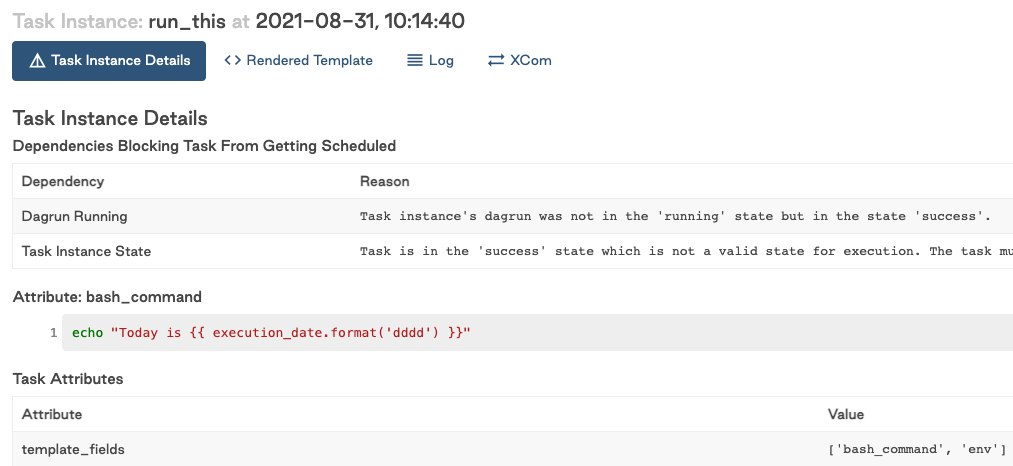
The `template_fields` attribute holds a list of attributes that can use templated values. You can also find this list in [the Airflow documentation](https://airflow.apache.org/docs/apache-airflow/stable/_api/airflow/operators/bash/index.html#airflow.operators.bash.BashOperator.template_fields) or in the Airflow UI as shown in the following image:
 `template_ext` contains a list of file extensions that can be read and templated at runtime. For example, instead of providing a Bash command to `bash_command`, you could provide a `.sh` script that contains a templated value:
```python wrap theme={null}
run_this = BashOperator(
task_id="run_this",
bash_command="script.sh", # .sh extension can be read and templated
)
```
The `BashOperator` takes the contents of the following script, templates it, and executes it:
```bash wrap theme={null}
# script.sh
echo "Today is {{ execution_date.format('dddd') }}"
```
Templating from files speeds development because an integrated development environment (IDE) can apply language-specific syntax highlighting on the script. This wouldn't be possible if your script is defined as a big string of Airflow code.
By default, Airflow searches for the location of your scripts relative to the directory the DAG file is defined in. If your DAG is stored in `/path/to/dag.py` and your script is stored in `/path/to/scripts/script.sh`, update the value of `bash_command` in the previous example to `scripts/script.sh`.
Alternatively, you can set a base path for templates at the DAG-level with the `template_searchpath` argument. For example, the following DAG would look for `script.sh` at `/tmp/script.sh`:
```python wrap theme={null}
@dag(..., template_searchpath="/tmp")
def my_dag():
run_this = BashOperator(task_id="run_this", bash_command="script.sh")
```
`template_ext` contains a list of file extensions that can be read and templated at runtime. For example, instead of providing a Bash command to `bash_command`, you could provide a `.sh` script that contains a templated value:
```python wrap theme={null}
run_this = BashOperator(
task_id="run_this",
bash_command="script.sh", # .sh extension can be read and templated
)
```
The `BashOperator` takes the contents of the following script, templates it, and executes it:
```bash wrap theme={null}
# script.sh
echo "Today is {{ execution_date.format('dddd') }}"
```
Templating from files speeds development because an integrated development environment (IDE) can apply language-specific syntax highlighting on the script. This wouldn't be possible if your script is defined as a big string of Airflow code.
By default, Airflow searches for the location of your scripts relative to the directory the DAG file is defined in. If your DAG is stored in `/path/to/dag.py` and your script is stored in `/path/to/scripts/script.sh`, update the value of `bash_command` in the previous example to `scripts/script.sh`.
Alternatively, you can set a base path for templates at the DAG-level with the `template_searchpath` argument. For example, the following DAG would look for `script.sh` at `/tmp/script.sh`:
```python wrap theme={null}
@dag(..., template_searchpath="/tmp")
def my_dag():
run_this = BashOperator(task_id="run_this", bash_command="script.sh")
```
Traditional
```python wrap theme={null}
with DAG(..., template_searchpath="/tmp") as dag:
run_this = BashOperator(task_id="run_this", bash_command="script.sh")
```
### Templating additional fields
If you need to template a field that isn't listed in the operator's `template_fields`, you can either set the `template_fields` attribute on a task or create a custom operator.
The following examples demonstrate how to use each method to template the `cwd` field of the `BashOperator`.
Task
After defining a task and assigning it to a Python variable, you can modify its `template_fields` attribute. This allows you to enable Jinja templating for any field that isn't templated by default.
This method is preferable when you need to template a field only once.
```python wrap theme={null}
from airflow.decorators import dag
from airflow.operators.bash import BashOperator
from airflow.utils.dates import days_ago
@dag(schedule=None, start_date=days_ago(1))
def templating_dag():
bash_task = BashOperator(
task_id="set_template_field",
bash_command="script.sh",
cwd="/usr/local/airflow/{{ ds }}",
)
bash_task.template_fields = ("bash_command", "env", "cwd")
templating_dag()
```
Operator
You can create a custom operator with additional templated fields by subclassing the desired operator class and adding your desired field to the `template_fields` argument.
In this example, `TemplatedBashOperator` is a new operator that inherits the behavior of `BashOperator` and allows Jinja templating of the `cwd` field.
This method is preferred if you need to template a field repeatedly.
For existing projects, naming your custom operator the same as the existing one simplifies refactoring by allowing you to only modify imports, minimizing the required code changes.
```python wrap theme={null}
from airflow.decorators import dag
from airflow.operators.bash import BashOperator
from airflow.utils.dates import days_ago
from typing import TYPE_CHECKING
if TYPE_CHECKING:
from collections.abc import Sequence
class TemplatedBashOperator(BashOperator):
template_fields: Sequence[str] = ("bash_command", "env", "cwd")
@dag(schedule=None, start_date=days_ago(1))
def templating_dag():
bash_task = TemplatedBashOperator(
task_id="custom_operator",
bash_command="script.sh",
cwd="/usr/local/airflow/{{ ds }}",
)
templating_dag()
```
### Disable templating
As of Airflow 2.8 it is possible to use a wrapper class to disable templating for the input to a templatable field without needing to modify the operator itself. This is useful when you want to pass a string that contains Jinja syntax to an operator without it being rendered. For example, you may want to pass a Jinja template to a `BashOperator` that won't be rendered. This can be achieved by wrapping the string into the `literal` function:
```python wrap theme={null}
from airflow.utils.template import literal
BashOperator(
task_id="use_literal_wrapper_to_ignore_jinja_template",
bash_command=literal("echo {{ params.the_best_number }}"),
)
```
The code above will print `{{ params.the_best_number }}` to the logs instead of showing the rendered value of `params.the_best_number`.
## Use a Python callable for template fields
In Airflow 2.10+ it is possible to pass a Python callable to templateable fields. This is especially useful when the parameter value is created using complex operations that might not be possible or are hard to read in Jinja.
The example below shows a `TriggerDagRunOperator` for which the `conf` parameter is generated based on a value in a JSON file by using a Python callable instead of a Jinja template. Note that the two keyword arguments `context` and `jinja_env` are mandatory to define in the provided callable.
```python wrap theme={null}
# from airflow.operators.trigger_dagrun import TriggerDagRunOperator
def build_conf(context, jinja_env): # the two kwargs are mandatory
with open("include/configuration.json", "r") as file:
data = json.load(file)
value = data.get("time_value", None)
return {"sleep_time": value}
tdro = TriggerDagRunOperator(
task_id="tdro",
trigger_dag_id="tdro_downstream",
conf=build_conf,
)
callable_template_custom()
```
For more information, see [Jinja Templating](https://airflow.apache.org/docs/apache-airflow/stable/core-concepts/operators.html#jinja-templating).
## Validate templates
The output of templates can be checked in both the Airflow UI and Airflow CLI. One advantage of the Airflow CLI is that you don't need to run any tasks before seeing the result.
The Airflow CLI command `airflow tasks render` renders all templateable attributes of a given task. Given a `dag_id`, `task_id`, and random `execution_date`, the command output is similar to the following example:
```bash wrap theme={null}
$ airflow tasks render example_dag run_this 2021-01-01
# ----------------------------------------------------------
# property: bash_command
# ----------------------------------------------------------
echo "Today is Friday"
# ----------------------------------------------------------
# property: env
# ----------------------------------------------------------
None
```
For this command to work, Airflow needs access to a metadata database. To set up a local SQLite database, run the following commands:
```bash wrap theme={null}
cd
export AIRFLOW_HOME=$(pwd)
airflow db migrate # generates airflow.db, airflow.cfg, and webserver_config.py in your project dir
# note that in Airflow versions pre-2.7 you'll need to use `airflow db init` instead
# airflow tasks render [dag_id] [task_id] [execution_date]
```
If you use the Astro CLI, a Postgres metadata database is automatically configured for you after running `astro dev start` in your project directory. From here, you can run `astro dev run tasks render ` to test your templated values.
For most templates, this is sufficient. However, if an external system such as a variable in your production Airflow metadata database is reached by the templating logic, you must have connectivity to it.
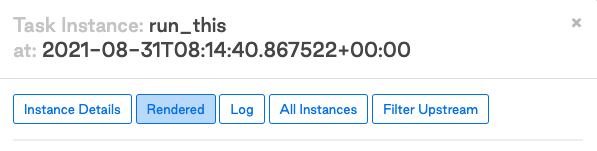
To view the result of templated attributes after running a task in the Airflow UI, click a task and then click **Rendered** as shown in the following image:
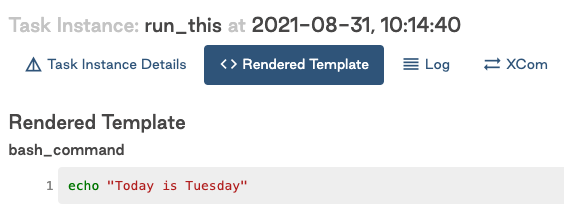
 The Rendered Template view and the output of the templated attributes are shown in the following image:
 ## Macros: using custom functions and variables in templates
As discussed previously, there are several variables available during templating. A Jinja environment and Airflow runtime are different. You can view a Jinja environment as a very stripped-down Python environment. That, among other things, means modules can't be imported. For example, this command won't work in a Jinja template:
```python wrap theme={null}
from datetime import datetime
BashOperator(
task_id="print_now",
# raises jinja2.exceptions.UndefinedError: 'datetime' is undefined
bash_command="echo It is currently {{ datetime.now() }}",
)
```
However, it is possible to inject functions into your Jinja environment. In Airflow, several standard Python modules are injected by default for templating, under the name macros. For example, the previous code example can be updated to use `macros.datetime`:
```python wrap theme={null}
BashOperator(
task_id="print_now",
# It is currently 2021-08-30 13:51:55.820299
bash_command="echo It is currently {{ macros.datetime.now() }}",
)
```
Airflow includes some pre-injected functions out of the box for you to use in your templates. See [Airflow documentation](https://airflow.apache.org/docs/apache-airflow/stable/templates-ref.html#macros) for a list of available functions. You can also load information in JSON format using `"{{ macros.json.loads(...) }}"` and information in YAML format using `"{{ macros.yaml.safe_load(...) }}"`.
Besides pre-injected functions, you can also use self-defined variables and functions in your templates. Airflow provides a convenient way to inject these into the Jinja environment. In the following example, a function is added to the DAG to print the number of days since May 1st, 2015:
```python wrap theme={null}
def days_to_now(starting_date):
return (datetime.now() - starting_date).days
```
To use this inside a Jinja template, you can pass a dict to `user_defined_macros` in the DAG. For example:
```python wrap theme={null}
def days_to_now(starting_date):
return (datetime.now() - starting_date).days
@dag(
start_date=datetime(2021, 1, 1),
schedule=None,
user_defined_macros={
"starting_date": datetime(2015, 5, 1), # Macro can be a variable
"days_to_now": days_to_now, # Macro can also be a function
},
)
def demo_template():
print_days = BashOperator(
task_id="print_days",
# Call user defined macros
bash_command="echo Days since {{ starting_date }} is {{ days_to_now(starting_date) }}",
)
# Days since 2015-05-01 00:00:00 is 2313
demo_template():
```
It's also possible to inject functions as Jinja [filters](https://jinja.palletsprojects.com/en/3.0.x/api/#jinja2.Environment.filters) using `user_defined_filters`. You can use filters as pipe-operations. The following example completes the same work as the previous example, only this time filters are used:
```python wrap theme={null}
@dag(
start_date=datetime(2021, 1, 1),
schedule=None,
# Set user_defined_filters to use function as pipe-operation
user_defined_filters={"days_to_now": days_to_now},
user_defined_macros={"starting_date": datetime(2015, 5, 1)},
)
def bash_script_template():
print_days = BashOperator(
task_id="print_days",
# Pipe value to function
bash_command="echo Days since {{ starting_date }} is {{ starting_date | days_to_now }}",
)
# Days since 2015-05-01 00:00:00 is 2313
bash_script_template()
```
Functions injected with `user_defined_filters` and `user_defined_macros` are both usable in the Jinja environment. While they achieve the same result, Astronomer recommends using filters when you need to import multiple custom functions because the filter formatting improves the readability of your code. You can see this when comparing the two techniques side-to-side:
```python wrap theme={null}
"{{ name | striptags | title }}" # chained filters are read naturally from left to right
"{{ title(striptags(name)) }}" # multiple functions are more difficult to interpret because reading right to left
```
If you want to use a function to generate input at the top-level of the DAG, for example for a value in the DAG's `default_args`, you can register a custom macro. Defining a function as a macro has the advantage that it is only parsed at runtime, not every time the DAG file is parsed. This pattern follows the best practice of [avoiding top-level code in your DAG](/docs/learn/2.x/dag-best-practices#avoid-top-level-code-in-your-dag-file).
To register a custom macro, you need to define it as an [Airflow plugin](/docs/learn/2.x/using-airflow-plugins). For example, if you add the following code to a file in the `plugins` directory:
```python wrap theme={null}
from airflow.plugins_manager import AirflowPlugin
def get_acl():
return 'helooo!'
class TestPlugin(AirflowPlugin):
name = 'test_macro'
macros = [get_acl]
```
Then, you can use the `get_acl` macro in the `default_args` by accessing it in a Jinja template.
```python wrap theme={null}
default_args = {
'owner': 'astro',
'access_control_list': "{{ macros.test_macro.get_acl() }}",
}
```
## Render native Python code
By default, Jinja templates always render to Python strings. Sometimes it's desirable to render templates to native Python code. When the code you're calling doesn't work with strings, it can cause issues. For example:
```python wrap theme={null}
def sum_numbers(*args):
total = 0
for val in args:
total += val
return total
sum_numbers(1, 2, 3)
# returns 6
sum_numbers("1", "2", "3")
# TypeError: unsupported operand type(s) for +=: 'int' and 'str'
```
Consider a scenario where you're passing a list of values to this function by triggering a DAG with a config that holds some numbers:
```python wrap theme={null}
@dag(
start_date=datetime.datetime(2021, 1, 1),
schedule=None,
catchup=False
)
def failing_template():
PythonOperator(
task_id="sumnumbers",
python_callable=sum_numbers,
op_args="{{ dag_run.conf['numbers'] }}",
)
failing_template()
```
You would trigger the DAG with the following JSON to the DAG run configuration:
```json wrap theme={null}
{"numbers": [1,2,3]}
```
The rendered value is a string. Since the `sum_numbers` function unpacks the given string, it ends up trying to add up every character in the string:
```python wrap theme={null}
('[', '1', ',', ' ', '2', ',', ' ', '3', ']')
```
This rendered string won't work, so you must tell Jinja to return a native Python list instead of a string. Jinja supports this with Environments. The [default Jinja environment](https://jinja.palletsprojects.com/en/3.0.x/api/#jinja2.Environment) outputs strings, but you can configure a [NativeEnvironment](https://jinja.palletsprojects.com/en/3.0.x/nativetypes/#jinja2.nativetypes.NativeEnvironment) to render templates as native Python code with the `render_template_as_native_obj` argument on the DAG class.
```python wrap theme={null}
def sum_numbers(*args):
total = 0
for val in args:
total += val
return total
@dag(
dag_id="native_templating",
start_date=datetime.datetime(2021, 1, 1),
schedule=None,
# Render templates using Jinja NativeEnvironment
render_template_as_native_obj=True,
)
def native_templating()
sumnumbers = PythonOperator(
task_id="sumnumbers",
python_callable=sum_numbers,
op_args="{{ dag_run.conf['numbers'] }}",
)
native_templating()
```
Passing the same JSON configuration `{"numbers": [1,2,3]}` now renders a list of integers which the `sum_numbers` function processes correctly:
```text wrap theme={null}
[2021-08-26 11:53:12,872] {python.py:151} INFO - Done. Returned value was: 6
```
The Jinja environment must be configured on the DAG-level. This means that all tasks in a DAG render either using the default Jinja environment or using the NativeEnvironment.
## Macros: using custom functions and variables in templates
As discussed previously, there are several variables available during templating. A Jinja environment and Airflow runtime are different. You can view a Jinja environment as a very stripped-down Python environment. That, among other things, means modules can't be imported. For example, this command won't work in a Jinja template:
```python wrap theme={null}
from datetime import datetime
BashOperator(
task_id="print_now",
# raises jinja2.exceptions.UndefinedError: 'datetime' is undefined
bash_command="echo It is currently {{ datetime.now() }}",
)
```
However, it is possible to inject functions into your Jinja environment. In Airflow, several standard Python modules are injected by default for templating, under the name macros. For example, the previous code example can be updated to use `macros.datetime`:
```python wrap theme={null}
BashOperator(
task_id="print_now",
# It is currently 2021-08-30 13:51:55.820299
bash_command="echo It is currently {{ macros.datetime.now() }}",
)
```
Airflow includes some pre-injected functions out of the box for you to use in your templates. See [Airflow documentation](https://airflow.apache.org/docs/apache-airflow/stable/templates-ref.html#macros) for a list of available functions. You can also load information in JSON format using `"{{ macros.json.loads(...) }}"` and information in YAML format using `"{{ macros.yaml.safe_load(...) }}"`.
Besides pre-injected functions, you can also use self-defined variables and functions in your templates. Airflow provides a convenient way to inject these into the Jinja environment. In the following example, a function is added to the DAG to print the number of days since May 1st, 2015:
```python wrap theme={null}
def days_to_now(starting_date):
return (datetime.now() - starting_date).days
```
To use this inside a Jinja template, you can pass a dict to `user_defined_macros` in the DAG. For example:
```python wrap theme={null}
def days_to_now(starting_date):
return (datetime.now() - starting_date).days
@dag(
start_date=datetime(2021, 1, 1),
schedule=None,
user_defined_macros={
"starting_date": datetime(2015, 5, 1), # Macro can be a variable
"days_to_now": days_to_now, # Macro can also be a function
},
)
def demo_template():
print_days = BashOperator(
task_id="print_days",
# Call user defined macros
bash_command="echo Days since {{ starting_date }} is {{ days_to_now(starting_date) }}",
)
# Days since 2015-05-01 00:00:00 is 2313
demo_template():
```
It's also possible to inject functions as Jinja [filters](https://jinja.palletsprojects.com/en/3.0.x/api/#jinja2.Environment.filters) using `user_defined_filters`. You can use filters as pipe-operations. The following example completes the same work as the previous example, only this time filters are used:
```python wrap theme={null}
@dag(
start_date=datetime(2021, 1, 1),
schedule=None,
# Set user_defined_filters to use function as pipe-operation
user_defined_filters={"days_to_now": days_to_now},
user_defined_macros={"starting_date": datetime(2015, 5, 1)},
)
def bash_script_template():
print_days = BashOperator(
task_id="print_days",
# Pipe value to function
bash_command="echo Days since {{ starting_date }} is {{ starting_date | days_to_now }}",
)
# Days since 2015-05-01 00:00:00 is 2313
bash_script_template()
```
Functions injected with `user_defined_filters` and `user_defined_macros` are both usable in the Jinja environment. While they achieve the same result, Astronomer recommends using filters when you need to import multiple custom functions because the filter formatting improves the readability of your code. You can see this when comparing the two techniques side-to-side:
```python wrap theme={null}
"{{ name | striptags | title }}" # chained filters are read naturally from left to right
"{{ title(striptags(name)) }}" # multiple functions are more difficult to interpret because reading right to left
```
If you want to use a function to generate input at the top-level of the DAG, for example for a value in the DAG's `default_args`, you can register a custom macro. Defining a function as a macro has the advantage that it is only parsed at runtime, not every time the DAG file is parsed. This pattern follows the best practice of [avoiding top-level code in your DAG](/docs/learn/2.x/dag-best-practices#avoid-top-level-code-in-your-dag-file).
To register a custom macro, you need to define it as an [Airflow plugin](/docs/learn/2.x/using-airflow-plugins). For example, if you add the following code to a file in the `plugins` directory:
```python wrap theme={null}
from airflow.plugins_manager import AirflowPlugin
def get_acl():
return 'helooo!'
class TestPlugin(AirflowPlugin):
name = 'test_macro'
macros = [get_acl]
```
Then, you can use the `get_acl` macro in the `default_args` by accessing it in a Jinja template.
```python wrap theme={null}
default_args = {
'owner': 'astro',
'access_control_list': "{{ macros.test_macro.get_acl() }}",
}
```
## Render native Python code
By default, Jinja templates always render to Python strings. Sometimes it's desirable to render templates to native Python code. When the code you're calling doesn't work with strings, it can cause issues. For example:
```python wrap theme={null}
def sum_numbers(*args):
total = 0
for val in args:
total += val
return total
sum_numbers(1, 2, 3)
# returns 6
sum_numbers("1", "2", "3")
# TypeError: unsupported operand type(s) for +=: 'int' and 'str'
```
Consider a scenario where you're passing a list of values to this function by triggering a DAG with a config that holds some numbers:
```python wrap theme={null}
@dag(
start_date=datetime.datetime(2021, 1, 1),
schedule=None,
catchup=False
)
def failing_template():
PythonOperator(
task_id="sumnumbers",
python_callable=sum_numbers,
op_args="{{ dag_run.conf['numbers'] }}",
)
failing_template()
```
You would trigger the DAG with the following JSON to the DAG run configuration:
```json wrap theme={null}
{"numbers": [1,2,3]}
```
The rendered value is a string. Since the `sum_numbers` function unpacks the given string, it ends up trying to add up every character in the string:
```python wrap theme={null}
('[', '1', ',', ' ', '2', ',', ' ', '3', ']')
```
This rendered string won't work, so you must tell Jinja to return a native Python list instead of a string. Jinja supports this with Environments. The [default Jinja environment](https://jinja.palletsprojects.com/en/3.0.x/api/#jinja2.Environment) outputs strings, but you can configure a [NativeEnvironment](https://jinja.palletsprojects.com/en/3.0.x/nativetypes/#jinja2.nativetypes.NativeEnvironment) to render templates as native Python code with the `render_template_as_native_obj` argument on the DAG class.
```python wrap theme={null}
def sum_numbers(*args):
total = 0
for val in args:
total += val
return total
@dag(
dag_id="native_templating",
start_date=datetime.datetime(2021, 1, 1),
schedule=None,
# Render templates using Jinja NativeEnvironment
render_template_as_native_obj=True,
)
def native_templating()
sumnumbers = PythonOperator(
task_id="sumnumbers",
python_callable=sum_numbers,
op_args="{{ dag_run.conf['numbers'] }}",
)
native_templating()
```
Passing the same JSON configuration `{"numbers": [1,2,3]}` now renders a list of integers which the `sum_numbers` function processes correctly:
```text wrap theme={null}
[2021-08-26 11:53:12,872] {python.py:151} INFO - Done. Returned value was: 6
```
The Jinja environment must be configured on the DAG-level. This means that all tasks in a DAG render either using the default Jinja environment or using the NativeEnvironment.