> ## Documentation Index
> Fetch the complete documentation index at: https://astronomer.io/docs/llms.txt
> Use this file to discover all available pages before exploring further.
# Orchestrate Weaviate operations with Apache Airflow
[Weaviate](https://weaviate.io/developers/weaviate) is an open source vector database, which store high-dimensional embeddings of objects like text, images, audio or video. The [Weaviate Airflow provider](https://airflow.apache.org/docs/apache-airflow-providers-weaviate/stable/index.html) offers modules to easily integrate Weaviate with Airflow.
In this tutorial you'll use Airflow to ingest movie descriptions into Weaviate, use Weaviate's automatic vectorization to create vectors for the descriptions, and query Weaviate for movies that are thematically close to user-provided concepts.
**Other ways to learn**
There are multiple resources for learning about this topic. See also:
* Webinar: [Modern Infrastructure for World Class AI Applications](https://www.astronomer.io/events/webinars/modern-infrastructure-for-world-class-ai-applications-video/).
## Why use Airflow with Weaviate?
Weaviate allows you to store objects alongside their vector embeddings and to query these objects based on their similarity. Vector embeddings are key components of many modern machine learning models such as [LLMs](https://en.wikipedia.org/wiki/Large_language_model) or [ResNet](https://arxiv.org/abs/1512.03385).
Integrating Weaviate with Airflow into one end-to-end machine learning pipeline allows you to:
* Use Airflow's [data-driven scheduling](/docs/learn/2.x/airflow-datasets) to run operations on Weaviate based on upstream events in your data ecosystem, such as when a new model is trained or a new dataset is available.
* Run dynamic queries based on upstream events in your data ecosystem or user input via [Airflow params](/docs/learn/2.x/airflow-params) against Weaviate to retrieve objects with similar vectors.
* Add Airflow features like [retries](/docs/learn/2.x/rerunning-dags#automatically-retry-tasks) and [alerts](/docs/learn/2.x/error-notifications-in-airflow) to your Weaviate operations.
## Time to complete
This tutorial takes approximately 30 minutes to complete.
## Assumed knowledge
To get the most out of this tutorial, make sure you have an understanding of:
* The basics of Weaviate. See [Weaviate Introduction](https://weaviate.io/developers/weaviate).
* Airflow fundamentals, such as writing DAGs and defining tasks. See [Get started with Apache Airflow](/docs/learn/2.x/get-started-with-airflow).
* Airflow decorators. [Introduction to the TaskFlow API and Airflow decorators](/docs/learn/2.x/airflow-decorators).
* Airflow hooks. See [Hooks 101](/docs/learn/2.x/what-is-a-hook).
* Airflow connections. See [Managing your Connections in Apache Airflow](/docs/learn/2.x/connections).
## Prerequisites
* The [Astro CLI](/docs/cli/v1.43/get-started-cli).
* (Optional) An OpenAI API key of at least [tier 1](https://platform.openai.com/docs/guides/rate-limits/usage-tiers) if you want to use OpenAI for vectorization. The tutorial can be completed using local vectorization with `text2vec-transformers` if you don't have an OpenAI API key.
This tutorial uses a local Weaviate instance created as a Docker container. You do not need to install the Weaviate client locally.
The example code from this tutorial is also available on [GitHub](https://github.com/astronomer/airflow-weaviate-tutorial).
## Step 1: Configure your Astro project
1. Create a new Astro project:
```sh wrap theme={null}
$ mkdir astro-weaviate-tutorial && cd astro-weaviate-tutorial
$ astro dev init
```
2. Add `build-essential` to your `packages.txt` file to be able to install the [Weaviate Airflow Provider](https://airflow.apache.org/docs/apache-airflow-providers-weaviate/stable/index.html).
```text wrap theme={null}
build-essential
```
3. Add the following two packages to your `requirements.txt` file to install the [Weaviate Airflow provider](https://airflow.apache.org/docs/apache-airflow-providers-weaviate/stable/index.html) and the [Weaviate Python client](https://weaviate.io/developers/weaviate/client-libraries/python) in your Astro project:
```text wrap theme={null}
apache-airflow-providers-weaviate==2.0.0
weaviate-client==4.7.1
```
4. This tutorial uses a local Weaviate instance and a [text2vec-transformer model](https://hub.docker.com/r/semitechnologies/transformers-inference/), with each running in a Docker container. To add additional containers to your Astro project, create a new file in your project's root directory called `docker-compose.override.yml` and add the following:
```yaml expandable wrap theme={null}
version: '3.1'
services:
weaviate:
image: cr.weaviate.io/semitechnologies/weaviate:1.25.6
command: "--host 0.0.0.0 --port '8081' --scheme http"
ports:
- "8081:8081"
- "50051:50051"
volumes:
- ./include/weaviate/backup:/var/lib/weaviate/backup
environment:
QUERY_DEFAULTS_LIMIT: 25
AUTHENTICATION_APIKEY_ENABLED: 'true'
AUTHENTICATION_APIKEY_ALLOWED_KEYS: 'readonlykey,adminkey'
AUTHENTICATION_APIKEY_USERS: 'jane@doe.com,john@doe.com'
PERSISTENCE_DATA_PATH: '/var/lib/weaviate'
DEFAULT_VECTORIZER_MODULE: 'text2vec-openai'
ENABLE_MODULES: 'text2vec-openai, backup-filesystem, qna-openai, text2vec-transformers'
BACKUP_FILESYSTEM_PATH: '/var/lib/weaviate/backup'
CLUSTER_HOSTNAME: 'node1'
TRANSFORMERS_INFERENCE_API: 'http://t2v-transformers:8080'
networks:
- airflow
t2v-transformers:
image: semitechnologies/transformers-inference:sentence-transformers-multi-qa-MiniLM-L6-cos-v1
environment:
ENABLE_CUDA: 0 # set to 1 to enable
ports:
- 8082:8080
networks:
- airflow
```
5. To create an [Airflow connection](/docs/learn/2.x/connections) to the local Weaviate instance, add the following environment variable to your `.env` file. You only need to provide an `X-OpenAI-Api-Key` if you plan on using the OpenAI API for vectorization. To create a connection to your Weaviate Cloud instance, refer to the commented connection version below.
```text wrap theme={null}
## Local Weaviate connection
AIRFLOW_CONN_WEAVIATE_DEFAULT='{
"conn_type":"weaviate",
"host":"weaviate",
"port":"8081",
"extra":{
"token":"adminkey",
"additional_headers":{"X-Openai-Api-Key":""},
"grpc_port":"50051",
"grpc_host":"weaviate",
"grpc_secure":"False",
"http_secure":"False"
}
}'
## The Weaviate Cloud connection uses the following pattern:
# AIRFLOW_CONN_WEAVIATE_DEFAULT='{
# "conn_type":"weaviate",
# "host":".gcp.weaviate.cloud",
# "port":"8081",
# "extra":{
# "token":"",
# "additional_headers":{"X-Openai-Api-Key":""},
# "grpc_port":"443",
# "grpc_host":"grpc-.gcp.weaviate.cloud",
# "grpc_secure":"True",
# "http_secure":"True"
# }
# }'
```
See the Weaviate documentation on [environment variables](https://weaviate.io/developers/weaviate/config-refs/env-vars), [models](https://weaviate.io/developers/weaviate/model-providers), and [client instantiation](https://weaviate.io/developers/weaviate/client-libraries/python#instantiate-a-client) for more information on configuring a Weaviate instance and connection.
## Step 2: Add your data
The DAG in this tutorial runs a query on vectorized movie descriptions from [IMDB](https://www.imdb.com/). If you run the project locally, Astronomer recommends testing the pipeline with a small subset of the data. If you use a remote vectorizer like `text2vec-openai`, you can use larger parts of the [full dataset](https://github.com/astronomer/learn-tutorials-data/blob/main/movie_descriptions.txt).
Create a new file called `movie_data.txt` in the `include` directory, then copy and paste the following information:
```text wrap theme={null}
1 ::: Arrival (2016) ::: sci-fi ::: A linguist works with the military to communicate with alien lifeforms after twelve mysterious spacecraft appear around the world.
2 ::: Don't Look Up (2021) ::: drama ::: Two low-level astronomers must go on a giant media tour to warn humankind of an approaching comet that will destroy planet Earth.
3 ::: Primer (2004) ::: sci-fi ::: Four friends/fledgling entrepreneurs, knowing that there's something bigger and more innovative than the different error-checking devices they've built, wrestle over their new invention.
4 ::: Serenity (2005) ::: sci-fi ::: The crew of the ship Serenity try to evade an assassin sent to recapture telepath River.
5 ::: Upstream Colour (2013) ::: romance ::: A man and woman are drawn together, entangled in the life cycle of an ageless organism. Identity becomes an illusion as they struggle to assemble the loose fragments of wrecked lives.
6 ::: The Matrix (1999) ::: sci-fi ::: When a beautiful stranger leads computer hacker Neo to a forbidding underworld, he discovers the shocking truth--the life he knows is the elaborate deception of an evil cyber-intelligence.
7 ::: Inception (2010) ::: sci-fi ::: A thief who steals corporate secrets through the use of dream-sharing technology is given the inverse task of planting an idea into the mind of a C.E.O., but his tragic past may doom the project and his team to disaster.
```
## Step 3: Create your DAG
1. In your `dags` folder, create a file called `query_movie_vectors.py`.
2. Copy the following code into the file. If you want to use `text2vec-openai` for vectorization, change the `VECTORIZER` variable to `text2vec-openai` and make sure you provide an OpenAI API key in the `AIRFLOW_CONN_WEAVIATE_DEFAULT` in your `.env` file.
```python expandable wrap theme={null}
"""
## Use the Airflow Weaviate Provider to generate and query vectors for movie descriptions
This DAG runs a simple MLOps pipeline that uses the Weaviate Provider to import
movie descriptions, generate vectors for them, and query the vectors for movies based on
concept descriptions.
"""
from airflow.decorators import dag, task
from airflow.models.param import Param
from airflow.operators.empty import EmptyOperator
from airflow.models.baseoperator import chain
from airflow.providers.weaviate.hooks.weaviate import WeaviateHook
from airflow.providers.weaviate.operators.weaviate import WeaviateIngestOperator
from weaviate.util import generate_uuid5
import weaviate.classes.config as wvcc
from pendulum import datetime
import logging
import re
t_log = logging.getLogger("airflow.task")
WEAVIATE_USER_CONN_ID = "weaviate_default"
TEXT_FILE_PATH = "include/movie_data.txt"
# the base collection name is used to create a unique collection name for the vectorizer
# note that it is best practice to capitalize the first letter of the collection name
COLLECTION_NAME = "Movie"
# set the vectorizer to text2vec-openai if you want to use the openai model
# note that using the OpenAI vectorizer requires a valid API key in the
# AIRFLOW_CONN_WEAVIATE_DEFAULT connection.
# If you want to use a different vectorizer model
# (https://weaviate.io/developers/weaviate/model-providers)
# make sure to also add it to the weaviate configuration's `ENABLE_MODULES` list
# for example in the docker-compose.override.yml file
VECTORIZER = wvcc.Configure.Vectorizer.text2vec_transformers()
# VECTORIZER = wvcc.Configure.Vectorizer.text2vec_openai(model="ada")
@dag(
start_date=datetime(2023, 9, 1),
schedule=None,
catchup=False,
tags=["weaviate"],
params={
"movie_concepts": Param(
["innovation", "friends"],
type="array",
description=(
"What kind of movie do you want to watch today?"
+ " Add one concept per line."
),
),
},
)
def query_movie_vectors():
@task.branch
def check_for_collection(conn_id: str, collection_name: str) -> bool:
"Check if the provided collection already exists and decide on the next step."
# connect to Weaviate using the Airflow connection `conn_id`
hook = WeaviateHook(conn_id)
# check if the collection exists in the Weaviate database
collection = hook.get_conn().collections.exists(collection_name)
if collection:
t_log.info(f"Collection {collection_name} already exists.")
return "collection_exists"
else:
t_log.info(f"collection {collection_name} does not exist yet.")
return "create_collection"
@task
def create_collection(conn_id: str, collection_name: str, vectorizer: str):
"Create a collection with the provided name and vectorizer."
hook = WeaviateHook(conn_id)
hook.create_collection(name=collection_name, vectorizer_config=vectorizer)
collection_exists = EmptyOperator(task_id="collection_exists")
def import_data_func(text_file_path: str, collection_name: str):
"Read the text file and create a list of dicts for ingestion to Weaviate."
with open(text_file_path, "r") as f:
lines = f.readlines()
num_skipped_lines = 0
data = []
for line in lines:
parts = line.split(":::")
title_year = parts[1].strip()
match = re.match(r"(.+) \((\d{4})\)", title_year)
try:
title, year = match.groups()
year = int(year)
# skip malformed lines
except:
num_skipped_lines += 1
continue
genre = parts[2].strip()
description = parts[3].strip()
data.append(
{
"movie_id": generate_uuid5(
identifier=[title, year, genre, description],
namespace=collection_name,
),
"title": title,
"year": year,
"genre": genre,
"description": description,
}
)
print(
f"Created a list with {len(data)} elements while skipping {num_skipped_lines} lines."
)
return data
import_data = WeaviateIngestOperator(
task_id="import_data",
conn_id=WEAVIATE_USER_CONN_ID,
collection_name=COLLECTION_NAME,
input_json=import_data_func(
text_file_path=TEXT_FILE_PATH, collection_name=COLLECTION_NAME
),
trigger_rule="none_failed",
)
@task
def query_embeddings(weaviate_conn_id: str, collection_name: str, **context):
"Query the Weaviate instance for movies based on the provided concepts."
hook = WeaviateHook(weaviate_conn_id)
movie_concepts = context["params"]["movie_concepts"]
my_movie_collection = hook.get_collection(collection_name)
movie = my_movie_collection.query.near_text(
query=movie_concepts,
return_properties=["title", "year", "genre", "description"],
limit=1,
)
movie_title = movie.objects[0].properties["title"]
movie_year = movie.objects[0].properties["year"]
movie_genre = movie.objects[0].properties["genre"]
movie_description = movie.objects[0].properties["description"]
t_log.info(f"You should watch {movie_title}!")
t_log.info(
f"It was filmed in {int(movie_year)} and belongs to the {movie_genre} genre."
)
t_log.info(f"Description: {movie_description}")
chain(
check_for_collection(
conn_id=WEAVIATE_USER_CONN_ID, collection_name=COLLECTION_NAME
),
[
create_collection(
conn_id=WEAVIATE_USER_CONN_ID,
collection_name=COLLECTION_NAME,
vectorizer=VECTORIZER,
),
collection_exists,
],
import_data,
query_embeddings(
weaviate_conn_id=WEAVIATE_USER_CONN_ID, collection_name=COLLECTION_NAME
),
)
query_movie_vectors()
```
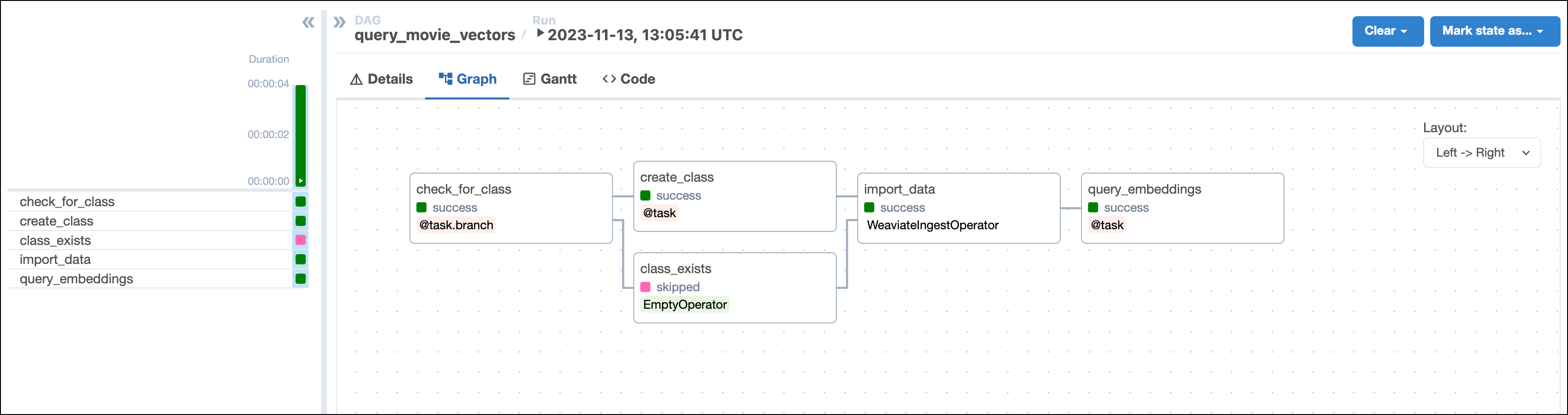
This DAG consists of five tasks to make a simple ML orchestration pipeline.
* The `check_for_collection` task uses the [`WeaviateHook`](https://airflow.apache.org/docs/apache-airflow-providers-weaviate/stable/_api/airflow/providers/weaviate/hooks/weaviate/index.html) to check if a collection of the name `COLLECTION_NAME` already exists in your Weaviate instance. The task is defined using the [`@task.branch` decorator](/docs/learn/2.x/airflow-branch-operator#@task-branch-branchpythonoperator) and returns the id of the task to run next based on whether the collection of interest exists. If the collection exists, the DAG runs the empty `collection_exists` task. If the collection doesn't exist, the DAG runs the `create_collection` task.
* The `create_collection` task uses the `WeaviateHook` to create a collection with the `COLLECTION_NAME` and specified `VECTORIZER` in your Weaviate instance.
* The `import_data` task is defined using the [`WeaviateIngestOperator`](https://airflow.apache.org/docs/apache-airflow-providers-weaviate/stable/operators/weaviate.html) and ingests the data into Weaviate. You can run any Python code on the data before ingesting it into Weaviate by providing a callable to the `input_json` parameter. This makes it possible to create your own embeddings or complete other transformations before ingesting the data. In this example we use automatic schema inference and vector creation by Weaviate.
* The `query_embeddings` task uses the `WeaviateHook` to connect to the Weaviate instance and run a query. The query returns the most similar movie to the concepts provided by the user when running the DAG in the next step.
## Step 4: Run your DAG
1. Run `astro dev start` in your Astro project to start Airflow and open the Airflow UI at `localhost:8080`.
2. In the Airflow UI, run the `query_movie_vectors` DAG by clicking the play button. Then, provide [Airflow params](/docs/learn/2.x/airflow-params) for `movie_concepts`.
Note that if you are running the project locally on a larger dataset, the `import_data` task might take a longer time to complete because Weaviate generates the vector embeddings in this task.
 3. View your movie suggestion in the task logs of the `query_embeddings` task:
```text wrap theme={null}
[2024-08-15, 13:34:10 UTC] {query_movie_vectors.py:155} INFO - You should watch Primer!
[2024-08-15, 13:34:10 UTC] {query_movie_vectors.py:156} INFO - It was filmed in 2004 and belongs to the sci-fi genre.
[2024-08-15, 13:34:10 UTC] {query_movie_vectors.py:159} INFO - Description: Four friends/fledgling entrepreneurs, knowing that there's something bigger and more innovative than the different error-checking devices they've built, wrestle over their new invention.
```
## Conclusion
Congratulations! You used Airflow and Weaviate to get your next movie suggestion!
3. View your movie suggestion in the task logs of the `query_embeddings` task:
```text wrap theme={null}
[2024-08-15, 13:34:10 UTC] {query_movie_vectors.py:155} INFO - You should watch Primer!
[2024-08-15, 13:34:10 UTC] {query_movie_vectors.py:156} INFO - It was filmed in 2004 and belongs to the sci-fi genre.
[2024-08-15, 13:34:10 UTC] {query_movie_vectors.py:159} INFO - Description: Four friends/fledgling entrepreneurs, knowing that there's something bigger and more innovative than the different error-checking devices they've built, wrestle over their new invention.
```
## Conclusion
Congratulations! You used Airflow and Weaviate to get your next movie suggestion!