> ## Documentation Index
> Fetch the complete documentation index at: https://astronomer.io/docs/llms.txt
> Use this file to discover all available pages before exploring further.
# Run data quality checks using SQL check operators
Data quality is key to the success of an organization's data systems. With in-DAG quality checks, you can halt pipelines and alert stakeholders before bad data makes its way to a production lake or warehouse.
The SQL check operators in the [Common SQL provider](https://airflow.apache.org/registry/providers/common-sql/) provide a simple and effective way to implement data quality checks in your Airflow DAGs. Using this set of operators, you can quickly develop a pipeline specifically for checking data quality, or you can add data quality checks to existing pipelines with just a few more lines of code.
This tutorial shows how to use three SQL check operators (`SQLColumnCheckOperator`, `SQLTableCheckOperator`, and `SQLCheckOperator`) to build a robust data quality suite for your DAGs.
**Other ways to learn**
There are multiple resources for learning about this topic. See also:
* Webinar: [Implementing Data Quality Checks in Airflow](https://www.astronomer.io/events/webinars/implementing-data-quality-checks-in-airflow/).
* Webinar: [Efficient data quality checks with Airflow 2.7](https://www.astronomer.io/events/webinars/efficient-data-quality-checks-with-airflow-2-7/).
* Use case: [Use Airflow setup/teardown to run data quality checks in an MLOps pipeline](/docs/learn/2.x/use-case-setup-teardown-data-quality).
* Example repository: [data quality demo](https://github.com/astronomer/airflow-data-quality-demo/).
## Time to complete
This tutorial takes approximately 30 minutes to complete.
## Assumed knowledge
To get the most out of this tutorial, you should have an understanding of:
* How to design a data quality process. See [Data quality and Airflow](/docs/learn/2.x/data-quality).
* Running SQL from Airflow. See [Using Airflow to execute SQL](/docs/learn/2.x/airflow-sql).
## Prerequisites
* The [Astro CLI](/docs/cli/v1.43/overview).
* Access to a relational database. You can use an in-memory SQLite database for which you'll need to install the [SQLite provider](https://airflow.apache.org/registry/providers/sqlite/). Note that currently the operators can't support BigQuery `job_id`s.
* A love for birds.
## Step 1: Configure your Astro project
To use SQL check operators, install the [Common SQL provider](https://airflow.apache.org/registry/providers/common-sql/) in your Astro project.
1. Run the following commands to create a new Astro project:
```sh wrap theme={null}
$ mkdir astro-sql-check-tutorial && cd astro-sql-check-tutorial
$ astro dev init
```
2. Add the Common SQL provider and the SQLite provider to your Astro project `requirements.txt` file.
```text wrap theme={null}
apache-airflow-providers-common-sql==1.5.2
apache-airflow-providers-sqlite==3.4.2
```
## Step 2: Create a connection to SQLite
1. In the Airflow UI, go to **Admin** > **Connections** and click **+**.
2. Create a new connection named `sqlite_conn` and choose the `SQLite` connection type. Enter the following information:
* **Connection Id**: `sqlite_conn`.
* **Connection Type**: `SQLite`.
* **Host**: `/tmp/sqlite.db`.
## Step 3: Add a SQL file with a custom check
1. In your `include` folder, create a file called `custom_check.sql`.
2. Copy and paste the following SQL statement into the file:
```sql wrap theme={null}
WITH all_combinations_unique AS (
SELECT DISTINCT bird_name, observation_year AS combos_unique
FROM '{{ params.table_name }}'
)
SELECT CASE
WHEN COUNT(*) = COUNT(combos_unique) THEN 1
ELSE 0
END AS is_unique
FROM '{{ params.table_name }}' JOIN all_combinations_unique;
```
This SQL statement returns 1 if all combinations of `bird_name` and `observation_year` in a templated table are unique, and 0 if not.
## Step 4: Create a DAG using SQL check operators
1. Start Airflow by running `astro dev start`.
2. Create a new file in your `dags` folder called `sql_data_quality.py`.
3. Copy and paste the following DAG code into the file:
```python expandable wrap theme={null}
"""
## Check data quality using SQL check operators
This DAG creates a toy table about birds in SQLite to run data quality checks on using the
SQLColumnCheckOperator, SQLTableCheckOperator, and SQLCheckOperator.
"""
from airflow.decorators import dag
from airflow.providers.common.sql.operators.sql import (
SQLColumnCheckOperator,
SQLTableCheckOperator,
SQLCheckOperator,
)
from airflow.providers.sqlite.operators.sqlite import SqliteOperator
from pendulum import datetime
_CONN_ID = "sqlite_conn"
_TABLE_NAME = "birds"
@dag(
start_date=datetime(2023, 7, 1),
schedule=None,
catchup=False,
template_searchpath=["/usr/local/airflow/include/"],
)
def sql_data_quality():
create_table = SqliteOperator(
task_id="create_table",
sqlite_conn_id=_CONN_ID,
sql=f"""
CREATE TABLE IF NOT EXISTS {_TABLE_NAME} (
bird_name VARCHAR,
observation_year INT,
bird_happiness INT
);
""",
)
populate_data = SqliteOperator(
task_id="populate_data",
sqlite_conn_id=_CONN_ID,
sql=f"""
INSERT INTO {_TABLE_NAME} (bird_name, observation_year, bird_happiness) VALUES
('King vulture (Sarcoramphus papa)', 2022, 9),
('Victoria Crowned Pigeon (Goura victoria)', 2021, 10),
('Orange-bellied parrot (Neophema chrysogaster)', 2021, 9),
('Orange-bellied parrot (Neophema chrysogaster)', 2020, 8),
(NULL, 2019, 8),
('Indochinese green magpie (Cissa hypoleuca)', 2018, 10);
""",
)
column_checks = SQLColumnCheckOperator(
task_id="column_checks",
conn_id=_CONN_ID,
table=_TABLE_NAME,
partition_clause="bird_name IS NOT NULL",
column_mapping={
"bird_name": {
"null_check": {"equal_to": 0},
"distinct_check": {"geq_to": 2},
},
"observation_year": {"max": {"less_than": 2023}},
"bird_happiness": {"min": {"greater_than": 0}, "max": {"leq_to": 10}},
},
)
table_checks = SQLTableCheckOperator(
task_id="table_checks",
conn_id=_CONN_ID,
table=_TABLE_NAME,
checks={
"row_count_check": {"check_statement": "COUNT(*) >= 3"},
"average_happiness_check": {
"check_statement": "AVG(bird_happiness) >= 9",
"partition_clause": "observation_year >= 2021",
},
},
)
custom_check = SQLCheckOperator(
task_id="custom_check",
conn_id=_CONN_ID,
sql="custom_check.sql",
params={"table_name": _TABLE_NAME},
)
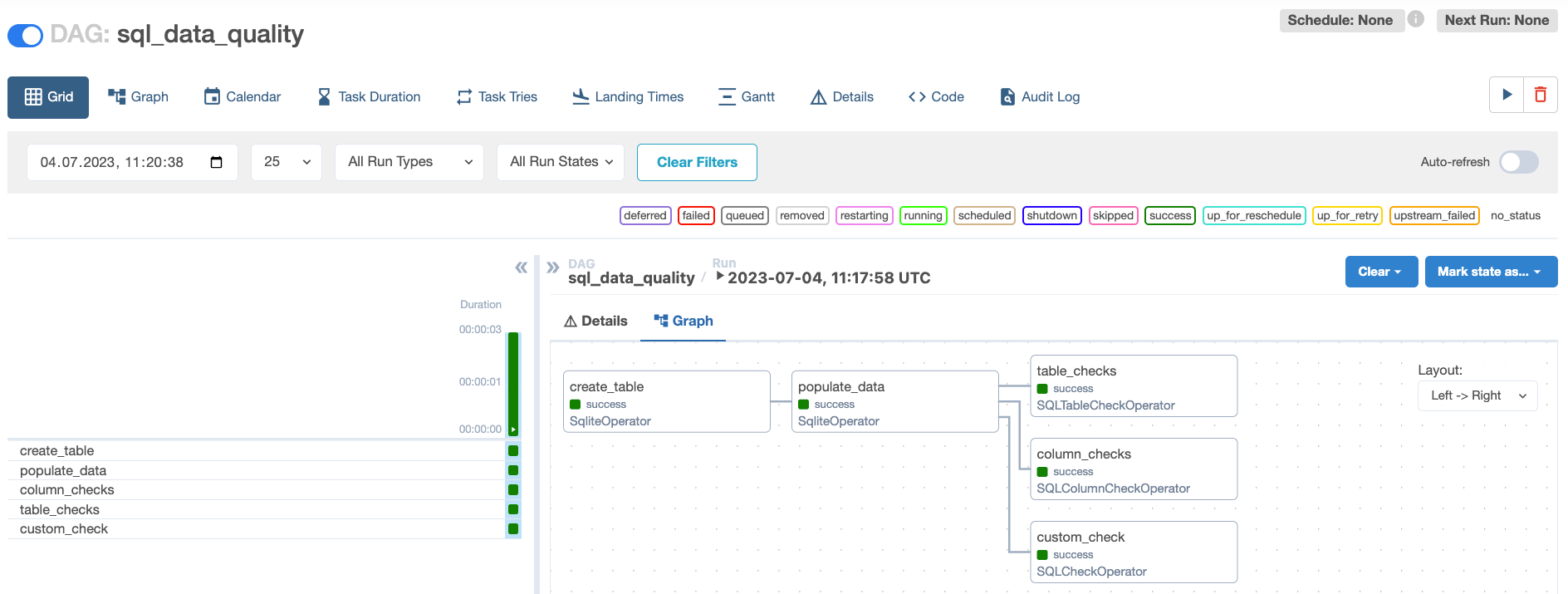
create_table >> populate_data >> [column_checks, table_checks, custom_check]
sql_data_quality()
```
This DAG creates and populates a small SQLite table `birds` with information about birds. Then, three tasks containing data quality checks are run on the table:
* The `column_checks` task uses the `SQLColumnCheckOperator` to run the column-level checks provided to the `column_mapping` dictionary. The task also uses an operator-level [`partition_clause`](#partition_clause) to only run the checks on rows where the `bird_name` column isn't null.
* The `table_checks` task uses the `SQLTableCheckOperator` to run two checks on the whole table:
* `row_count_check`: This check makes sure the table has at least three rows.
* `average_happiness_check`: This check makes sure the average happiness of the birds is at least 9. This check has a check-level `partition_clause` which means the check only runs on rows with observations from 2021 onward.
* The `custom_check` task uses the `SQLCheckOperator`. This operator can run any SQL statement that returns a single row and will deem the data quality check failed if that row contains any value [Python bool casting](https://docs.python.org/3/library/stdtypes.html) evaluates as `False`, for example `0`. Otherwise, the data quality check and the task will be marked as successful. This task will run the SQL statement in the file `include/custom_check.sql` on the `table_name` passed as a parameter. Note that in order to run SQL stored in a file, the path to the SQL file has to be added to the `template_searchpath` parameter of the DAG.
4. Open Airflow at `http://localhost:8080/`. Run the DAG manually by clicking the play button, then click the DAG name to view the DAG in the **Grid** view. All checks are set up to pass.
 5. View the logs of the SQL check operators to get detailed information about the checks that were run and their results:
For example, the logs for the `column_checks` task show the five individual checks that were run on three columns:
```text wrap theme={null}
[2023-07-04, 11:18:01 UTC] {sql.py:374} INFO - Running statement: SELECT col_name, check_type, check_result FROM (
SELECT 'bird_name' AS col_name, 'null_check' AS check_type, bird_name_null_check AS check_result
FROM (SELECT SUM(CASE WHEN bird_name IS NULL THEN 1 ELSE 0 END) AS bird_name_null_check FROM birds WHERE bird_name IS NOT NULL) AS sq
UNION ALL
SELECT 'bird_name' AS col_name, 'distinct_check' AS check_type, bird_name_distinct_check AS check_result
FROM (SELECT COUNT(DISTINCT(bird_name)) AS bird_name_distinct_check FROM birds WHERE bird_name IS NOT NULL) AS sq
UNION ALL
SELECT 'observation_year' AS col_name, 'max' AS check_type, observation_year_max AS check_result
FROM (SELECT MAX(observation_year) AS observation_year_max FROM birds WHERE bird_name IS NOT NULL) AS sq
UNION ALL
SELECT 'bird_happiness' AS col_name, 'min' AS check_type, bird_happiness_min AS check_result
FROM (SELECT MIN(bird_happiness) AS bird_happiness_min FROM birds WHERE bird_name IS NOT NULL) AS sq
UNION ALL
SELECT 'bird_happiness' AS col_name, 'max' AS check_type, bird_happiness_max AS check_result
FROM (SELECT MAX(bird_happiness) AS bird_happiness_max FROM birds WHERE bird_name IS NOT NULL) AS sq
) AS check_columns, parameters: None
[2023-07-04, 11:18:01 UTC] {sql.py:397} INFO - Record: [('bird_name', 'null_check', 0), ('bird_name', 'distinct_check', 4), ('observation_year', 'max', 2022), ('bird_happiness', 'min', 8), ('bird_happiness', 'max', 10)]
[2023-07-04, 11:18:01 UTC] {sql.py:420} INFO - All tests have passed
```
## How it works
The SQL check operators abstract SQL queries to streamline data quality checks. One difference between the SQL check operators and the standard [`BaseSQLOperator`](https://airflow.apache.org/docs/apache-airflow-providers-common-sql/stable/_api/airflow/providers/common/sql/operators/sql/index.html#airflow.providers.common.sql.operators.sql.BaseSQLOperator) is that the SQL check operators respond with a boolean, meaning the task fails when any of the resulting queries fail. This is particularly helpful for stopping a data pipeline before bad data makes it to a given destination. The lines of code and values that fail the check are observable in the Airflow logs.
The following SQL check operators are recommended for implementing data quality checks:
* **[`SQLColumnCheckOperator`](https://airflow.apache.org/registry/providers/common-sql#common-sql-sql-SQLColumnCheckOperator)**: Runs one or more predefined data quality checks on one or more columns within the same task.
* **[`SQLTableCheckOperator`](https://airflow.apache.org/registry/providers/common-sql#common-sql-sql-SQLTableCheckOperator)**: Runs multiple user-defined checks which can involve one or more columns of a table.
* **[`SQLCheckOperator`](https://airflow.apache.org/registry/providers/common-sql#common-sql-sql-SQLCheckOperator)**: Takes any SQL query and returns a single row that is evaluated to booleans. This operator is useful for more complicated checks that could span several tables of your database.
* **[`SQLIntervalCheckOperator`](https://airflow.apache.org/registry/providers/common-sql#common-sql-sql-SQLIntervalCheckOperator)**: Checks current data against historical data.
Astronomer recommends using the `SQLColumnCheckOperator` and `SQLTableCheckOperator` over the older operators ([`SQLValueCheckOperator`](https://airflow.apache.org/registry/providers/common-sql#common-sql-sql-SQLValueCheckOperator) and [`SQLThresholdCheckOperator`](https://airflow.apache.org/registry/providers/common-sql#common-sql-sql-SQLThresholdCheckOperator)) whenever possible to improve code readability.
### `SQLColumnCheckOperator`
The `SQLColumnCheckOperator` has a `column_mapping` parameter which stores a dictionary of checks. Using this dictionary, it can run many checks within one task and still provide observability in the Airflow logs over which checks passed and which failed.
This operator is useful for:
* Ensuring all numeric values in a column are above a minimum, below a maximum or within a certain range (with or without a tolerance threshold).
* Null checks.
* Checking primary key columns for uniqueness.
* Checking the number of distinct values of a column.
The `SQLColumnCheckOperator` offers 5 options for column checks which are abstractions over SQL statements:
* `"min"`: `"MIN(column) AS column_min"`
* `"max"`: `"MAX(column) AS column_max"`
* `"unique_check"`: `"COUNT(column) - COUNT(DISTINCT(column)) AS column_unique_check"`
* `"distinct_check"`: `"COUNT(DISTINCT(column)) AS column_distinct_check"`
* `"null_check"`: `"SUM(CASE WHEN column IS NULL THEN 1 ELSE 0 END) AS column_null_check"`
The resulting values can be compared to an expected value using any of the following qualifiers:
* `greater_than`
* `geq_to` (greater or equal than)
* `equal_to`
* `leq_to` (lesser or equal than)
* `less_than`
Additionally, the `SQLColumnCheckOperator`:
* Allows you to specify a tolerance to the comparisons as a fraction (0.1 = 10% tolerance), see the [`partition_clause`](#partition_clause) section for an example.
* Converts a returned `result` of `None` to 0 by default and still runs the check. For example, if a column check for the `MY_COL` column is set to accept a minimum value of -10 or more but runs on an empty table, the check would still pass because the `None` result is treated as 0. You can toggle this behavior by setting `accept_none=False`, which will cause all checks returning `None` to fail.
* Accepts an operator-level `partition_clause` parameter that allows you to run checks on a subset of your table. See the [`partition_clause`](#partition_clause) section for more information.
### `SQLTableCheckOperator`
The `SQLTableCheckOperator` provides a way to check the validity of user defined SQL statements which can involve one or more columns of a table. There is no limit to the amount of columns these statements can involve or to their complexity. The statements are provided to the operator as a dictionary with the `checks` parameter.
The `SQLTableCheckOperator` is useful for:
* Checks that include aggregate values using the whole table (for example, comparing the average of one column to the average of another using the SQL `AVG()` function).
* Row count checks.
* Checking if a date is between certain bounds (for example, using `MY_DATE_COL BETWEEN '2019-01-01' AND '2019-12-31'` to make sure only dates in the year 2019 exist).
* Comparisons between multiple columns, both aggregated and not aggregated.
Similarly to the `SQLColumnCheckOperator`, you can pass a SQL `WHERE`-clause (without the `WHERE` keyword) to the operator-level [`partition_clause`](#partition_clause) parameter or as a check-level `partition_clause`.
### `SQLCheckOperator`
The `SQLCheckOperator` returns a single row from a provided SQL query and checks to see if any of the returned values in that row are a value that [Python bool casting](https://docs.python.org/3/library/stdtypes.html) evaluates as `False`, for example `0`. If any values are `False`, the task fails. This operator lets you check:
* A specific, single column value.
* Part of or an entire row compared to a known set of values.
* Options for categorical variables and data types.
* Comparisons between multiple tables.
* The results of any other function that can be written as a SQL query.
The target table(s) for the `SQLCheckOperator` has to be specified within the SQL statement. The `sql` parameter of this operator can be either a complete SQL query as a string or, as in this tutorial, a reference to a query stored in a local file.
### `partition_clause`
With the `SQLColumnCheckOperator` and `SQLTableCheckOperator`, you can run checks on a subset of your table using either a check-level or task-level `partition_clause` parameter. This parameter takes a SQL `WHERE`-clause (without the `WHERE` keyword) and uses it to filter your table before running a given check or group of checks in a task.
The code snippet below shows a `SQLColumnCheckOperator` defined with a `partition_clause` at the operator level, as well as a `partition_clause` in one of the two column checks defined in the `column_mapping`.
In the following example, the operator checks whether:
* `MY_NUM_COL_1` has a minimum value of 10 with a tolerance of 10%, meaning that the check will pass if the minimum value in this column is between 9 and 11.
* `MY_NUM_COL_2` has a maximum value less than 300. Only rows that fulfill the check-level `partition_clause` are checked (rows where `CUSTOMER_STATUS = 'active'`).
Both of the above checks only run on rows that fulfill the operator-level partition clause `CUSTOMER_NAME IS NOT NULL`. If both an operator-level `partition_clause` and a check-level `partition_clause` are defined for a check, the check will only run on rows fulfilling both clauses.
```python wrap theme={null}
column_checks = SQLColumnCheckOperator(
task_id="column_checks",
conn_id="MY_DB_CONNECTION",
table="MY_TABLE",
partition_clause="CUSTOMER_NAME IS NOT NULL",
column_mapping={
"MY_NUM_COL_1": {"min": {"equal_to": 10, "tolerance": 0.1}},
"MY_NUM_COL_2": {
"max": {"less_than": 300, "partition_clause": "CUSTOMER_STATUS = 'active'"}
},
},
)
```
5. View the logs of the SQL check operators to get detailed information about the checks that were run and their results:
For example, the logs for the `column_checks` task show the five individual checks that were run on three columns:
```text wrap theme={null}
[2023-07-04, 11:18:01 UTC] {sql.py:374} INFO - Running statement: SELECT col_name, check_type, check_result FROM (
SELECT 'bird_name' AS col_name, 'null_check' AS check_type, bird_name_null_check AS check_result
FROM (SELECT SUM(CASE WHEN bird_name IS NULL THEN 1 ELSE 0 END) AS bird_name_null_check FROM birds WHERE bird_name IS NOT NULL) AS sq
UNION ALL
SELECT 'bird_name' AS col_name, 'distinct_check' AS check_type, bird_name_distinct_check AS check_result
FROM (SELECT COUNT(DISTINCT(bird_name)) AS bird_name_distinct_check FROM birds WHERE bird_name IS NOT NULL) AS sq
UNION ALL
SELECT 'observation_year' AS col_name, 'max' AS check_type, observation_year_max AS check_result
FROM (SELECT MAX(observation_year) AS observation_year_max FROM birds WHERE bird_name IS NOT NULL) AS sq
UNION ALL
SELECT 'bird_happiness' AS col_name, 'min' AS check_type, bird_happiness_min AS check_result
FROM (SELECT MIN(bird_happiness) AS bird_happiness_min FROM birds WHERE bird_name IS NOT NULL) AS sq
UNION ALL
SELECT 'bird_happiness' AS col_name, 'max' AS check_type, bird_happiness_max AS check_result
FROM (SELECT MAX(bird_happiness) AS bird_happiness_max FROM birds WHERE bird_name IS NOT NULL) AS sq
) AS check_columns, parameters: None
[2023-07-04, 11:18:01 UTC] {sql.py:397} INFO - Record: [('bird_name', 'null_check', 0), ('bird_name', 'distinct_check', 4), ('observation_year', 'max', 2022), ('bird_happiness', 'min', 8), ('bird_happiness', 'max', 10)]
[2023-07-04, 11:18:01 UTC] {sql.py:420} INFO - All tests have passed
```
## How it works
The SQL check operators abstract SQL queries to streamline data quality checks. One difference between the SQL check operators and the standard [`BaseSQLOperator`](https://airflow.apache.org/docs/apache-airflow-providers-common-sql/stable/_api/airflow/providers/common/sql/operators/sql/index.html#airflow.providers.common.sql.operators.sql.BaseSQLOperator) is that the SQL check operators respond with a boolean, meaning the task fails when any of the resulting queries fail. This is particularly helpful for stopping a data pipeline before bad data makes it to a given destination. The lines of code and values that fail the check are observable in the Airflow logs.
The following SQL check operators are recommended for implementing data quality checks:
* **[`SQLColumnCheckOperator`](https://airflow.apache.org/registry/providers/common-sql#common-sql-sql-SQLColumnCheckOperator)**: Runs one or more predefined data quality checks on one or more columns within the same task.
* **[`SQLTableCheckOperator`](https://airflow.apache.org/registry/providers/common-sql#common-sql-sql-SQLTableCheckOperator)**: Runs multiple user-defined checks which can involve one or more columns of a table.
* **[`SQLCheckOperator`](https://airflow.apache.org/registry/providers/common-sql#common-sql-sql-SQLCheckOperator)**: Takes any SQL query and returns a single row that is evaluated to booleans. This operator is useful for more complicated checks that could span several tables of your database.
* **[`SQLIntervalCheckOperator`](https://airflow.apache.org/registry/providers/common-sql#common-sql-sql-SQLIntervalCheckOperator)**: Checks current data against historical data.
Astronomer recommends using the `SQLColumnCheckOperator` and `SQLTableCheckOperator` over the older operators ([`SQLValueCheckOperator`](https://airflow.apache.org/registry/providers/common-sql#common-sql-sql-SQLValueCheckOperator) and [`SQLThresholdCheckOperator`](https://airflow.apache.org/registry/providers/common-sql#common-sql-sql-SQLThresholdCheckOperator)) whenever possible to improve code readability.
### `SQLColumnCheckOperator`
The `SQLColumnCheckOperator` has a `column_mapping` parameter which stores a dictionary of checks. Using this dictionary, it can run many checks within one task and still provide observability in the Airflow logs over which checks passed and which failed.
This operator is useful for:
* Ensuring all numeric values in a column are above a minimum, below a maximum or within a certain range (with or without a tolerance threshold).
* Null checks.
* Checking primary key columns for uniqueness.
* Checking the number of distinct values of a column.
The `SQLColumnCheckOperator` offers 5 options for column checks which are abstractions over SQL statements:
* `"min"`: `"MIN(column) AS column_min"`
* `"max"`: `"MAX(column) AS column_max"`
* `"unique_check"`: `"COUNT(column) - COUNT(DISTINCT(column)) AS column_unique_check"`
* `"distinct_check"`: `"COUNT(DISTINCT(column)) AS column_distinct_check"`
* `"null_check"`: `"SUM(CASE WHEN column IS NULL THEN 1 ELSE 0 END) AS column_null_check"`
The resulting values can be compared to an expected value using any of the following qualifiers:
* `greater_than`
* `geq_to` (greater or equal than)
* `equal_to`
* `leq_to` (lesser or equal than)
* `less_than`
Additionally, the `SQLColumnCheckOperator`:
* Allows you to specify a tolerance to the comparisons as a fraction (0.1 = 10% tolerance), see the [`partition_clause`](#partition_clause) section for an example.
* Converts a returned `result` of `None` to 0 by default and still runs the check. For example, if a column check for the `MY_COL` column is set to accept a minimum value of -10 or more but runs on an empty table, the check would still pass because the `None` result is treated as 0. You can toggle this behavior by setting `accept_none=False`, which will cause all checks returning `None` to fail.
* Accepts an operator-level `partition_clause` parameter that allows you to run checks on a subset of your table. See the [`partition_clause`](#partition_clause) section for more information.
### `SQLTableCheckOperator`
The `SQLTableCheckOperator` provides a way to check the validity of user defined SQL statements which can involve one or more columns of a table. There is no limit to the amount of columns these statements can involve or to their complexity. The statements are provided to the operator as a dictionary with the `checks` parameter.
The `SQLTableCheckOperator` is useful for:
* Checks that include aggregate values using the whole table (for example, comparing the average of one column to the average of another using the SQL `AVG()` function).
* Row count checks.
* Checking if a date is between certain bounds (for example, using `MY_DATE_COL BETWEEN '2019-01-01' AND '2019-12-31'` to make sure only dates in the year 2019 exist).
* Comparisons between multiple columns, both aggregated and not aggregated.
Similarly to the `SQLColumnCheckOperator`, you can pass a SQL `WHERE`-clause (without the `WHERE` keyword) to the operator-level [`partition_clause`](#partition_clause) parameter or as a check-level `partition_clause`.
### `SQLCheckOperator`
The `SQLCheckOperator` returns a single row from a provided SQL query and checks to see if any of the returned values in that row are a value that [Python bool casting](https://docs.python.org/3/library/stdtypes.html) evaluates as `False`, for example `0`. If any values are `False`, the task fails. This operator lets you check:
* A specific, single column value.
* Part of or an entire row compared to a known set of values.
* Options for categorical variables and data types.
* Comparisons between multiple tables.
* The results of any other function that can be written as a SQL query.
The target table(s) for the `SQLCheckOperator` has to be specified within the SQL statement. The `sql` parameter of this operator can be either a complete SQL query as a string or, as in this tutorial, a reference to a query stored in a local file.
### `partition_clause`
With the `SQLColumnCheckOperator` and `SQLTableCheckOperator`, you can run checks on a subset of your table using either a check-level or task-level `partition_clause` parameter. This parameter takes a SQL `WHERE`-clause (without the `WHERE` keyword) and uses it to filter your table before running a given check or group of checks in a task.
The code snippet below shows a `SQLColumnCheckOperator` defined with a `partition_clause` at the operator level, as well as a `partition_clause` in one of the two column checks defined in the `column_mapping`.
In the following example, the operator checks whether:
* `MY_NUM_COL_1` has a minimum value of 10 with a tolerance of 10%, meaning that the check will pass if the minimum value in this column is between 9 and 11.
* `MY_NUM_COL_2` has a maximum value less than 300. Only rows that fulfill the check-level `partition_clause` are checked (rows where `CUSTOMER_STATUS = 'active'`).
Both of the above checks only run on rows that fulfill the operator-level partition clause `CUSTOMER_NAME IS NOT NULL`. If both an operator-level `partition_clause` and a check-level `partition_clause` are defined for a check, the check will only run on rows fulfilling both clauses.
```python wrap theme={null}
column_checks = SQLColumnCheckOperator(
task_id="column_checks",
conn_id="MY_DB_CONNECTION",
table="MY_TABLE",
partition_clause="CUSTOMER_NAME IS NOT NULL",
column_mapping={
"MY_NUM_COL_1": {"min": {"equal_to": 10, "tolerance": 0.1}},
"MY_NUM_COL_2": {
"max": {"less_than": 300, "partition_clause": "CUSTOMER_STATUS = 'active'"}
},
},
)
```