> ## Documentation Index
> Fetch the complete documentation index at: https://astronomer.io/docs/llms.txt
> Use this file to discover all available pages before exploring further.
# Use setup and teardown tasks in Airflow
In production Airflow environments, it's best practice to set up resources and configurations before certain tasks can run, then tear the resources down even if the tasks fail. This pattern can reduce resource utilization and save costs.
Starting in Airflow 2.7, you can use a special type of task to create and delete resources. In this guide, you will learn all about *setup* and *teardown tasks* in Airflow.
 **Other ways to learn**
There are multiple resources for learning about this topic. See also:
* Webinar: [What’s New in Airflow 2.7](https://www.astronomer.io/events/webinars/whats-new-in-airflow-2-7/).
* Webinar: [Efficient data quality checks with Airflow 2.7](https://www.astronomer.io/events/webinars/efficient-data-quality-checks-with-airflow-2-7/).
* Use case: [Use Airflow setup/ teardown to run data quality checks in an MLOps pipeline](/docs/learn/2.x/use-case-setup-teardown-data-quality).
## Assumed knowledge
To get the most out of this guide, you should have an understanding of:
* Airflow decorators. See [Introduction to the TaskFlow API and Airflow decorators](/docs/learn/2.x/airflow-decorators).
* Managing dependencies in Airflow. See [Manage task and task group dependencies in Airflow](/docs/learn/2.x/managing-dependencies).
## When to use setup/ teardown tasks
Setup/ teardown tasks ensure that the necessary resources to run an Airflow task are set up before a task is executed and that those resources are torn down after the task has completed, regardless of any task failures.
Any existing Airflow task can be designated as a setup or teardown task, with special behavior and added visibility of the setup/ teardown relationship in the Airflow UI.
There are many use cases for setup and teardown tasks. For example, you might want to:
* Manage a Spark cluster to run heavy workloads.
* Manage compute resources to train an ML model.
* Manage the resources to run [data quality](/docs/learn/2.x/data-quality) checks.
* Set up storage in your [custom XCom backend](/docs/learn/2.x/custom-xcom-backend-strategies) to hold data processed through Airflow tasks, then tear the extra storage down afterwards when the XCom data is no longer needed.
## Setup/ teardown concepts
Any task can be designated as a setup or a teardown task. A setup task, its teardown task, and the tasks in between constitute a *setup/ teardown workflow*.
Tasks that run after a setup task and before the associated teardown task are considered to be *in scope* of the setup/ teardown workflow. Usually these tasks will use the resources set up by the setup task and which the teardown task will dismantle.
Setup/ teardown tasks have different behavior from regular tasks:
* Clearing a task that is in scope of a setup/ teardown workflow will also clear and rerun the associated setup and teardown tasks, ensuring that all resources the task needs are created again for the task rerun and torn down after the task has completed.
* A teardown task will run as long as at least one of its associated setup tasks have completed successfully and all of its upstream tasks have completed, regardless of whether they were successful or not. If all associated setup tasks fail or are skipped, the teardown task will be failed or skipped respectively.
* A teardown task without any associated setup tasks will always run once all upstream worker tasks have completed running, independently of whether they were successful or not.
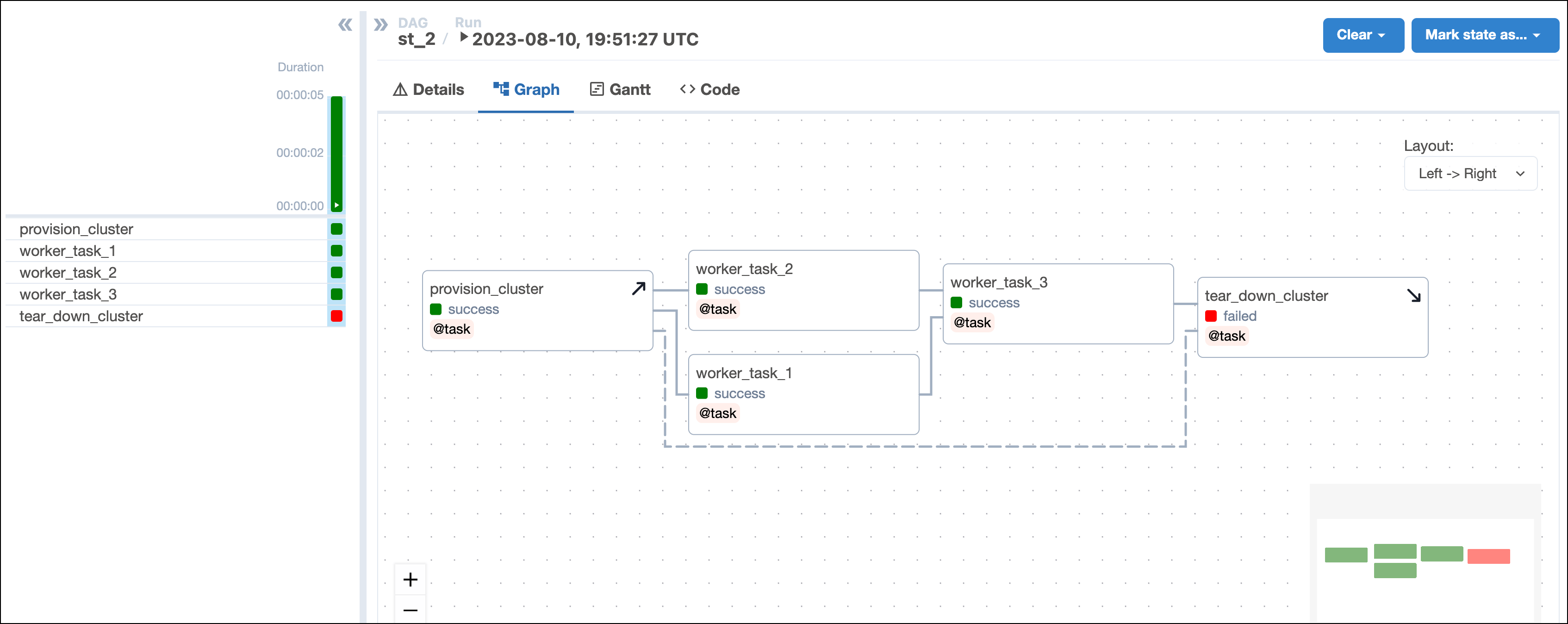
* When evaluating whether a DAG run was successful, Airflow will ignore teardown tasks by default. This means if a teardown task fails as the final task of a DAG, the DAG is still marked as having succeeded. In the example shown in the screenshot below, the DAG run state isn't impacted by the failure of `tear_down_cluster` and is marked as successful. You can change this behavior by setting `on_failure_fail_dagrun=True` in the [`.as_teardown()` method](#as_setup-and-as_teardown-methods) or [`@teardown` decorator](#@setup-and-@teardown-decorators).
**Other ways to learn**
There are multiple resources for learning about this topic. See also:
* Webinar: [What’s New in Airflow 2.7](https://www.astronomer.io/events/webinars/whats-new-in-airflow-2-7/).
* Webinar: [Efficient data quality checks with Airflow 2.7](https://www.astronomer.io/events/webinars/efficient-data-quality-checks-with-airflow-2-7/).
* Use case: [Use Airflow setup/ teardown to run data quality checks in an MLOps pipeline](/docs/learn/2.x/use-case-setup-teardown-data-quality).
## Assumed knowledge
To get the most out of this guide, you should have an understanding of:
* Airflow decorators. See [Introduction to the TaskFlow API and Airflow decorators](/docs/learn/2.x/airflow-decorators).
* Managing dependencies in Airflow. See [Manage task and task group dependencies in Airflow](/docs/learn/2.x/managing-dependencies).
## When to use setup/ teardown tasks
Setup/ teardown tasks ensure that the necessary resources to run an Airflow task are set up before a task is executed and that those resources are torn down after the task has completed, regardless of any task failures.
Any existing Airflow task can be designated as a setup or teardown task, with special behavior and added visibility of the setup/ teardown relationship in the Airflow UI.
There are many use cases for setup and teardown tasks. For example, you might want to:
* Manage a Spark cluster to run heavy workloads.
* Manage compute resources to train an ML model.
* Manage the resources to run [data quality](/docs/learn/2.x/data-quality) checks.
* Set up storage in your [custom XCom backend](/docs/learn/2.x/custom-xcom-backend-strategies) to hold data processed through Airflow tasks, then tear the extra storage down afterwards when the XCom data is no longer needed.
## Setup/ teardown concepts
Any task can be designated as a setup or a teardown task. A setup task, its teardown task, and the tasks in between constitute a *setup/ teardown workflow*.
Tasks that run after a setup task and before the associated teardown task are considered to be *in scope* of the setup/ teardown workflow. Usually these tasks will use the resources set up by the setup task and which the teardown task will dismantle.
Setup/ teardown tasks have different behavior from regular tasks:
* Clearing a task that is in scope of a setup/ teardown workflow will also clear and rerun the associated setup and teardown tasks, ensuring that all resources the task needs are created again for the task rerun and torn down after the task has completed.
* A teardown task will run as long as at least one of its associated setup tasks have completed successfully and all of its upstream tasks have completed, regardless of whether they were successful or not. If all associated setup tasks fail or are skipped, the teardown task will be failed or skipped respectively.
* A teardown task without any associated setup tasks will always run once all upstream worker tasks have completed running, independently of whether they were successful or not.
* When evaluating whether a DAG run was successful, Airflow will ignore teardown tasks by default. This means if a teardown task fails as the final task of a DAG, the DAG is still marked as having succeeded. In the example shown in the screenshot below, the DAG run state isn't impacted by the failure of `tear_down_cluster` and is marked as successful. You can change this behavior by setting `on_failure_fail_dagrun=True` in the [`.as_teardown()` method](#as_setup-and-as_teardown-methods) or [`@teardown` decorator](#@setup-and-@teardown-decorators).
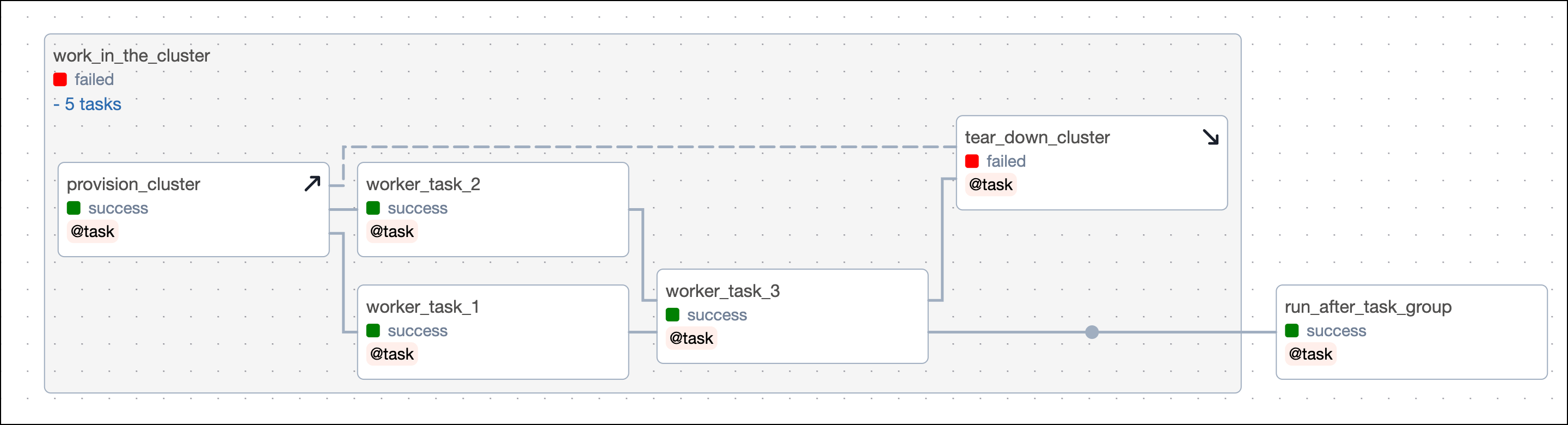
 * When a teardown task is within a [task group](/docs/learn/2.x/task-groups) and a dependency is set on the task group, the teardown task will be ignored when evaluating if a dependency has been met. For example, `run_after_task_group`, which is dependent on the `work_in_the_cluster` task group, will run even if the teardown task has failed or is still running.
 * You can have a setup task without an associated teardown task and vice versa. If you define a setup task without a teardown task, everything downstream of the setup task is considered in its scope and will cause the setup task to rerun when cleared.
### Before and after using setup and teardown tasks
Setup and teardown tasks can help you write more robust DAGs by making sure resources are set up at the right moment and torn down even when worker tasks fail.
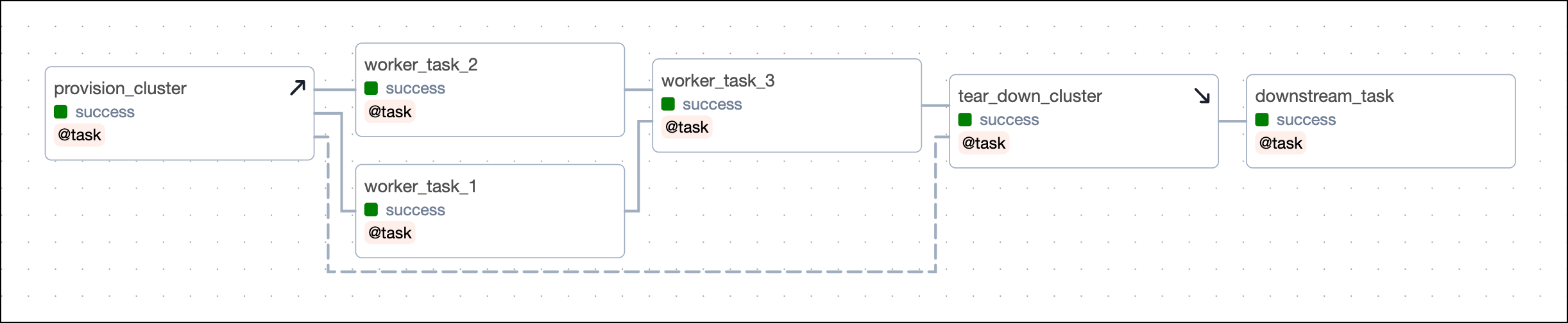
The following DAG isn't using Airflow setup and teardown functionality. It sets up its resources using a standard task called `provision_cluster`, runs three worker tasks using those resources, and tears down the resources using the `tear_down_cluster` task.
* You can have a setup task without an associated teardown task and vice versa. If you define a setup task without a teardown task, everything downstream of the setup task is considered in its scope and will cause the setup task to rerun when cleared.
### Before and after using setup and teardown tasks
Setup and teardown tasks can help you write more robust DAGs by making sure resources are set up at the right moment and torn down even when worker tasks fail.
The following DAG isn't using Airflow setup and teardown functionality. It sets up its resources using a standard task called `provision_cluster`, runs three worker tasks using those resources, and tears down the resources using the `tear_down_cluster` task.
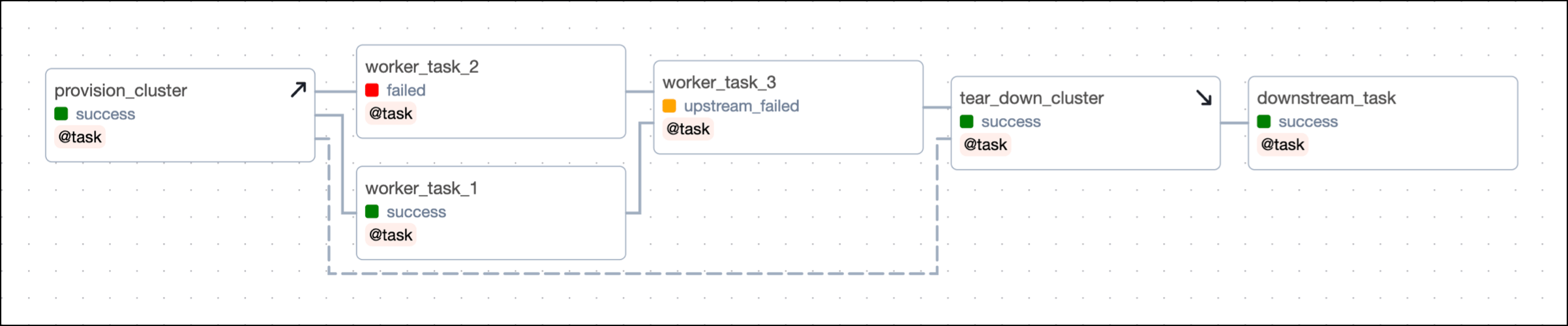
 The way this DAG is set up, a failure in any of the worker tasks will lead to the `tear_down_cluster` task not running. This means that the resources won't be torn down and will continue to incur costs. Additionally, any downstream tasks depending on `tear_down_cluster` will also fail to run unless they have [trigger rules](/docs/learn/2.x/airflow-trigger-rules) to run independently of upstream failures.
 In this example, you can turn the `provision_cluster` task into a setup task and the `tear_down_cluster` into a teardown task by using the code examples shown in [setup/ teardown implementation](#setup/-teardown-implementation).
After you convert the tasks, the **Grid** view shows your setup tasks with an upwards arrow and teardown tasks with a downwards arrow. After you configure the [setup/ teardown workflow](#create-setup/-teardown-workflows) between `provision_cluster` and `tear_down_cluster`, the tasks are connected by a dotted line. The tasks `worker_task_1`, `worker_task_2` and `worker_task_3` are in the scope of this setup/ teardown workflow.
In this example, you can turn the `provision_cluster` task into a setup task and the `tear_down_cluster` into a teardown task by using the code examples shown in [setup/ teardown implementation](#setup/-teardown-implementation).
After you convert the tasks, the **Grid** view shows your setup tasks with an upwards arrow and teardown tasks with a downwards arrow. After you configure the [setup/ teardown workflow](#create-setup/-teardown-workflows) between `provision_cluster` and `tear_down_cluster`, the tasks are connected by a dotted line. The tasks `worker_task_1`, `worker_task_2` and `worker_task_3` are in the scope of this setup/ teardown workflow.
 Now, even if one of the worker tasks fails, like `worker_task_2` in the following screenshot, the `tear_down_cluster` task will still run, the resources will be torn down, and downstream tasks will run successfully.
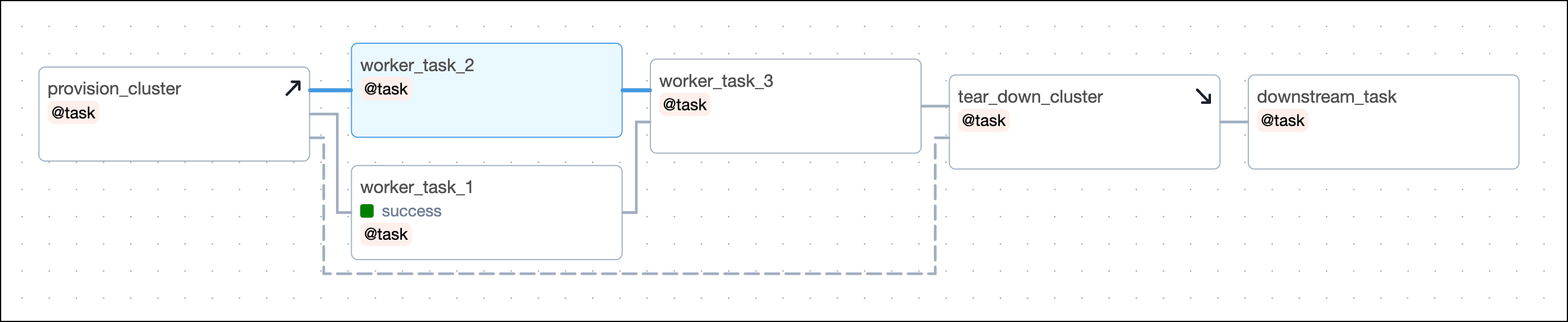
 Additionally, when you clear any of the worker tasks, both the setup and teardown tasks will also be cleared and rerun. This is useful when you are recovering from a pipeline issue and need to rerun one or more tasks that use a resource independent of the other tasks in the scope.
For example, in the previous DAG, consider if `worker_task_2` failed and `worker_task_3` was unable to run due to its upstream task having failed. If you cleared `worker_task_2` by clicking **Clear task**, both the setup task `provision_cluster` and the teardown task `tear_down_cluster` will be cleared and rerun in addition to `worker_task_2`, `worker_task_3` and `downstream_task`. This lets you completely recover without needing to rerun `worker_task_1` or manually rerun individual tasks.
Additionally, when you clear any of the worker tasks, both the setup and teardown tasks will also be cleared and rerun. This is useful when you are recovering from a pipeline issue and need to rerun one or more tasks that use a resource independent of the other tasks in the scope.
For example, in the previous DAG, consider if `worker_task_2` failed and `worker_task_3` was unable to run due to its upstream task having failed. If you cleared `worker_task_2` by clicking **Clear task**, both the setup task `provision_cluster` and the teardown task `tear_down_cluster` will be cleared and rerun in addition to `worker_task_2`, `worker_task_3` and `downstream_task`. This lets you completely recover without needing to rerun `worker_task_1` or manually rerun individual tasks.
 ## Setup/ teardown implementation
There are two ways to turn tasks into setup/ teardown tasks:
* Using the `.as_setup()` and `.as_teardown()` methods on TaskFlow API tasks or traditional operators.
* Using the `@setup` and `@teardown` decorators on a Python function.
Worker tasks can be added to the scope of a setup/ teardown workflow in two ways:
* By being between the setup and teardown tasks in the DAG dependency relationship.
* By using a context manager with the `.teardown()` method.
Which method you choose to add worker tasks to a setup/ teardown scope is a matter of personal preference.
You can define as many setup and teardown tasks in one DAG as you need. In order for Airflow to understand which setup and teardown tasks belong together, you need to [create setup/ teardown workflows](#create-setup/-teardown-workflows).
### `.as_setup()` and `.as_teardown()` methods
Any individual task can be turned into a setup or teardown task.
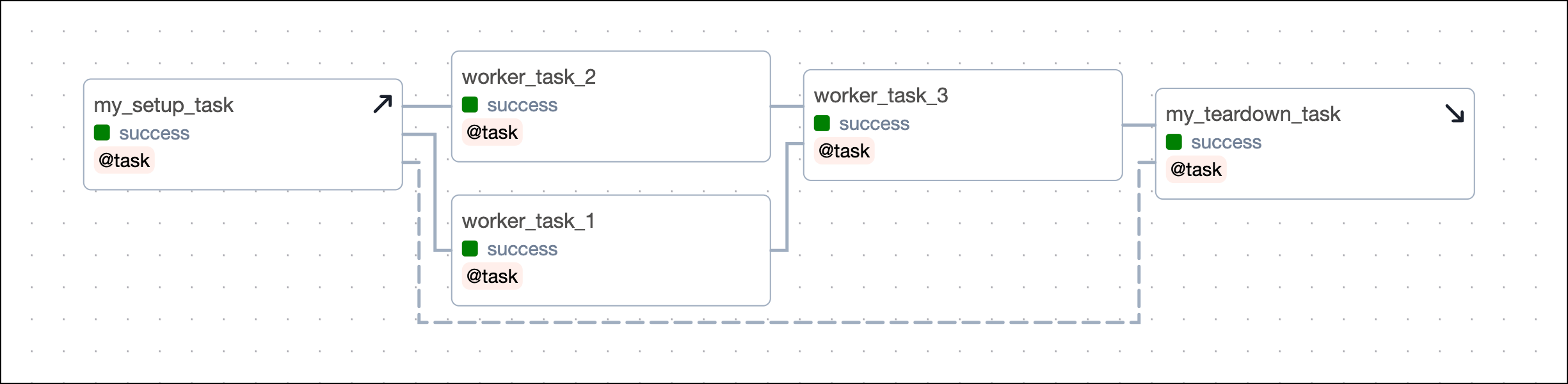
To turn a task into a setup task, call the `.as_setup()` method on the called task object.
```python wrap theme={null}
@task
def my_setup_task():
return "Setting up resources!"
my_setup_task_obj = my_setup_task()
my_setup_task_obj.as_setup()
# it is also possible to call `.as_setup()` directly on the function call
# my_setup_task().as_setup()
```
## Setup/ teardown implementation
There are two ways to turn tasks into setup/ teardown tasks:
* Using the `.as_setup()` and `.as_teardown()` methods on TaskFlow API tasks or traditional operators.
* Using the `@setup` and `@teardown` decorators on a Python function.
Worker tasks can be added to the scope of a setup/ teardown workflow in two ways:
* By being between the setup and teardown tasks in the DAG dependency relationship.
* By using a context manager with the `.teardown()` method.
Which method you choose to add worker tasks to a setup/ teardown scope is a matter of personal preference.
You can define as many setup and teardown tasks in one DAG as you need. In order for Airflow to understand which setup and teardown tasks belong together, you need to [create setup/ teardown workflows](#create-setup/-teardown-workflows).
### `.as_setup()` and `.as_teardown()` methods
Any individual task can be turned into a setup or teardown task.
To turn a task into a setup task, call the `.as_setup()` method on the called task object.
```python wrap theme={null}
@task
def my_setup_task():
return "Setting up resources!"
my_setup_task_obj = my_setup_task()
my_setup_task_obj.as_setup()
# it is also possible to call `.as_setup()` directly on the function call
# my_setup_task().as_setup()
```

Traditional
```python wrap theme={null}
def my_setup_task_func():
return "Setting up resources!"
my_setup_task_obj = PythonOperator(
task_id="my_setup_task",
python_callable=my_setup_task_func,
)
my_setup_task_obj.as_setup()
```

To turn a task into a teardown task, call the `.as_teardown()` method on the called task object. Note that you can't have a teardown task without at least one upstream worker task.
```python wrap theme={null}
@task
def worker_task():
return "Doing some work!"
@task
def my_teardown_task():
return "Tearing down resources!"
my_teardown_task_obj = my_teardown_task()
worker_task() >> my_teardown_task_obj.as_teardown()
# it is also possible to call `.as_teardown()` directly on the function call
# worker_task() >> my_teardown_task().as_teardown()
```

Traditional
```python wrap theme={null}
def worker_task_func():
return "Doing some work!"
worker_task_obj = PythonOperator(
task_id="worker_task",
python_callable=worker_task_func,
)
def my_teardown_task_func():
return "Setting up resources!"
my_teardown_task_obj = PythonOperator(
task_id="my_teardown_task",
python_callable=my_teardown_task_func,
)
worker_task_obj >> my_teardown_task_obj.as_teardown()
```

After you have defined your setup and teardown tasks you need to [define their workflow](#create-setup/-teardown-workflows) in order for Airflow to know which setup and teardown tasks perform actions on the same resources.
### `@setup` and `@teardown` decorators
When working with the TaskFlow API you can also use the `@setup` and `@teardown` decorators to turn any Python function into a setup or teardown task.
```python wrap theme={null}
from airflow.decorators import setup
@setup
def my_setup_task():
return "Setting up resources!"
my_setup_task()
```
As with the `.as_teardown()` method you can't have a `@teardown` task without at least one upstream worker task. The worker task can use the `@task` decorator or be defined with a traditional operator.
```python wrap theme={null}
from airflow.decorators import task, teardown
@task
def worker_task():
return "Doing some work!"
@teardown
def my_teardown_task():
return "Tearing down resources!"
worker_task() >> my_teardown_task()
```
After you have defined your setup and teardown tasks you need to [create their workflows](#create-setup/-teardown-workflows) in order for Airflow to know which setup and teardown tasks perform actions on the same resources.
### Create setup/ teardown workflows
Airflow needs to know which setup and teardown tasks are related based on the resources they manage. Setup and teardown tasks can be defined in the same workflow by:
* Providing the setup task object to the `setups` argument in the `.as_teardown()` method of a teardown task object.
* Connecting a setup and a teardown task with a normal task dependency using the bit-shift operator (`>>`) or a dependency function like `chain()`.
* Providing the called object of a task created using the `@setup` decorator as an argument to a task created using the `@teardown` decorator.
Which method you use is a matter of personal preference. However, note that if you are using `@setup` and `@teardown` decorators, you can't use the `setups` argument.
You can have multiple sets of setup and teardown tasks in a DAG, both in [parallel](#parallel-setup/-teardown-workflows) and [nested](#nested-setup/-teardown-workflows) workflows.
There are no limits to how many setup and teardown tasks you can have, nor are there limits to how many worker tasks you can include in their scope.
For example, you could have one task that creates a cluster, a second task that modifies the environment within that cluster, and a third task that tears down the cluster. In this case you could define the first two tasks as setup tasks and the last one as a teardown task, all belonging to the same resource. In a second step, you could add 10 tasks performing actions on that cluster to the scope of the setup/ teardown workflow.
There are multiple methods for linking setup and teardown tasks.
TaskFlow Setups
Using the `@task` decorator, you can use the `.as_teardown()` method and the `setups` argument to define which setup tasks are in the same workflow as the teardown task. Note that it is also possible to use [`@setup` and `@teardown` decorators](#@setup-and-@teardown-decorators) instead and link them using direct dependencies.
```python wrap theme={null}
@task
def my_setup_task():
return "Setting up resources!"
@task
def worker_task():
return "Doing some work!"
@task
def my_teardown_task():
return "Tearing down resources!"
my_setup_task_obj = my_setup_task()
(
my_setup_task_obj#.as_setup() does not need to be called anymore
>> worker_task()
>> my_teardown_task().as_teardown(setups=my_setup_task_obj)
)
```

Traditional Setups
If you are using traditional Airflow operators, you can use the `.as_teardown()` method and the `setups` argument to define which setup tasks are in the same workflow as the teardown task.
```python wrap theme={null}
def my_setup_task_func():
return "Setting up resources!"
def worker_task_func():
return "Doing some work!"
def my_teardown_task_func():
return "Tearing down resources!"
my_setup_task_obj = PythonOperator(
task_id="my_setup_task",
python_callable=my_setup_task_func,
)
worker_task_obj = PythonOperator(
task_id="worker_task",
python_callable=worker_task_func,
)
my_teardown_task_obj = PythonOperator(
task_id="my_teardown_task",
python_callable=my_teardown_task_func,
)
(
my_setup_task_obj#.as_setup() does not need to be called anymore
>> worker_task_obj
>> my_teardown_task_obj.as_teardown(setups=my_setup_task_obj)
)
```

TaskFlow Direct
Instead of using the `setups` argument you can directly link the setup and teardown tasks with a traditional dependency. Whenever you define a direct dependency between a setup and a teardown task Airflow will interpret this as them being in the same workflow together, no matter what actions the tasks actually perform.
```python wrap theme={null}
(
my_setup_task_obj.as_setup() # calling .as_setup() is necessary
>> worker_task()
>> my_teardown_task_obj.as_teardown()
)
my_setup_task_obj >> my_teardown_task_obj
```
This code creates an identical DAG using the `setups` argument.
```python wrap theme={null}
(
my_setup_task_obj#.as_setup() is not necessary
>> worker_task()
>> my_teardown_task_obj.as_teardown(setups=my_setup_task_obj)
)
```
Decorators
With the`@setup` and `@teardown` decorators, you can define the setup/ teardown workflow between two tasks either by defining direct dependencies or by providing the object of the setup task as an argument to the teardown task.
The latter pattern is often used to pass information like a resource id from the setup task to the teardown task.
```python wrap theme={null}
from airflow.decorators import task, setup, teardown
@setup
def my_setup_task():
print("Setting up resources!")
my_cluster_id = "cluster-2319"
return my_cluster_id
@task
def worker_task():
return "Doing some work!"
@teardown
def my_teardown_task(my_cluster_id):
return f"Tearing down {my_cluster_id}!"
my_setup_task_obj = my_setup_task()
my_setup_task_obj >> worker_task() >> my_teardown_task(my_setup_task_obj)
```
Context Manager
You can also use a task that calls the `.as_teardown()` method to wrap a set of tasks that should be in scope of a setup/ teardown workflow. The code snippet below shows three tasks being in scope of the setup/ teardown workflow created by `my_cluster_setup_task` and `my_cluster_teardown_task`.
```python wrap theme={null}
with my_cluster_teardown_task_obj.as_teardown(setups=my_cluster_setup_task_obj):
worker_task_1() >> [worker_task_2(), worker_task_3()]
```
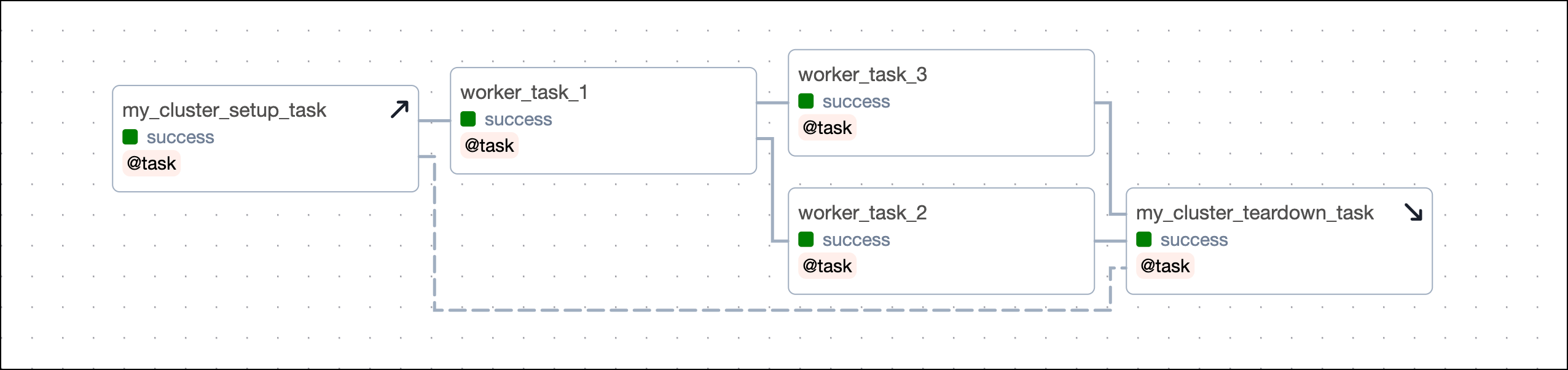 Note that a task that was already instantiated outside of the context manager can still be added to the scope, but you have to do this explicitly using the `.add_task()` method on the context manager object.
```python wrap theme={null}
# task instantiation outside of the context manager
worker_task_1_obj = worker_task_1()
with my_cluster_teardown_task_obj.as_teardown(
setups=my_cluster_setup_task_obj
) as my_scope:
# adding the task to the context manager
my_scope.add_task(worker_task_1_obj)
```
Note that a task that was already instantiated outside of the context manager can still be added to the scope, but you have to do this explicitly using the `.add_task()` method on the context manager object.
```python wrap theme={null}
# task instantiation outside of the context manager
worker_task_1_obj = worker_task_1()
with my_cluster_teardown_task_obj.as_teardown(
setups=my_cluster_setup_task_obj
) as my_scope:
# adding the task to the context manager
my_scope.add_task(worker_task_1_obj)
```
#### Use multiple setup/ teardown tasks in one workflow
To define several setup tasks for one teardown task, you can pass a list of setup tasks to the `setups` argument. You don't need to call `.as_setup()` on any of the setup tasks.
```python wrap theme={null}
(
[my_setup_task_obj_1, my_setup_task_obj_2, my_setup_task_obj_3]
>> worker_task()
>> my_teardown_task().as_teardown(
setups=[my_setup_task_obj_1, my_setup_task_obj_2, my_setup_task_obj_3]
)
)
```
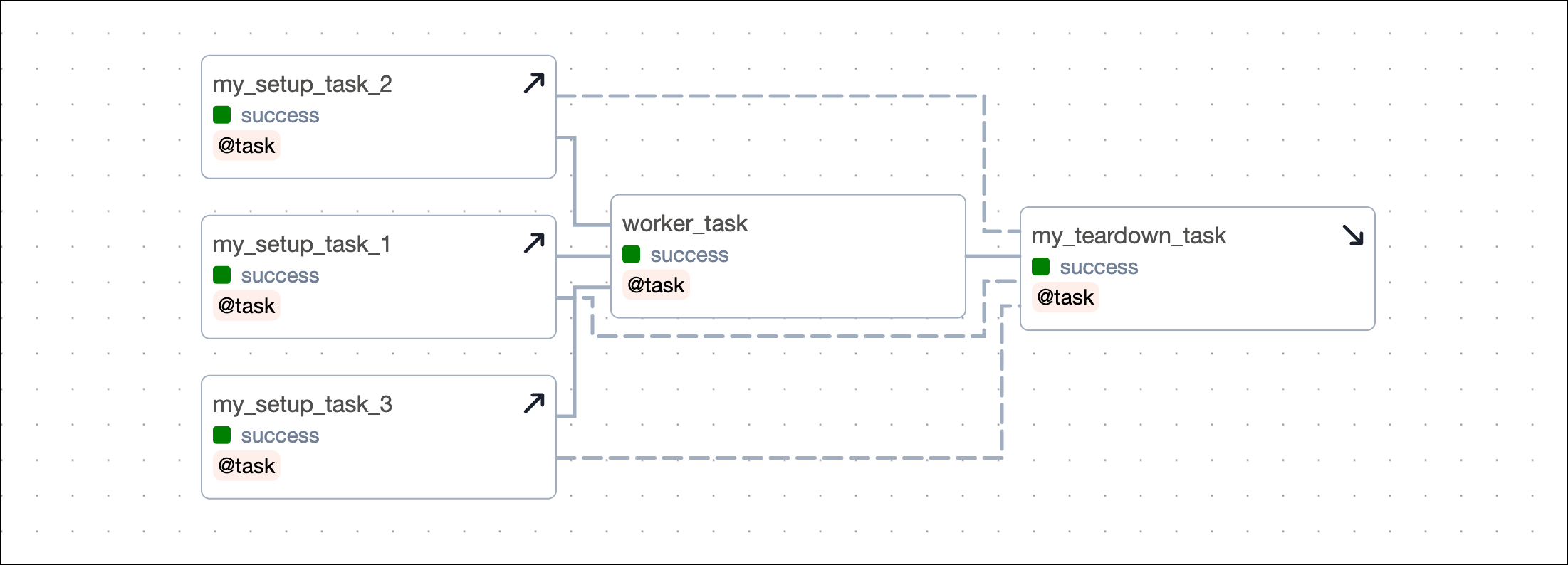 To define several teardown tasks for one setup task, you have to provide the setup task object to the `setups` argument of the `.as_teardown()` method of each teardown task.
```python wrap theme={null}
(
my_setup_task_obj
>> worker_task()
>> [
my_teardown_task_obj_1.as_teardown(setups=my_setup_task_obj),
my_teardown_task_obj_2.as_teardown(setups=my_setup_task_obj),
my_teardown_task_obj_3.as_teardown(setups=my_setup_task_obj),
]
)
```
To define several teardown tasks for one setup task, you have to provide the setup task object to the `setups` argument of the `.as_teardown()` method of each teardown task.
```python wrap theme={null}
(
my_setup_task_obj
>> worker_task()
>> [
my_teardown_task_obj_1.as_teardown(setups=my_setup_task_obj),
my_teardown_task_obj_2.as_teardown(setups=my_setup_task_obj),
my_teardown_task_obj_3.as_teardown(setups=my_setup_task_obj),
]
)
```
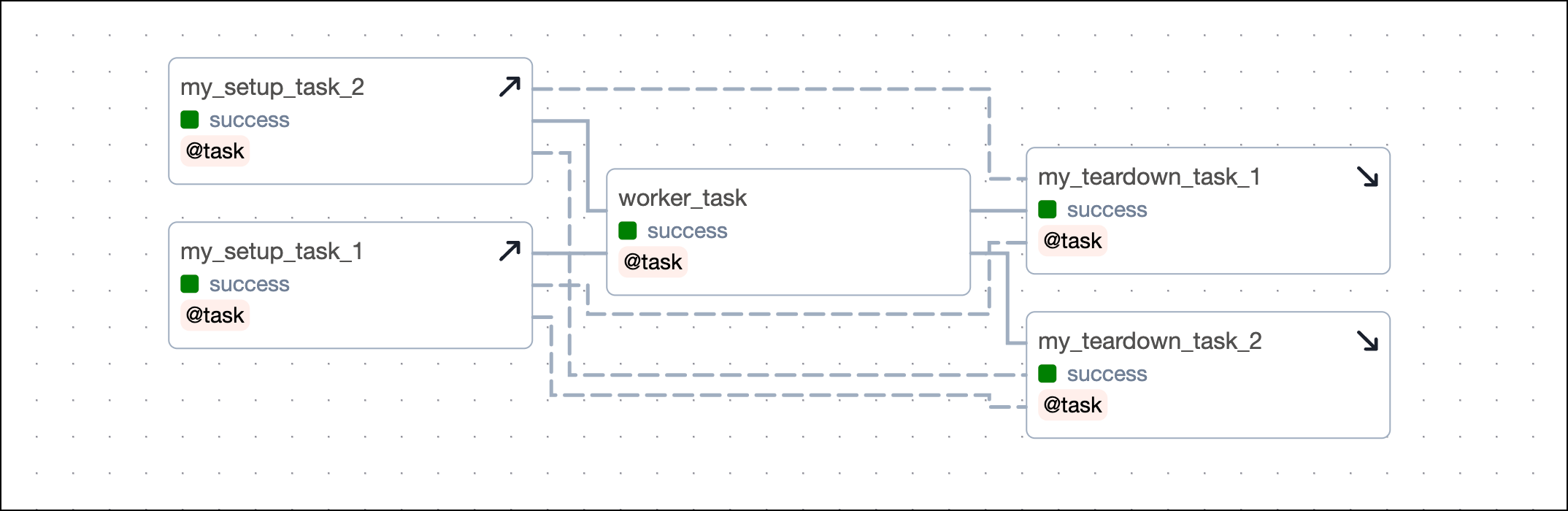
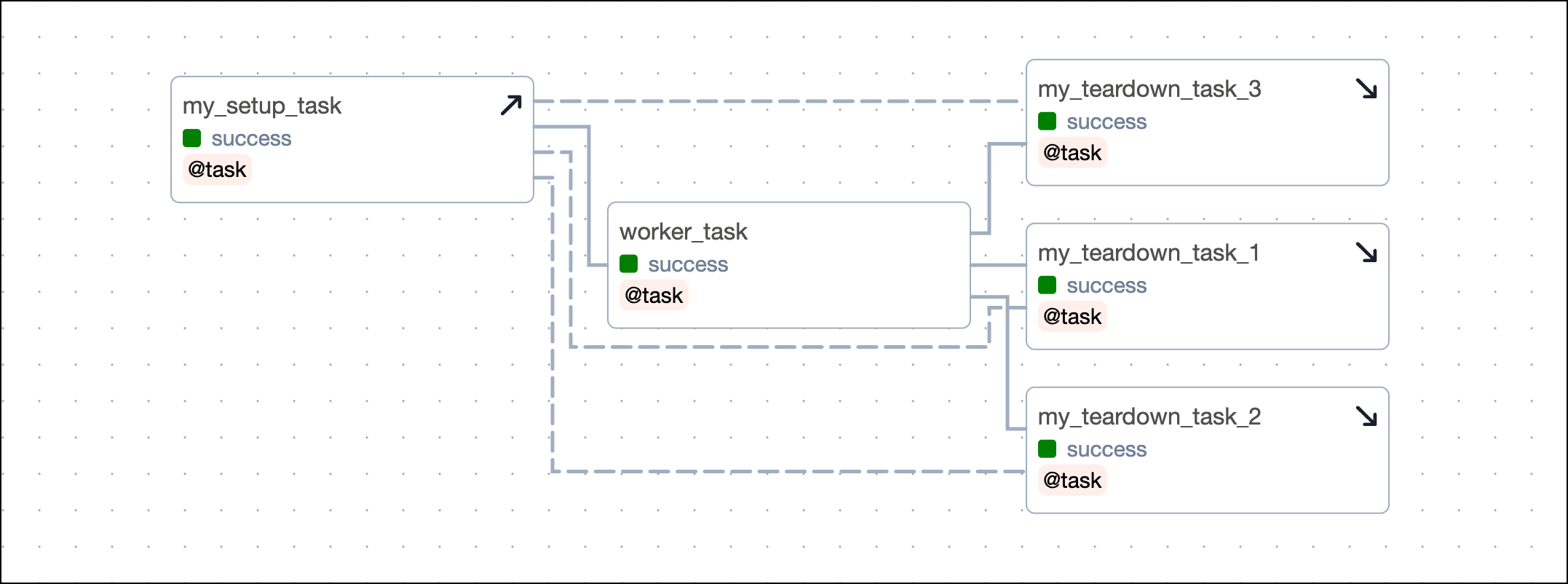 If your setup/ teardown workflow contains more than one setup and one teardown task, you need to define several dependencies, when not using the `setups` argument. Each setup task needs to be set as an upstream dependency to each teardown task. The example below shows a setup/ teardown workflow containing two setup tasks and two teardown tasks. To define the workflow, you need to set four dependencies.
```python wrap theme={null}
(
[my_setup_task_obj_1.as_setup(), my_setup_task_obj_2.as_setup()]
>> worker_task()
>> [my_teardown_task_obj_1.as_teardown(), my_teardown_task_obj_2.as_teardown()]
)
# defining the dependency between each setup and each teardown task
my_setup_task_obj_1 >> my_teardown_task_obj_1
my_setup_task_obj_1 >> my_teardown_task_obj_2
my_setup_task_obj_2 >> my_teardown_task_obj_1
my_setup_task_obj_2 >> my_teardown_task_obj_2
```
This code creates an identical DAG using the `setups` argument.
```python wrap theme={null}
(
[my_setup_task_obj_1, my_setup_task_obj_2]
>> worker_task()
>> [
my_teardown_task_obj_1.as_teardown(
setups=[my_setup_task_obj_1, my_setup_task_obj_2]
),
my_teardown_task_obj_2.as_teardown(
setups=[my_setup_task_obj_1, my_setup_task_obj_2]
),
]
)
```
If your setup/ teardown workflow contains more than one setup and one teardown task, you need to define several dependencies, when not using the `setups` argument. Each setup task needs to be set as an upstream dependency to each teardown task. The example below shows a setup/ teardown workflow containing two setup tasks and two teardown tasks. To define the workflow, you need to set four dependencies.
```python wrap theme={null}
(
[my_setup_task_obj_1.as_setup(), my_setup_task_obj_2.as_setup()]
>> worker_task()
>> [my_teardown_task_obj_1.as_teardown(), my_teardown_task_obj_2.as_teardown()]
)
# defining the dependency between each setup and each teardown task
my_setup_task_obj_1 >> my_teardown_task_obj_1
my_setup_task_obj_1 >> my_teardown_task_obj_2
my_setup_task_obj_2 >> my_teardown_task_obj_1
my_setup_task_obj_2 >> my_teardown_task_obj_2
```
This code creates an identical DAG using the `setups` argument.
```python wrap theme={null}
(
[my_setup_task_obj_1, my_setup_task_obj_2]
>> worker_task()
>> [
my_teardown_task_obj_1.as_teardown(
setups=[my_setup_task_obj_1, my_setup_task_obj_2]
),
my_teardown_task_obj_2.as_teardown(
setups=[my_setup_task_obj_1, my_setup_task_obj_2]
),
]
)
```
 #### Parallel setup/ teardown workflows
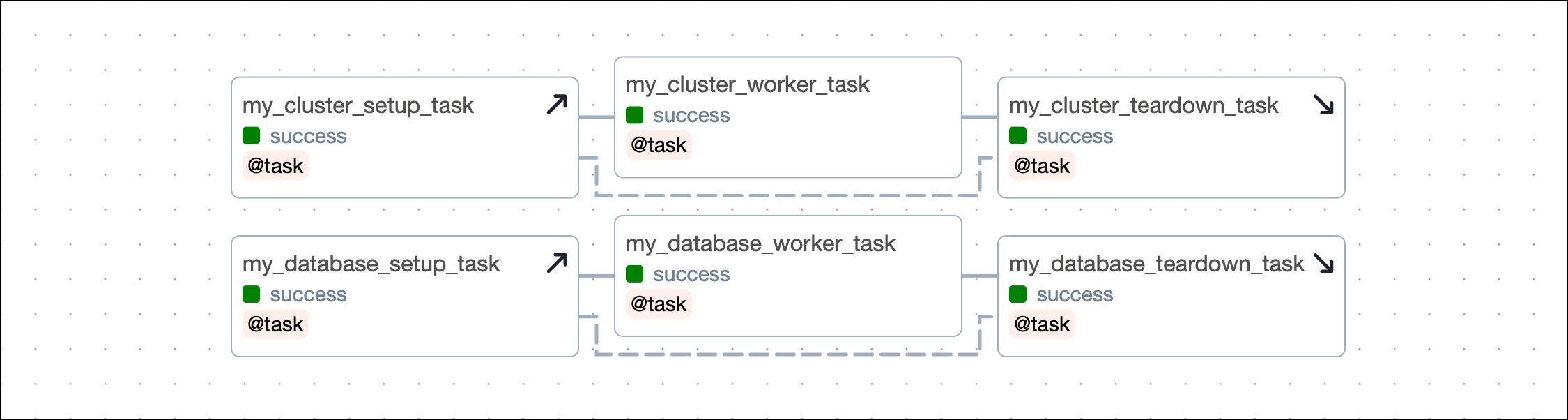
You can have several independent sets of setup and teardown tasks in the same DAG. For example, you might have a workflow of tasks that sets up and tears down a cluster and another workflow that sets up and tears down a temporary database.
#### Parallel setup/ teardown workflows
You can have several independent sets of setup and teardown tasks in the same DAG. For example, you might have a workflow of tasks that sets up and tears down a cluster and another workflow that sets up and tears down a temporary database.
Decorators
```python expandable wrap theme={null}
from airflow.decorators import task, setup, teardown
@setup
def my_cluster_setup_task():
print("Setting up resources!")
my_cluster_id = "cluster-2319"
return my_cluster_id
@task
def my_cluster_worker_task():
return "Doing some work!"
@teardown
def my_cluster_teardown_task(my_cluster_id):
return f"Tearing down {my_cluster_id}!"
@setup
def my_database_setup_task():
print("Setting up my database!")
my_database_name = "DWH"
return my_database_name
@task
def my_database_worker_task():
return "Doing some work!"
@teardown
def my_database_teardown_task(my_database_name):
return f"Tearing down {my_database_name}!"
my_setup_task_obj = my_cluster_setup_task()
(
my_setup_task_obj
>> my_cluster_worker_task()
>> my_cluster_teardown_task(my_setup_task_obj)
)
my_database_setup_obj = my_database_setup_task()
(
my_database_setup_obj
>> my_database_worker_task()
>> my_database_teardown_task(my_database_setup_obj)
)
```
Methods
```python expandable wrap theme={null}
@task
def my_cluster_setup_task():
print("Setting up resources!")
my_cluster_id = "cluster-2319"
return my_cluster_id
@task
def my_cluster_worker_task():
return "Doing some work!"
@task
def my_cluster_teardown_task(my_cluster_id):
return f"Tearing down {my_cluster_id}!"
@task
def my_database_setup_task():
print("Setting up my database!")
my_database_name = "DWH"
return my_database_name
@task
def my_database_worker_task():
return "Doing some work!"
@task
def my_database_teardown_task(my_database_name):
return f"Tearing down {my_database_name}!"
my_setup_task_obj = my_cluster_setup_task()
(
my_setup_task_obj
>> my_cluster_worker_task()
>> my_cluster_teardown_task(my_setup_task_obj).as_teardown(
setups=my_setup_task_obj
)
)
my_database_setup_obj = my_database_setup_task()
(
my_database_setup_obj
>> my_database_worker_task()
>> my_database_teardown_task(my_database_setup_obj).as_teardown(
setups=my_database_setup_obj
)
)
```
 #### Nested setup/ teardown workflows
You can nest setup and teardown tasks to have an outer and inner scope. This is useful if you have basic resources, such as a cluster that you want to set up once and then tear down after all the work is done, but you also have resources running on that cluster that you want to set up and tear down for individual groups of tasks.
The example below shows the dependency code for a simple structure with an outer and inner setup/ teardown workflow:
* `outer_setup` and `outer_teardown` are the outer setup and teardown tasks.
* `inner_setup` and `inner_teardown` are the inner setup and teardown tasks and both are in scope of the outer setup/ teardown workflow.
* `inner_worker_1` and `inner_worker_2` are worker tasks that are in scope of the inner setup/ teardown workflow. All tasks in scope of the inner setup/ teardown workflow will also be in scope of the outer setup/ teardown workflow.
* `outer_worker_1`, `outer_worker_2`, `outer_worker_3` are worker tasks that are in scope of the outer setup/ teardown workflow.
```python wrap theme={null}
outer_setup_obj = outer_setup()
inner_setup_obj = inner_setup()
outer_teardown_obj = outer_teardown()
(
outer_setup_obj
>> inner_setup_obj
>> [inner_worker_1(), inner_worker_2()]
>> inner_teardown().as_teardown(setups=inner_setup_obj)
>> [outer_worker_1(), outer_worker_2()]
>> outer_teardown_obj.as_teardown(setups=outer_setup_obj)
)
outer_setup_obj >> outer_worker_3() >> outer_teardown_obj
```
#### Nested setup/ teardown workflows
You can nest setup and teardown tasks to have an outer and inner scope. This is useful if you have basic resources, such as a cluster that you want to set up once and then tear down after all the work is done, but you also have resources running on that cluster that you want to set up and tear down for individual groups of tasks.
The example below shows the dependency code for a simple structure with an outer and inner setup/ teardown workflow:
* `outer_setup` and `outer_teardown` are the outer setup and teardown tasks.
* `inner_setup` and `inner_teardown` are the inner setup and teardown tasks and both are in scope of the outer setup/ teardown workflow.
* `inner_worker_1` and `inner_worker_2` are worker tasks that are in scope of the inner setup/ teardown workflow. All tasks in scope of the inner setup/ teardown workflow will also be in scope of the outer setup/ teardown workflow.
* `outer_worker_1`, `outer_worker_2`, `outer_worker_3` are worker tasks that are in scope of the outer setup/ teardown workflow.
```python wrap theme={null}
outer_setup_obj = outer_setup()
inner_setup_obj = inner_setup()
outer_teardown_obj = outer_teardown()
(
outer_setup_obj
>> inner_setup_obj
>> [inner_worker_1(), inner_worker_2()]
>> inner_teardown().as_teardown(setups=inner_setup_obj)
>> [outer_worker_1(), outer_worker_2()]
>> outer_teardown_obj.as_teardown(setups=outer_setup_obj)
)
outer_setup_obj >> outer_worker_3() >> outer_teardown_obj
```
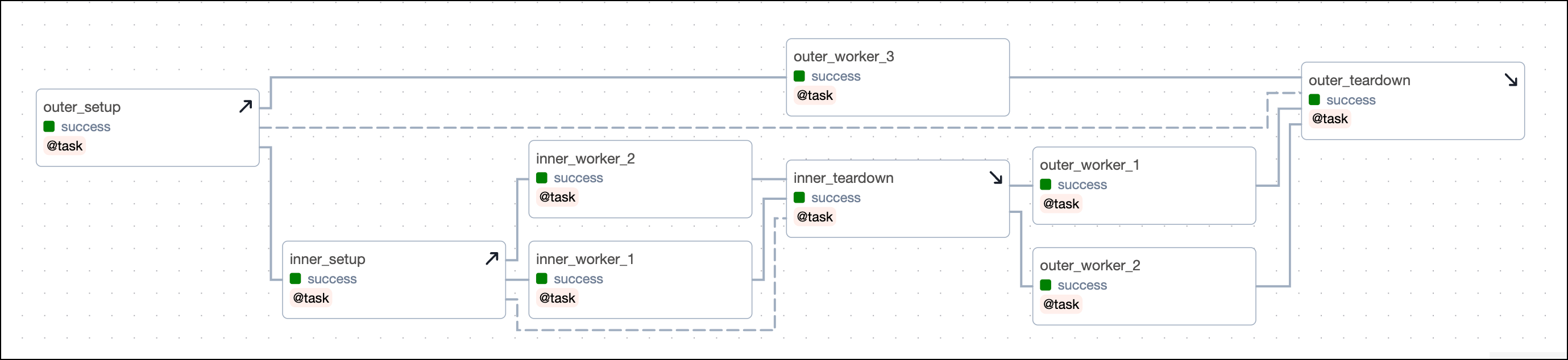 Clearing a task will clear all setups and teardowns the task is in scope of, in addition to all downstream tasks. For example:
* Clearing any of the outer worker tasks (`outer_worker_1`, `outer_worker_2`, `outer_worker_3`) will also clear `outer_setup`, `outer_teardown`.
* Clearing any of the inner worker tasks (`inner_worker_1`, `inner_worker_2`) will clear `inner_setup`, `inner_teardown`, `outer_setup`, and `outer_teardown`. Additionally `outer_worker_1` and `outer_worker_2` will be cleared because they are downstream of the inner worker tasks. `outer_worker_3` won't be cleared because it runs parallel to the inner worker tasks.
### Narrow the scope of a setup task
If you have a setup task with no associated downstream task, you can narrow the scope of the setup task by using an empty task as its teardown. For example, if `my_worker_task_3_obj` doesn't need the resources created by `my_setup_task` and shouldn't cause a rerun of the setup task when cleared, you can add an empty teardown task in the dependency chain:
```python wrap theme={null}
my_setup_task >> [my_worker_task_1_obj >> my_worker_task_2_obj] >> my_worker_task_3_obj
[my_worker_task_1_obj >> my_worker_task_2_obj] >> EmptyOperator(
task_id="empty_task"
).as_teardown(setups=my_setup_task)
```
## Example DAG
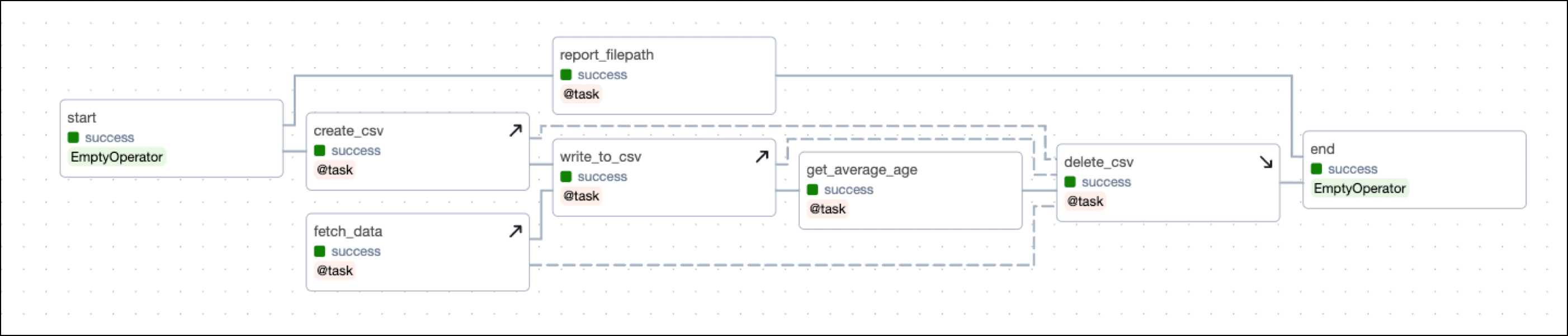
The DAG shown in this example mimics a setup/ teardown pattern that you can run locally. The setup/ teardown workflow consists of the following tasks:
* The `create_csv` task is a setup task that creates a CSV file in a directory specified as a [DAG param](/docs/learn/2.x/airflow-params).
* The `write_to_csv` task is a setup task that writes data to the CSV file.
* The `fetch_data` task is a setup task that fetches data from a remote source and writes it to the CSV file.
* The `delete_csv` task is the associated teardown task and deletes the resource of the CSV file.
* The `get_average_age_obj` task is in scope of the setup/ teardown workflow. If this task fails, the DAG still needs to delete the "CSV file" afterwards (to make it more real, consider the CSV file to be an expensive cluster).
To recover from a failure when rerunning the `get_average_age_obj` task, you always need the CSV file to be created again, as well as the data to be fetched again and written to the CSV file. Because the task is in scope of `create_csv`, `write_to_csv`, and `fetch_data`, these tasks will also rerun when you rerun `get_average_age_obj`.
The DAG contains 3 tasks which aren't in scope of the setup/ teardown workflow:
* The `start` task is an empty task at the start of the DAG.
* The `report_file_path` task is a task that prints the path of the CSV file to the logs.
* The `end` task is an empty task at the end of the DAG.
This DAG comes with a convenience parameter to test setup/ teardown functionality. Toggle `fetch_bad_data` in the **Trigger DAG** view to cause bad data to get into the pipeline and the `get_average_age_obj` to fail. You will see that `delete_csv` will still run and delete the CSV file. In a real-world scenario, after fixing the data issue you would clear the `get_average_age_obj` task and all tasks of the setup/ teardown workflow would rerun and complete successfully.
Clearing a task will clear all setups and teardowns the task is in scope of, in addition to all downstream tasks. For example:
* Clearing any of the outer worker tasks (`outer_worker_1`, `outer_worker_2`, `outer_worker_3`) will also clear `outer_setup`, `outer_teardown`.
* Clearing any of the inner worker tasks (`inner_worker_1`, `inner_worker_2`) will clear `inner_setup`, `inner_teardown`, `outer_setup`, and `outer_teardown`. Additionally `outer_worker_1` and `outer_worker_2` will be cleared because they are downstream of the inner worker tasks. `outer_worker_3` won't be cleared because it runs parallel to the inner worker tasks.
### Narrow the scope of a setup task
If you have a setup task with no associated downstream task, you can narrow the scope of the setup task by using an empty task as its teardown. For example, if `my_worker_task_3_obj` doesn't need the resources created by `my_setup_task` and shouldn't cause a rerun of the setup task when cleared, you can add an empty teardown task in the dependency chain:
```python wrap theme={null}
my_setup_task >> [my_worker_task_1_obj >> my_worker_task_2_obj] >> my_worker_task_3_obj
[my_worker_task_1_obj >> my_worker_task_2_obj] >> EmptyOperator(
task_id="empty_task"
).as_teardown(setups=my_setup_task)
```
## Example DAG
The DAG shown in this example mimics a setup/ teardown pattern that you can run locally. The setup/ teardown workflow consists of the following tasks:
* The `create_csv` task is a setup task that creates a CSV file in a directory specified as a [DAG param](/docs/learn/2.x/airflow-params).
* The `write_to_csv` task is a setup task that writes data to the CSV file.
* The `fetch_data` task is a setup task that fetches data from a remote source and writes it to the CSV file.
* The `delete_csv` task is the associated teardown task and deletes the resource of the CSV file.
* The `get_average_age_obj` task is in scope of the setup/ teardown workflow. If this task fails, the DAG still needs to delete the "CSV file" afterwards (to make it more real, consider the CSV file to be an expensive cluster).
To recover from a failure when rerunning the `get_average_age_obj` task, you always need the CSV file to be created again, as well as the data to be fetched again and written to the CSV file. Because the task is in scope of `create_csv`, `write_to_csv`, and `fetch_data`, these tasks will also rerun when you rerun `get_average_age_obj`.
The DAG contains 3 tasks which aren't in scope of the setup/ teardown workflow:
* The `start` task is an empty task at the start of the DAG.
* The `report_file_path` task is a task that prints the path of the CSV file to the logs.
* The `end` task is an empty task at the end of the DAG.
This DAG comes with a convenience parameter to test setup/ teardown functionality. Toggle `fetch_bad_data` in the **Trigger DAG** view to cause bad data to get into the pipeline and the `get_average_age_obj` to fail. You will see that `delete_csv` will still run and delete the CSV file. In a real-world scenario, after fixing the data issue you would clear the `get_average_age_obj` task and all tasks of the setup/ teardown workflow would rerun and complete successfully.
Methods
```python expandable wrap theme={null}
"""
## Use `.as_teardown()` in a simple local example to enable setup/teardown functionality
DAG that uses setup/teardown to prepare a CSV file to write to and then showcases the
behavior in case faulty data is fetched.
"""
from airflow.decorators import dag, task
from airflow.models.baseoperator import chain
from pendulum import datetime
from airflow.models.param import Param
from airflow.operators.empty import EmptyOperator
import os
import csv
import time
def get_params_helper(**context):
folder = context["params"]["folder"]
filename = context["params"]["filename"]
cols = context["params"]["cols"]
return folder, filename, cols
@dag(
start_date=datetime(2023, 7, 1),
schedule=None,
catchup=False,
params={
"folder": "include/my_data",
"filename": "data.csv",
"cols": ["id", "name", "age"],
"fetch_bad_data": Param(False, type="boolean"),
},
tags=[".is_teardown()", "setup/teardown"],
)
def setup_teardown_csv_methods():
start = EmptyOperator(task_id="start")
end = EmptyOperator(task_id="end")
@task
def report_filepath(**context):
folder, filename, cols = get_params_helper(**context)
print(f"Filename: {folder}/{filename}")
@task
def create_csv(**context):
folder, filename, cols = get_params_helper(**context)
if not os.path.exists(folder):
os.makedirs(folder)
with open(f"{folder}/{filename}", "w", newline="") as f:
writer = csv.writer(f)
writer.writerows([cols])
@task
def fetch_data(**context):
bad_data = context["params"]["fetch_bad_data"]
if bad_data:
return [
[1, "Joe", "Forty"],
[2, "Tom", 29],
[3, "Lea", 19],
]
else:
return [
[1, "Joe", 40],
[2, "Tom", 29],
[3, "Lea", 19],
]
@task
def write_to_csv(data, **context):
folder, filename, cols = get_params_helper(**context)
with open(f"{folder}/{filename}", "a", newline="") as f:
writer = csv.writer(f)
writer.writerows(data)
time.sleep(10)
@task
def get_average_age(**context):
folder, filename, cols = get_params_helper(**context)
with open(f"{folder}/{filename}", "r", newline="") as f:
reader = csv.reader(f)
next(reader)
ages = [int(row[2]) for row in reader]
return sum(ages) / len(ages)
@task
def delete_csv(**context):
folder, filename, cols = get_params_helper(**context)
os.remove(f"{folder}/{filename}")
if not os.listdir(f"{folder}"):
os.rmdir(f"{folder}")
start >> report_filepath() >> end
create_csv_obj = create_csv()
fetch_data_obj = fetch_data()
write_to_csv_obj = write_to_csv(fetch_data_obj)
get_average_age_obj = get_average_age()
delete_csv_obj = delete_csv()
chain(
start,
create_csv_obj,
write_to_csv_obj,
get_average_age_obj,
delete_csv_obj.as_teardown(
setups=[create_csv_obj, write_to_csv_obj, fetch_data_obj]
),
end,
)
setup_teardown_csv_methods()
```
Decorators
```python expandable wrap theme={null}
"""
## Use `@setup` and `@teardown` in a simple local example to enable setup/teardown functionality
DAG that uses setup/teardown to prepare a CSV file to write to and then showcases the
behavior in case faulty data is fetched.
"""
from airflow.decorators import dag, task, setup, teardown
from airflow.models.baseoperator import chain
from pendulum import datetime
from airflow.models.param import Param
from airflow.operators.empty import EmptyOperator
import os
import csv
import time
def get_params_helper(**context):
folder = context["params"]["folder"]
filename = context["params"]["filename"]
cols = context["params"]["cols"]
return folder, filename, cols
@dag(
start_date=datetime(2023, 7, 1),
schedule=None,
catchup=False,
params={
"folder": "include/my_data",
"filename": "data.csv",
"cols": ["id", "name", "age"],
"fetch_bad_data": Param(False, type="boolean"),
},
tags=["@setup", "@teardown", "setup/teardown"],
)
def setup_teardown_csv_decorators():
start = EmptyOperator(task_id="start")
end = EmptyOperator(task_id="end")
@task
def report_filepath(**context):
folder, filename, cols = get_params_helper(**context)
print(f"Filename: {folder}/{filename}")
@setup
def create_csv(**context):
folder, filename, cols = get_params_helper(**context)
if not os.path.exists(folder):
os.makedirs(folder)
with open(f"{folder}/{filename}", "w", newline="") as f:
writer = csv.writer(f)
writer.writerows([cols])
@setup
def fetch_data(**context):
bad_data = context["params"]["fetch_bad_data"]
if bad_data:
return [
[1, "Joe", "Forty"],
[2, "Tom", 29],
[3, "Lea", 19],
]
else:
return [
[1, "Joe", 40],
[2, "Tom", 29],
[3, "Lea", 19],
]
@setup
def write_to_csv(data, **context):
folder, filename, cols = get_params_helper(**context)
with open(f"{folder}/{filename}", "a", newline="") as f:
writer = csv.writer(f)
writer.writerows(data)
time.sleep(10)
@task
def get_average_age(**context):
folder, filename, cols = get_params_helper(**context)
with open(f"{folder}/{filename}", "r", newline="") as f:
reader = csv.reader(f)
next(reader)
ages = [int(row[2]) for row in reader]
return sum(ages) / len(ages)
@teardown
def delete_csv(**context):
folder, filename, cols = get_params_helper(**context)
os.remove(f"{folder}/{filename}")
if not os.listdir(f"{folder}"):
os.rmdir(f"{folder}")
start >> report_filepath() >> end
create_csv_obj = create_csv()
fetch_data_obj = fetch_data()
write_to_csv_obj = write_to_csv(fetch_data_obj)
get_average_age_obj = get_average_age()
delete_csv_obj = delete_csv()
chain(
start,
create_csv_obj,
write_to_csv_obj,
get_average_age_obj,
delete_csv_obj,
end,
)
# when using @setup and @teardown the tasks can be linked using normal dependency syntax
# or by leveraging task flow (see the complex example)
create_csv_obj >> delete_csv_obj
fetch_data_obj >> delete_csv_obj
write_to_csv_obj >> delete_csv_obj
setup_teardown_csv_decorators()
```