> ## Documentation Index
> Fetch the complete documentation index at: https://astronomer.io/docs/llms.txt
> Use this file to discover all available pages before exploring further.
# Create and use params in Airflow
Params are arguments which you can pass to an Airflow DAG or task at runtime and are stored in the [Airflow context dictionary](/docs/learn/2.x/airflow-context) for each DAG run. You can pass DAG and task-level params by using the `params` parameter.
Params are ideal to store information that is specific to individual DAG runs like changing dates, file paths or ML model configurations. Params aren't encrypted and therefore not suitable to pass secrets. See also [Best practices for storing information in Airflow](/docs/learn/2.x/airflow-variables#best-practices-for-storing-information-in-airflow).
This guide covers:
* How to pass params to a DAG at runtime.
* How to define DAG-level param defaults which are rendered in the **Trigger DAG** UI.
* How to access params in an Airflow task.
* The hierarchy of params in Airflow.
## Assumed knowledge
To get the most out of this guide, you should have an understanding of:
* Airflow DAGs. See [Introduction to Airflow DAGs](/docs/learn/2.x/dags).
* Airflow operators. See [Operators 101](/docs/learn/2.x/what-is-an-operator).
* Airflow context. See [Access the Apache Airflow context](/docs/learn/2.x/airflow-context).
## Pass params to a DAG run at runtime
Params can be passed to a DAG at runtime in four different ways:
* In the Airflow UI by using the **Trigger DAG** form. This form appears when you click the **Play** button in the Airflow UI only for DAGs that have at least one param defined at the DAG level, see [Define DAG-level param defaults](#define-dag-level-param-defaults).
* Running a DAG with the `--conf` flag using the Airflow CLI ([`airflow dags trigger`](https://airflow.apache.org/docs/apache-airflow/stable/cli-and-env-variables-ref.html#trigger)).
* Using the `TriggerDagRunOperator` with the `conf` parameter.
* Making a POST request to the Airflow REST APIs [Trigger a new DAG run](https://airflow.apache.org/docs/apache-airflow/stable/stable-rest-api-ref.html#operation/post_dag_run) endpoint and using the `conf` parameter.
Param values passed to a DAG by any of these methods will override existing default values for the same key as long as the [Airflow core config `dag_run_conf_overrides_params`](https://airflow.apache.org/docs/apache-airflow/stable/configurations-ref.html#dag-run-conf-overrides-params) is set to `True`.
While it's possible to pass non-JSON serializable params, this behavior is deprecated and will be removed in a future release. It is best practice to make sure your params are JSON serializable.
### Trigger DAG form
You can pass params to DAGs with pre-defined params from the Airflow UI by clicking the **Play** button.
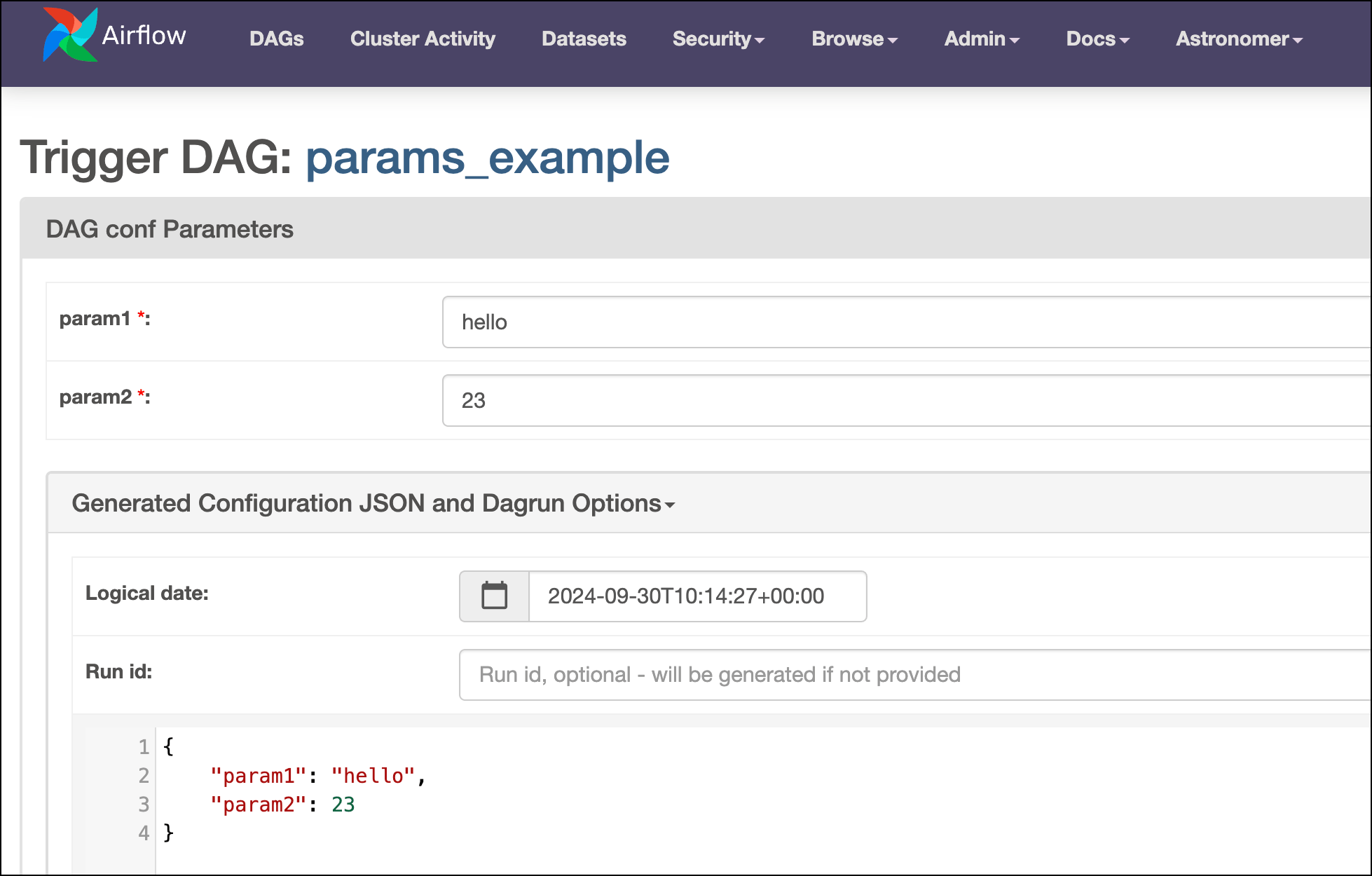
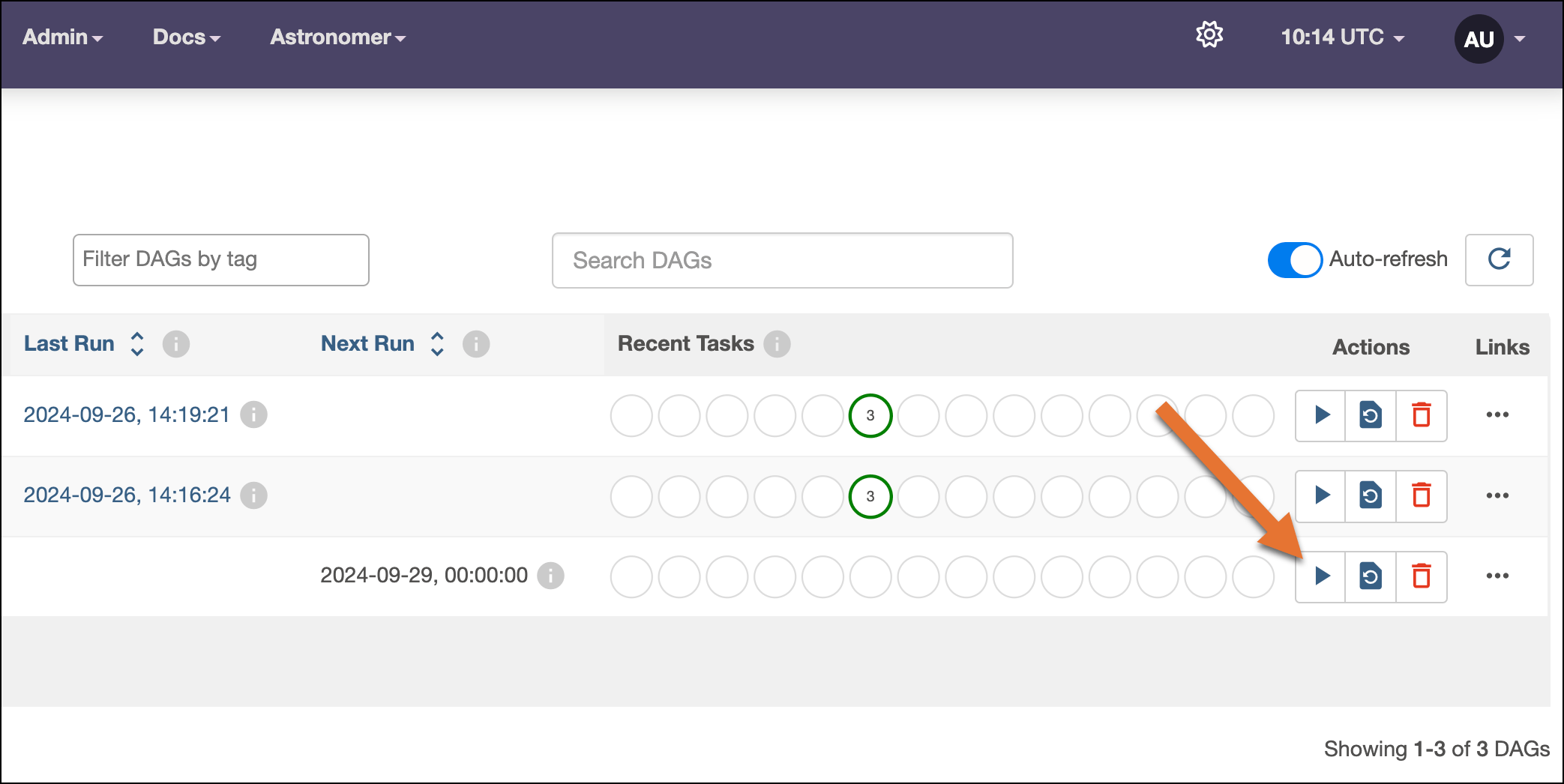 When the DAG that has at least one param [defined at the DAG-level](#define-dag-level-param-defaults) this button opens a form in which you can specify details for the DAG run:
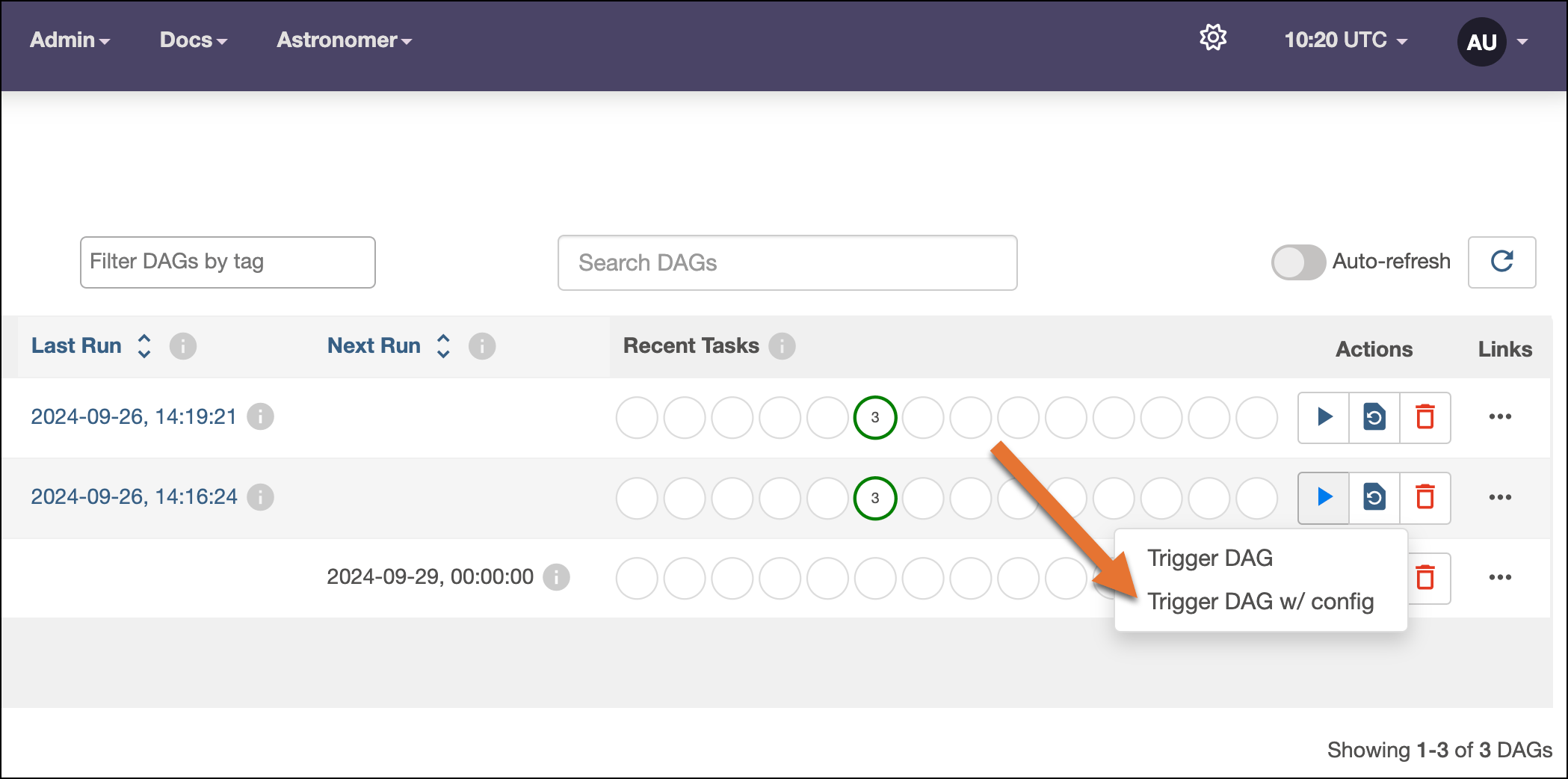
 In earlier Airflow versions the **Play** button opened a dropdown menu with two options **Trigger DAG** and **Trigger DAG w/ config**. The **Trigger DAG w/ config** button allowed you to pass params to the DAG run even if no params were defined at the DAG level. To re-enable this behavior in Airflow 2.7+, you need to set the environment variable `AIRFLOW__WEBSERVER__SHOW_TRIGGER_FORM_IF_NO_PARAMS=True`.
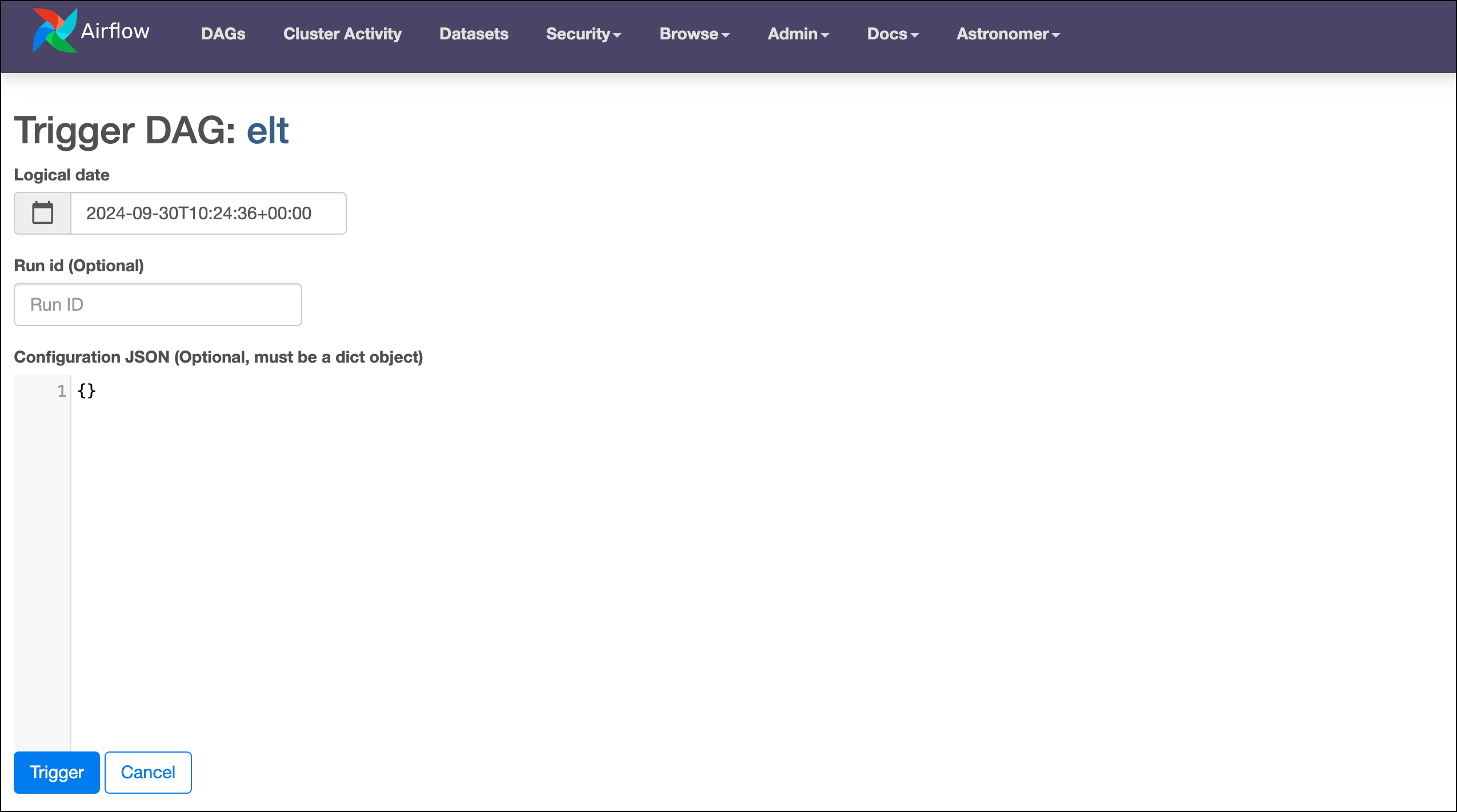
 The Trigger DAG form for DAGs without DAG-level params defined will look like this:
 In the **Trigger DAG** form:
* You can set the **Logical date** of the DAG run to any date that is in between the `start_date` and the `end_date` of the DAG to create DAG runs in the past or future.
* You can set the **Run id** to any string. If no run ID is specified, Airflow generates one based on the type of run (`scheduled`, `dataset_triggered`, `manual` or `backfill`) and the logical date (for example: `manual__2023-06-16T08:03:45+00:00`).
* The **Trigger DAG** form will render a UI element for every DAG-level params you define with a default value. See also [Define DAG-level param defaults](#define-dag-level-param-defaults).
* The information in the UI elements generates a Configuration JSON. You can directly edit the **Generated Configuration JSON** in the UI and add any additional params, whether a default has been defined for them or not.
If there are previous runs of the DAG with params different from the defaults, the **Trigger DAG** form will show a dropdown menu **Select Recent Configurations** with the option to select a previous run and copy its configuration.
In the **Trigger DAG** form:
* You can set the **Logical date** of the DAG run to any date that is in between the `start_date` and the `end_date` of the DAG to create DAG runs in the past or future.
* You can set the **Run id** to any string. If no run ID is specified, Airflow generates one based on the type of run (`scheduled`, `dataset_triggered`, `manual` or `backfill`) and the logical date (for example: `manual__2023-06-16T08:03:45+00:00`).
* The **Trigger DAG** form will render a UI element for every DAG-level params you define with a default value. See also [Define DAG-level param defaults](#define-dag-level-param-defaults).
* The information in the UI elements generates a Configuration JSON. You can directly edit the **Generated Configuration JSON** in the UI and add any additional params, whether a default has been defined for them or not.
If there are previous runs of the DAG with params different from the defaults, the **Trigger DAG** form will show a dropdown menu **Select Recent Configurations** with the option to select a previous run and copy its configuration.
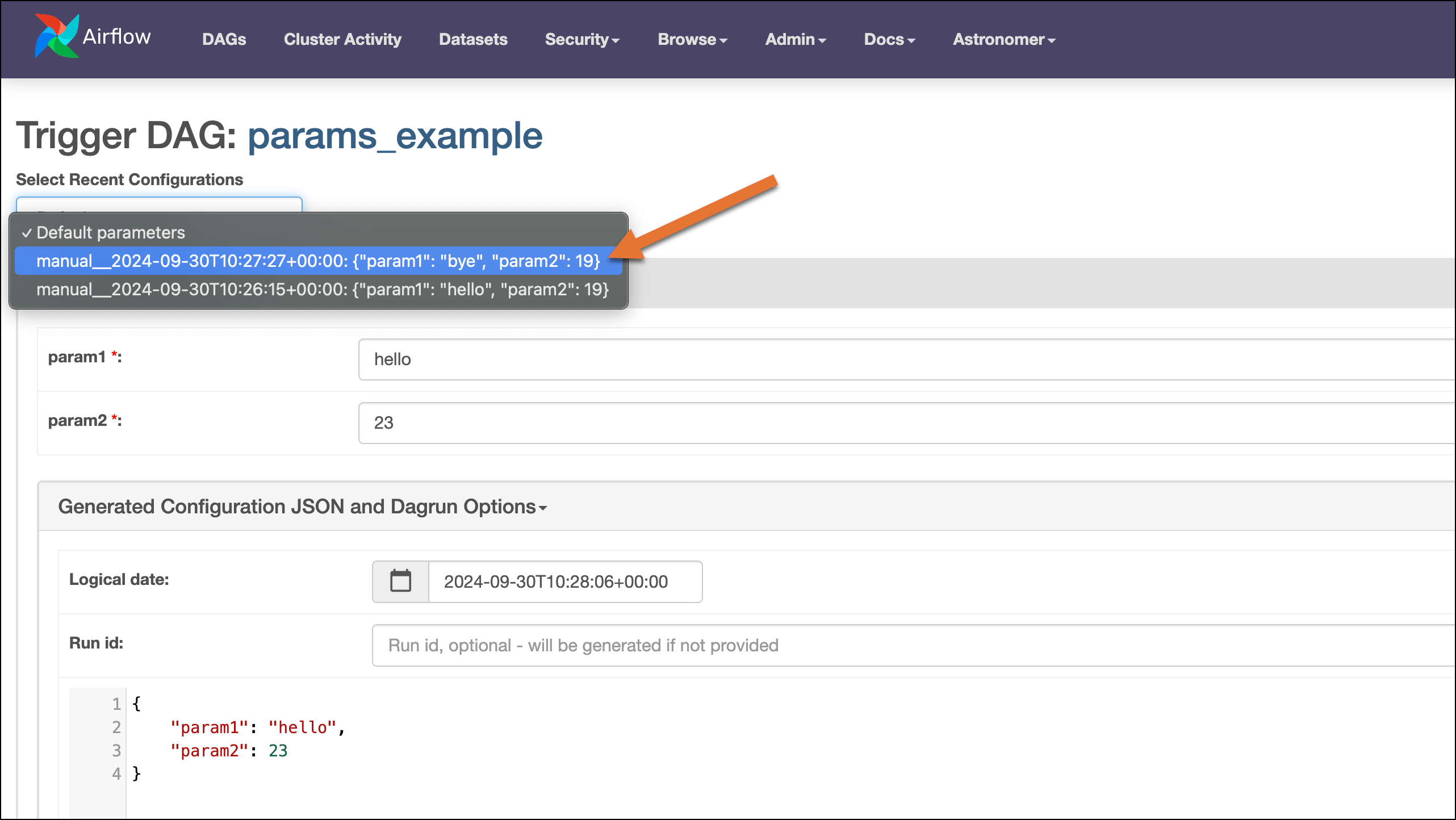 After setting the configuration, you can start the DAG run with the **Trigger** button.
### CLI
When you run an [Airflow DAG from the CLI](https://airflow.apache.org/docs/apache-airflow/stable/cli-and-env-variables-ref.html#dags), you can pass params to the DAG run by providing a JSON string to the `--conf` flag. For example, to trigger the `params_default_example` DAG with the value of `Hello from the CLI` for `param1`, run:
After setting the configuration, you can start the DAG run with the **Trigger** button.
### CLI
When you run an [Airflow DAG from the CLI](https://airflow.apache.org/docs/apache-airflow/stable/cli-and-env-variables-ref.html#dags), you can pass params to the DAG run by providing a JSON string to the `--conf` flag. For example, to trigger the `params_default_example` DAG with the value of `Hello from the CLI` for `param1`, run:
Astro CLI
Run Airflow commands from the Astro CLI using `astro dev run`:
```sh wrap theme={null}
astro dev run dags trigger params_defaults_example --conf '{"param1" : "Hello from the CLI"}'
```
Airflow CLI
```sh wrap theme={null}
airflow dags trigger params_defaults_example --conf '{"param1" : "Hello from the CLI"}'
```
The CLI prints the configuration for the triggered run to the command line:
 You can use a `--conf` flag with the following Airflow CLI sub-commands:
* `airflow dags backfill`
* `airflow dags test`
* `airflow dags trigger`
### `TriggerDagRunOperator`
The [`TriggerDagRunOperator`](/docs/learn/2.x/cross-dag-dependencies#triggerdagrunoperator) is a core Airflow operator that allows you to start a DAG run from within another DAG. You can use the `TriggerDAGRunOperator` `conf` param to trigger the dependent DAG with a specific configuration.
The DAG below uses the `TriggerDagRunOperator` to trigger the `tdro_example_downstream` DAG while passing a dynamic value for the `upstream_color` param using the `conf` parameter. The value for `upstream_color` is passed using a [Jinja template](/docs/learn/2.x/templating) pulling the return value of an upstream task using [XCom](/docs/learn/2.x/airflow-passing-data-between-tasks#xcom).
```python wrap theme={null}
from pendulum import datetime
from airflow.decorators import dag, task
from airflow.operators.trigger_dagrun import TriggerDagRunOperator
import random
@dag(
start_date=datetime(2023, 6, 1),
schedule="@daily",
catchup=False,
)
def tdro_example_upstream():
@task
def choose_color():
color = random.choice(["blue", "red", "green", "yellow"])
return color
tdro = TriggerDagRunOperator(
task_id="tdro",
trigger_dag_id="tdro_example_downstream",
conf={"upstream_color": "{{ ti.xcom_pull(task_ids='choose_color')}}"},
)
choose_color() >> tdro
tdro_example_upstream()
```
You can use a `--conf` flag with the following Airflow CLI sub-commands:
* `airflow dags backfill`
* `airflow dags test`
* `airflow dags trigger`
### `TriggerDagRunOperator`
The [`TriggerDagRunOperator`](/docs/learn/2.x/cross-dag-dependencies#triggerdagrunoperator) is a core Airflow operator that allows you to start a DAG run from within another DAG. You can use the `TriggerDAGRunOperator` `conf` param to trigger the dependent DAG with a specific configuration.
The DAG below uses the `TriggerDagRunOperator` to trigger the `tdro_example_downstream` DAG while passing a dynamic value for the `upstream_color` param using the `conf` parameter. The value for `upstream_color` is passed using a [Jinja template](/docs/learn/2.x/templating) pulling the return value of an upstream task using [XCom](/docs/learn/2.x/airflow-passing-data-between-tasks#xcom).
```python wrap theme={null}
from pendulum import datetime
from airflow.decorators import dag, task
from airflow.operators.trigger_dagrun import TriggerDagRunOperator
import random
@dag(
start_date=datetime(2023, 6, 1),
schedule="@daily",
catchup=False,
)
def tdro_example_upstream():
@task
def choose_color():
color = random.choice(["blue", "red", "green", "yellow"])
return color
tdro = TriggerDagRunOperator(
task_id="tdro",
trigger_dag_id="tdro_example_downstream",
conf={"upstream_color": "{{ ti.xcom_pull(task_ids='choose_color')}}"},
)
choose_color() >> tdro
tdro_example_upstream()
```
Traditional
```python expandable wrap theme={null}
from pendulum import datetime
from airflow.decorators import dag, task
from airflow.operators.trigger_dagrun import TriggerDagRunOperator
from airflow.operators.python import PythonOperator
import random
def choose_color_func():
color = random.choice(["blue", "red", "green", "yellow"])
return color
@dag(
start_date=datetime(2023, 6, 1),
schedule="@daily",
catchup=False,
)
def tdro_example_upstream_traditional():
choose_color = PythonOperator(
task_id="choose_color",
python_callable=choose_color_func,
)
tdro = TriggerDagRunOperator(
task_id="tdro",
trigger_dag_id="tdro_example_downstream",
conf={"upstream_color": "{{ ti.xcom_pull(task_ids='choose_color')}}"},
)
choose_color >> tdro
tdro_example_upstream_traditional()
```
Runs of the `tdro_example_downstream` DAG that are triggered by this upstream DAG will override the default value of the `upstream_color` param with the value passed using the `conf` parameter, which leads to the `print_color` task to print either `red`, `green`, `blue` or `yellow`.
```python wrap theme={null}
from pendulum import datetime
from airflow.decorators import dag, task
@dag(
start_date=datetime(2023, 6, 1),
schedule=None,
catchup=False,
params={"upstream_color": "Manual run, no upstream color available."},
)
def tdro_example_downstream():
@task
def print_color(**context):
print(context["params"]["upstream_color"])
print_color()
tdro_example_downstream()
```
Traditional
```python wrap theme={null}
from pendulum import datetime
from airflow.decorators import dag
from airflow.operators.python import PythonOperator
def print_color_func(**context):
print(context["params"]["upstream_color"])
@dag(
start_date=datetime(2023, 6, 1),
schedule=None,
catchup=False,
params={"upstream_color": "Manual run, no upstream color available."},
)
def tdro_example_downstream_traditional():
PythonOperator(
task_id="print_color",
python_callable=print_color_func,
)
tdro_example_downstream_traditional()
```
## Define DAG-level param defaults
To specify params for all runs of a given DAG, pass default values to the `param` parameter of the `@dag` decorator or the `DAG` class in your DAG file. You can directly specify a default value or use the `Param` class to define a default value with additional attributes.
The DAG below has two DAG-level params with defaults: `param1` and `param2`, the latter only accepting integers.
```python wrap theme={null}
from pendulum import datetime
from airflow.decorators import dag, task
from airflow.models.param import Param
@dag(
start_date=datetime(2023, 6, 1),
schedule=None,
catchup=False,
params={
"param1": "Hello!",
"param2": Param(
23,
type="integer",
),
},
)
def simple_param_dag():
@task
def print_all_params(**context):
print(context["params"]["param1"] * 3)
print(context["params"]["param2"])
print_all_params()
simple_param_dag()
```
Traditional
```python wrap theme={null}
from pendulum import datetime
from airflow import DAG
from airflow.operators.python import PythonOperator
from airflow.models.param import Param
def print_all_params_func(**context):
print(context["params"]["param1"] * 3)
print(context["params"]["param2"])
with DAG(
dag_id="simple_param_dag",
start_date=datetime(2023, 6, 1),
schedule=None,
catchup=False,
params={
"param1": "Hello!",
"param2": Param(
23,
type="integer",
),
},
):
PythonOperator(
task_id="print_all_params",
python_callable=print_all_params_func,
)
```
If you define DAG-level param defaults, the **Trigger DAG** form renders a field for each param. From this UI, you can then override your defaults for individual DAG runs. A param with a red asterisk is a required param.
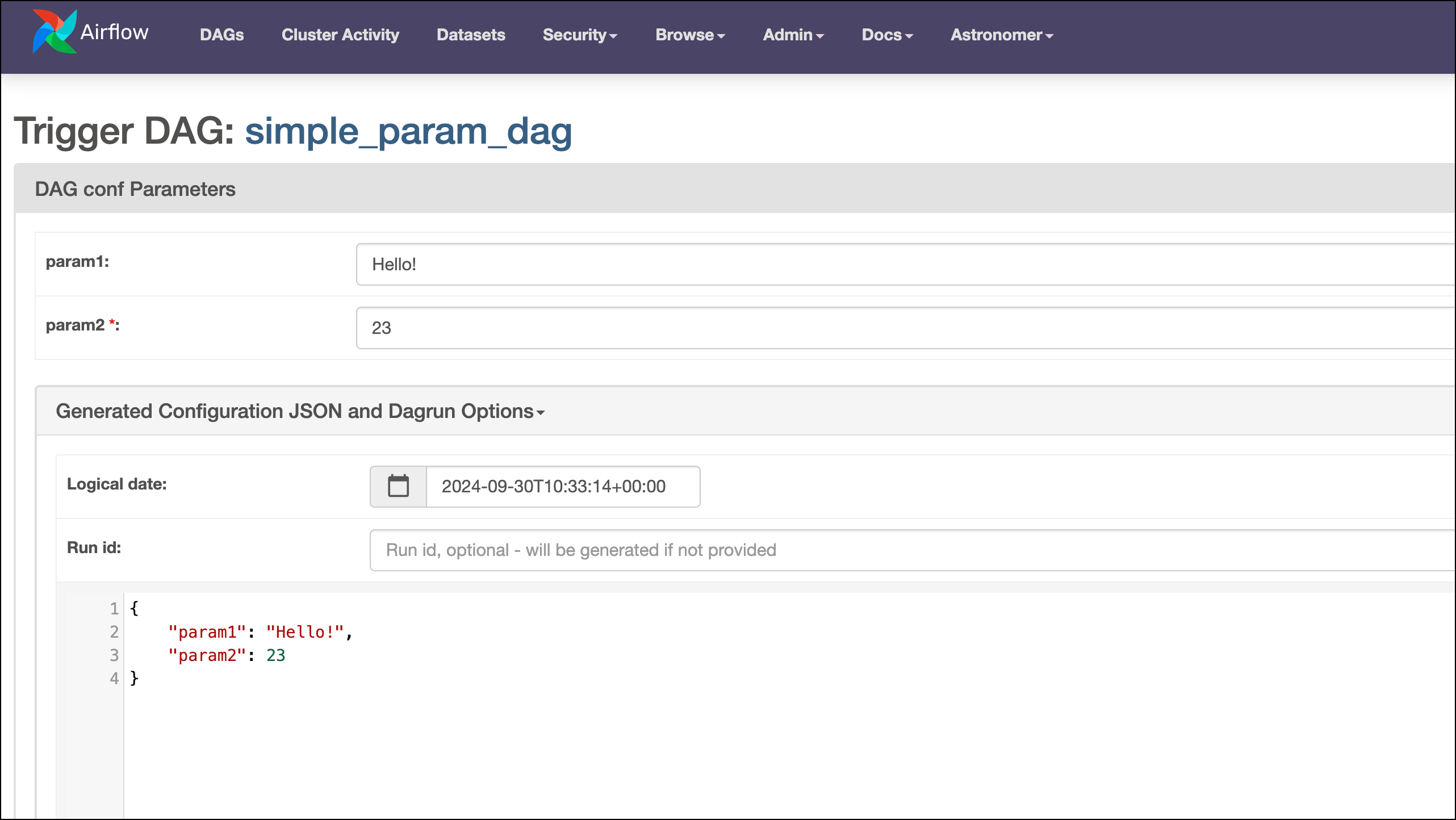 When you specify a required `type` for a param, the field will be a required input by default because of [JSON validation](https://json-schema.org/draft/2020-12/json-schema-validation.html#name-dates-times-and-duration). To make a field optional but still require a specific input type, allow NULL values by setting the type to `["null", ""]`.
By default, Airflow assumes that the values provided to a keyword in the `params` dictionary are strings. You can change this behavior by setting the DAG parameter `render_template_as_native_obj=True`. See [Render native Python code](/docs/learn/2.x/templating#render-native-python-code).
### Param types
The following param types are supported:
* `string`: A string. This is the default type.
* `null`: Allows the param to be None by being left empty.
* `integer` or `number`: An integer (floats aren't supported).
* `boolean`: `True` or `False`.
* `array`: An HTML multi line text field, every line edited will be made into a string array as the value.
* `object`: A JSON entry field.
### Param attributes
Aside from the `type` attribute, the `Param` class has several other attributes that you can use to define how users interact with the param:
* `title`: The title of the param that appears in the **Trigger DAG** UI.
* `description`: A description of the param.
* `description_md`: A description defined in Markdown that can contain links and other Markdown elements. In Airflow 2.8+, if you want to use HTML in the description, you need to set the Airflow configuration `webserver.allow_raw_html_descriptions` to `True` (`AIRFLOW__WEBSERVER__ALLOW_RAW_HTML_DESCRIPTIONS=True`). Note that HTML can introduce vulnerabilities and that adding invalid HTML might lead to the UI not rendering correctly.
* `section`: Creates a section under which the param will appear in the **Trigger DAG** UI. All params with no specified section will appear under the default section **DAG conf Parameters**.
* `format`: A [JSON format](https://json-schema.org/draft/2020-12/json-schema-validation.html#name-dates-times-and-duration) that Airflow will validate a user's input against.
* `enum`: A list of valid values for a param. Setting this attribute creates a dropdown menu in the UI.
* `const`: Defines a permanent default value and hides the param from the **Trigger DAG** UI. Note that you still need to provide a `default` value for the param.
* `custom_html_form`: Allows you to create custom HTML on top of the provided features. As of Airflow 2.8 this feature is deprecated and will be replaced by a new implementation in the future.
All `Param` attributes are optional to set. For string type params, you can additionally set `minLength` and `maxLength` to define the minimum and maximum length of the input. Similarly, integer and number type params can have a `minimum` and `maximum` value.
### Param examples in the Airflow UI
This section presents a few examples of params and how they are rendered in the **Trigger DAG** UI.
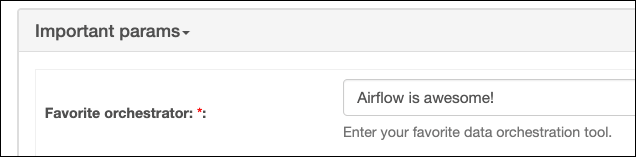
The code snippet below defines a mandatory string param with a few UI elements to help users input a value.
```python wrap theme={null}
"my_string_param": Param(
"Airflow is awesome!",
type="string",
title="Favorite orchestrator:",
description="Enter your favorite data orchestration tool.",
section="Important params",
minLength=1,
maxLength=200,
)
```
When you specify a required `type` for a param, the field will be a required input by default because of [JSON validation](https://json-schema.org/draft/2020-12/json-schema-validation.html#name-dates-times-and-duration). To make a field optional but still require a specific input type, allow NULL values by setting the type to `["null", ""]`.
By default, Airflow assumes that the values provided to a keyword in the `params` dictionary are strings. You can change this behavior by setting the DAG parameter `render_template_as_native_obj=True`. See [Render native Python code](/docs/learn/2.x/templating#render-native-python-code).
### Param types
The following param types are supported:
* `string`: A string. This is the default type.
* `null`: Allows the param to be None by being left empty.
* `integer` or `number`: An integer (floats aren't supported).
* `boolean`: `True` or `False`.
* `array`: An HTML multi line text field, every line edited will be made into a string array as the value.
* `object`: A JSON entry field.
### Param attributes
Aside from the `type` attribute, the `Param` class has several other attributes that you can use to define how users interact with the param:
* `title`: The title of the param that appears in the **Trigger DAG** UI.
* `description`: A description of the param.
* `description_md`: A description defined in Markdown that can contain links and other Markdown elements. In Airflow 2.8+, if you want to use HTML in the description, you need to set the Airflow configuration `webserver.allow_raw_html_descriptions` to `True` (`AIRFLOW__WEBSERVER__ALLOW_RAW_HTML_DESCRIPTIONS=True`). Note that HTML can introduce vulnerabilities and that adding invalid HTML might lead to the UI not rendering correctly.
* `section`: Creates a section under which the param will appear in the **Trigger DAG** UI. All params with no specified section will appear under the default section **DAG conf Parameters**.
* `format`: A [JSON format](https://json-schema.org/draft/2020-12/json-schema-validation.html#name-dates-times-and-duration) that Airflow will validate a user's input against.
* `enum`: A list of valid values for a param. Setting this attribute creates a dropdown menu in the UI.
* `const`: Defines a permanent default value and hides the param from the **Trigger DAG** UI. Note that you still need to provide a `default` value for the param.
* `custom_html_form`: Allows you to create custom HTML on top of the provided features. As of Airflow 2.8 this feature is deprecated and will be replaced by a new implementation in the future.
All `Param` attributes are optional to set. For string type params, you can additionally set `minLength` and `maxLength` to define the minimum and maximum length of the input. Similarly, integer and number type params can have a `minimum` and `maximum` value.
### Param examples in the Airflow UI
This section presents a few examples of params and how they are rendered in the **Trigger DAG** UI.
The code snippet below defines a mandatory string param with a few UI elements to help users input a value.
```python wrap theme={null}
"my_string_param": Param(
"Airflow is awesome!",
type="string",
title="Favorite orchestrator:",
description="Enter your favorite data orchestration tool.",
section="Important params",
minLength=1,
maxLength=200,
)
```
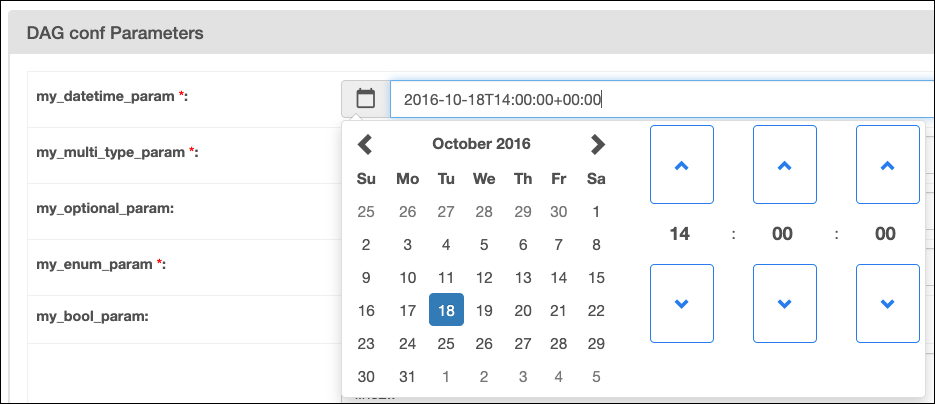
 When you define [date, datetime, or time param](https://datatracker.ietf.org/doc/html/rfc3339#section-5.6), a calendar picker appears in the **Trigger DAG** UI.
```python wrap theme={null}
"my_datetime_param": Param(
"2016-10-18T14:00:00+00:00",
type="string",
format="date-time",
),
```
When you define [date, datetime, or time param](https://datatracker.ietf.org/doc/html/rfc3339#section-5.6), a calendar picker appears in the **Trigger DAG** UI.
```python wrap theme={null}
"my_datetime_param": Param(
"2016-10-18T14:00:00+00:00",
type="string",
format="date-time",
),
```
 Providing a list of values to the `enum` attribute will create a dropdown menu in the **Trigger DAG** UI. Note that the default value must also be in the list of valid values provided to `enum`. Due to JSON validation rules, a value has to be selected.
```python wrap theme={null}
"my_enum_param": Param(
"Hi :)", type="string", enum=["Hola :)", "Hei :)", "Bonjour :)", "Hi :)"]
),
```
Providing a list of values to the `enum` attribute will create a dropdown menu in the **Trigger DAG** UI. Note that the default value must also be in the list of valid values provided to `enum`. Due to JSON validation rules, a value has to be selected.
```python wrap theme={null}
"my_enum_param": Param(
"Hi :)", type="string", enum=["Hola :)", "Hei :)", "Bonjour :)", "Hi :)"]
),
```
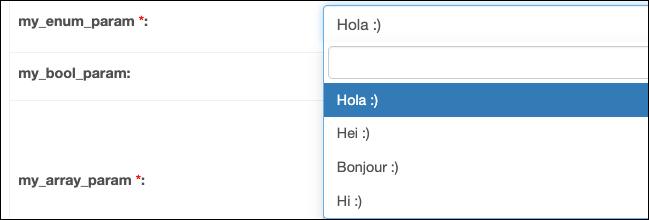 A boolean type param will create a toggle in the **Trigger DAG** UI.
```python wrap theme={null}
"my_bool_param": Param(True, type="boolean"),
```
A boolean type param will create a toggle in the **Trigger DAG** UI.
```python wrap theme={null}
"my_bool_param": Param(True, type="boolean"),
```
 If you provide custom HTML to the `custom_html_form` attribute, you can create more complex UI elements like a color picker. For sample code, see [this example DAG in the Airflow documentation](https://airflow.apache.org/docs/apache-airflow/stable/_modules/airflow/example_dags/example_params_ui_tutorial.html). Note that this feature is deprecated as of Airflow 2.8 and its implementation will change in the future.
 ## Define task-level param defaults
You can set task-level param defaults in the same way as for DAG-level params. If a param of the same key is specified at both the DAG and task level, the DAG-level param will take precedence.
```python wrap theme={null}
@task(params={"param1": "Hello World!"})
def t1(**context):
print(context["params"]["param1"])
```
## Define task-level param defaults
You can set task-level param defaults in the same way as for DAG-level params. If a param of the same key is specified at both the DAG and task level, the DAG-level param will take precedence.
```python wrap theme={null}
@task(params={"param1": "Hello World!"})
def t1(**context):
print(context["params"]["param1"])
```
Traditional
```python wrap theme={null}
t1 = BashOperator(
task_id="t1",
bash_command="echo {{ params.param1 }}",
params={"param1": "Hello World!"},
)
```
## Access params in a task
You can access params in an Airflow task like you can with other elements in the [Airflow context](/docs/learn/2.x/airflow-context).
```python wrap theme={null}
@task
def t1(**context):
print(context["params"]["my_param"])
```
Traditional
```python wrap theme={null}
def t1_func(**context):
print(context["params"]["my_param"])
t1 = PythonOperator(
task_id="t1",
python_callable=t1_func,
)
```
Params are also accessible as a [Jinja template](/docs/learn/2.x/templating) using the `{{ params.my_param }}` syntax.
If you try to access a param that hasn't been specified for a specific DAG run, the task will fail with an exception.
## Param precedence
The order of precedence for params, with the first item taking most precedence, is as follows:
* Params that have been provided for a specific DAG run by a method detailed in [pass params to a DAG run at runtime](#pass-params-to-a-dag-run-at-runtime) as long as the [Airflow config core.`dag_run_conf_overrides_params`](https://airflow.apache.org/docs/apache-airflow/stable/configurations-ref.html#dag-run-conf-overrides-params) is set to `True`.
* Param defaults that have been defined at the DAG level.
* Param defaults that have been defined at the task level.