> ## Documentation Index
> Fetch the complete documentation index at: https://astronomer.io/docs/llms.txt
> Use this file to discover all available pages before exploring further.
# Orchestrate OpenSearch operations with Apache Airflow
[OpenSearch](https://opensearch.org/) is an open source distributed search and analytics engine based on [Apache Lucene](https://lucene.apache.org/). It offers advanced search capabilities on large bodies of text alongside powerful machine learning plugins. The [OpenSearch Airflow provider](https://airflow.apache.org/docs/apache-airflow-providers-opensearch/stable/index.html) offers modules to easily integrate OpenSearch with Airflow.
In this tutorial you'll use Airflow to create an index in OpenSearch, ingest the lyrics of the musical [Hamilton](https://hamiltonmusical.com/new-york/) into the index, and run a search query on the index to see which character most often sings a specific word.
## Why use Airflow with OpenSearch?
OpenSearch allows you to perform complex search queries on indexed text documents. Additionally, the tool comes with a variety of plugins for use cases such as security analytics, semantic search, and neural search.
Integrating OpenSearch with Airflow allows you to:
* Use Airflow's [data-driven scheduling](/docs/learn/2.x/airflow-datasets) to run operations involving documents stored in OpenSearch based on upstream events in your data ecosystem, such as when a new model is trained or a new dataset is available.
* Run dynamic queries based on upstream events in your data ecosystem or user input via [Airflow params](/docs/learn/2.x/airflow-params) on documents and vectors stored in OpenSearch to retrieve relevant objects.
* Add Airflow features like [retries](/docs/learn/2.x/rerunning-dags#automatically-retry-tasks) and [alerts](/docs/learn/2.x/error-notifications-in-airflow) to your OpenSearch operations.
## Time to complete
This tutorial takes approximately 30 minutes to complete.
## Assumed knowledge
To get the most out of this tutorial, make sure you have an understanding of:
* The basics of OpenSearch. See the [OpenSearch documentation](https://opensearch.org/docs/latest/about/).
* Vector embeddings. See [Using OpenSearch as a Vector Database](https://opensearch.org/platform/search/vector-database.html).
* Airflow fundamentals, such as writing DAGs and defining tasks. See [Get started with Apache Airflow](/docs/learn/2.x/get-started-with-airflow).
* Airflow decorators. [Introduction to the TaskFlow API and Airflow decorators](/docs/learn/2.x/airflow-decorators).
* Airflow connections. See [Managing your Connections in Apache Airflow](/docs/learn/2.x/connections).
## Prerequisites
* The [Astro CLI](/docs/cli/v1.43/get-started-cli).
This tutorial uses a local OpenSearch instance created as a [Docker container](https://hub.docker.com/r/opensearchproject/opensearch). You don't need to install OpenSearch on your machine.
The example code from this tutorial is also available on [GitHub](https://github.com/astronomer/airflow-opensearch-tutorial).
## Step 1: Configure your Astro project
1. Create a new Astro project:
```sh wrap theme={null}
$ mkdir astro-opensearch-tutorial && cd astro-opensearch-tutorial
$ astro dev init
```
2. Add the following two lines to your Astro project `requirements.txt` file to install the [OpenSearch Airflow provider](https://airflow.apache.org/docs/apache-airflow-providers-opensearch/stable/index.html) and the [pandas](https://pandas.pydata.org/) package in your Astro project:
```text wrap theme={null}
apache-airflow-providers-opensearch==1.0.0
pandas==1.5.3
```
3. This tutorial uses a local OpenSearch instance running in a Docker container. To run an OpenSearch container as part of your Airflow environment, create a new file in your Astro project root directory called `docker-compose.override.yml` and copy and paste the following into it:
```yaml expandable wrap theme={null}
version: '3.1'
services:
opensearch:
image: opensearchproject/opensearch:2
ports:
- "9200:9200" # OpenSearch REST API
- "9300:9300" # OpenSearch Node-to-Node communication
environment:
- discovery.type=single-node
- plugins.security.ssl.http.enabled=false
volumes:
- opensearch-data:/usr/share/opensearch/data
networks:
- airflow
# Airflow containers
scheduler:
networks:
- airflow
webserver:
networks:
- airflow
triggerer:
networks:
- airflow
postgres:
networks:
- airflow
# volume for OpenSearch
volumes:
opensearch-data:
```
4. Add the following configuration to your `.env` file to create an [Airflow connection](/docs/learn/2.x/connections) between Airflow and your OpenSearch instance. If you already have a cloud-based OpenSearch instance, you can connect to that instead of the local instance by adjusting the values in the connection.
```text wrap theme={null}
AIRFLOW_CONN_OPENSEARCH_DEFAULT='{
"conn_type": "opensearch",
"host": "opensearch",
"port": 9200,
"login": "admin",
"password": "admin"
}'
```
## Step 2: Add your data
The DAG in this tutorial uses a [Kaggle](https://www.kaggle.com/datasets/lbalter/hamilton-lyrics) dataset that contains the lyrics of the musical [Hamilton](https://hamiltonmusical.com/new-york/).
1. Download the [`hamilton_lyrics`.csv](https://github.com/astronomer/airflow-opensearch-tutorial/blob/main/include/hamilton_lyrics.csv) from Astronomer's GitHub.
2. Save the file in your Astro project `include` folder.
## Step 3: Create your DAG
1. In your `dags` folder, create a file called `search_hamilton.py`.
2. Copy the following code into the file.
```python expandable wrap theme={null}
"""
## Use the OpenSearch provider to ingest and search Hamilton lyrics
This DAG uses the OpenSearch provider to create an index in OpenSearch,
ingest Hamilton lyrics into the index, and search for which character and which song
mention a keyword the most.
"""
from airflow.decorators import dag, task
from airflow.models.baseoperator import chain
from airflow.operators.empty import EmptyOperator
from airflow.providers.opensearch.operators.opensearch import (
OpenSearchAddDocumentOperator,
OpenSearchCreateIndexOperator,
OpenSearchQueryOperator,
)
from airflow.providers.opensearch.hooks.opensearch import OpenSearchHook
from pendulum import datetime
import csv
import uuid
import pandas as pd
OPENSEARCH_INDEX_NAME = "hamilton_lyrics"
OPENSEARCH_CONN_ID = "opensearch_default"
LYRICS_CSV_PATH = "include/hamilton_lyrics.csv"
KEYWORD_TO_SEARCH = "write"
@dag(
start_date=datetime(2023, 10, 18),
schedule=None,
catchup=False,
)
def search_hamilton():
@task.branch
def check_if_index_exists(index_name: str, conn_id: str) -> str:
client = OpenSearchHook(open_search_conn_id=conn_id, log_query=True).client
is_index_exist = client.indices.exists(index_name)
if is_index_exist:
return "index_exists"
return "create_index"
create_index = OpenSearchCreateIndexOperator(
task_id="create_index",
opensearch_conn_id=OPENSEARCH_CONN_ID,
index_name=OPENSEARCH_INDEX_NAME,
index_body={
"settings": {"index": {"number_of_shards": 1}},
"mappings": {
"properties": {
"title": {"type": "keyword"},
"speaker": {
"type": "keyword",
},
"lines": {"type": "text"},
}
},
},
)
index_exists = EmptyOperator(task_id="index_exists")
@task
def csv_to_dict_list(csv_file_path: str) -> list:
with open(csv_file_path, mode="r", encoding="utf-8") as file:
reader = csv.DictReader(file)
list_of_hamilton_lines = list(reader)
list_of_kwargs = []
for line in list_of_hamilton_lines:
unique_line_id = uuid.uuid5(
name=" ".join([line["title"], line["speaker"], line["lines"]]),
namespace=uuid.NAMESPACE_DNS,
)
kwargs = {"doc_id": str(unique_line_id), "document": line}
list_of_kwargs.append(kwargs)
return list_of_kwargs
list_of_document_kwargs = csv_to_dict_list(csv_file_path=LYRICS_CSV_PATH)
add_lines_as_documents = OpenSearchAddDocumentOperator.partial(
task_id="add_lines_as_documents",
opensearch_conn_id=OPENSEARCH_CONN_ID,
trigger_rule="none_failed",
index_name=OPENSEARCH_INDEX_NAME,
).expand_kwargs(list_of_document_kwargs)
search_for_keyword = OpenSearchQueryOperator(
task_id=f"search_for_{KEYWORD_TO_SEARCH}",
opensearch_conn_id=OPENSEARCH_CONN_ID,
index_name=OPENSEARCH_INDEX_NAME,
query={
"size": 0,
"query": {
"match": {"lines": {"query": KEYWORD_TO_SEARCH, "fuzziness": "AUTO"}}
},
"aggs": {
"most_mentions_person": {"terms": {"field": "speaker"}},
"most_mentions_song": {"terms": {"field": "title"}},
},
},
)
@task
def print_query_result(query_result: dict, keyword: str) -> None:
results_most_mentions_person = query_result["aggregations"][
"most_mentions_person"
]["buckets"]
results_most_mentions_song = query_result["aggregations"]["most_mentions_song"][
"buckets"
]
df_person = pd.DataFrame(results_most_mentions_person)
df_person.columns = ["Character", f"Number of lines that include '{keyword}'"]
df_song = pd.DataFrame(results_most_mentions_song)
df_song.columns = ["Song", f"Number of lines that include '{keyword}'"]
print(
f"\n Top 3 Hamilton characters that mention '{keyword}' the most:\n ",
df_person.head(3).to_string(index=False),
)
print(
f"\n Top 3 Hamilton songs that mention '{keyword}' the most:\n ",
df_song.head(3).to_string(index=False),
)
chain(
check_if_index_exists(
index_name=OPENSEARCH_INDEX_NAME, conn_id=OPENSEARCH_CONN_ID
),
[create_index, index_exists],
add_lines_as_documents,
)
chain(
list_of_document_kwargs,
add_lines_as_documents,
search_for_keyword,
print_query_result(
query_result=search_for_keyword.output,
keyword=KEYWORD_TO_SEARCH,
),
)
search_hamilton()
```
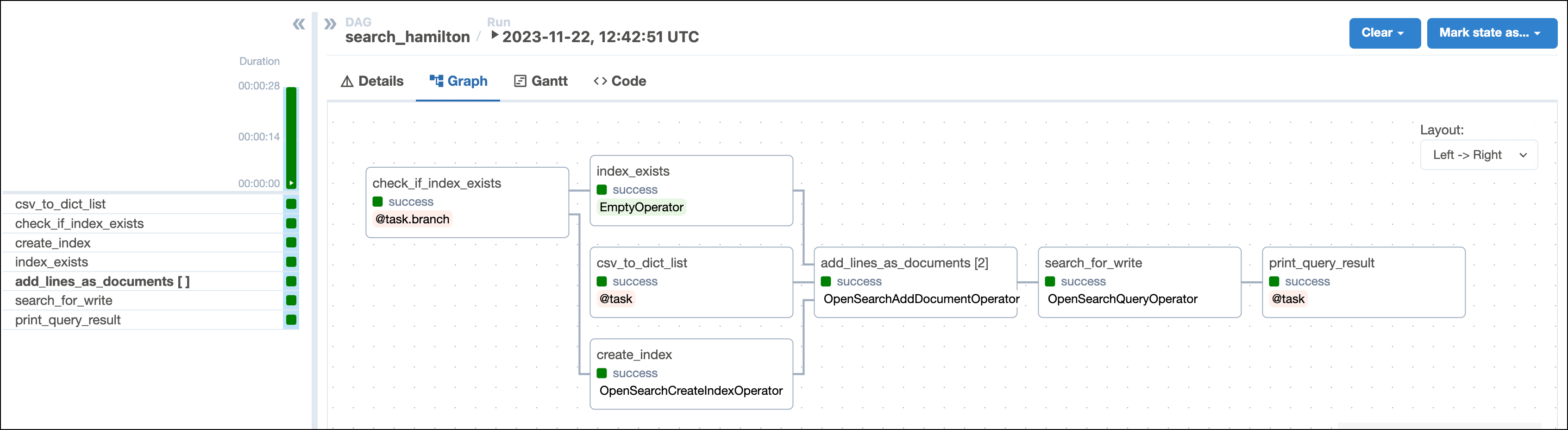
This DAG consists of seven tasks to make a simple ML orchestration pipeline.
* The `check_if_index_exists` task uses a [`@task.branch`](/docs/learn/2.x/airflow-branch-operator#@task-branch-branchpythonoperator) decorator to check if the index `OPENSEARCH_INDEX_NAME` exists in your OpenSearch instance. If it doesn't exist, the task returns the string `create_index` causing the downstream `create_index` task to run. If the index exists, the task causes the empty `index_exists` task to run instead.
* The `create_index` task defined with the [`OpenSearchCreateIndexOperator`](https://airflow.apache.org/registry/providers/opensearch#opensearch-opensearch-OpenSearchCreateIndexOperator) creates the index `OPENSEARCH_INDEX_NAME` in your OpenSearch instance with the three properties `title`, `speaker` and `lines`.
* The `csv_to_dict_list` task uses the [`@task`](/docs/learn/2.x/airflow-decorators) decorator to ingest the lyrics of the musical Hamilton from the `hamilton_lyrics.csv` file into a list of Python dictionaries. Each dictionary represents a line of the musical and will be one document in the OpenSearch index.
* The `add_lines_as_documents` task is a [dynamically mapped task](/docs/learn/2.x/dynamic-tasks) using the [`OpenSearchAddDocumentOperator`](https://airflow.apache.org/registry/providers/opensearch#opensearch-opensearch-OpenSearchAddDocumentOperator) to create one mapped task instance for each document to ingest.
* The `search_for_keyword` task is defined with the [`OpenSearchQueryOperator`](https://airflow.apache.org/registry/providers/opensearch#opensearch-opensearch-OpenSearchQueryOperator) and performs a [fuzzy query](https://opensearch.org/docs/latest/query-dsl/term/fuzzy/) on the OpenSearch index to find the character and song that mention the `KEYWORD_TO_SEARCH` the most.
* The `print_query_result` prints the query results to the task logs.
 For information on more advanced search techniques in OpenSearch, see the [OpenSearch documentation](https://opensearch.org/docs/latest/).
## Step 4: Run your DAG
1. Run `astro dev start` in your Astro project to start Airflow and open the Airflow UI at `localhost:8080`.
2. In the Airflow UI, run the `search_hamilton` DAG by clicking the **Play** button. By default the DAG will search the lyrics for the word `write`, but you can change the search term by updating the `KEYWORD_TO_SEARCH` variable in your DAG file.
3. View your song results in the task logs of the `print_query_result` task:
```text wrap theme={null}
[2023-11-22, 14:01:58 UTC] {logging_mixin.py:154} INFO -
Top 3 Hamilton characters that mention 'write' the most:
Character Number of lines that include 'write'
HAMILTON 15
ELIZA 8
BURR 4
[2023-11-22, 14:01:58 UTC] {logging_mixin.py:154} INFO -
Top 3 Hamilton songs that mention 'write' the most:
Song Number of lines that include 'write'
Non-Stop 11
Hurricane 10
Burn 3
```
4. (Optional) Listen to the [song](https://open.spotify.com/track/7qfoq1JFKBUEIvhqOHzuqX?si=49a2e7c259ad43e2) that mentions your keyword the most.
## Conclusion
Congratulations! You used Airflow and OpenSearch to analyze the lyrics of Hamilton! You can now use Airflow to orchestrate OpenSearch operations in your own machine learning pipelines. History has its eyes on you.
For information on more advanced search techniques in OpenSearch, see the [OpenSearch documentation](https://opensearch.org/docs/latest/).
## Step 4: Run your DAG
1. Run `astro dev start` in your Astro project to start Airflow and open the Airflow UI at `localhost:8080`.
2. In the Airflow UI, run the `search_hamilton` DAG by clicking the **Play** button. By default the DAG will search the lyrics for the word `write`, but you can change the search term by updating the `KEYWORD_TO_SEARCH` variable in your DAG file.
3. View your song results in the task logs of the `print_query_result` task:
```text wrap theme={null}
[2023-11-22, 14:01:58 UTC] {logging_mixin.py:154} INFO -
Top 3 Hamilton characters that mention 'write' the most:
Character Number of lines that include 'write'
HAMILTON 15
ELIZA 8
BURR 4
[2023-11-22, 14:01:58 UTC] {logging_mixin.py:154} INFO -
Top 3 Hamilton songs that mention 'write' the most:
Song Number of lines that include 'write'
Non-Stop 11
Hurricane 10
Burn 3
```
4. (Optional) Listen to the [song](https://open.spotify.com/track/7qfoq1JFKBUEIvhqOHzuqX?si=49a2e7c259ad43e2) that mentions your keyword the most.
## Conclusion
Congratulations! You used Airflow and OpenSearch to analyze the lyrics of Hamilton! You can now use Airflow to orchestrate OpenSearch operations in your own machine learning pipelines. History has its eyes on you.