> ## Documentation Index
> Fetch the complete documentation index at: https://astronomer.io/docs/llms.txt
> Use this file to discover all available pages before exploring further.
# Airflow cluster policies
Cluster policies are sets of rules that Airflow administrators can define to mutate or perform custom logic on a few important Airflow objects:
* DAG
* Task
* Task Instance
* Pod
* Airflow Context variables
These policies allow administrators to centrally manage how Airflow users or DAG writers are interacting with the Airflow Cluster. Cluster policies can modify or restrict a user's capability based on organization policy or ensure that users conform to common standards. For example, you might want to ensure all DAGs have `tags` in your production Airflow environment.
Unlike Airflow Plugins, Cluster Policies aren't visible in the Airflow UI. Since end users lack visibility into the installed Cluster Policies, Astronomer recommends implementing logging every time a policy modifies an Airflow object to inform users of the change.
Here are some common use cases for cluster policies:
* Enforce Task or DAG-level retries
* Verify a DAG's `catchup` parameter based on production or development environment
* Limit the resources requested by a `KubernetesPodOperator`
* Routing critical jobs to a specific Celery `queue` or Airflow `pool`
* Add missing `tags` or `owner` emails
In this guide, you'll learn about the types of cluster policies, how the policies work, and how to implement them in Airflow.
## Assumed knowledge
To get the most out of this guide, you should have an understanding of:
* Basic Airflow concepts. See [Introduction to Apache Airflow](/docs/learn/2.x/intro-to-airflow).
* The Astro CLI. See [Get started with Astro CLI](/docs/cli/v1.43/get-started-cli)
## Types of cluster policies
You can use four types of cluster policies in Airflow:
* DAG policy: This policy is applicable to a DAG object, and takes a DAG object `dag` as a parameter.
* Task policy: This policy is applicable to a Task object.
* Task Instance policy: This policy is applicable to a Task Instance, which is an instance of a Task object and is created at run time.
* Pod policy: This policy is applicable to a Kubernetes Pod launched by `KubernetesPodOperator` or `KubernetesExecutor` at runtime.
## How cluster policies work
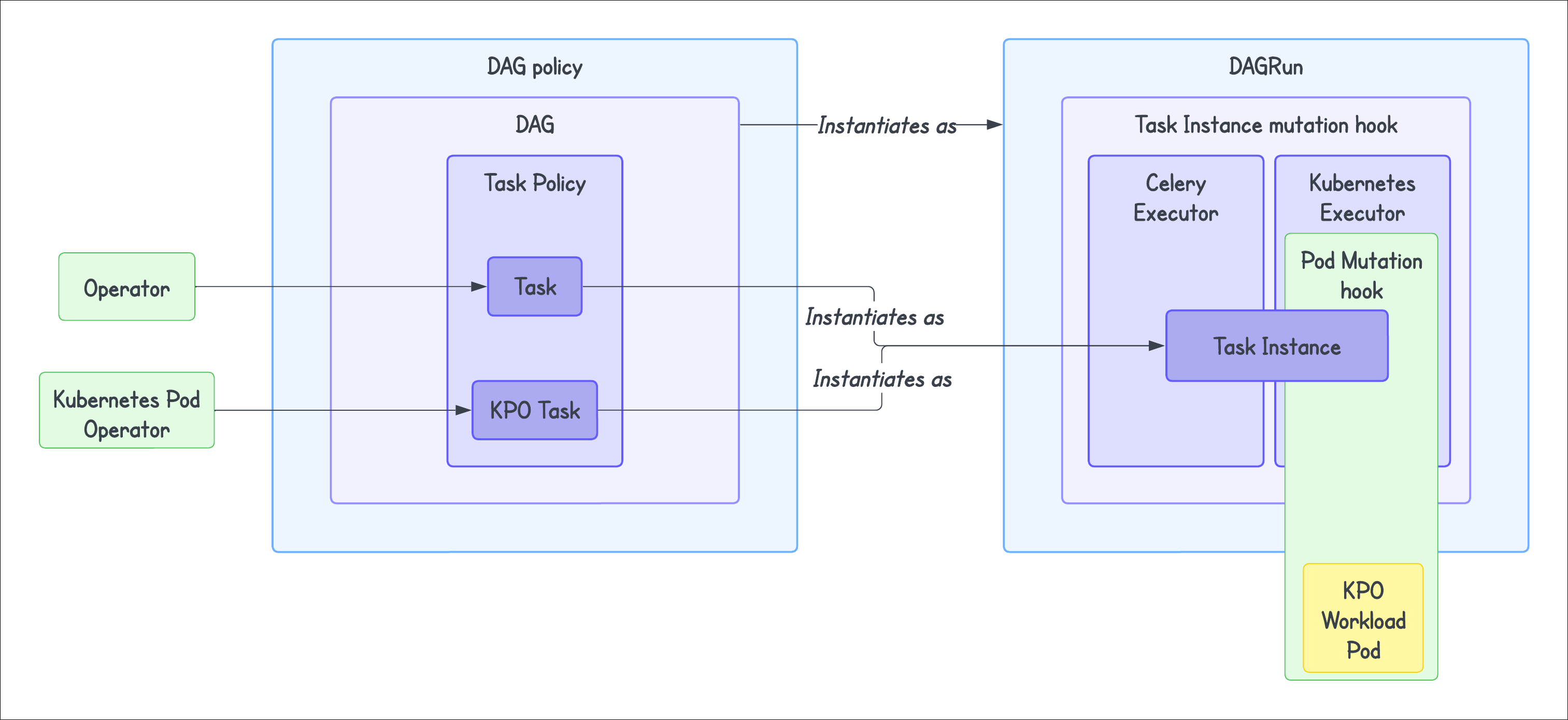 Any attributes defined using cluster policies take precedence over the attributes defined in your DAG or Task. Once implemented, if a DAG or task isn't compliant with your set policies, the policy will raise the `AirflowClusterPolicyViolation` exception and the DAG won't be loaded. The Airflow web UI displays this exception as an `import error`.
You can also use the `AirflowClusterPolicySkipDag` exception to skip a DAG. For example, you may want to skip month-end DAGs from daily processing or skip any DAGs with the wrong environment tag. Another possible use case could be when you are migrating from a deprecated source system to a new source system. You might want to skip the old DAGs to avoid any failures and alerts. Note that this exception won't be displayed on the Airflow web UI.
### DAG policy
The DAG policy allows you to overwrite or reconfigure a DAG’s parameters based on the criteria you set. You can implement this using `dag_policy` function. It runs at the time the DAG is loaded from the `DagBag`. It allows you to:
* Mutate a DAG object after it is loaded in the `DagBag`.
* Run code after your DAG has been fully generated.
This means that the DAG processor still parses all DAG files even if you skip one using a DAG policy.
Some example implementations include:
* Enforcing a default owner for your DAGs.
* Enforcing certain tags for DAGs, either default or based on conditions.
* Ensuring development DAGs don't run in production.
* Stopping a DAG from being executed by raising an `AirflowClusterPolicyViolation` exception.
Note that the `dag_policy` is applied before the `task_policy` and after the DAG has been completely loaded. Hence, overriding the `default_args` parameter has no effect using `dag_policy`. If you want to override the default operator settings, use task policies instead.
#### Example
```python wrap theme={null}
@hookimpl
def ensure_dags_are_tagged(dag: "DAG") -> None:
tag_labels = [tag.split(":")[0]
for tag in dag.tags]
if not "Owner" in tag_labels:
raise AirflowClusterPolicyViolation(f"{dag.dag_id} does not have a 'Owner' tag defined.")
```
### Task policy
A task policy allows you to overwrite or reconfigure a task’s parameters. You can implement this using `task_policy` function. It gets executed when the task is created during parsing of the task from `DagBag` at load time and mutates tasks after they have been added to a DAG. This means that the whole task definition can be altered in the task policy. It doesn't relate to a specific task running in a `DagRun`. The `task_policy` defined is applied to all the task instances that will be executed in the future. It expects a `BaseOperator` as a parameter.
Some example implementations include:
* Enforcing a task timeout policy.
* Using a different environment for different operators.
* Overriding a `on_success_callback` or `on_failure_callback` for a task.
#### Example
```python wrap theme={null}
@hookimpl
def task_policy(task: "BaseOperator") -> None:
min_timeout = datetime.timedelta(hours=24)
if not task.execution_timeout or task.execution_timeout > min_timeout:
raise AirflowClusterPolicyViolation(f"{task.dag.dag_id}:{task.task_id} time out is greater than {min_timeout}")
```
### Task Instance policy
If you are on Airflow version `2.9.1` or lower, you might see some inconsistencies in the application of `task_instance_mutation_hook`. This was fixed in Airflow `2.9.2`.
A Task Instance policy allows you to alter task instances before the Airflow scheduler queues them. You can implement a Task Instance policy using the function `task_instance_mutation_hook`. This is different from the `task_policy` function, which inspects and mutates tasks “as defined”. By contrast, task instance policies inspect and mutate task instances before execution. It takes a TaskInstance object, `task_instance`, as a parameter. This policy applies not to a task but to the instance of a task that relates to a particular `DagRun`. It is only applied to the currently executed run (in other words, instance) of that task. The policy is applied to a task instance in an Airflow worker before the task instance is executed, not in the DAG file processor.
Some example implementations include:
* Enforcing a specific queue for certain Airflow Operators.
* Modifying a task instance between retries.
#### Example
```python wrap theme={null}
@hookimpl
def task_instance_mutation_hook(task_instance:TaskInstance):
if task_instance.try_number >= 3:
task_instance.queue = "big-machine"
```
Note that since Airflow determines priority weight dynamically using weight rules, you can't alter the `priority_weight` of a task instance within the Task Instance mutation hook.
### Pod policy
This policy is applicable to Kubernetes Pod created at runtime when using the `KubernetesPodOperator` or `KubernetesExecutor`. You can implement this policy using `pod_mutation_hook` function. This is a policy function that allows altering a `kubernetes.client.models.V1Pod` object before Airflow passes it to the Kubernetes client for scheduling. It takes a Pod object `pod` as a parameter. Note that this cluster policy is available only from Airflow version `2.6`.
For instance, one could use this to alter the resources for a Pod or to add sidecar or init containers to every worker pod launched. Astro, however, doesn't allow adding init or sidecar containers. [Astro](/docs/astro/deployment-metrics) provides advanced logging, metrics collection, and multiple ways to manage your environment without the need to run separate containers to collect stats or apply environment settings.
Some example implementations include:
* Setting resource requests and limits.
* Increasing resources assigned to a Pod.
#### Example
```python wrap theme={null}
from kubernetes.client import models as k8s
from airflow.policies import hookimpl
@hookimpl
def pod_mutation_hook(pod) -> None:
print("hello from pod_mutation_hook ",type(pod))
resources = k8s.V1ResourceRequirements(
requests={
"cpu": "100m",
"memory": "256Mi",
},
limits={
"cpu": "1000m",
"memory": "1Gi",
},
)
pod.spec.containers[0].resources = resources
```
## Implementation
In this section, we describe how to use `pluggy` to implement cluster policies for an Airflow project using Astro CLI. `pluggy` is useful for plugin management, allowing you to have multiple implementations of the policy functions.
Note that the `pluggy` method is available only in Airflow version 2.6 and above. For versions lower than 2.6, a similar implementation is possible using the `config/airflow_local_settings.py` file in your `$AIRFLOW_HOME`. You can define your policies within this file. There is no need to build or install any package when you use the `airflow_local_settings.py` file. However, on Astro, you can only implement policies using the `pluggy` interface.
### Step 1: Create a package for your policies
The simplest way to implement cluster policies is to build a package for them that you apply to your Airflow environment. You can add this package to the `plugins` folder of your Astro project and install it by [customizing your `Dockerfile`](/docs/cli/v1.43/customize-dockerfile). This method uses `setuptools` entrypoint for your project. You can read more about Python packaging [here](https://packaging.python.org/en/latest/guides/writing-pyproject-toml/).
For example, you can create a package `plugins` with the following structure:
```bash wrap theme={null}
plugins/
│
├── src/
│ └── policy_plugin/
│ ├── __init__.py
│ └── policy.py
│
├── pyproject.toml
└── README.md
```
1. In the `pyproject.toml` file, add the following:
```bash wrap theme={null}
[build-system]
requires = ["setuptools >= 61.0"]
build-backend = "setuptools.build_meta"
[project]
name = "policy_plugin"
version = "0.3.0"
dependencies = ["apache-airflow>=2.6"]
requires-python = ">=3.8"
description = "Airflow cluster policy"
[project.entry-points.'airflow.policy']
_ = 'policy_plugin.policy'
```
2. Define the policies in `policy.py`:
```python wrap theme={null}
from airflow.policies import hookimpl
from airflow.exceptions import AirflowClusterPolicyViolation
@hookimpl
def task_policy(task):
print("Hello from task_policy")
doc_str = "This is a test doc string"
task.doc = doc_str
@hookimpl
def dag_policy(dag):
"""Ensure that DAG has at least one tag and skip the DAG with `only_for_beta` tag."""
print("Hello from DAG policy")
if not dag.tags:
raise AirflowClusterPolicyViolation(
f"DAG {dag.dag_id} has no tags. At least one tag required. File path: {dag.fileloc}"
)
```
When using Airflow version lower than 2.6 or when you don't want to package your policies, you can define these policies in `config/airflow_local_settings.py` and rebuild your local Astro project.
3. (Optional) Build the Python package:
```bash wrap theme={null}
python -m build
```
### Step 2: Setup your Astro project
1. Initialize your Astro project using the [Astro CLI](/docs/cli/v1.43/get-started-cli) or reopen your Astro project.
2. Copy over your plugin package to the `plugins` directory of your Astro project.
3. Add the following line to your `Dockerfile`:
```docker wrap theme={null}
COPY plugins plugins
RUN pip install ./plugins
```
**Alternate setup**
To avoid copying over the source code or to reuse the package across multiple projects, it's recommended to `build` the plugin package. You can then choose to distribute the `wheel` file or upload the package to a private Python repository for easy management and version control.
You can copy over the `wheel` file to the `plugins` directory and `pip install` in your `Dockerfile`:
```docker wrap theme={null}
RUN pip install .plugins/plugin_package-*.whl
```
You can read more about Python packaging [here](https://packaging.python.org/en/latest/guides/distributing-packages-using-setuptools/#packaging-your-project).
4. Run `astro dev restart` to refresh your local Airflow instance. Run `astro deploy` to build and deploy to your Astro Deployment.
## See also
* [Airflow docs](https://airflow.apache.org/docs/apache-airflow/stable/administration-and-deployment/cluster-policies.html#how-do-define-a-policy-function) on Cluster policies
* [Airflow summit session](https://airflowsummit.org/sessions/2023/an-introduction-to-airflow-cluster-policies/) on Cluster policies
Any attributes defined using cluster policies take precedence over the attributes defined in your DAG or Task. Once implemented, if a DAG or task isn't compliant with your set policies, the policy will raise the `AirflowClusterPolicyViolation` exception and the DAG won't be loaded. The Airflow web UI displays this exception as an `import error`.
You can also use the `AirflowClusterPolicySkipDag` exception to skip a DAG. For example, you may want to skip month-end DAGs from daily processing or skip any DAGs with the wrong environment tag. Another possible use case could be when you are migrating from a deprecated source system to a new source system. You might want to skip the old DAGs to avoid any failures and alerts. Note that this exception won't be displayed on the Airflow web UI.
### DAG policy
The DAG policy allows you to overwrite or reconfigure a DAG’s parameters based on the criteria you set. You can implement this using `dag_policy` function. It runs at the time the DAG is loaded from the `DagBag`. It allows you to:
* Mutate a DAG object after it is loaded in the `DagBag`.
* Run code after your DAG has been fully generated.
This means that the DAG processor still parses all DAG files even if you skip one using a DAG policy.
Some example implementations include:
* Enforcing a default owner for your DAGs.
* Enforcing certain tags for DAGs, either default or based on conditions.
* Ensuring development DAGs don't run in production.
* Stopping a DAG from being executed by raising an `AirflowClusterPolicyViolation` exception.
Note that the `dag_policy` is applied before the `task_policy` and after the DAG has been completely loaded. Hence, overriding the `default_args` parameter has no effect using `dag_policy`. If you want to override the default operator settings, use task policies instead.
#### Example
```python wrap theme={null}
@hookimpl
def ensure_dags_are_tagged(dag: "DAG") -> None:
tag_labels = [tag.split(":")[0]
for tag in dag.tags]
if not "Owner" in tag_labels:
raise AirflowClusterPolicyViolation(f"{dag.dag_id} does not have a 'Owner' tag defined.")
```
### Task policy
A task policy allows you to overwrite or reconfigure a task’s parameters. You can implement this using `task_policy` function. It gets executed when the task is created during parsing of the task from `DagBag` at load time and mutates tasks after they have been added to a DAG. This means that the whole task definition can be altered in the task policy. It doesn't relate to a specific task running in a `DagRun`. The `task_policy` defined is applied to all the task instances that will be executed in the future. It expects a `BaseOperator` as a parameter.
Some example implementations include:
* Enforcing a task timeout policy.
* Using a different environment for different operators.
* Overriding a `on_success_callback` or `on_failure_callback` for a task.
#### Example
```python wrap theme={null}
@hookimpl
def task_policy(task: "BaseOperator") -> None:
min_timeout = datetime.timedelta(hours=24)
if not task.execution_timeout or task.execution_timeout > min_timeout:
raise AirflowClusterPolicyViolation(f"{task.dag.dag_id}:{task.task_id} time out is greater than {min_timeout}")
```
### Task Instance policy
If you are on Airflow version `2.9.1` or lower, you might see some inconsistencies in the application of `task_instance_mutation_hook`. This was fixed in Airflow `2.9.2`.
A Task Instance policy allows you to alter task instances before the Airflow scheduler queues them. You can implement a Task Instance policy using the function `task_instance_mutation_hook`. This is different from the `task_policy` function, which inspects and mutates tasks “as defined”. By contrast, task instance policies inspect and mutate task instances before execution. It takes a TaskInstance object, `task_instance`, as a parameter. This policy applies not to a task but to the instance of a task that relates to a particular `DagRun`. It is only applied to the currently executed run (in other words, instance) of that task. The policy is applied to a task instance in an Airflow worker before the task instance is executed, not in the DAG file processor.
Some example implementations include:
* Enforcing a specific queue for certain Airflow Operators.
* Modifying a task instance between retries.
#### Example
```python wrap theme={null}
@hookimpl
def task_instance_mutation_hook(task_instance:TaskInstance):
if task_instance.try_number >= 3:
task_instance.queue = "big-machine"
```
Note that since Airflow determines priority weight dynamically using weight rules, you can't alter the `priority_weight` of a task instance within the Task Instance mutation hook.
### Pod policy
This policy is applicable to Kubernetes Pod created at runtime when using the `KubernetesPodOperator` or `KubernetesExecutor`. You can implement this policy using `pod_mutation_hook` function. This is a policy function that allows altering a `kubernetes.client.models.V1Pod` object before Airflow passes it to the Kubernetes client for scheduling. It takes a Pod object `pod` as a parameter. Note that this cluster policy is available only from Airflow version `2.6`.
For instance, one could use this to alter the resources for a Pod or to add sidecar or init containers to every worker pod launched. Astro, however, doesn't allow adding init or sidecar containers. [Astro](/docs/astro/deployment-metrics) provides advanced logging, metrics collection, and multiple ways to manage your environment without the need to run separate containers to collect stats or apply environment settings.
Some example implementations include:
* Setting resource requests and limits.
* Increasing resources assigned to a Pod.
#### Example
```python wrap theme={null}
from kubernetes.client import models as k8s
from airflow.policies import hookimpl
@hookimpl
def pod_mutation_hook(pod) -> None:
print("hello from pod_mutation_hook ",type(pod))
resources = k8s.V1ResourceRequirements(
requests={
"cpu": "100m",
"memory": "256Mi",
},
limits={
"cpu": "1000m",
"memory": "1Gi",
},
)
pod.spec.containers[0].resources = resources
```
## Implementation
In this section, we describe how to use `pluggy` to implement cluster policies for an Airflow project using Astro CLI. `pluggy` is useful for plugin management, allowing you to have multiple implementations of the policy functions.
Note that the `pluggy` method is available only in Airflow version 2.6 and above. For versions lower than 2.6, a similar implementation is possible using the `config/airflow_local_settings.py` file in your `$AIRFLOW_HOME`. You can define your policies within this file. There is no need to build or install any package when you use the `airflow_local_settings.py` file. However, on Astro, you can only implement policies using the `pluggy` interface.
### Step 1: Create a package for your policies
The simplest way to implement cluster policies is to build a package for them that you apply to your Airflow environment. You can add this package to the `plugins` folder of your Astro project and install it by [customizing your `Dockerfile`](/docs/cli/v1.43/customize-dockerfile). This method uses `setuptools` entrypoint for your project. You can read more about Python packaging [here](https://packaging.python.org/en/latest/guides/writing-pyproject-toml/).
For example, you can create a package `plugins` with the following structure:
```bash wrap theme={null}
plugins/
│
├── src/
│ └── policy_plugin/
│ ├── __init__.py
│ └── policy.py
│
├── pyproject.toml
└── README.md
```
1. In the `pyproject.toml` file, add the following:
```bash wrap theme={null}
[build-system]
requires = ["setuptools >= 61.0"]
build-backend = "setuptools.build_meta"
[project]
name = "policy_plugin"
version = "0.3.0"
dependencies = ["apache-airflow>=2.6"]
requires-python = ">=3.8"
description = "Airflow cluster policy"
[project.entry-points.'airflow.policy']
_ = 'policy_plugin.policy'
```
2. Define the policies in `policy.py`:
```python wrap theme={null}
from airflow.policies import hookimpl
from airflow.exceptions import AirflowClusterPolicyViolation
@hookimpl
def task_policy(task):
print("Hello from task_policy")
doc_str = "This is a test doc string"
task.doc = doc_str
@hookimpl
def dag_policy(dag):
"""Ensure that DAG has at least one tag and skip the DAG with `only_for_beta` tag."""
print("Hello from DAG policy")
if not dag.tags:
raise AirflowClusterPolicyViolation(
f"DAG {dag.dag_id} has no tags. At least one tag required. File path: {dag.fileloc}"
)
```
When using Airflow version lower than 2.6 or when you don't want to package your policies, you can define these policies in `config/airflow_local_settings.py` and rebuild your local Astro project.
3. (Optional) Build the Python package:
```bash wrap theme={null}
python -m build
```
### Step 2: Setup your Astro project
1. Initialize your Astro project using the [Astro CLI](/docs/cli/v1.43/get-started-cli) or reopen your Astro project.
2. Copy over your plugin package to the `plugins` directory of your Astro project.
3. Add the following line to your `Dockerfile`:
```docker wrap theme={null}
COPY plugins plugins
RUN pip install ./plugins
```
**Alternate setup**
To avoid copying over the source code or to reuse the package across multiple projects, it's recommended to `build` the plugin package. You can then choose to distribute the `wheel` file or upload the package to a private Python repository for easy management and version control.
You can copy over the `wheel` file to the `plugins` directory and `pip install` in your `Dockerfile`:
```docker wrap theme={null}
RUN pip install .plugins/plugin_package-*.whl
```
You can read more about Python packaging [here](https://packaging.python.org/en/latest/guides/distributing-packages-using-setuptools/#packaging-your-project).
4. Run `astro dev restart` to refresh your local Airflow instance. Run `astro deploy` to build and deploy to your Astro Deployment.
## See also
* [Airflow docs](https://airflow.apache.org/docs/apache-airflow/stable/administration-and-deployment/cluster-policies.html#how-do-define-a-policy-function) on Cluster policies
* [Airflow summit session](https://airflowsummit.org/sessions/2023/an-introduction-to-airflow-cluster-policies/) on Cluster policies