> ## Documentation Index
> Fetch the complete documentation index at: https://astronomer.io/docs/llms.txt
> Use this file to discover all available pages before exploring further.
# 2024 Astro release notes
> Astro release notes from 2024, covering features, bug fixes, and version updates for Astro, the Astro CLI, Astro Runtime, and the Remote Execution Agent.
[Subscribe to Astro release notes](/docs/astro/release-notes-subscribe) to receive updates via RSS, email, or Slack.
Astro release notes from 2024. See the [current release notes](/docs/astro/release-notes) for the latest updates.
### Additional improvements
* Two new [Astro alert types](/docs/astro/alerts#notification-channels-scope), **Task Failure** and **DAG Duration** are generally available.
* Add icon to certain Deployment fields to indicate that they cannot be edited after the Deployment is created.
### Bug fixes
* Fixed a bug that prevented users with custom roles at their Team level from making API tokens with the same level of permissions as themselves.
### Additional improvements
* Added `bundle` as a deploy type for [Deploy APIs](https://www.astronomer.io/docs/astro/api/v-1-beta-1/platform-api-reference/deploy/) to support [dbt deploys](/docs/astro/deploy-dbt-project#option-2) via the Astro API.
### Pay-as-you-go Astro now available on AWS Marketplace
You can now sign up for [Developer-tier Astro](https://www.astronomer.io/pricing/) as a month-to-month subscription through the AWS Marketplace. Choosing to subscribe to Astro through the AWS Marketplace allows you to start an Astro Trial, and then proceed with a monthly subscription that uses your AWS Billing information.
See [Subscribe to Astro from the AWS Marketplace](/docs/astro/subscribe-aws) to get started.
### Additional improvements
* Two new Airflow application metrics are available for the Universal Metrics Exporter, `dagrun.first_task_scheduling_delay` and `task_instance_created_`. See [Export metrics](/docs/astro/export-metrics#airflow-application-metrics) for more information.
* Improved Astro's logic for choosing Deployment [fallback contact emails](/docs/astro/deployment-details#fallback-emails).
* Added message in Deployment details to clarify if the contact emails listed are a fallback value or not.
### Bug fixes
* Fixed an issue where Data Product Alerts were unexpectedly showing up when using the Workspace filter in the Organization Alert Management List.
* Fixed a bug where asset filters weren't incorporating the entered search.
### Additional improvements
* [dbt deploy](/docs/astro/deploy-dbt-project) is now generally available.
* Improved error messaging when an Organization Owner email is not supplied, preventing you from creating default Deployment alerts.
* Updated the onboarding flow so that newly invited users see a signup page, instead of the login page.
* Added the ability to retrieve audit logs via the Astro API. See [Audit logs reference](/docs/astro/audit-logs#audit-logs-reference) and [Astro API changelog](https://astronomer.io/docs/astro/api/platform/changelog/2024/11/19) for more information.
### Bug fixes
* Fixed a bug in Observe where selecting a dataset with only downstream dependencies did not fully update the asset lineage graph. Now, all dependencies are correctly displayed.
### Network egress management
**Preview**
This feature is in [Preview](/docs/astro/feature-previews).
You can now enable [Private Network Egress](/docs/astro/private-network-egress) or configure [Customer Managed Egress for Dag Workloads](/docs/astro/customer-managed-egress) for dedicated AWS clusters to ensure security and compliance, and to provide a data loss protection architecture to secure against unauthorized data transfer.
### Additional improvements
* Added the ability to work with the Astro Environment Manager through the Astro API, by working with **Environment Objects**. Environment Objects are the API representation of the different functionalities the Environment Manager supports such as Universal Metrics Export, Airflow Variables, and Connections.
* Added the ability to filter assets list by asset type, namespace, and dag.
* Updated Deployment configuration page.
* Removed **Airflow Variable Key** from UI when editing Airflow Variable.
* Moved the **IP Access List** from being a sub-section of the Authentication settings page to a dedicated page within Organization **Access Management**.
### Bug fixes
* Fixed a bug where only Organization owners were considered as fallback emails for Deployment Health Alerts alerts. With this fix, Workspace owners will be considered first and Organization owners will only be considered as a final fallback if no human Workspace owners exist.
### Proactive Alerts for Deployment health
**Preview**
This feature is in [Preview](/docs/astro/feature-previews).
Astro now proactively alerts you on Deployment-level health issues when infrastructure components aren’t running as expected. New Deployments now receive four Deployment health alerts by default. These alerts provide insight into infrastructure-level issues and suggest specific actions to remediate the problem. Alerts notify the **Contact Emails** associated with a Deployment by default and are fully customizable. See [Astro Alerts](/docs/astro/alerts#deployment-health-alerts).
### Create data products with Astro Observe
**Preview**
This feature is in [Preview](/docs/astro/feature-previews).
You can now use Astro Observe to create Data Products, which allow you to configure alerts and receive insights into the performance of the pipelines where you integrate them. See [Create a Data Product](/docs/astro/create-data-products).
### Additional improvements
* Added validation of environment variable keys in `deployment create` and `update` requests. Environment variables must now match the following regex: `^[a-zA-Z_]+[a-zA-Z0-9_]*$`.
* Upgraded Azure clusters to Kubernetes 1.29
* Improved descriptions for scheduler sizes and **High Availability** in advanced section of cluster creation.
* Improved description of **Development Mode** in advanced section of Deployment creation.
* Removed a warning that displayed in the Astro UI when a user's Deployment was using **CI/CD Enforcement**.
### Bug fixes
* Fixed an issue where **Open Airflow** button was disabled, even when the Deployment was not getting created or hibernating.
* Fixed a bug where the Airflow webserver would restart for dag-only deploys.
### Airflow mini-scheduler turned off by default
The [mini-scheduler config](https://airflow.apache.org/docs/apache-airflow/stable/configurations-ref.html#schedule-after-task-execution) (`AIRFLOW__SCHEDULER__SCHEDULE_AFTER_TASK_EXECUTION`) is now disabled by default. Previously enabled to optimize performance at scale, the mini-scheduler sometimes led to unexpected task state changes and failures, especially when the main scheduler got out of sync. This change reduces debugging complexity, but users with very large dags, many downstream dependencies, and the need to run over 10,000 tasks per hour can re-enable it for potential performance benefits by setting `AIRFLOW__SCHEDULER__SCHEDULE_AFTER_TASK_EXECUTION` to `True`.
### Bug fixes
* Fixed a bug where only users with Organization-scoped roles could create or update Deployment alerts, even if they had Deployment alert creation and update permissions enabled.
### Bug fixes
* Fixed a bug affecting dbt deploys for Deployments using the Kubernetes executor.
### Additional improvements
* The **Scope** and **Scope Entity ID** columns of the **Alerts** and **Notification Channels** lists are now consolidated to the **Scope** column, which displays the entity name and links to the Deployment or Workspace the alert is enabled for. If the scope of the Alert or Notification Channel is the entire Organization, the **Scope** column value is `This Organization`. This enhancement allows you to navigate directly to the Deployment or Workspace from the list.
### Bug fixes
* Fixed a bug where the **Default Pod Size** field was showing incorrect sizes.
### Updates and changes to Astro Alerting UI
* You can now define whether a notification channel is available to specific Deployments, an entire Workspace, or to an entire Organization.
* You can create and edit alerts and notification channels of any type through the **Organization Alerting** page, whether they are Deployment or Organization alerts. If you don't have user permissions with privileges to make a particular type of alert, you can still access the **Alerting** editor in the **Organization** menu to create, edit, and manage both alerts and notification channels.
* Previously, you could access and edit Workspace alerts from the **Alerting** page in the main navigation of the Astro UI. Now, you can create and manage your Organization alerts through the **Alerting** page in the **Organization** menu, or your Deployment-specific alerts in your Deployment's **Alerts** page.
### Bug fixes
* Fixed a bug where editing Airflow variable links in the Environment Manager would delete any links to Deployments. Now, editing Airflow variables in the Environment Manager does not affect linked Deployments.
### Additional improvements
* Added **Updated By** and **Created By** columns to the Workspaces list.
* Enhanced the onboarding experience so you can use one of the [template Deployments](/docs/astro/first-dag-onboarding#step-3-select-a-template) without connecting to your GitHub account.
### Bug fixes
* Fixed an issue that showed incorrect pagination numbers in the table footer when searching the Alerts list.
* Resolved an issue where the `globalFilter` search paramameter would not clear if you deleted the input value entirely.
* Fixed an issue with the dbt deploy rollback functionality where dbt bundles weren't updated to the rollback deploy version's bundle state.
### Additional improvements
* The Universal Metrics Exporter is now generally available to Team-tier level customers. See [Export metrics](/docs/astro/export-metrics) for information about how to export infrastructure metrics about your Airflow use on Astro to your preferred third-party observability tools.
* Updated the **Alerts** tab in the Astro UI to improve bulk-selecting alerts, increase the number of characters you can use when naming an alert, and allow auto-generated alert names to include the alert type in the alert name.
* Improved the display of long strings to have a truncated display, which expands to show the full string when you hover over or copy the value.
### Bug fixes
* Fixed an issue where you couldn't submit Log Summary feedback for different task runs that had the same task ID.
### Additional improvements
* Updated the Organization Dashboards' **Cost Breakdown** tab, which now displays top-level **Network** and **Cluster** costs.
### Bug fixes
* Fixed an issue which prevented KPO task Pods from terminating correctly.
### Scale Deployments Reliably with XL Deployment size and standalone Dag processor
As your team and Airflow use cases grow, scaling up your Airflow environment reliably can be a challenge. Complex, dynamically-generated dags, sub-optimal dag parsing practices, or a growing business that requires a larger data pipeline can strain dag processing and threaten your Airflow scheduler’s availability.
Astro Hosted Deployments now support high-scale environments more reliably by separating the Dag processor from the scheduler. You can take advantage of this Airflow best practice in Astro Hosted Deployments with **Medium** and larger sizes. By separating the Dag processor from the scheduler, Astro protects your core scheduling function from competing with the Dag processor for resources. This separation ensures scheduler availability for your most complex use cases and improves overall dag parsing performance.
In addition to this change, you can now create Extra Large size Deployments to confidently run your largest workloads on Astro. The Extra Large Deployment provides 8 vCPU and 16 GiB of memory and comes with two Dag processors to support your largest and most complex workloads, ranging from [dynamically-generated dags](/docs/learn/dynamically-generating-dags) to high-scale pipelines that can grow alongside your business.
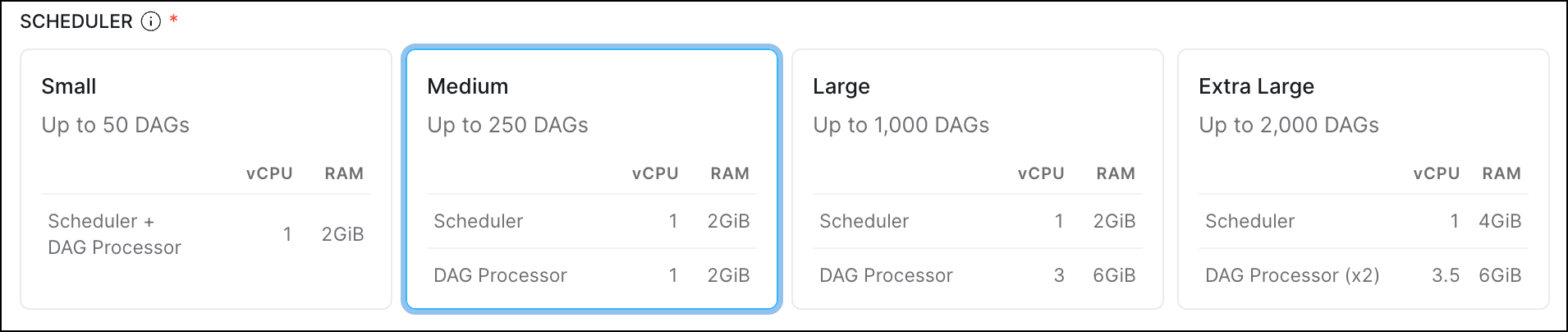 This update is available on Runtime version 9.7.0 and greater; if you are running a lower Runtime version, [upgrade your Runtime version](https://www.astronomer.io/docs/astro/../runtime/upgrade-astro-runtime). To learn more about this feature, read more about [Deployment scheduler resources](/docs/astro/deployment-resources#scheduler).
### Astro UI improvements
Improved the navigation and design for managing clusters, editing settings, and accessing analytics for Organizations and Deployments.
These changes include:
* A new section in the main menu to include an **Organization** section with links to important resources for administering your Astro Organization. These include links to your [Organization Settings](/docs/astro/organization-settings), [Organization Dashboards](/docs/astro/organization-dashboard), and quick access to your cluster settings.
* A dedicated **Deployment Analytics** page in your detailed **Deployment** information, which now includes improvements to the tooltips and metrics visualization design. See [Deployment metrics](/docs/astro/deployment-metrics) for more information about the available metrics.
* Your **Deploy History** now appears on the **Overview** page of your Deployment. See [Deploy history](/docs/astro/deploy-history) for more information about how to view your code deploy history.
### Create and manage Airflow variables with the Environment Manager
**Preview**
This feature is in [Preview](/docs/astro/feature-previews).
You can now create and manage Airflow variables for Deployments across your Workspace through the Astro Environment Manager. This allows you to quickly and securely create Airflow variables once and share them to multiple Deployments without having to set up your own secrets backend.
See [Create Airflow variables in the Astro UI](/docs/astro/create-and-link-variables) for more information.
### Additional improvements
* Made updates to the Astro UI for editing **Astro Alerts**, to clarify whether you are discarding your edits to an alert, or discarding the alert.
### Bug fixes
* Fixed an issue that blocked some users from pushing project images to the Docker registry.
### Additional improvements
* You can now give Airflow Dataset **Create** and **Delete** permissions to custom roles. This capability is provided to **Deployment Admin**, **Workspace Author**, **Workspace Operator**, and **Workspace Owner** default roles. Previously only **Workspace Owner** and above had access to this permission set. See more information about [User Permissions](/docs/astro/user-permissions) and [Custom Deployment Roles](/docs/astro/customize-deployment-roles).
* If your Astro Deployments run on AWS or GCP clusters, you can now see the **Account** ID of the clusters in the **Cluster Details** page in your **Organization Settings**.
* For Deployment alert emails, the sender now shows as **Astro**. It previously showed the sender as **Postmaster**.
* You can now see Deployment details while Astro creates your Deployment, where only the specific actions that are not available until after creation is complete are disabled.
### Additional improvements
* Added the ability to specify Custom Workload Identity at Deployment creation time when creating an AWS Deployment.
* Improved the descriptions of default hibernation schedules in the UI.
* Added more detail in descriptions for code deploy failures in the **Deploy History** page.
### Bug fixes
* Fixed an issue where you could not use global text search for dags in your Alerts.
* Resolved a problem where search query parameters might be deleted when using pagination.
### Additional improvements
* Improved the descriptions of [Deployment Health Alerts](/docs/astro/alerts#deployment-health-alerts) to provide more specific information about performance thresholds.
### Bug fixes
* Fixed an issue where dag lists didn't update when you switched Deployments in the Astro UI.
* Fixed a bug where the cursor would disappear while typing in certain fields in the Astro UI.
### Customize labels on your metrics export
You can now add Key:Value pair labels to metrics that you export using the Universal Metrics Exporter. This allows you to tag and record metrics coming from specific Deployments or Workspaces. See [Export metrics from Astro](/docs/astro/export-metrics) for more information.
### Additional improvements
* Added a new template demonstrating how to run dbt projects on Astro using [Cosmos](https://www.astronomer.io/integrations/dbt/) when you're onboarding. See [Get started on Astro](https://cloud.astronomer.io/start-astro) to set up a trial account and try out a template.
### Bug fixes
* Fixed an issue where a user could not bulk select alerts if they had different names but the same configurations.
### New alerts for Deployment health incidents
**Labs**
This feature is in [Labs](/docs/astro/feature-previews). Please reach out to your account team to enable this feature.
This release introduces four new alert types that correspond to four of the existing [Deployment health incident types](/docs/astro/deployment-health-incidents#deployment-incidents). These new **Deployment Health Alerts** allow Astro to proactively notify you when Deployment health issues arise.
Using Deployment health alerts, you can:
* Improve alerting coverage beyond dag and task failures to address infrastructure-level incidents that are otherwise difficult to monitor.
* Proactively monitor Deployment health and take immediate remediation actions through email, Slack, and PagerDuty to reduce mean time to resolution.
* Share Deployment health visibility across teams.
See [Astro Alerts: Trigger Types](/docs/astro/alerts#alert-types) and [Deployment Health Incidents](/docs/astro/deployment-health-incidents) for more information.
### Additional improvements
* Now, when you link directly to your Astro or Airflow UI, any link previews successfully have improved visuals and include metadata information.
* Improved the Astro Alerts UI to streamline creating notification channels and alerts across dags and Deployments. See [Astro Alerts](/docs/astro/alerts) for setup information.
* Added an example Universal Metrics Export dashboard configuration file for Grafana Cloud. See [Export metrics from Astro](/docs/astro/export-metrics) for setup instructions and [Grafana example](/docs/astro/export-metrics#grafana-example) for a configuration example.
* Organization Dashboards are now generally available to Enterprise-tier customers. See [View Organization Dashboards](/docs/astro/organization-dashboard) for more information.
### Bug fixes
* Fixed a bug where the Astro UI would show an error in your Deploy History instead of your Runtime Version, if the Runtime version is `yanked`.
* Fixed an issue when creating an alert where you couldn't select tasks with the same `task_id` across multiple selected dags.
### Run your first dag on Astro with GitHub Integration
Now, when you first set up your Astro account, you can choose to connect your GitHub account and run a sample Astro project template and dag. Previously, to run your first dag on Astro, you needed to either download and use the Astro CLI or work with GitHub Actions. Now, the onboarding process allows you to customize your first experience with Astro to focus on your use case, whether that's Business Operations, Generative AI, or learning Airflow, and set up a GitHub Integration to quickly clone and deploy the example dags. Try it now with [Start Astro](https://cloud.astronomer.io/start-astro).
### Work with dbt projects on Astro
**Labs**
This feature is in [Labs](/docs/astro/feature-previews). Please reach out to your account team to enable this feature.
You can now deploy dbt code to Astro quickly and independently of your dag or image deploys. Data build tool (dbt) core is an open source tool for data transformation that uses SQL to transform your data instead of Python in your dags. You can also use both Cosmos, an open source tool that integrates dbt models into Airflow and treats them like dags, and dbt deploys on Astro to have unparalleled visibility into your dbt tasks with the Airflow UI and a streamlined code deploy process.
See [Deploy dbt projects](/docs/astro/deploy-dbt-project) for more information about how to get started.
### Additional improvements
* Improved how the GitHub Integration in the Astro UI links directly to the Astro Project in a GitHub repository.
* (*Astro Hosted only*) The customer managed workload identity setting for Deployments is now generally available. This allows you to grant Astro Deployments all of the permissions of an AWS IAM role. See [Attach an IAM role to your Deployment](/docs/astro/authorize-deployments-to-your-cloud#attach-an-iam-role-to-your-deployment) for detailed information.
* The ability to deploy automatically from GitHub using the official Astro GitHub integration is now generally available. See [Deploy code with GitHub](/docs/astro/deploy-github-integration) for setup steps.
* Astro Runtime version 11 is now classified as Long Term Support (LTS). This means that instead of being supported until October 2024, Astro will support Runtime version 11 until October 2025. See the [Astro Runtime maintenance and lifecycle schedule](/docs/runtime/runtime-version-lifecycle-policy) for more information, including information about restricted versions.
### Bug fixes
* Fixed some bugs in the Astro UI for defining ephemeral storage to show storage limits, fix maximum pod size for storage, and add storage for default pod size.
### Additional improvements
* Added the following metrics to [Metrics Export](/docs/astro/export-metrics):
* The new `airflow_executor_open_slots`, `airflow_dagrun_dependency-check`, and `airflow_dagrun_dependency-check.` metrics allow you to collect metrics about your dags and executor status.
* Monitor task execution with `kube_pod_container_resource_limits`. This new metric enables you to track resource use against the configured limits so you can understand if task execution meets your configured CPU, memory, or storage limits for your Celery Workers or Kubernetes Executor and KubernetesPodOperator pods.
* Added new supporting documentation for the Astro Terraform Provider, including a Getting Started guide and code examples for common uses. Read [Astro Terraform Provider](/docs/astro/terraform-provider) for more information.
### Bug fixes
* Fix an error where start times in the UI were different from actual dag run trigger times.
### Additional improvements
* Fixed a bug that prevented adding a date input for a dag filter in the Astro UI.
### Export metrics about your Astro Deployments to observability tools
This is feature is only available if you are on the **Team** tier or above. See [Astro Plans and Pricing](https://www.astronomer.io/pricing/).
**Preview**
This feature is in [Preview](/docs/astro/feature-previews).
You can now export comprehensive, operational metrics about the performance of your Astro Deployments to third-party observability tools, such as New Relic, using the new Universal Metrics Exporter. This new feature allows you to configure a Prometheus endpoint to export metrics using the Prometheus data model, which means you can integrate your Astro observability metrics directly into your existing monitoring tools. See [Export metrics from Astro](/docs/astro/export-metrics) for setup instructions.
### Added ephemeral storage metrics to Astro Deployment Analytics
To assist you in determining the amount of custom ephemeral storage to configure for your workers and schedulers, you can now use Deployment Analytics to see relevant usage metrics. These include:
* **Ephemeral Storage Usage** metric that shows a % of usage against the configured limit for your Celery Workers, KubernetesPodOperator, Kubernetes Executor, and Scheduler.
* **Dynamic Y-axis Scaling** to the Celery Worker, KPO/KE, and Scheduler Deployment analytics panel to include dynamic zooming.
See [Deployment Analytics](/docs/astro/deployment-metrics#deployment-analytics) for more information.
### Additional improvements
* The `Scheduler heartbeat not found` Deployment health incident is downgraded to `Warning` from `Critical`.
### Customer managed workload identity for AWS
**Preview**
This feature is in [Preview](/docs/astro/feature-previews).
The **Customer Managed Identity** Deployment setting is now available on AWS. This means that you can now assign an existing workload identity and AWS IAM role to your Airflow Deployments on Astro. When you use this setting, your Deployment uses the identity to assume the permissions of your IAM role and gain secure access to your data services. With this feature, you can:
* Re-use or share a customer managed identity across many Deployments, either ephemeral or static.
* Leverage existing identities when migrating from MWAA or open source Airflow environments
This can reduce friction when migrating to Astro. See [Attach an IAM role to your Deployment](/docs/astro/authorize-deployments-to-your-cloud#attach-an-iam-role-to-your-deployment) for detailed information.
### Self-healing workers automatically address stuck queued tasks
A new improvement to the Astro Data Plane now automatically identifies when Celery workers are online and healthy, but not actually processing new tasks. When this happens, it looks like many tasks are stuck in a `queued` state. With this new feature, you will experience a lower frequency of tasks stuck in a `queued` state, which causes performance and reliability issues for your Airflow implementation.
Self-healing workers use the following process:
* It first identifies workers that both have tasks stuck in a `queued` state for an extensive time period and are in Deployments where the concurrency available means that tasks should not be queued.
* The healer then kills catatonic workers that are not running tasks or shifts workers that are still running tasks into a warm shutdown period.
* After the catatonic worker is shut down, a new healthy, worker comes online and resumes tasks.
This feature is automatically enabled for the Astro Hosted infrastructure and does not require any action.
### Additional Improvements
* Improved the formatting for how IP addresses are listed in the Astro UI to make it easier to copy and paste them.
### Bug fixes
* `europe-west6` is no longer available as a region for dedicated clusters on GCP.
### Additional Improvements
* Moved the **Environment variable** tab in **Deployment Settings** to the **Environment** tab, and renamed it to **Environment Variables**. This helps disambiguate between Environment Variables and Airflow Variables in the Astro UI. Refer to [Manage environment variables](/docs/astro/manage-env-vars#use-the-astro-ui) for more information about the different methods to set up and manage Environment variables.
### Bug fixes
* Fixed a bug where a duplicate **Customer managed identity** option displayed when configuring Deployment settings.
### Restrict Astro access to specific IP Address ranges with IP Access list
This is feature is only available if you are on the **Enterprise** tier or above. See [Astro Plans and Pricing](https://www.astronomer.io/pricing/).
Organization owners can now limit the IP addresses of users to control who can access the Astro UI or programmatically work with the Astro API for their organization. This allows you to restrict access to your Astro Organization to users on a VPN or to specific network ranges. See [Set up IP Access list](/docs/astro/ip-access-list).
### Additional improvements
* When using the GitHub integration, you can now retry a failed deploy or trigger a Git deploy directly from your Deployment settings page in the Astro UI. See [GitHub Integration](/docs/astro/deploy-github-integration) for more information.
* Deployments at the end of an Astro trial now automatically hibernate and are not immediately deleted. If your trial has ended, add a credit card number to your Organization to access your Workspaces and wake your hibernating Deployment. While in hibernation, Deployment settings and configurations are preserved. If you don't enter a payment method within 30 days, your hibernating Deployments and all corresponding data are deleted. See [Start a trial](/docs/astro/trial) for more information.
* The ability to create, update, and delete Deployment API tokens is restricted to users with the Workspace Owner role. Read [Workspace user permissions](/docs/astro/user-permissions#workspace-roles) for more information.
### Bug fixes
* Fixed an issue where the Organization Settings Dashboard failed to load correctly.
### API keys are no longer supported
As of June 1, 2024, Deployment API keys are no longer supported. Replace your API keys with [Deployment API tokens](/docs/astro/deployment-api-tokens), confirm successful operation with your API tokens, and then delete your API keys.
### Configure ephemeral storage on worker Pods
**Preview**
This feature is in [Preview](/docs/astro/feature-previews).
You can now customize the amount of ephemeral storage for data intensive workloads on Celery, Kubernetes, and KubernetesPodOperator workers. Previously, to accommodate larger workloads, you needed to integrate an external object storage or database tool to process large datasets within a single task. Now, you can customize the ephemeral storage when creating or updating your Deployment so that all data processing happens directly in your task Pod.
You are only charged for requested resources which are greater than the minimum defaults for each worker type:
* **Celery worker**: 10 GiB minimum by default. 100 GiB maximum.
* **Kubernetes executor/ Kubernetes pod operator**: 0.25 GiB minimum by default. 100 GiB maximum.
### Automate Airflow, resource, and infrastucture management with the Astro Terraform Provider
**Preview**
This feature is in [Preview](/docs/astro/feature-previews).
You can now use Terraform to automate managing resources and changes to large organizations and Airflow infrastructure with the Astronomer Terraform provider package. The provider is available through both the Terraform Registry and a public Github repository, where you can review the provider's code, make issues, and create pull requests.
Refer to the Astronomer Terraform Provider docs in the [Terraform registry](https://registry.terraform.io/providers/astronomer/astro/latest/docs) or the [GitHub repository](https://github.com/astronomer/terraform-provider-astro) for more information.
### Additional improvements
* The Astro UI now validates cron expressions for development Deployment hibernation schedules and shows commonly used hibernation schedules that you can enable or disable. Refer to [Create a hibernation schedule](/docs/astro/deployment-resources#hibernate-a-development-deployment) for more information.
* If you don't already have a GitHub repository, you can now create one when you authorize the [GitHub Integration](/docs/astro/deploy-github-integration) from the Astro UI. Previously, you could only connect Astro to existing repositories.
### Bug fixes
* Fixed an issue where you could not use Airflow connection testing with Azure Managed Identities on Astro.
### Additional improvements
* Dedicated clusters are now available only to [**Team**](https://www.astronomer.io/pricing/) tier customers and above.
* Added a centralized docs reference page that lists all open source Apache Airflow provider packages and their versions for each Astro Runtime version. See [Provider package reference](/docs/runtime/runtime-provider-reference).
### Bug fixes
* Fixed an issue where you could make changes to clusters and Deployments on an inactive Organization.
* The default storage resources for the Kubernetes executor and KubernetesPodOperator Pods are now enforced with `0.25Gi` instead of `10Gi` in some cases. You can still customize the resource allocation for Kubernetes pods depending on your needs. See [Configure Kubernetes Pod Resources](/docs/astro/deployment-resources#configure-kubernetes-pod-resources)
### The Astro GitHub integration is now in Preview
**Preview**
This feature is in [Preview](/docs/astro/feature-previews).
The ability to deploy automatically from GitHub using the official Astro GitHub integration is now in Preview.
The Astro GitHub integration is a new way to automatically deploy code from a GitHub repository to Astro by merging pull requests or making commits directly to specific branches, without needing to configure a GitHub Action. Additionally, the GitHub integration displays Git metadata directly in the Astro UI, including Git commit descriptions and gives you greater visibility into the status and logs of individual code deploys.
See [Deploy code with the Astro GitHub integration](/docs/astro/deploy-github-integration) for more information.
### Bug fixes
* Fixed an issue where users with custom roles could see roles that could not be assigned in the Astro UI.
### Additional improvements
* Airflow connections that you configure through the Astro UI environment manager are now mounted to Deployment schedulers, meaning that scheduler processes can now make use of these Airflow connections.
### Bug fixes
* Fixed an issue where you couldn't update users who were added through SCIM but didn't belong to an Organization.
* Fixed an issue where a user with a custom role could create API Tokens, users, or teams with greater permissions than their own.
### Updates to address ranges for dedicated clusters on Google Cloud Provider
Astro on GCP Dedicated Clusters uses source network address translation (SNAT) that performs many-to-one IP address translations for connections to your data sources and defaults secondary ranges to RFC 6598 address space (non-standard Private IP addresses), to minimize the risk and concern with IP overlap and exhaustion. Your target data sources will see connections from Astro using the VPC Subnet Range when using private networking, like VPC Peering or VPN. If you want to configure private connectivity, ensure the default subnet and peering ranges don't overlap with your target data source network when you're creating your dedicated cluster. See [Create a dedicated Astro cluster](/docs/astro/create-dedicated-cluster?tab=gcp) for more details.
### Improvements to Astro performance
As part of continued investment in the reliability, performance, and scalability of Astro, Astronomer is embarking on a migration of public and private image registries. Astro Runtime clusters will benefit from more performant, globally distributed and geo-replicated image registries, with built-in registry resilience if a regional outage occurs. This is in addition to the previous release of the registry cache local to every Astro cluster.
No end user or task runtime change or impact is expected as part of the backend cutover during the week of May 6th, 2024.
### Additional improvements
* You can no longer create Deployments using Astro Runtime versions marked as `yanked` in `https://updates.astronomer.io/astronomer-runtime`, even if your Organization has enabled creating Deployments with deprecated Runtime versions. These versions of the Astro Runtime have known issues and should not be used. For more information, see [Restricted Runtime Versions](/docs/runtime/runtime-version-lifecycle-policy#restricted-runtime-versions).
### Bug fixes
* Fixed a bug where multiple users could not access [Organization Dashboards](/docs/astro/organization-dashboard) simultaneously.
### Deploy automatically from GitHub using the official Astro GitHub integration
**Labs**
This feature is in [Labs](/docs/astro/feature-previews). Please reach out to your account team to enable this feature.
The Astro GitHub integration is a new way to automatically deploy code from a GitHub repository to Astro without needing to configure a GitHub Action. Compared to using GitHub Actions, the Astro GitHub integration:
* Allows you to enforce software development best practices without maintaining custom CI/CD scripts.
* Enables developers to iterate on dag code quickly.
* Shows Git metadata directly in the Astro UI, including Git commit descriptions.
* Gives you greater visibility into the status and detailed logs of an individual deploy.
See [Deploy code with the Astro GitHub integration](/docs/astro/deploy-github-integration) for more information.
### Restrict a custom Deployment role to specific Workspaces
You can now restrict the use of a custom Deployment role to specific Workspaces. Use Workspace role restriction when some Workspaces in your Organization have different requirements for how users interact with Deployments. See [Restrict a custom Deployment role to specific Workspaces](/docs/astro/customize-deployment-roles#restrict-a-custom-deployment-role-to-specific-workspaces) for setup steps.
### Additional improvements
* The [custom Deployment roles](/docs/astro/customize-deployment-roles) feature is now generally available.
* You can now promote a [development Deployment](/docs/astro/deployment-resources#hibernate-a-development-deployment) to a production Deployment by switching off the **Development Mode** toggle in the Deployment's configuration.
* Workspace Members can now see and use [custom Airflow menu items](/docs/learn/2.x/using-airflow-plugins#appbuilder-menu-items). To give a custom role this permission, you can add `deployment.airflow.customMenu.get` to the role's permissions list. This permission works only on Deployments running Astro Runtime 9 or later.
Note that you might have to modify the code for your menu item plugins to make them work on Astro. See [Appbuilder menu items](/docs/learn/2.x/using-airflow-plugins#appbuilder-menu-items) for more information.
* You can now filter the Workspaces and clusters lists in the Astro UI by name.
### Bug fixes
* To improve the reliability of data lineage for customers who leverage it, data lineage is now a private preview feature that can be enabled upon request. To reenable data lineage for an Astro Organization, reach out to your account team.
### Bug fixes
* Fixed an issue where you couldn't grant a custom Deployment role to a Deployment API token using the Astro API.
### Additional improvements
* You can now manage [custom Deployment roles](/docs/astro/customize-deployment-roles) using the Astro API.
* Improved the time it takes to load Deployment analytics in the Astro UI.
* You can now view info-level incidents from the Deployment health status indicator in the Astro UI.
* It is now possible for workers to use up to 6400 CPUs and 12800 GiB of memory on a single Deployment.
### Bug fixes
* Fixed an issue where you couldn't configure boolean values for Airflow connections in the Astro UI.
* Fixed an issue where Airflow connections configured through the Astro UI did not work with deferrable tasks.
### Additional improvements
* [Deployment health incidents](/docs/astro/deployment-health-incidents) are now generally available.
* [Deployment hibernation](/docs/astro/deployment-resources#hibernate-a-development-deployment) is now in public preview.
### Bug fixes
* Fixed an issue where connections configured in the Astro UI were not mounted to triggerer Pods, resulting in failed runs for tasks that use deferrable operators.
* Fixed an issue where a field in the **Snowflake - Private Key (Content)** connection type was not parsed correctly.
* Fixed an issue where Organization Members could delete and update Astro alerts.
* Fixed an issue where the Astro UI didn't show the correct amount of available ephemeral storage for the default worker queue.
* Removed additional dependencies to make Astro more resilient to Quay outages.
### Refactored Astro API documentation
Astro API documentation is now hosted at [https://www.astronomer.io/docs/api](/docs/astro/api/v-1/overview). In the new API documentation center, you can:
* Format and test API requests directly in your browser.
* Export requests to Python, Javascript, and curl.
* View weekly changelogs for the API.
### Create Deployments with deprecated versions of Astro Runtime
You can now use the Astro API to create Deployments with deprecated versions of Astro Runtime. Using deprecated Astro Runtime versions is sometimes necessary if you're migrating existing Airflow environments to Astro, or if you need to maintain deprecated environments for testing purposes.
Note that this feature is disabled by default. To use this feature, reach out to your account team and request for the feature to be enabled. See [Run a deprecated Astro Runtime version](https://www.astronomer.io/docs/astro/../runtime/upgrade-astro-runtime#run-a-deprecated-astro-runtime-version) for more information.
### New GCP database instance types available
You can now use the following node instance types for database instances in GCP clusters:
* XLarge Compute Optimized (24 CPU, 48 GiB MEM)
* XXLarge Compute Optimized (32 CPU, 64 GiB MEM)
See [GCP Hybrid cluster settings](/docs/astro/resource-reference-gcp-hybrid#supported-cloud-sql-instance-types) for a list of all available database instance types.
### Additional improvements
* The Astro UI now includes [Learning Bytes](https://academy.astronomer.io/learning-bytes-reporting) for features that are not yet configured within your Organization.
* The Astro UI now loads the status for dag and task runs more quickly.
### Bug fixes
* When you change a worker type for an existing worker queue, the Astro UI no longer resets the worker queue's concurrency configurations.
* Fixed an issue where the Astro API did not return the correct value for `IsHibernating` when you queried Deployment information.
### New Azure regions available on Astro Hosted
You can now create Hosted dedicated clusters in the following Azure regions:
* `centralus`
* `westus3`
* `southcentralus`
See [Astro Hosted resource reference](/docs/astro/resource-reference-hosted) for more information.
### Custom Deployment roles are now in Preview
This is feature is only available if you are on the **Enterprise** tier or above. See [Astro Plans and Pricing](https://www.astronomer.io/pricing/).
**Preview**
This feature is in [Preview](/docs/astro/feature-previews).
The ability to customize Deployment-level permissions with Deployment roles is now in [Preview](/docs/astro/feature-previews).
You can additionally use the new **Workplace Accessor** and **Deployment Admin** roles to define which users have access to specific Deployments in your Workspace. See more in [User permissions reference](/docs/astro/user-permissions#workspace-roles) and and [Create and assign custom Deployment roles](/docs/astro/customize-deployment-roles).
### Export data from reporting dashboards using webhooks
This is feature is only available if you are on the **Enterprise** tier or above. See [Astro Plans and Pricing](https://www.astronomer.io/pricing/).
**Preview**
This feature is in [Preview](/docs/astro/feature-previews).
In addition to exporting report data with downloads or email, you can now [export reporting data](/docs/astro/org-dash-exports) using webhooks. Use webhooks to send your reporting data to services such as Segment, Airtable, or Marketo.
Note that webhook exports are a [Sigma feature in beta](https://help.sigmacomputing.com/docs/webhook-exports) and might experience behavior changes.
### Additional improvements
* You can now use the new **Credits** tab in the [Organization Billing page](/docs/astro/manage-billing) to see your credit balance.
* On Astro Hybrid, the maximum worker concurrency on a worker queue has increased from `64` to `256`.
### Reporting dashboards are now in public preview
[Organization dashboards](/docs/astro/organization-dashboard) are now in [Preview](/docs/astro/feature-previews) to use for examining key metrics across your Organization.
You can also export data from dashboards in the format of your choice. Exports can be triggered on a regular schedule or as an alert when specific criteria are met in your data. Export reporting data to share with other team members or to keep a record of key performance indicators. See [Export reporting data](/docs/astro/org-dash-exports) for more information.
### Customize Deployment-level permissions using Deployment roles
**Labs**
This feature is in [Labs](/docs/astro/feature-previews). Please reach out to your account team to enable this feature.
Custom Deployment roles are a new way to define granular permissions for Astro users. For the first time, you can set a user's permissions at the Deployment level and define which specific parts of a Deployment they can access or modify. Use custom Deployment roles to have users collaborate in the same Workspace with only the minimum permissions they require. See [Customize Deployment roles](/docs/astro/customize-deployment-roles) for more information.
### New Deployment registry cache to improve resiliency
Deployments now include a cache of Astronomer's image registry that stores the current Astro Runtime image for your Deployment. Because Deployments now always have access to their running image, image registry outages should no longer result in failed dag runs.
### Additional improvements
* Removed nonfunctional network usage per Pod metrics from the Deployment **Analytics** page.
* The end-of-life date for Deployment API keys is June 1, 2024.
* The Cloud UI has been renamed to the Astro UI across all help text and documentation.
* Due to a minor change to Astronomer cluster architecture, you can no longer add custom tags to Hybrid clusters on AWS.
### Bug fixes
* Fixed an issue where CPU usage per Pod metrics did not render correctly in the Deployment **Analytics** page.
* Fixed an issue where the Astro UI didn't show all available Teams when selecting Teams to add to a Workspace.
### Use a custom service account to authorize Deployments to GCP
You can now attach a custom GCP [service account](https://cloud.google.com/iam/docs/service-account-overview) to your Deployment to grant the Deployment all of the service account's permissions to your cloud. Using a custom service account provides the greatest amount of flexibility for authorizing Deployments to your cloud. For example, you can use existing service accounts on new Deployments, or your can attach a single service account to multiple Deployments that should all have the same level of access to your cloud. For setup steps, see [Authorize Deployments to your cloud](/docs/astro/authorize-deployments-to-your-cloud).
### Bug fixes
* Fixed an issue where the Astro API failed to list Deployments after you deleted a hibernation override setting.
### New worker types
Astro Hosted Deployments now support A120 and A160 workers, which include enough CPU and memory to handle the most resource-intensive tasks in your dags. See [Astro Hosted resource reference](/docs/astro/resource-reference-hosted#astro-worker-types) for more information about each worker type.
### New platform variables to improve Celery executor reliability
Astro Deployments now have the following environment variables set by default. This is to ensure that the Celery executor doesn't freeze when it attempts to connect with a Pod in the Celery backend that has unexpectedly terminated.
```text wrap theme={null}
AIRFLOW__CELERY_BROKER_TRANSPORT_OPTIONS__SOCKET_TIMEOUT=30
AIRFLOW__CELERY_BROKER_TRANSPORT_OPTIONS__SOCKET_CONNECT_TIMEOUT=5
AIRFLOW__CELERY_BROKER_TRANSPORT_OPTIONS__SOCKET_KEEPALIVE=True
AIRFLOW__CELERY_BROKER_TRANSPORT_OPTIONS__RETRY_ON_TIMEOUT=True
```
For more information about each of these variables, see [Platform variables](/docs/astro/platform-variables)
### Ephemeral storage limit on schedulers
Astro now limits that amount of ephemeral storage in a scheduler to 5Gi. If a scheduler attempts to use more than 5Gi of ephemeral storage, it will be terminated.
It is rare for schedulers to require more than 5Gi of ephemeral storage. If your schedulers start to terminate after this update, ensure the following:
* Your Deployment is not producing large amounts of temporary files without cleaning them up.
* If you're using the BingAds Python SDK, your Deployment uses version 13.0.14 or later. Earlier releases include a [bug](https://github.com/BingAds/BingAds-Python-SDK/issues/117) that generates large amounts of temporary files.
### Bug fixes
* You can no longer create Teams using the Astro API in an Organization that has SCIM provisioning enabled.
* Astro API responses have been standardized to always return cloud provider names in uppercase (for example, `AWS`).
### New Astro reporting dashboards show metrics for Deployments across your Organization
This feature is in [Labs](/docs/astro/feature-previews). Please reach out to your customer success manager to enable this feature.
The new **Dashboards** page includes a suite of dashboards that you can use to asses the performance of Deployments and dags across your entire Organization. Each dashboard focuses on a different aspect of your data pipelines to show you opportunities for cost and performance improvements. You can additionally configure Astro to send you alerts when a given metric reaches a specific threshold. See [Organization Dashboards](/docs/astro/organization-dashboard) for summaries of each available dashboard.
### Additional improvements
* When you submit a support request from the Astro UI, you must now define an **Active Engagement Period** when you or a member of your team can engage with a member of Astronomer support.
* Workspace Members can now access the **Clusters** view in the Airflow UI for a Deployment.
### Bug fixes
* Fixed an issue where network connections between clusters could be disrupted occasionally.
* When you retrieve information about a Deployment through the Astro API, the API now returns an empty value for `EnvironmentVariables` if the Deployment has no environment variables.
* Deleting a Workspace through the Astro API now deletes all Astro Cloud IDE projects associated with the Workspace.
* Fixed an issue where you could not clear optional fields in a Deployment's configuration using the Astro API.
### Bug fixes
* Fixed an issue where all Deployment task logs included the error `Not exporting configs to configmap...`
### New messages for Deployment health status
This feature is in [Preview](/docs/astro/feature-previews).
Astro now automatically monitors Deployments and notifies you when a Deployment isn't running as expected, such as when it can't detect a heartbeat in a scheduler. These notifications, known as Deployment incidents, appear in your Deployment's health status in the Astro UI.
See [Deployment health incidents](/docs/astro/deployment-health-incidents) to learn more about each available incident type and how to address them.
This update is available on Runtime version 9.7.0 and greater; if you are running a lower Runtime version, [upgrade your Runtime version](https://www.astronomer.io/docs/astro/../runtime/upgrade-astro-runtime). To learn more about this feature, read more about [Deployment scheduler resources](/docs/astro/deployment-resources#scheduler).
### Astro UI improvements
Improved the navigation and design for managing clusters, editing settings, and accessing analytics for Organizations and Deployments.
These changes include:
* A new section in the main menu to include an **Organization** section with links to important resources for administering your Astro Organization. These include links to your [Organization Settings](/docs/astro/organization-settings), [Organization Dashboards](/docs/astro/organization-dashboard), and quick access to your cluster settings.
* A dedicated **Deployment Analytics** page in your detailed **Deployment** information, which now includes improvements to the tooltips and metrics visualization design. See [Deployment metrics](/docs/astro/deployment-metrics) for more information about the available metrics.
* Your **Deploy History** now appears on the **Overview** page of your Deployment. See [Deploy history](/docs/astro/deploy-history) for more information about how to view your code deploy history.
### Create and manage Airflow variables with the Environment Manager
**Preview**
This feature is in [Preview](/docs/astro/feature-previews).
You can now create and manage Airflow variables for Deployments across your Workspace through the Astro Environment Manager. This allows you to quickly and securely create Airflow variables once and share them to multiple Deployments without having to set up your own secrets backend.
See [Create Airflow variables in the Astro UI](/docs/astro/create-and-link-variables) for more information.
### Additional improvements
* Made updates to the Astro UI for editing **Astro Alerts**, to clarify whether you are discarding your edits to an alert, or discarding the alert.
### Bug fixes
* Fixed an issue that blocked some users from pushing project images to the Docker registry.
### Additional improvements
* You can now give Airflow Dataset **Create** and **Delete** permissions to custom roles. This capability is provided to **Deployment Admin**, **Workspace Author**, **Workspace Operator**, and **Workspace Owner** default roles. Previously only **Workspace Owner** and above had access to this permission set. See more information about [User Permissions](/docs/astro/user-permissions) and [Custom Deployment Roles](/docs/astro/customize-deployment-roles).
* If your Astro Deployments run on AWS or GCP clusters, you can now see the **Account** ID of the clusters in the **Cluster Details** page in your **Organization Settings**.
* For Deployment alert emails, the sender now shows as **Astro**. It previously showed the sender as **Postmaster**.
* You can now see Deployment details while Astro creates your Deployment, where only the specific actions that are not available until after creation is complete are disabled.
### Additional improvements
* Added the ability to specify Custom Workload Identity at Deployment creation time when creating an AWS Deployment.
* Improved the descriptions of default hibernation schedules in the UI.
* Added more detail in descriptions for code deploy failures in the **Deploy History** page.
### Bug fixes
* Fixed an issue where you could not use global text search for dags in your Alerts.
* Resolved a problem where search query parameters might be deleted when using pagination.
### Additional improvements
* Improved the descriptions of [Deployment Health Alerts](/docs/astro/alerts#deployment-health-alerts) to provide more specific information about performance thresholds.
### Bug fixes
* Fixed an issue where dag lists didn't update when you switched Deployments in the Astro UI.
* Fixed a bug where the cursor would disappear while typing in certain fields in the Astro UI.
### Customize labels on your metrics export
You can now add Key:Value pair labels to metrics that you export using the Universal Metrics Exporter. This allows you to tag and record metrics coming from specific Deployments or Workspaces. See [Export metrics from Astro](/docs/astro/export-metrics) for more information.
### Additional improvements
* Added a new template demonstrating how to run dbt projects on Astro using [Cosmos](https://www.astronomer.io/integrations/dbt/) when you're onboarding. See [Get started on Astro](https://cloud.astronomer.io/start-astro) to set up a trial account and try out a template.
### Bug fixes
* Fixed an issue where a user could not bulk select alerts if they had different names but the same configurations.
### New alerts for Deployment health incidents
**Labs**
This feature is in [Labs](/docs/astro/feature-previews). Please reach out to your account team to enable this feature.
This release introduces four new alert types that correspond to four of the existing [Deployment health incident types](/docs/astro/deployment-health-incidents#deployment-incidents). These new **Deployment Health Alerts** allow Astro to proactively notify you when Deployment health issues arise.
Using Deployment health alerts, you can:
* Improve alerting coverage beyond dag and task failures to address infrastructure-level incidents that are otherwise difficult to monitor.
* Proactively monitor Deployment health and take immediate remediation actions through email, Slack, and PagerDuty to reduce mean time to resolution.
* Share Deployment health visibility across teams.
See [Astro Alerts: Trigger Types](/docs/astro/alerts#alert-types) and [Deployment Health Incidents](/docs/astro/deployment-health-incidents) for more information.
### Additional improvements
* Now, when you link directly to your Astro or Airflow UI, any link previews successfully have improved visuals and include metadata information.
* Improved the Astro Alerts UI to streamline creating notification channels and alerts across dags and Deployments. See [Astro Alerts](/docs/astro/alerts) for setup information.
* Added an example Universal Metrics Export dashboard configuration file for Grafana Cloud. See [Export metrics from Astro](/docs/astro/export-metrics) for setup instructions and [Grafana example](/docs/astro/export-metrics#grafana-example) for a configuration example.
* Organization Dashboards are now generally available to Enterprise-tier customers. See [View Organization Dashboards](/docs/astro/organization-dashboard) for more information.
### Bug fixes
* Fixed a bug where the Astro UI would show an error in your Deploy History instead of your Runtime Version, if the Runtime version is `yanked`.
* Fixed an issue when creating an alert where you couldn't select tasks with the same `task_id` across multiple selected dags.
### Run your first dag on Astro with GitHub Integration
Now, when you first set up your Astro account, you can choose to connect your GitHub account and run a sample Astro project template and dag. Previously, to run your first dag on Astro, you needed to either download and use the Astro CLI or work with GitHub Actions. Now, the onboarding process allows you to customize your first experience with Astro to focus on your use case, whether that's Business Operations, Generative AI, or learning Airflow, and set up a GitHub Integration to quickly clone and deploy the example dags. Try it now with [Start Astro](https://cloud.astronomer.io/start-astro).
### Work with dbt projects on Astro
**Labs**
This feature is in [Labs](/docs/astro/feature-previews). Please reach out to your account team to enable this feature.
You can now deploy dbt code to Astro quickly and independently of your dag or image deploys. Data build tool (dbt) core is an open source tool for data transformation that uses SQL to transform your data instead of Python in your dags. You can also use both Cosmos, an open source tool that integrates dbt models into Airflow and treats them like dags, and dbt deploys on Astro to have unparalleled visibility into your dbt tasks with the Airflow UI and a streamlined code deploy process.
See [Deploy dbt projects](/docs/astro/deploy-dbt-project) for more information about how to get started.
### Additional improvements
* Improved how the GitHub Integration in the Astro UI links directly to the Astro Project in a GitHub repository.
* (*Astro Hosted only*) The customer managed workload identity setting for Deployments is now generally available. This allows you to grant Astro Deployments all of the permissions of an AWS IAM role. See [Attach an IAM role to your Deployment](/docs/astro/authorize-deployments-to-your-cloud#attach-an-iam-role-to-your-deployment) for detailed information.
* The ability to deploy automatically from GitHub using the official Astro GitHub integration is now generally available. See [Deploy code with GitHub](/docs/astro/deploy-github-integration) for setup steps.
* Astro Runtime version 11 is now classified as Long Term Support (LTS). This means that instead of being supported until October 2024, Astro will support Runtime version 11 until October 2025. See the [Astro Runtime maintenance and lifecycle schedule](/docs/runtime/runtime-version-lifecycle-policy) for more information, including information about restricted versions.
### Bug fixes
* Fixed some bugs in the Astro UI for defining ephemeral storage to show storage limits, fix maximum pod size for storage, and add storage for default pod size.
### Additional improvements
* Added the following metrics to [Metrics Export](/docs/astro/export-metrics):
* The new `airflow_executor_open_slots`, `airflow_dagrun_dependency-check`, and `airflow_dagrun_dependency-check.` metrics allow you to collect metrics about your dags and executor status.
* Monitor task execution with `kube_pod_container_resource_limits`. This new metric enables you to track resource use against the configured limits so you can understand if task execution meets your configured CPU, memory, or storage limits for your Celery Workers or Kubernetes Executor and KubernetesPodOperator pods.
* Added new supporting documentation for the Astro Terraform Provider, including a Getting Started guide and code examples for common uses. Read [Astro Terraform Provider](/docs/astro/terraform-provider) for more information.
### Bug fixes
* Fix an error where start times in the UI were different from actual dag run trigger times.
### Additional improvements
* Fixed a bug that prevented adding a date input for a dag filter in the Astro UI.
### Export metrics about your Astro Deployments to observability tools
This is feature is only available if you are on the **Team** tier or above. See [Astro Plans and Pricing](https://www.astronomer.io/pricing/).
**Preview**
This feature is in [Preview](/docs/astro/feature-previews).
You can now export comprehensive, operational metrics about the performance of your Astro Deployments to third-party observability tools, such as New Relic, using the new Universal Metrics Exporter. This new feature allows you to configure a Prometheus endpoint to export metrics using the Prometheus data model, which means you can integrate your Astro observability metrics directly into your existing monitoring tools. See [Export metrics from Astro](/docs/astro/export-metrics) for setup instructions.
### Added ephemeral storage metrics to Astro Deployment Analytics
To assist you in determining the amount of custom ephemeral storage to configure for your workers and schedulers, you can now use Deployment Analytics to see relevant usage metrics. These include:
* **Ephemeral Storage Usage** metric that shows a % of usage against the configured limit for your Celery Workers, KubernetesPodOperator, Kubernetes Executor, and Scheduler.
* **Dynamic Y-axis Scaling** to the Celery Worker, KPO/KE, and Scheduler Deployment analytics panel to include dynamic zooming.
See [Deployment Analytics](/docs/astro/deployment-metrics#deployment-analytics) for more information.
### Additional improvements
* The `Scheduler heartbeat not found` Deployment health incident is downgraded to `Warning` from `Critical`.
### Customer managed workload identity for AWS
**Preview**
This feature is in [Preview](/docs/astro/feature-previews).
The **Customer Managed Identity** Deployment setting is now available on AWS. This means that you can now assign an existing workload identity and AWS IAM role to your Airflow Deployments on Astro. When you use this setting, your Deployment uses the identity to assume the permissions of your IAM role and gain secure access to your data services. With this feature, you can:
* Re-use or share a customer managed identity across many Deployments, either ephemeral or static.
* Leverage existing identities when migrating from MWAA or open source Airflow environments
This can reduce friction when migrating to Astro. See [Attach an IAM role to your Deployment](/docs/astro/authorize-deployments-to-your-cloud#attach-an-iam-role-to-your-deployment) for detailed information.
### Self-healing workers automatically address stuck queued tasks
A new improvement to the Astro Data Plane now automatically identifies when Celery workers are online and healthy, but not actually processing new tasks. When this happens, it looks like many tasks are stuck in a `queued` state. With this new feature, you will experience a lower frequency of tasks stuck in a `queued` state, which causes performance and reliability issues for your Airflow implementation.
Self-healing workers use the following process:
* It first identifies workers that both have tasks stuck in a `queued` state for an extensive time period and are in Deployments where the concurrency available means that tasks should not be queued.
* The healer then kills catatonic workers that are not running tasks or shifts workers that are still running tasks into a warm shutdown period.
* After the catatonic worker is shut down, a new healthy, worker comes online and resumes tasks.
This feature is automatically enabled for the Astro Hosted infrastructure and does not require any action.
### Additional Improvements
* Improved the formatting for how IP addresses are listed in the Astro UI to make it easier to copy and paste them.
### Bug fixes
* `europe-west6` is no longer available as a region for dedicated clusters on GCP.
### Additional Improvements
* Moved the **Environment variable** tab in **Deployment Settings** to the **Environment** tab, and renamed it to **Environment Variables**. This helps disambiguate between Environment Variables and Airflow Variables in the Astro UI. Refer to [Manage environment variables](/docs/astro/manage-env-vars#use-the-astro-ui) for more information about the different methods to set up and manage Environment variables.
### Bug fixes
* Fixed a bug where a duplicate **Customer managed identity** option displayed when configuring Deployment settings.
### Restrict Astro access to specific IP Address ranges with IP Access list
This is feature is only available if you are on the **Enterprise** tier or above. See [Astro Plans and Pricing](https://www.astronomer.io/pricing/).
Organization owners can now limit the IP addresses of users to control who can access the Astro UI or programmatically work with the Astro API for their organization. This allows you to restrict access to your Astro Organization to users on a VPN or to specific network ranges. See [Set up IP Access list](/docs/astro/ip-access-list).
### Additional improvements
* When using the GitHub integration, you can now retry a failed deploy or trigger a Git deploy directly from your Deployment settings page in the Astro UI. See [GitHub Integration](/docs/astro/deploy-github-integration) for more information.
* Deployments at the end of an Astro trial now automatically hibernate and are not immediately deleted. If your trial has ended, add a credit card number to your Organization to access your Workspaces and wake your hibernating Deployment. While in hibernation, Deployment settings and configurations are preserved. If you don't enter a payment method within 30 days, your hibernating Deployments and all corresponding data are deleted. See [Start a trial](/docs/astro/trial) for more information.
* The ability to create, update, and delete Deployment API tokens is restricted to users with the Workspace Owner role. Read [Workspace user permissions](/docs/astro/user-permissions#workspace-roles) for more information.
### Bug fixes
* Fixed an issue where the Organization Settings Dashboard failed to load correctly.
### API keys are no longer supported
As of June 1, 2024, Deployment API keys are no longer supported. Replace your API keys with [Deployment API tokens](/docs/astro/deployment-api-tokens), confirm successful operation with your API tokens, and then delete your API keys.
### Configure ephemeral storage on worker Pods
**Preview**
This feature is in [Preview](/docs/astro/feature-previews).
You can now customize the amount of ephemeral storage for data intensive workloads on Celery, Kubernetes, and KubernetesPodOperator workers. Previously, to accommodate larger workloads, you needed to integrate an external object storage or database tool to process large datasets within a single task. Now, you can customize the ephemeral storage when creating or updating your Deployment so that all data processing happens directly in your task Pod.
You are only charged for requested resources which are greater than the minimum defaults for each worker type:
* **Celery worker**: 10 GiB minimum by default. 100 GiB maximum.
* **Kubernetes executor/ Kubernetes pod operator**: 0.25 GiB minimum by default. 100 GiB maximum.
### Automate Airflow, resource, and infrastucture management with the Astro Terraform Provider
**Preview**
This feature is in [Preview](/docs/astro/feature-previews).
You can now use Terraform to automate managing resources and changes to large organizations and Airflow infrastructure with the Astronomer Terraform provider package. The provider is available through both the Terraform Registry and a public Github repository, where you can review the provider's code, make issues, and create pull requests.
Refer to the Astronomer Terraform Provider docs in the [Terraform registry](https://registry.terraform.io/providers/astronomer/astro/latest/docs) or the [GitHub repository](https://github.com/astronomer/terraform-provider-astro) for more information.
### Additional improvements
* The Astro UI now validates cron expressions for development Deployment hibernation schedules and shows commonly used hibernation schedules that you can enable or disable. Refer to [Create a hibernation schedule](/docs/astro/deployment-resources#hibernate-a-development-deployment) for more information.
* If you don't already have a GitHub repository, you can now create one when you authorize the [GitHub Integration](/docs/astro/deploy-github-integration) from the Astro UI. Previously, you could only connect Astro to existing repositories.
### Bug fixes
* Fixed an issue where you could not use Airflow connection testing with Azure Managed Identities on Astro.
### Additional improvements
* Dedicated clusters are now available only to [**Team**](https://www.astronomer.io/pricing/) tier customers and above.
* Added a centralized docs reference page that lists all open source Apache Airflow provider packages and their versions for each Astro Runtime version. See [Provider package reference](/docs/runtime/runtime-provider-reference).
### Bug fixes
* Fixed an issue where you could make changes to clusters and Deployments on an inactive Organization.
* The default storage resources for the Kubernetes executor and KubernetesPodOperator Pods are now enforced with `0.25Gi` instead of `10Gi` in some cases. You can still customize the resource allocation for Kubernetes pods depending on your needs. See [Configure Kubernetes Pod Resources](/docs/astro/deployment-resources#configure-kubernetes-pod-resources)
### The Astro GitHub integration is now in Preview
**Preview**
This feature is in [Preview](/docs/astro/feature-previews).
The ability to deploy automatically from GitHub using the official Astro GitHub integration is now in Preview.
The Astro GitHub integration is a new way to automatically deploy code from a GitHub repository to Astro by merging pull requests or making commits directly to specific branches, without needing to configure a GitHub Action. Additionally, the GitHub integration displays Git metadata directly in the Astro UI, including Git commit descriptions and gives you greater visibility into the status and logs of individual code deploys.
See [Deploy code with the Astro GitHub integration](/docs/astro/deploy-github-integration) for more information.
### Bug fixes
* Fixed an issue where users with custom roles could see roles that could not be assigned in the Astro UI.
### Additional improvements
* Airflow connections that you configure through the Astro UI environment manager are now mounted to Deployment schedulers, meaning that scheduler processes can now make use of these Airflow connections.
### Bug fixes
* Fixed an issue where you couldn't update users who were added through SCIM but didn't belong to an Organization.
* Fixed an issue where a user with a custom role could create API Tokens, users, or teams with greater permissions than their own.
### Updates to address ranges for dedicated clusters on Google Cloud Provider
Astro on GCP Dedicated Clusters uses source network address translation (SNAT) that performs many-to-one IP address translations for connections to your data sources and defaults secondary ranges to RFC 6598 address space (non-standard Private IP addresses), to minimize the risk and concern with IP overlap and exhaustion. Your target data sources will see connections from Astro using the VPC Subnet Range when using private networking, like VPC Peering or VPN. If you want to configure private connectivity, ensure the default subnet and peering ranges don't overlap with your target data source network when you're creating your dedicated cluster. See [Create a dedicated Astro cluster](/docs/astro/create-dedicated-cluster?tab=gcp) for more details.
### Improvements to Astro performance
As part of continued investment in the reliability, performance, and scalability of Astro, Astronomer is embarking on a migration of public and private image registries. Astro Runtime clusters will benefit from more performant, globally distributed and geo-replicated image registries, with built-in registry resilience if a regional outage occurs. This is in addition to the previous release of the registry cache local to every Astro cluster.
No end user or task runtime change or impact is expected as part of the backend cutover during the week of May 6th, 2024.
### Additional improvements
* You can no longer create Deployments using Astro Runtime versions marked as `yanked` in `https://updates.astronomer.io/astronomer-runtime`, even if your Organization has enabled creating Deployments with deprecated Runtime versions. These versions of the Astro Runtime have known issues and should not be used. For more information, see [Restricted Runtime Versions](/docs/runtime/runtime-version-lifecycle-policy#restricted-runtime-versions).
### Bug fixes
* Fixed a bug where multiple users could not access [Organization Dashboards](/docs/astro/organization-dashboard) simultaneously.
### Deploy automatically from GitHub using the official Astro GitHub integration
**Labs**
This feature is in [Labs](/docs/astro/feature-previews). Please reach out to your account team to enable this feature.
The Astro GitHub integration is a new way to automatically deploy code from a GitHub repository to Astro without needing to configure a GitHub Action. Compared to using GitHub Actions, the Astro GitHub integration:
* Allows you to enforce software development best practices without maintaining custom CI/CD scripts.
* Enables developers to iterate on dag code quickly.
* Shows Git metadata directly in the Astro UI, including Git commit descriptions.
* Gives you greater visibility into the status and detailed logs of an individual deploy.
See [Deploy code with the Astro GitHub integration](/docs/astro/deploy-github-integration) for more information.
### Restrict a custom Deployment role to specific Workspaces
You can now restrict the use of a custom Deployment role to specific Workspaces. Use Workspace role restriction when some Workspaces in your Organization have different requirements for how users interact with Deployments. See [Restrict a custom Deployment role to specific Workspaces](/docs/astro/customize-deployment-roles#restrict-a-custom-deployment-role-to-specific-workspaces) for setup steps.
### Additional improvements
* The [custom Deployment roles](/docs/astro/customize-deployment-roles) feature is now generally available.
* You can now promote a [development Deployment](/docs/astro/deployment-resources#hibernate-a-development-deployment) to a production Deployment by switching off the **Development Mode** toggle in the Deployment's configuration.
* Workspace Members can now see and use [custom Airflow menu items](/docs/learn/2.x/using-airflow-plugins#appbuilder-menu-items). To give a custom role this permission, you can add `deployment.airflow.customMenu.get` to the role's permissions list. This permission works only on Deployments running Astro Runtime 9 or later.
Note that you might have to modify the code for your menu item plugins to make them work on Astro. See [Appbuilder menu items](/docs/learn/2.x/using-airflow-plugins#appbuilder-menu-items) for more information.
* You can now filter the Workspaces and clusters lists in the Astro UI by name.
### Bug fixes
* To improve the reliability of data lineage for customers who leverage it, data lineage is now a private preview feature that can be enabled upon request. To reenable data lineage for an Astro Organization, reach out to your account team.
### Bug fixes
* Fixed an issue where you couldn't grant a custom Deployment role to a Deployment API token using the Astro API.
### Additional improvements
* You can now manage [custom Deployment roles](/docs/astro/customize-deployment-roles) using the Astro API.
* Improved the time it takes to load Deployment analytics in the Astro UI.
* You can now view info-level incidents from the Deployment health status indicator in the Astro UI.
* It is now possible for workers to use up to 6400 CPUs and 12800 GiB of memory on a single Deployment.
### Bug fixes
* Fixed an issue where you couldn't configure boolean values for Airflow connections in the Astro UI.
* Fixed an issue where Airflow connections configured through the Astro UI did not work with deferrable tasks.
### Additional improvements
* [Deployment health incidents](/docs/astro/deployment-health-incidents) are now generally available.
* [Deployment hibernation](/docs/astro/deployment-resources#hibernate-a-development-deployment) is now in public preview.
### Bug fixes
* Fixed an issue where connections configured in the Astro UI were not mounted to triggerer Pods, resulting in failed runs for tasks that use deferrable operators.
* Fixed an issue where a field in the **Snowflake - Private Key (Content)** connection type was not parsed correctly.
* Fixed an issue where Organization Members could delete and update Astro alerts.
* Fixed an issue where the Astro UI didn't show the correct amount of available ephemeral storage for the default worker queue.
* Removed additional dependencies to make Astro more resilient to Quay outages.
### Refactored Astro API documentation
Astro API documentation is now hosted at [https://www.astronomer.io/docs/api](/docs/astro/api/v-1/overview). In the new API documentation center, you can:
* Format and test API requests directly in your browser.
* Export requests to Python, Javascript, and curl.
* View weekly changelogs for the API.
### Create Deployments with deprecated versions of Astro Runtime
You can now use the Astro API to create Deployments with deprecated versions of Astro Runtime. Using deprecated Astro Runtime versions is sometimes necessary if you're migrating existing Airflow environments to Astro, or if you need to maintain deprecated environments for testing purposes.
Note that this feature is disabled by default. To use this feature, reach out to your account team and request for the feature to be enabled. See [Run a deprecated Astro Runtime version](https://www.astronomer.io/docs/astro/../runtime/upgrade-astro-runtime#run-a-deprecated-astro-runtime-version) for more information.
### New GCP database instance types available
You can now use the following node instance types for database instances in GCP clusters:
* XLarge Compute Optimized (24 CPU, 48 GiB MEM)
* XXLarge Compute Optimized (32 CPU, 64 GiB MEM)
See [GCP Hybrid cluster settings](/docs/astro/resource-reference-gcp-hybrid#supported-cloud-sql-instance-types) for a list of all available database instance types.
### Additional improvements
* The Astro UI now includes [Learning Bytes](https://academy.astronomer.io/learning-bytes-reporting) for features that are not yet configured within your Organization.
* The Astro UI now loads the status for dag and task runs more quickly.
### Bug fixes
* When you change a worker type for an existing worker queue, the Astro UI no longer resets the worker queue's concurrency configurations.
* Fixed an issue where the Astro API did not return the correct value for `IsHibernating` when you queried Deployment information.
### New Azure regions available on Astro Hosted
You can now create Hosted dedicated clusters in the following Azure regions:
* `centralus`
* `westus3`
* `southcentralus`
See [Astro Hosted resource reference](/docs/astro/resource-reference-hosted) for more information.
### Custom Deployment roles are now in Preview
This is feature is only available if you are on the **Enterprise** tier or above. See [Astro Plans and Pricing](https://www.astronomer.io/pricing/).
**Preview**
This feature is in [Preview](/docs/astro/feature-previews).
The ability to customize Deployment-level permissions with Deployment roles is now in [Preview](/docs/astro/feature-previews).
You can additionally use the new **Workplace Accessor** and **Deployment Admin** roles to define which users have access to specific Deployments in your Workspace. See more in [User permissions reference](/docs/astro/user-permissions#workspace-roles) and and [Create and assign custom Deployment roles](/docs/astro/customize-deployment-roles).
### Export data from reporting dashboards using webhooks
This is feature is only available if you are on the **Enterprise** tier or above. See [Astro Plans and Pricing](https://www.astronomer.io/pricing/).
**Preview**
This feature is in [Preview](/docs/astro/feature-previews).
In addition to exporting report data with downloads or email, you can now [export reporting data](/docs/astro/org-dash-exports) using webhooks. Use webhooks to send your reporting data to services such as Segment, Airtable, or Marketo.
Note that webhook exports are a [Sigma feature in beta](https://help.sigmacomputing.com/docs/webhook-exports) and might experience behavior changes.
### Additional improvements
* You can now use the new **Credits** tab in the [Organization Billing page](/docs/astro/manage-billing) to see your credit balance.
* On Astro Hybrid, the maximum worker concurrency on a worker queue has increased from `64` to `256`.
### Reporting dashboards are now in public preview
[Organization dashboards](/docs/astro/organization-dashboard) are now in [Preview](/docs/astro/feature-previews) to use for examining key metrics across your Organization.
You can also export data from dashboards in the format of your choice. Exports can be triggered on a regular schedule or as an alert when specific criteria are met in your data. Export reporting data to share with other team members or to keep a record of key performance indicators. See [Export reporting data](/docs/astro/org-dash-exports) for more information.
### Customize Deployment-level permissions using Deployment roles
**Labs**
This feature is in [Labs](/docs/astro/feature-previews). Please reach out to your account team to enable this feature.
Custom Deployment roles are a new way to define granular permissions for Astro users. For the first time, you can set a user's permissions at the Deployment level and define which specific parts of a Deployment they can access or modify. Use custom Deployment roles to have users collaborate in the same Workspace with only the minimum permissions they require. See [Customize Deployment roles](/docs/astro/customize-deployment-roles) for more information.
### New Deployment registry cache to improve resiliency
Deployments now include a cache of Astronomer's image registry that stores the current Astro Runtime image for your Deployment. Because Deployments now always have access to their running image, image registry outages should no longer result in failed dag runs.
### Additional improvements
* Removed nonfunctional network usage per Pod metrics from the Deployment **Analytics** page.
* The end-of-life date for Deployment API keys is June 1, 2024.
* The Cloud UI has been renamed to the Astro UI across all help text and documentation.
* Due to a minor change to Astronomer cluster architecture, you can no longer add custom tags to Hybrid clusters on AWS.
### Bug fixes
* Fixed an issue where CPU usage per Pod metrics did not render correctly in the Deployment **Analytics** page.
* Fixed an issue where the Astro UI didn't show all available Teams when selecting Teams to add to a Workspace.
### Use a custom service account to authorize Deployments to GCP
You can now attach a custom GCP [service account](https://cloud.google.com/iam/docs/service-account-overview) to your Deployment to grant the Deployment all of the service account's permissions to your cloud. Using a custom service account provides the greatest amount of flexibility for authorizing Deployments to your cloud. For example, you can use existing service accounts on new Deployments, or your can attach a single service account to multiple Deployments that should all have the same level of access to your cloud. For setup steps, see [Authorize Deployments to your cloud](/docs/astro/authorize-deployments-to-your-cloud).
### Bug fixes
* Fixed an issue where the Astro API failed to list Deployments after you deleted a hibernation override setting.
### New worker types
Astro Hosted Deployments now support A120 and A160 workers, which include enough CPU and memory to handle the most resource-intensive tasks in your dags. See [Astro Hosted resource reference](/docs/astro/resource-reference-hosted#astro-worker-types) for more information about each worker type.
### New platform variables to improve Celery executor reliability
Astro Deployments now have the following environment variables set by default. This is to ensure that the Celery executor doesn't freeze when it attempts to connect with a Pod in the Celery backend that has unexpectedly terminated.
```text wrap theme={null}
AIRFLOW__CELERY_BROKER_TRANSPORT_OPTIONS__SOCKET_TIMEOUT=30
AIRFLOW__CELERY_BROKER_TRANSPORT_OPTIONS__SOCKET_CONNECT_TIMEOUT=5
AIRFLOW__CELERY_BROKER_TRANSPORT_OPTIONS__SOCKET_KEEPALIVE=True
AIRFLOW__CELERY_BROKER_TRANSPORT_OPTIONS__RETRY_ON_TIMEOUT=True
```
For more information about each of these variables, see [Platform variables](/docs/astro/platform-variables)
### Ephemeral storage limit on schedulers
Astro now limits that amount of ephemeral storage in a scheduler to 5Gi. If a scheduler attempts to use more than 5Gi of ephemeral storage, it will be terminated.
It is rare for schedulers to require more than 5Gi of ephemeral storage. If your schedulers start to terminate after this update, ensure the following:
* Your Deployment is not producing large amounts of temporary files without cleaning them up.
* If you're using the BingAds Python SDK, your Deployment uses version 13.0.14 or later. Earlier releases include a [bug](https://github.com/BingAds/BingAds-Python-SDK/issues/117) that generates large amounts of temporary files.
### Bug fixes
* You can no longer create Teams using the Astro API in an Organization that has SCIM provisioning enabled.
* Astro API responses have been standardized to always return cloud provider names in uppercase (for example, `AWS`).
### New Astro reporting dashboards show metrics for Deployments across your Organization
This feature is in [Labs](/docs/astro/feature-previews). Please reach out to your customer success manager to enable this feature.
The new **Dashboards** page includes a suite of dashboards that you can use to asses the performance of Deployments and dags across your entire Organization. Each dashboard focuses on a different aspect of your data pipelines to show you opportunities for cost and performance improvements. You can additionally configure Astro to send you alerts when a given metric reaches a specific threshold. See [Organization Dashboards](/docs/astro/organization-dashboard) for summaries of each available dashboard.
### Additional improvements
* When you submit a support request from the Astro UI, you must now define an **Active Engagement Period** when you or a member of your team can engage with a member of Astronomer support.
* Workspace Members can now access the **Clusters** view in the Airflow UI for a Deployment.
### Bug fixes
* Fixed an issue where network connections between clusters could be disrupted occasionally.
* When you retrieve information about a Deployment through the Astro API, the API now returns an empty value for `EnvironmentVariables` if the Deployment has no environment variables.
* Deleting a Workspace through the Astro API now deletes all Astro Cloud IDE projects associated with the Workspace.
* Fixed an issue where you could not clear optional fields in a Deployment's configuration using the Astro API.
### Bug fixes
* Fixed an issue where all Deployment task logs included the error `Not exporting configs to configmap...`
### New messages for Deployment health status
This feature is in [Preview](/docs/astro/feature-previews).
Astro now automatically monitors Deployments and notifies you when a Deployment isn't running as expected, such as when it can't detect a heartbeat in a scheduler. These notifications, known as Deployment incidents, appear in your Deployment's health status in the Astro UI.
See [Deployment health incidents](/docs/astro/deployment-health-incidents) to learn more about each available incident type and how to address them.
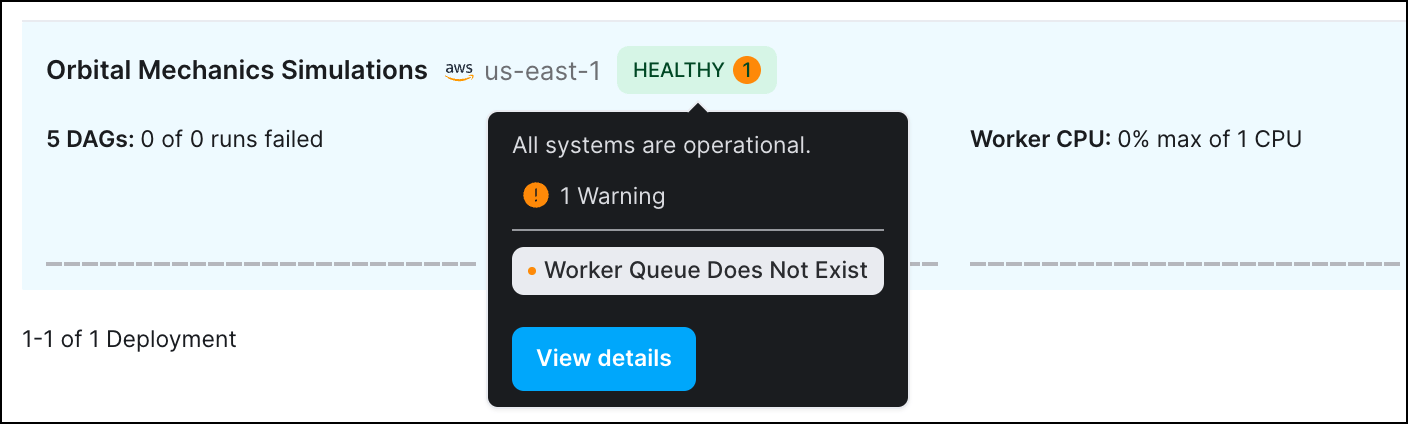 ### Additional improvements
* You can now access [Ask Astro](https://ask.astronomer.io/) from the Astro UI **Help** menu:
### Additional improvements
* You can now access [Ask Astro](https://ask.astronomer.io/) from the Astro UI **Help** menu:
 * User role titles are now consistently formatted across the Astro UI.
### Self-service VPC peering and route management for AWS
This feature is in [Preview](/docs/astro/feature-previews).
You can now configure a network connection between Astro and an AWS VPC without contacting Astronomer support. Astro automatically handles creating a connection request and provides instructions for completing the setup yourself. After you create a VPC connection, you can configure routes whenever you need to connect to an additional service in your external VPC. See [Create a private connection between Astro and AWS](/docs/astro/connect-aws-vpc-peering).
### Additional improvements
* There is no longer a minimum on the amount of CPU and memory that you can request for Kubernetes Pods.
### Bug fixes
* Fixed an issue in Astro Hybrid where refreshing the browser could occasionally reset a worker queue's worker type setting.
### Additional improvements
* The Astro UI Deployment analytics page now shows **CPU Usage Per Pod (%)** and **Memory Usage Per Pod (MB)** as a percentage of your total available resources rather than the resources of a single worker Pod, such that these metrics will never show Deployment resources usage as exceeding 100%.
* The maximum value for worker queue **Max # of workers** has increased from 30 to 100.
### Additional improvements
* When you create a Deployment, the Astro UI now shows the Airflow version of your Deployment instead of the equivalent Astro Runtime version.
* Enabled point-in-time restore (PITR) on Hybrid GCP clusters to improve resiliency to outages. Note that this might result in increased costs for cloud storage.
### Bug fixes
* Fixed an issue where you occasionally couldn't access the Airflow UI for a Deployment with the error "No healthy upstream".
* Fixed an issue where deleting a user with no Workspace membership from an Organization would affect how their Workspace membership appeared in other, unrelated Organizations.
* Fixed an issue where the **Open in Airflow** button on the dag details page in the Astro UI did not open the Airflow UI as expected.
* User role titles are now consistently formatted across the Astro UI.
### Self-service VPC peering and route management for AWS
This feature is in [Preview](/docs/astro/feature-previews).
You can now configure a network connection between Astro and an AWS VPC without contacting Astronomer support. Astro automatically handles creating a connection request and provides instructions for completing the setup yourself. After you create a VPC connection, you can configure routes whenever you need to connect to an additional service in your external VPC. See [Create a private connection between Astro and AWS](/docs/astro/connect-aws-vpc-peering).
### Additional improvements
* There is no longer a minimum on the amount of CPU and memory that you can request for Kubernetes Pods.
### Bug fixes
* Fixed an issue in Astro Hybrid where refreshing the browser could occasionally reset a worker queue's worker type setting.
### Additional improvements
* The Astro UI Deployment analytics page now shows **CPU Usage Per Pod (%)** and **Memory Usage Per Pod (MB)** as a percentage of your total available resources rather than the resources of a single worker Pod, such that these metrics will never show Deployment resources usage as exceeding 100%.
* The maximum value for worker queue **Max # of workers** has increased from 30 to 100.
### Additional improvements
* When you create a Deployment, the Astro UI now shows the Airflow version of your Deployment instead of the equivalent Astro Runtime version.
* Enabled point-in-time restore (PITR) on Hybrid GCP clusters to improve resiliency to outages. Note that this might result in increased costs for cloud storage.
### Bug fixes
* Fixed an issue where you occasionally couldn't access the Airflow UI for a Deployment with the error "No healthy upstream".
* Fixed an issue where deleting a user with no Workspace membership from an Organization would affect how their Workspace membership appeared in other, unrelated Organizations.
* Fixed an issue where the **Open in Airflow** button on the dag details page in the Astro UI did not open the Airflow UI as expected.