> ## Documentation Index
> Fetch the complete documentation index at: https://astronomer.io/docs/llms.txt
> Use this file to discover all available pages before exploring further.
# 2023 Astro release notes: January to June
> Astro release notes from January to June 2023, covering features, bug fixes, and version updates for Astro, the Astro CLI, Astro Runtime, and the Remote Execution Agent.
[Subscribe to Astro release notes](/docs/astro/release-notes-subscribe) to receive updates via RSS, email, or Slack.
Astro release notes from January to June 2023. For the other half of 2023, see [2023 release notes: July to December](/docs/astro/release-notes-2023). See the [current release notes](/docs/astro/release-notes) for the latest updates.
### Support for dedicated clusters on Azure
You can now create a dedicated cluster in the following Azure regions:
* `australiaeast`
* `eastus2`
* `northeurope`
* `westeurope`
* `uswest2`
See [Astro Hosted resource reference](/docs/astro/resource-reference-hosted) for more information.
### Additional improvements
* The Astro UI now shows how many Workspaces each Team belongs to in **Settings** > **Access Management** > **Teams**.
* You can now create dedicated clusters in `us-west1` on GCP.
### Additional improvements
* You can now add a new Astro user to Workspaces before the user has accepted their invite.
* If you have Organization Owner permissions, you can now add a user to a Workspace even if the user hasn't been added to your Organization. Users added to Workspaces this way are automatically added to your Organization as an Organization Member.
* The Astro UI now shows your Team IDs in **Settings** > **Access Management** > **Teams**. Use Team IDs to add Teams to Workspaces using the Astro CLI.
* A Team's **Updated At** and **Updated By** values are now updated when you change the Team's permissions in a Workspace or Organization.
### Bug fixes
* Fixed an issue where a Workspace descriptions were incorrectly required when creating a new Workspace through the Astro CLI.
### Manage billing and track usage for Astro Hosted
Use the new **Billing** page in the Astro UI to see both high-level and detailed metrics about your spend in Astro Hosted. You can also use this page to configure your billing details and view invoices. See [Manage billing](/docs/astro/manage-billing) for more details.
### New cell type for using Airflow operators in the Astro Cloud IDE
You can now use any Airflow operator available on the Astronomer Registry in your Astro Cloud IDE pipeline. Operator cells apply formatting and checks for parameter inputs, making it easy to configure operators as part of your pipeline.
Additionally, you can configure custom cells to use your team's custom operators in a pipeline.
### IMDSv2 is now enforced on AWS clusters
**Breaking change**
If your dags assume IAM roles to directly access metadata on your cluster using IMDSv1, this change can result in dag run failures. Upgrade your dags to use IMDSv2 for all cluster metadata requests.
See [Use IMDSv2](https://docs.aws.amazon.com/AWSEC2/latest/UserGuide/configuring-instance-metadata-service.html) for more information.
Astronomer now enforces IMDSv2 on all AWS clusters. Any requests for resources on your clusters are now session-based and muse include a token in the request body.
### Additional improvements
* Trial Deployments now have [dag-only deploys](/docs/astro/deploy-code) enabled by default.
* The Astro UI now shows your **Organization Short Name** and **Astro SAML Connection Name** in the Astro UI.
* You can now view mapped tasks from the **DAGs** page in the Astro UI.
### Bug fixes
* Fixed an issue where worker node pools in Hosted dedicated clusters on Azure were not being updated correctly.
* Fixed an issue the Astro UI would reset a Deployment's **Min Worker Count** from 0 to 1 after you edited the Deployment in any way.
### Track user actions and ensure compliance with audit logs
You can now export audit logs from the Astro UI to view all actions taken in your Organization over a given time period. See [Export audit logs](/docs/astro/audit-logs) for setup steps.
### Additional improvements
* You can now configure Hybrid GCP clusters with additional Memory Optimized and Compute Optimized Cloud SQL instance types. See [Supported Cloud SQL instance types](/docs/astro/resource-reference-gcp-hybrid#supported-cloud-sql-instance-types).
### Manage permissions for groups of users with Teams
Configure Teams from the Astro UI to manage the permissions for many users across Workspaces from a single page. *Teams* are a group of users in an Organization that you grant the same Workspace permissions, without needing to define them individually.
See [Make a Team](/docs/astro/manage-teams) for setup steps.
### Bug fixes
* In Astro Hosted, an irrelevant **AWS external ID** info page has been removed from the Astro UI.
* Fixed an issue where dag-only deploys could be unreliable due to the deploy process not requesting enough resources in the cluster.
### Introducing Astro Hosted and Hybrid
*Astro Hosted* is a new way to run Airflow on Astronomer's cloud. On Astro Hosted, Airflow environments are managed and hosted entirely by Astronomer, enabling you to shift your focus from infrastructure to data.
For more information about how Astro Hosted works, see the [Architecture overview](/docs/astro/astro-architecture).
If you're already an Astro user and your Deployments run in your company's own cloud, you're using *Astro Hybrid*. This version of Astro was formerly known as Astro - Bring Your Own Cloud.
To see whether you're an Astro Hybrid user, open your Organization in the Astro UI and go to **Settings** > **General**. Your version of Astro is listed under **Product Type**.
See [Documentation refactor for Astro Hybrid](#documentation-refactor-for-astro-hybrid) to learn how the documentation has changed for current Astro Hybrid users.
### Configure default Kubernetes Pods on Astro Hosted
One of the biggest risks of running the Kubernetes executor or KubernetesPodOperator is that your tasks can accidentally request more resources than expected, which can drive up costs. To limit this risk, you can now configure default and maximum Pod resources from the Astro UI. If a task tries to request Pod resources that are more than your configured limits, the task fails.
See [Configure Kubernetes Pod resources](/docs/astro/deployment-resources#configure-kubernetes-pod-resources) for setup steps.
### Documentation refactor for Astro Hybrid
The following updates have been made to documentation to accommodate new Astro Hosted information:
* Astro Hybrid documentation now has a dedicated menu under "Administration" that contains all docs related to Hybrid installation and cluster management. See [Astro Hybrid overview](/docs/astro/hybrid-overview).
* All other docs now assume Astro Hosted by default. If a feature is functionally different between Hosted and Hybrid, the documentation for that feature will include a note about how that setup differs for Hybrid. Look for the blue **Alternative Astro Hybrid setup** notes throughout documentation.
### Automate Organization management with Organization API tokens
You can now create Organization API tokens to automate key actions across your Organization and all of the Workspaces in it. You can customize the role and expiration date of the token to give it the minimum required permissions for the task it completes. Some common actions that you can automate with Organization API token are:
* Creating Workspaces.
* Inviting users to an Organization or Workspace.
* Creating and updating Deployments using a [Deployment file](/docs/astro/manage-deployments-as-code).
* Exporting audit logs.
* Gathering metadata about Deployments using the Airflow REST API.
* Completing any of the actions you can complete with a Workspace API token or Deployment API key across all Deployments in your Organization.
See [Manage Organization API tokens](/docs/astro/organization-api-tokens) for more information.
### Receive Astro alerts on Slack or PagerDuty
Astro alerts are a new way to be notified when your dags aren't running as expected. Unlike Airflow callbacks and SLAs, Astro alerts require no changes to dag code and integrate with Slack and PagerDuty.
You can set an alert on any dag to be notified when the dag fails or when a task takes longer to run than expected. See [Astro alerts](/docs/astro/alerts) for configuration steps.
### Bug fixes
* Fixed an issue where SSO configurations made through Astronomer support could be overridden by updating the SSO configuration through the Astro UI.
### Improved log viewing in the Astro UI
The Deployment **Logs** page in the Astro UI now shows logs for your Deployment's workers, schedulers, triggerers, and webserver. Additionally, you can now view up to the last 10,000 logs emitted by your Deployment from the Astro UI.
To make it easier to parse this larger log volume, the **Logs** page now lets you filter by log type, date, and keyword. See [View logs](/docs/astro/view-logs) for more information.
### Self-service configuration for single sign-on (SSO) connections
You can now configure SSO connections directly from the Astro UI without assistance from Astronomer support. Use the **Authentication** page to configure different authentication environments for your Organization by creating and managing multiple SSO connections and domains.
To review the new process for creating SSO connections, see [Set up authentication and SSO](/docs/astro/configure-idp). To create new managed domains to map to your SSO connections, see [Manage domains](/docs/astro/manage-domains).
### Additional improvements
* The node type for running Airflow system components on GCP clusters has been reduced from `n2-standard-4` to `e2-standard-4`.
* To optimize infrastructure costs for running the Kubernetes executor, Kubernetes executor worker Pods from different Deployments can now run on the same worker node. This occurs only when the Deployments are hosted in the same cluster and use the same worker node instance type.
### Preview Deployments
You can now create preview Deployments from feature branches in your Git repository. Use a [preview Deployment template](/docs/astro/ci-cd-templates/template-overview#preview-deployment-templates) or [GitHub Actions template](/docs/astro/ci-cd-templates/github-actions-deployment-preview) to configure your Astro pipelines to:
* Create the preview Deployment when you create a new branch.
* Deploy code changes to Astro when you make updates in the branch.
* Delete the preview Deployment when you delete the branch.
* Deploy your changes to your base Deployment after you merge your changes into your main branch.
### Additional improvements
* Added the ability to enforce CI/CD deploys. You can now configure your Deployment to only accept code deploys if they are triggered by a Deployment API key or Workspace token.
* When you create a new cell in the Astro Cloud IDE, the editor auto-scrolls to your new cell and selects it.
### Bug fixes
* Fixed a bug where the UI passed the wrong cluster type.
* Fixed an issue where the Deployment status shows as 'deploying' when KPOs are running.
### New GCP node instance types available
You can now use the following node instance types for worker nodes in GCP clusters:
* `e2-standard-32`
* `e2-highcpu-32`
* `n2-standard-32`
* `n2-standard-48`
* `n2-standard-64`
* `n2-highmem-32`
* `n2-highmem-48`
* `n2-highmem-64`
* `n2-highcpu-32`
* `n2-highcpu-48`
* `n2-highcpu-64`
For a list of all instance types available for GCP, see [Supported worker node pool instance types](/docs/astro/resource-reference-gcp-hybrid#supported-worker-node-pool-instance-types).
### Additional improvements
* You can now use `db.m6g` and `db.r6g` RDS instance types on AWS clusters.
* The default RDS instance type for new AWS clusters has been reduced from `db.r5.large` to `db.m6g.large`
* The default CIDR range for new AWS clusters has been reduced from /19 to /20.
* You can now submit a **Request type** in the [Astro UI support form](https://cloud.astronomer.io/open-support-request). When you choose a request type, the form updates to help you submit the most relevant information for your support request.
* You can no longer delete a Workspace if there are any Astro Cloud IDE projects still in the Workspace.
* Organization role permissions have changed so that only Organization Owners can create Workspaces.
### Bug fixes
* Fixed an issue where you could set a Deployment's scheduler resources to less than 5 AU.
### Automate Workspace and Deployment actions using Workspace API tokens
Use Workspace API tokens to automate Workspace actions, such as adding users to a Workspace and creating new Deployments, or for processes that a Deployment API key can automate. You can customize the role and expiration date of the token to give it the minimum required permissions for the task it completes.
To create and use Workspace API tokens, see [Workspace API tokens](/docs/astro/workspace-api-tokens).
### Additional improvements
* In the Astro Cloud IDE, you can now specify the output table for a Warehouse SQL cell using both literal and Python expressions.
* Port 80 is no longer used for certificate management on the data plane.
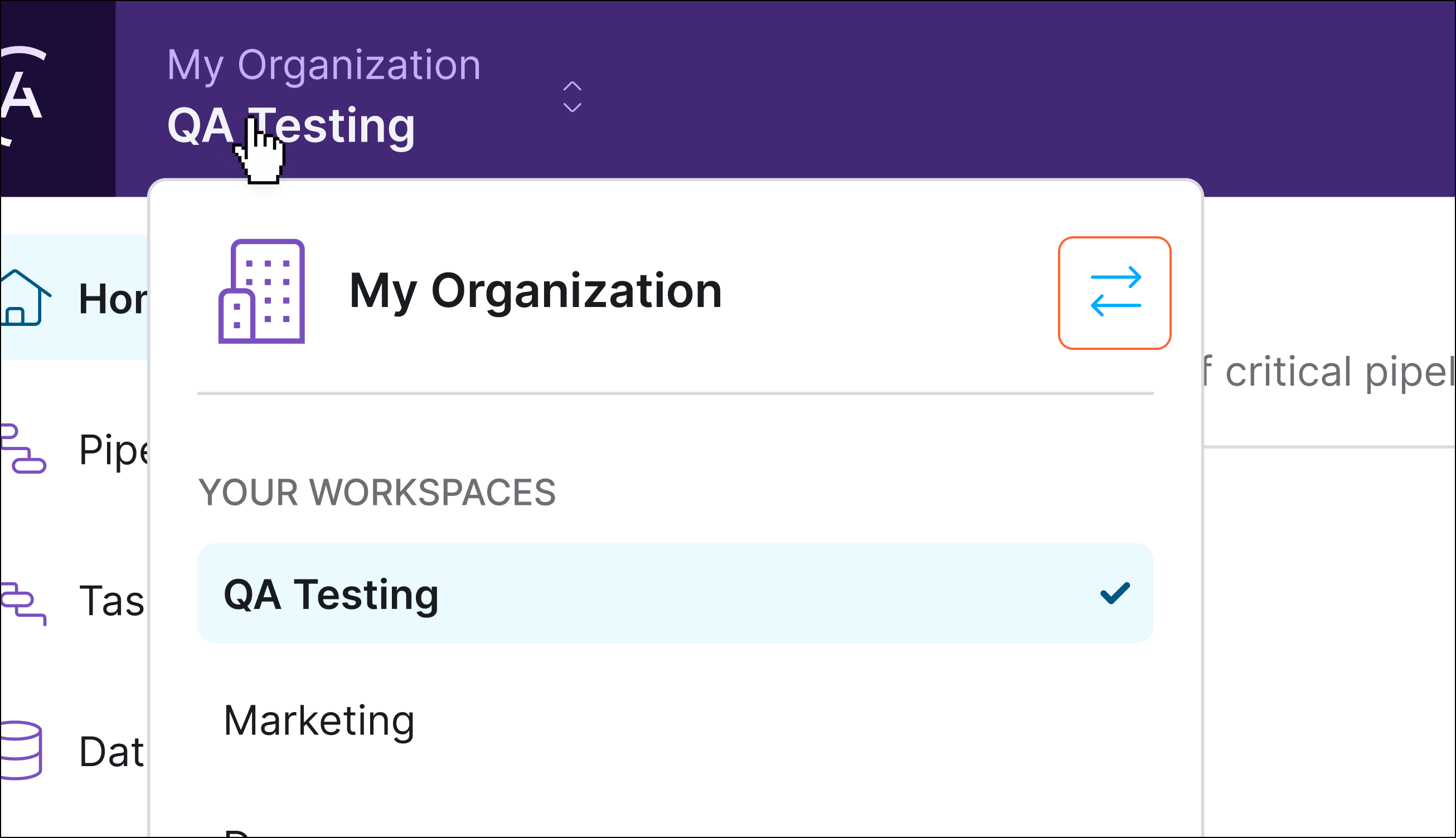
* To switch Organizations in the Astro UI, you now use the **Switch Organization** button next to your Organization's name.
 ### Run the Kubernetes executor in Astro
You can now configure your Deployments to use the Kubernetes executor for executing tasks. Using the Kubernetes executor, you can:
* Run tasks with different version dependencies in the same Astro project.
* Request specific amounts of CPU and memory for individual tasks.
* Automatically down your resources when no tasks are running.
The Kubernetes executor runs each task in its own Kubernetes Pod instead of in shared Celery workers. Astronomer fully manages the infrastructure required to run the executor and automatically spins Pods up and down for each of your task runs. This executor is a good fit for teams that want fine-grained control over the execution environment for each of their tasks.
To learn whether the Kubernetes executor works for your use case, see [Choose an executor](/docs/astro/executors-overview#choose-an-executor). To configure the Kubernetes executor for a task or Deployment, see [Configure the Kubernetes executor](/docs/astro/kubernetes-executor).
### Simplified Organization management in the Astro UI
The Astro UI has been redesigned so that Organization settings tabs are now available in the left menu. Use this new menu to switch between pages as you can for Workspace settings.
While most tabs were migrated directly to the left menu with the same name, some pages have been renamed and moved:
* Formerly located in **Overview**, your Workspace list is now available in **Workspaces**.
* Formerly located in the **People** tab, Organization user management settings are now in **Settings** > **Access Management**.
* Formerly located in the **Settings** tab, general Organization settings are now in **Settings** > **General**.
### New Astro Cloud IDE integration with GitLab
You can now configure a GitLab repository in your Astro Cloud IDE project. Configuring a GitLab repository allows you to commit your pipelines and deploy them to Astro directly from the Astro Cloud IDE.
### Additional improvements
* Clusters on an Astro - Hosted installation no longer retain Airflow logs which are older than 90 days.
* The Data Plane System node pool instance type on GCP clusters has been reduced from `n2-standard-4` to `n2-standard-2`.
### Get expert advice on Astro and Airflow in office hours
Office hours are a new way for Astro customers to meet with the Astronomer Data Engineering team. In an office hour meeting, you can ask questions, make feature requests, or get expert advice for your data pipelines.
You can now schedule a 30-minute office hour meeting in the **Help** menu next to your user profile in the Astro UI.
### Run the Kubernetes executor in Astro
You can now configure your Deployments to use the Kubernetes executor for executing tasks. Using the Kubernetes executor, you can:
* Run tasks with different version dependencies in the same Astro project.
* Request specific amounts of CPU and memory for individual tasks.
* Automatically down your resources when no tasks are running.
The Kubernetes executor runs each task in its own Kubernetes Pod instead of in shared Celery workers. Astronomer fully manages the infrastructure required to run the executor and automatically spins Pods up and down for each of your task runs. This executor is a good fit for teams that want fine-grained control over the execution environment for each of their tasks.
To learn whether the Kubernetes executor works for your use case, see [Choose an executor](/docs/astro/executors-overview#choose-an-executor). To configure the Kubernetes executor for a task or Deployment, see [Configure the Kubernetes executor](/docs/astro/kubernetes-executor).
### Simplified Organization management in the Astro UI
The Astro UI has been redesigned so that Organization settings tabs are now available in the left menu. Use this new menu to switch between pages as you can for Workspace settings.
While most tabs were migrated directly to the left menu with the same name, some pages have been renamed and moved:
* Formerly located in **Overview**, your Workspace list is now available in **Workspaces**.
* Formerly located in the **People** tab, Organization user management settings are now in **Settings** > **Access Management**.
* Formerly located in the **Settings** tab, general Organization settings are now in **Settings** > **General**.
### New Astro Cloud IDE integration with GitLab
You can now configure a GitLab repository in your Astro Cloud IDE project. Configuring a GitLab repository allows you to commit your pipelines and deploy them to Astro directly from the Astro Cloud IDE.
### Additional improvements
* Clusters on an Astro - Hosted installation no longer retain Airflow logs which are older than 90 days.
* The Data Plane System node pool instance type on GCP clusters has been reduced from `n2-standard-4` to `n2-standard-2`.
### Get expert advice on Astro and Airflow in office hours
Office hours are a new way for Astro customers to meet with the Astronomer Data Engineering team. In an office hour meeting, you can ask questions, make feature requests, or get expert advice for your data pipelines.
You can now schedule a 30-minute office hour meeting in the **Help** menu next to your user profile in the Astro UI.
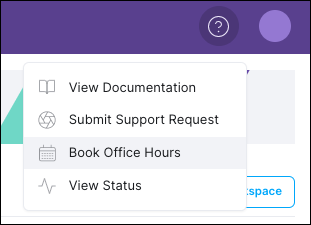 For more information, see [Astro office hours](/docs/astro/astro-office-hours).
### Additional improvements
* The node pool instance type used for Astro system components on GCP clusters has been reduced from `n2-standard-4` to `n2-standard-2`.
* Dags generated by the Astro Cloud IDE now use UTC instead of your current timezone as the default timezone for scheduling dag runs.
### Bug fixes
* Fixed an issue in the Astro Cloud IDE where you could not update a pipeline that was configured with an invalid cyclic dependency chain.
* Fixed an issue where deploying an Astro project with a custom Docker image tag resulted in the Deployment always having the **Deploying** status in the Astro UI.
* Fixed an issue where worker Pods on Azure clusters were sometimes unable to scale because there was no prioritization for starting up essential scheduling Pods.
### Astro no longer requires administrator access on AWS
Astro no longer requires administrator permissions for its dedicated AWS account. Instead, Astro now assumes a cross-account IAM role with the minimum necessary permissions for running and managing clusters. See [Install Astro on AWS](/docs/astro/install-aws-hybrid) for more information.
### IdP-initiated logins through the Okta dashboard
If your Organization uses Okta as your Astro identity provider, you can now log in to Astro directly from your [Okta Apps dashboard](https://help.okta.com/eu/en-us/Content/Topics/end-user/dashboard-overview.htm). If you've been authenticated by Okta, you no longer need to be authenticated by Astro when you access it through your dashboard.
### Additional improvements
* Ingress to the Kubernetes API on Google Cloud Platform (GCP) and Azure clusters is now limited to Astro control plane IPs. This change will be implemented on all clusters in the coming weeks.
### Bug fixes
* To protect the functionality of Astro monitoring services, you can no longer override the values of the following environment variables:
* `AIRFLOW__METRICS__STATSD_ON`
* `AIRFLOW__METRICS__STATSD_HOST`
* `AIRFLOW__METRICS__STATSD_PORT`
* `AIRFLOW__METRICS__STATSD_ALLOW_LIST`
* `AIRFLOW__METRICS__STATSD_STATSD_CUSTOM_CLIENT_PATH`
* `AIRFLOW__METRICS__STATSD_PREFIX`
You can still set new values for these variables, but the values will be automatically overwritten in the Astro data plane. See [Platform variables](/docs/astro/platform-variables).
* Fixed an issue where a user could provision multiple accounts when their login email address included differently cased characters.
### New identity-first authentication model
Astro has migrated to an identity-first authentication model. Users now authenticate to the Astro platform instead of individual Organizations, and Organizations can set permissions for how users can modify and access resources. This model prioritizes identity verification and enforces authentication policies for user email domains.
For all users logging in to Astro, this migration has the following effects:
* Instead of being redirected to separate login pages for each Organization, all Astro users log in through a universal login page.
* Users belonging to multiple Organizations no longer have to log in again when switching Organizations.
* Users no longer need to enter their email on a separate page before they log in to the Astro UI.
* If your Organization enforces single sign-on (SSO), users can now authenticate to Astro with a username and password when your email domain doesn't enforce SSO.
For Organization Owners, this migration has the following additional effects:
* You can now use an SSO bypass link to log in to Astro if your SSO connection is disrupted.
* Your Organization now has a list of owned email domains, and any users logging into Astro with one of those domains will be redirected to your configured identity provider.
To configure authentication behavior, see [Configure SSO](/docs/astro/configure-idp#advanced-setup).
### New Hosted regions available
You can now create clusters in the following regions on an Astro - Hosted installation.
* AWS
* `ap-northeast-1`
* `ap-southeast-2`
* `eu-central-1`
* `eu-west-1`
* `us-east-1`
* `us-west-2`
* Google Cloud
* `asia-northeast1`
* `australia-southeast1`
* `europe-west1`
* `europe-west2`
* `us-central1`
* `us-east4`
* Microsoft Azure
* `australiaeast`
* `japaneast`
* `northeurope`
* `westeurope`
* `eastus2`
* `westus2`
### Additional improvements
The default CIDR ranges for new GCP clusters have been reduced. The following are the new CIDR ranges:
* **Subnet CIDR**: `172.20.0.0/22`
* **Pod CIDR**: `172.21.0.0/19`
* **Service Address CIDR**: `172.22.0.0/22`
* **Service VPC Peering**: `172.23.0.0/20`
### Bug fixes
In the Astro UI, when using **Compare** on the **Lineage Graph** page, you can now compare shorter run lengths.
### Authorize Workspaces to clusters
You can now keep teams and projects isolated by authorizing Workspaces to specific clusters. Use this feature to better manage cloud resources by ensuring that only authorized Deployments are running on specific clusters.
### New Deployment health statuses and information in the Astro UI
The Astro UI now includes three additional [Deployment health statuses](/docs/astro/deployment-health-incidents) that you might see when creating or pushing code to a Deployment.
* The **Creating** status indicates that Astro is still provisioning the resources for the Deployment.
* The **Deploying** status indicates that a code deploy is in progress. Hover over the status indicator to view specific information about the deploy, including whether it was an image deploy or a dag-only deploy.
* The **Unknown** status indicates that Deployment status can't be determined.
Additionally, the Deployment information page in the Astro UI now includes fields for **Docker Image** and **DAG Bundle Version** that show unique timestamps and tags based on your latest code deploy. Use this information as the source of truth for which version of your code is currently running on the Deployment.
### View OpenLineage facets for lineage job runs
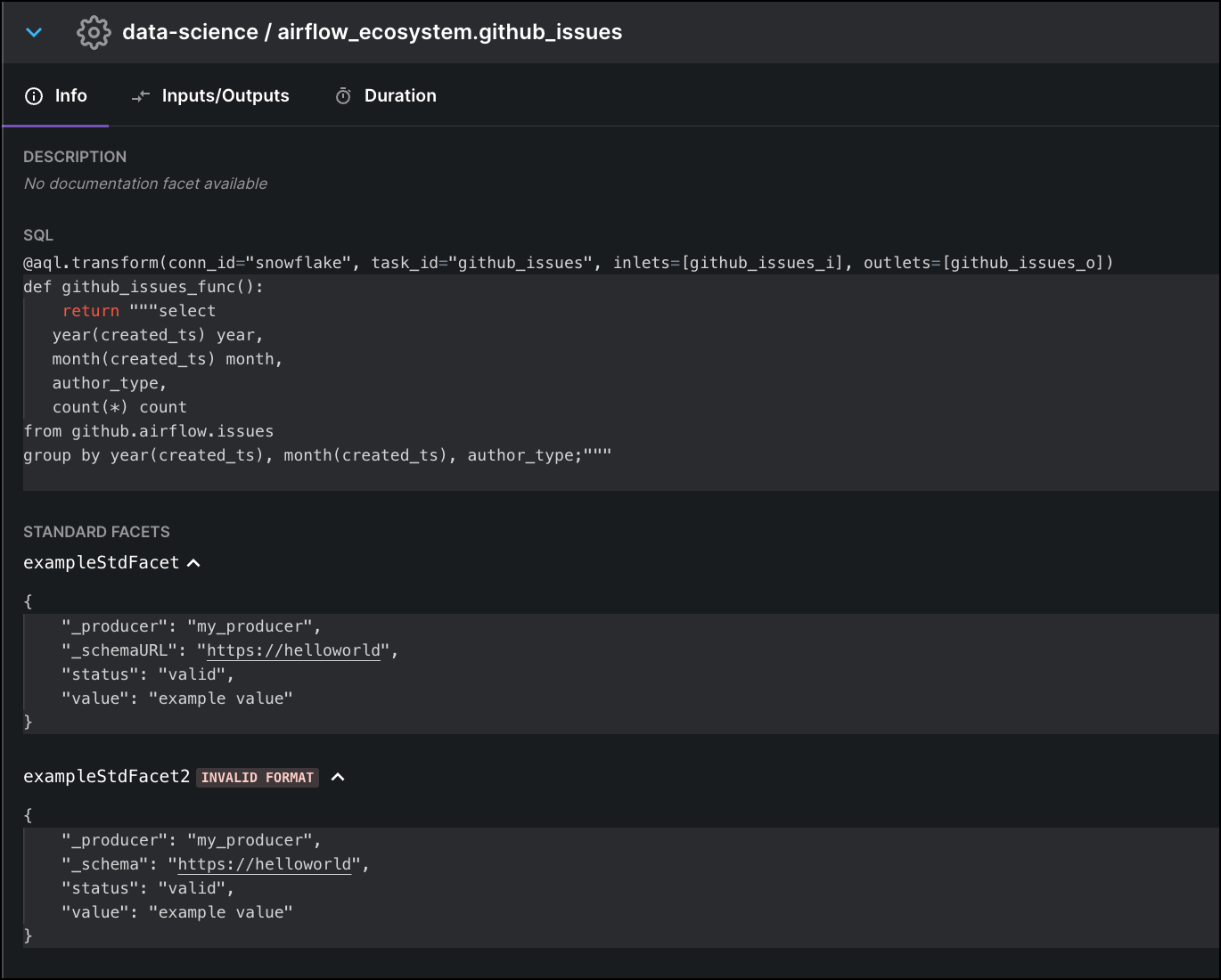
[OpenLineage facets](https://openlineage.io/docs/spec/facets/) are JSON objects that provide additional context about a given job run. By default, a job run includes facets that show what kind of job was completed, whether the job run was successful, and who owns the job.
You can now view all available facets for a job run, including [custom facets](https://openlineage.io/docs/spec/facets/custom-facets), by opening the job run's **Lineage Graph** and then selecting the **Info** tab. You can check the status of your facets, including whether they are correctly formatted, so that you can resolve potential issues in your data pipelines.
For more information, see [Astro office hours](/docs/astro/astro-office-hours).
### Additional improvements
* The node pool instance type used for Astro system components on GCP clusters has been reduced from `n2-standard-4` to `n2-standard-2`.
* Dags generated by the Astro Cloud IDE now use UTC instead of your current timezone as the default timezone for scheduling dag runs.
### Bug fixes
* Fixed an issue in the Astro Cloud IDE where you could not update a pipeline that was configured with an invalid cyclic dependency chain.
* Fixed an issue where deploying an Astro project with a custom Docker image tag resulted in the Deployment always having the **Deploying** status in the Astro UI.
* Fixed an issue where worker Pods on Azure clusters were sometimes unable to scale because there was no prioritization for starting up essential scheduling Pods.
### Astro no longer requires administrator access on AWS
Astro no longer requires administrator permissions for its dedicated AWS account. Instead, Astro now assumes a cross-account IAM role with the minimum necessary permissions for running and managing clusters. See [Install Astro on AWS](/docs/astro/install-aws-hybrid) for more information.
### IdP-initiated logins through the Okta dashboard
If your Organization uses Okta as your Astro identity provider, you can now log in to Astro directly from your [Okta Apps dashboard](https://help.okta.com/eu/en-us/Content/Topics/end-user/dashboard-overview.htm). If you've been authenticated by Okta, you no longer need to be authenticated by Astro when you access it through your dashboard.
### Additional improvements
* Ingress to the Kubernetes API on Google Cloud Platform (GCP) and Azure clusters is now limited to Astro control plane IPs. This change will be implemented on all clusters in the coming weeks.
### Bug fixes
* To protect the functionality of Astro monitoring services, you can no longer override the values of the following environment variables:
* `AIRFLOW__METRICS__STATSD_ON`
* `AIRFLOW__METRICS__STATSD_HOST`
* `AIRFLOW__METRICS__STATSD_PORT`
* `AIRFLOW__METRICS__STATSD_ALLOW_LIST`
* `AIRFLOW__METRICS__STATSD_STATSD_CUSTOM_CLIENT_PATH`
* `AIRFLOW__METRICS__STATSD_PREFIX`
You can still set new values for these variables, but the values will be automatically overwritten in the Astro data plane. See [Platform variables](/docs/astro/platform-variables).
* Fixed an issue where a user could provision multiple accounts when their login email address included differently cased characters.
### New identity-first authentication model
Astro has migrated to an identity-first authentication model. Users now authenticate to the Astro platform instead of individual Organizations, and Organizations can set permissions for how users can modify and access resources. This model prioritizes identity verification and enforces authentication policies for user email domains.
For all users logging in to Astro, this migration has the following effects:
* Instead of being redirected to separate login pages for each Organization, all Astro users log in through a universal login page.
* Users belonging to multiple Organizations no longer have to log in again when switching Organizations.
* Users no longer need to enter their email on a separate page before they log in to the Astro UI.
* If your Organization enforces single sign-on (SSO), users can now authenticate to Astro with a username and password when your email domain doesn't enforce SSO.
For Organization Owners, this migration has the following additional effects:
* You can now use an SSO bypass link to log in to Astro if your SSO connection is disrupted.
* Your Organization now has a list of owned email domains, and any users logging into Astro with one of those domains will be redirected to your configured identity provider.
To configure authentication behavior, see [Configure SSO](/docs/astro/configure-idp#advanced-setup).
### New Hosted regions available
You can now create clusters in the following regions on an Astro - Hosted installation.
* AWS
* `ap-northeast-1`
* `ap-southeast-2`
* `eu-central-1`
* `eu-west-1`
* `us-east-1`
* `us-west-2`
* Google Cloud
* `asia-northeast1`
* `australia-southeast1`
* `europe-west1`
* `europe-west2`
* `us-central1`
* `us-east4`
* Microsoft Azure
* `australiaeast`
* `japaneast`
* `northeurope`
* `westeurope`
* `eastus2`
* `westus2`
### Additional improvements
The default CIDR ranges for new GCP clusters have been reduced. The following are the new CIDR ranges:
* **Subnet CIDR**: `172.20.0.0/22`
* **Pod CIDR**: `172.21.0.0/19`
* **Service Address CIDR**: `172.22.0.0/22`
* **Service VPC Peering**: `172.23.0.0/20`
### Bug fixes
In the Astro UI, when using **Compare** on the **Lineage Graph** page, you can now compare shorter run lengths.
### Authorize Workspaces to clusters
You can now keep teams and projects isolated by authorizing Workspaces to specific clusters. Use this feature to better manage cloud resources by ensuring that only authorized Deployments are running on specific clusters.
### New Deployment health statuses and information in the Astro UI
The Astro UI now includes three additional [Deployment health statuses](/docs/astro/deployment-health-incidents) that you might see when creating or pushing code to a Deployment.
* The **Creating** status indicates that Astro is still provisioning the resources for the Deployment.
* The **Deploying** status indicates that a code deploy is in progress. Hover over the status indicator to view specific information about the deploy, including whether it was an image deploy or a dag-only deploy.
* The **Unknown** status indicates that Deployment status can't be determined.
Additionally, the Deployment information page in the Astro UI now includes fields for **Docker Image** and **DAG Bundle Version** that show unique timestamps and tags based on your latest code deploy. Use this information as the source of truth for which version of your code is currently running on the Deployment.
### View OpenLineage facets for lineage job runs
[OpenLineage facets](https://openlineage.io/docs/spec/facets/) are JSON objects that provide additional context about a given job run. By default, a job run includes facets that show what kind of job was completed, whether the job run was successful, and who owns the job.
You can now view all available facets for a job run, including [custom facets](https://openlineage.io/docs/spec/facets/custom-facets), by opening the job run's **Lineage Graph** and then selecting the **Info** tab. You can check the status of your facets, including whether they are correctly formatted, so that you can resolve potential issues in your data pipelines.
 ### Additional improvements
* You can now create AWS clusters in `ap-northeast-1` and `ap-southeast-2` on an Astro - Hosted installation.
* You can now create GCP clusters in `australia-southeast1` on an Astro - Hosted installation.
### Security fixes
* Fixed [CVE-2023-0286](https://nvd.nist.gov/vuln/detail/CVE-2023-0286).
### Additional improvements
* The instructions on the welcome page for new Astro users who are not yet part of an Organization have been improved to make getting started easier.
### Bug fixes
* Removed nonfunctioning date filtering functionality from the Lineage UI.
* Fixed an issue where triggering an image deploy from an older version of the Astro CLI could unintentionally turn off dag deploys on a Deployment.
### Bug fixes
* When you select **Mark Success** or **Clear** for Deployment task actions in the Airflow UI, you are now correctly redirected to the dag **Tree** view instead of the **DAGs** homepage.
* Fixed [CVE-2022-41721](https://avd.aquasec.com/nvd/2022/cve-2022-41721/).
### New Workspace Home page
When you select a Workspace in the Astro UI, the **Home** page now appears first. On this page, you can:
* Check the status of your Deployments.
* Quickly access your most recently viewed Deployments and Cloud IDE projects.
* View release notes for all Astro products.
### Additional improvements
* You can now create AWS clusters in `ap-northeast-1` and `ap-southeast-2` on an Astro - Hosted installation.
* You can now create GCP clusters in `australia-southeast1` on an Astro - Hosted installation.
### Security fixes
* Fixed [CVE-2023-0286](https://nvd.nist.gov/vuln/detail/CVE-2023-0286).
### Additional improvements
* The instructions on the welcome page for new Astro users who are not yet part of an Organization have been improved to make getting started easier.
### Bug fixes
* Removed nonfunctioning date filtering functionality from the Lineage UI.
* Fixed an issue where triggering an image deploy from an older version of the Astro CLI could unintentionally turn off dag deploys on a Deployment.
### Bug fixes
* When you select **Mark Success** or **Clear** for Deployment task actions in the Airflow UI, you are now correctly redirected to the dag **Tree** view instead of the **DAGs** homepage.
* Fixed [CVE-2022-41721](https://avd.aquasec.com/nvd/2022/cve-2022-41721/).
### New Workspace Home page
When you select a Workspace in the Astro UI, the **Home** page now appears first. On this page, you can:
* Check the status of your Deployments.
* Quickly access your most recently viewed Deployments and Cloud IDE projects.
* View release notes for all Astro products.
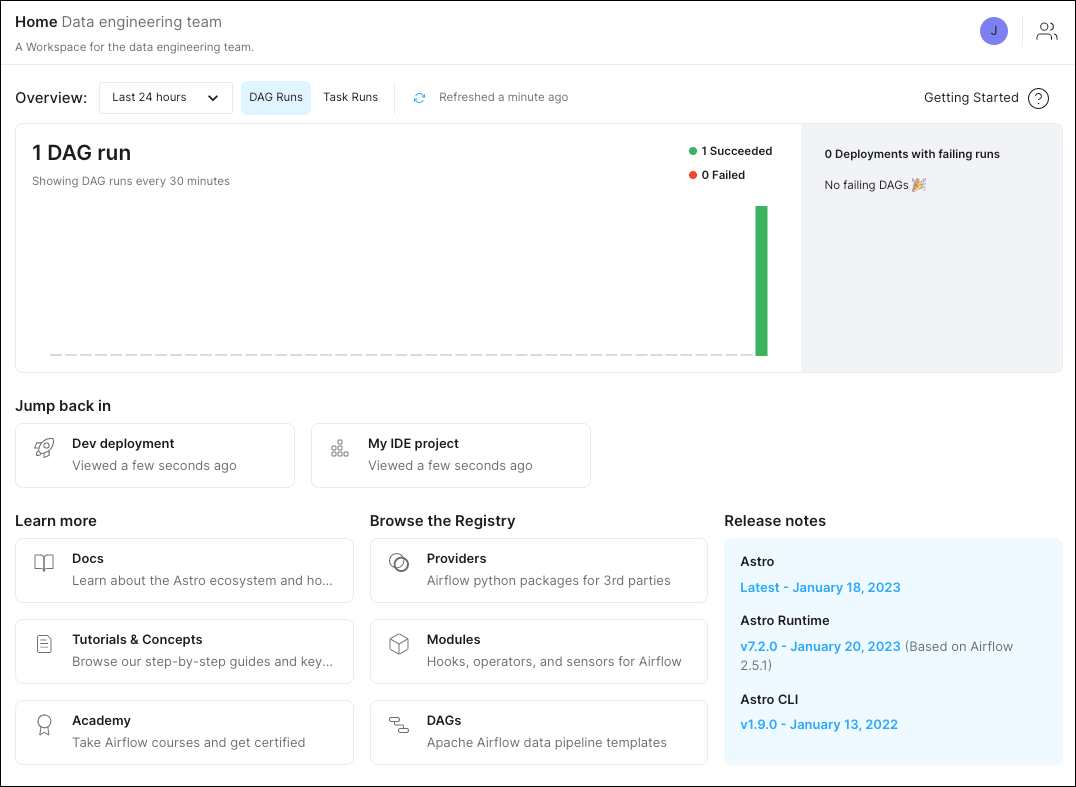 See [Introducing Astro’s New Workspace Homepage](https://www.astronomer.io/blog/introducing-astros-new-workspace-homepage/) for more information.
### Additional improvements
* Ingress to the Airflow UI and API on Astro clusters is now limited to control plane IPs. This change will be implemented on all clusters in the coming weeks.
* You can now request custom tags for your AWS clusters by submitting a support request to [Astronomer support](https://cloud.astronomer.io/open-support-request). You can view your cluster tags in the Astro UI by selecting **Clusters**, selecting a cluster, and then clicking the **Details** tab.
* You can now create new clusters in France Central for Bring Your Own Cloud installations of Astro on Azure.
* Improved the speed of dags appearing in the Airflow after completing a dag-only deploy.
### Bug fixes
* Fixed [CVE-2022-48195](https://avd.aquasec.com/nvd/2022/cve-2022-48195/).
### Bug fixes
* Fixed an issue with Google Cloud Platform (GCP) clusters where the metadata database for a Deployment could persist after the Deployment was deleted.
### New Astro Cloud IDE cell types
To simplify the creation of new tasks, the following new cell types are now available in the Astro Cloud IDE:
* **SQL**: Run a SQL query against an existing database connection and save the query results in an XCom file for use by other cells. Use this cell type to run smaller queries and store the results in Airflow for quick access by other cells.
* **Warehouse SQL**: Run a SQL query against an existing database connection and store the query results in your data warehouse. Use this cell type for data operations that require more storage and reliability.
* **Markdown**: Add inline Markdown comments to your generated dag code. Use this cell type to document code decisions and to make it easier for team members to collaborate on shared pipelines.
### Additional improvements
* To reduce the time it takes for Airflow to parse new dag files, the default value for `AIRFLOW__SCHEDULER__DAG_DIR_LIST_INTERVAL` has been reduced from 5 minutes to 30 seconds for all Deployments regardless of Runtime version. For most users, this means that you will see new dags appear in the Airflow UI faster.
* In the Astro UI, a banner now appears if there is an incident reported on the [Astro status page](https://status.astronomer.io/).
### Bug fixes
* Sorting the **Organization Role** column in the **People** tab of the Astro UI now works as expected.
* Fixed an issue where lineage groups would occasionally not collapse as expected in the **Lineage Graph** view.
See [Introducing Astro’s New Workspace Homepage](https://www.astronomer.io/blog/introducing-astros-new-workspace-homepage/) for more information.
### Additional improvements
* Ingress to the Airflow UI and API on Astro clusters is now limited to control plane IPs. This change will be implemented on all clusters in the coming weeks.
* You can now request custom tags for your AWS clusters by submitting a support request to [Astronomer support](https://cloud.astronomer.io/open-support-request). You can view your cluster tags in the Astro UI by selecting **Clusters**, selecting a cluster, and then clicking the **Details** tab.
* You can now create new clusters in France Central for Bring Your Own Cloud installations of Astro on Azure.
* Improved the speed of dags appearing in the Airflow after completing a dag-only deploy.
### Bug fixes
* Fixed [CVE-2022-48195](https://avd.aquasec.com/nvd/2022/cve-2022-48195/).
### Bug fixes
* Fixed an issue with Google Cloud Platform (GCP) clusters where the metadata database for a Deployment could persist after the Deployment was deleted.
### New Astro Cloud IDE cell types
To simplify the creation of new tasks, the following new cell types are now available in the Astro Cloud IDE:
* **SQL**: Run a SQL query against an existing database connection and save the query results in an XCom file for use by other cells. Use this cell type to run smaller queries and store the results in Airflow for quick access by other cells.
* **Warehouse SQL**: Run a SQL query against an existing database connection and store the query results in your data warehouse. Use this cell type for data operations that require more storage and reliability.
* **Markdown**: Add inline Markdown comments to your generated dag code. Use this cell type to document code decisions and to make it easier for team members to collaborate on shared pipelines.
### Additional improvements
* To reduce the time it takes for Airflow to parse new dag files, the default value for `AIRFLOW__SCHEDULER__DAG_DIR_LIST_INTERVAL` has been reduced from 5 minutes to 30 seconds for all Deployments regardless of Runtime version. For most users, this means that you will see new dags appear in the Airflow UI faster.
* In the Astro UI, a banner now appears if there is an incident reported on the [Astro status page](https://status.astronomer.io/).
### Bug fixes
* Sorting the **Organization Role** column in the **People** tab of the Astro UI now works as expected.
* Fixed an issue where lineage groups would occasionally not collapse as expected in the **Lineage Graph** view.