> ## Documentation Index
> Fetch the complete documentation index at: https://astronomer.io/docs/llms.txt
> Use this file to discover all available pages before exploring further.
# Configure a Kubernetes namespace pool for Astro Private Cloud
Every Deployment within your Astro Private Cloud installation requires an individual [Kubernetes namespace](https://kubernetes.io/docs/concepts/overview/working-with-objects/namespaces/). You can configure a pool of pre-created namespaces to limit Astro Private Cloud access to these namespaces.
When you configure a pool of pre-created namespaces, Astronomer users are required to select a namespace from the pool whenever they create a new Deployment. Once the Deployment is created, Astro Private Cloud marks its corresponding namespace as unavailable. If a Deployment is deleted, its namespace is returned to the pool and is available.
## Benefits of pre-created namespaces
A pre-created namespace pool provides the following benefits:
* It limits the cluster-level permissions your organization needs to give to Astro Private Cloud. Astro Private Cloud requires permissions only for the individual namespaces you configure. Pre-created namespaces are recommended when your organization doesn't want to give Astro Private Cloud cluster-level permissions in a multi-tenant cluster.
* It can reduce costs and resource consumption. By default, Astro Private Cloud allows users to create Deployments until there is no more unreserved space in your cluster. If you use a pool, you can limit the number of active Deployments running at a time. This is especially important if you run other Elastic workloads on the same cluster where Astro Private Cloud runs and need to prevent users from accidentally claiming your entire pool of unallocated resources.
**Technical Details**
When a user creates a new Deployment with the UI or CLI, Astro Private Cloud creates the necessary Airflow components and isolates them in a dedicated Kubernetes namespace. These Airflow components depend on Kubernetes resources, some of which are stored as secrets.
To protect your Deployment Kubernetes secrets, Astronomer uses dedicated service accounts for parts of your Deployment that need to interact with external components. To enable this interaction, Astro Private Cloud needs extensive cluster-level permissions for all namespaces running in a cluster.
In Kubernetes, you can grant service account permissions for an entire cluster, or you can grant permissions for existing namespaces. Astronomer uses cluster-level permissions because, by default, the amount of Deployments to manage is unknown. This level of permissions is appropriate when Astro Private Cloud runs in its own dedicated cluster, but it poses security risks when other applications share the cluster.
For example, consider the deployment orchestrator service, which controls creating, updating, and deleting Deployments. By default, the deployment orchestrator has permissions to interact with secrets, roles, and service accounts for all applications in your cluster. The only way to mitigate this risk is by implementing pre-created namespaces.
## Setup
To create a namespace pool you have the following options:
* Delegate the creation of each namespace, including roles and rolebindings, to the Astronomer Helm chart. This option is suitable for most organizations.
* Create each namespace manually, including roles and rolebindings. This option is suitable if you need to further restrict Astronomer Kubernetes resource permissions. However, using this methodology to limit permissions can prevent Deployments from functioning as expected.
If you have a separate control plane and data plane(s), following changes in the `values.yaml` file must be done for the data plane(s) and namespaces must be created in the data plane cluster(s). Each data plane can have their dedicated namespaces.
## Prerequisites
* [Helm](https://helm.sh/).
* [kubectl](https://kubernetes.io/docs/reference/kubectl/overview/) with access to the cluster hosting Astro Private Cloud.
## Option 1: Use the Astronomer Helm chart
1. Set the following configuration in your `values.yaml` file:
```yaml wrap theme={null}
global:
# Set global.manageClusterScopedResources.enabled to false if you don't use ClusterRoles.
# manageClusterScopedResources:
# enabled: false
namespaceManagement:
# Configure Vector to gather logs from all available namespaces.
manualNamespaceNames:
enabled: false
# Prevent users from entering namespace names outside the configured pool.
namespaceFreeFormEntry:
enabled: false
namespacePools:
enabled: true
# Create roles and rolebindings for the namespaces in the pool.
createRbac: true
namespaces:
# Create the namespaces listed in names.
create: true
names:
-
-
```
2. Save the changes in your `values.yaml` file and update your Astro Private Cloud. See [Apply a config change](/docs/astro-private-cloud/v-2-x/apply-platform-config).
Based on the namespace names that you specified, Astronomer creates the necessary namespaces and Kubernetes resources. These resources have permissions scoped appropriately for most use-cases.
Once you apply your configuration, you should be able to create new Deployments using a namespace from your pre-created namespace pool. You should also be able to see the namespaces you specified inside your cluster resources.
## Option 2: Manually create namespaces, roles, and rolebindings
Complete this setup if you want to further limit the namespace permissions that Astronomer provides by default.
### Step 1: Configure namespaces
For every namespace you want to add to a pool, you must create a [namespace](https://kubernetes.io/docs/concepts/overview/working-with-objects/namespaces/), [role](https://kubernetes.io/docs/reference/access-authn-authz/rbac/#role-and-clusterrole), and [rolebinding](https://kubernetes.io/docs/reference/access-authn-authz/rbac/#rolebinding-and-clusterrolebinding) for Astro Private Cloud to access the namespace with. The `rolebinding` must be scoped to the `astronomer-commander` service account and the `namespace` you are creating.
1. Create a new manifest file for each namespace you want to add to the pool. Replace `` with the name of the namespace.
```yaml expandable wrap theme={null}
apiVersion: v1
kind: Namespace
metadata:
name:
---
apiVersion: rbac.authorization.k8s.io/v1
kind: Role
metadata:
name: astronomer-commander
namespace:
rules:
- apiGroups: ["*"]
resources: ["*"]
verbs: ["list", "watch"]
- apiGroups: [""]
resources: ["configmaps"]
verbs: ["create", "delete", "deletecollection", "get", "list", "patch", "update", "watch"]
- apiGroups: ["keda.k8s.io"]
resources: ["scaledobjects"]
verbs: ["get", "create", "delete"]
- apiGroups: [""]
resources: ["secrets"]
verbs: ["create", "delete", "deletecollection", "get", "list", "patch", "update", "watch"]
- apiGroups: [""]
resources: ["namespaces"]
verbs: ["get", "list", "patch", "update", "watch"]
- apiGroups: [""]
resources: ["serviceaccounts"]
verbs: ["create", "delete", "get", "patch"]
- apiGroups: ["rbac.authorization.k8s.io"]
resources: ["roles"]
verbs: ["*"]
- apiGroups: [""]
resources: ["persistentvolumeclaims"]
verbs: ["create", "delete", "deletecollection", "get", "list", "update", "watch", "patch"]
- apiGroups: [""]
resources: ["pods"]
verbs: ["get", "list", "watch", "delete", "create", "patch"]
- apiGroups: [""]
resources: ["endpoints"]
verbs: ["create", "delete", "get", "list", "update", "watch"]
- apiGroups: [""]
resources: ["limitranges"]
verbs: ["create", "delete", "get", "list", "watch", "patch"]
- apiGroups: [""]
resources: ["nodes"]
verbs: ["get", "list", "watch"]
- apiGroups: [""]
resources: ["nodes/proxy"]
verbs: ["get"]
- apiGroups: [""]
resources: ["persistentvolumes"]
verbs: ["create", "delete", "get", "list", "watch", "patch"]
- apiGroups: [""]
resources: ["replicationcontrollers"]
verbs: ["list", "watch"]
- apiGroups: [""]
resources: ["resourcequotas"]
verbs: ["create", "delete", "get", "list", "patch", "watch"]
- apiGroups: [""]
resources: ["services"]
verbs: ["create", "delete", "deletecollection", "get", "list", "patch", "update", "watch"]
- apiGroups: ["apps"]
resources: ["statefulsets"]
verbs: ["create", "delete", "get", "list", "patch", "watch"]
- apiGroups: ["apps"]
resources: ["deployments"]
verbs: ["create", "delete", "get", "patch","update"]
- apiGroups: ["autoscaling"]
resources: ["horizontalpodautoscalers"]
verbs: ["list", "watch"]
- apiGroups: ["batch"]
resources: ["jobs"]
verbs: ["list", "watch", "create", "delete", "get"]
- apiGroups: ["batch"]
resources: ["cronjobs"]
verbs: ["create", "delete", "get", "list", "patch", "watch"]
- apiGroups: ["extensions"]
resources: ["daemonsets", "replicasets"]
verbs: ["list", "watch"]
- apiGroups: ["extensions"]
resources: ["deployments"]
verbs: ["create", "delete", "get", "list", "patch", "update", "watch"]
- apiGroups: [""]
resources: ["events"]
verbs: ["create", "delete", "patch", "list"]
- apiGroups: ["extensions"]
resources: ["ingresses"]
verbs: ["create", "delete", "deletecollection", "get", "list", "patch", "update", "watch"]
- apiGroups: ["extensions"]
resources: ["ingresses/status"]
verbs: ["update"]
- apiGroups: ["networking.k8s.io"]
resources: ["ingresses"]
verbs: ["get", "create", "delete", "patch"]
- apiGroups: ["networking.k8s.io"]
resources: ["ingresses/status"]
verbs: ["update"]
- apiGroups: ["networking.k8s.io"]
resources: ["networkpolicies"]
verbs: ["create", "delete", "get", "patch"]
- apiGroups: ["rbac.authorization.k8s.io"]
resources: ["rolebindings"]
verbs: ["create", "delete", "get", "patch"]
- apiGroups: ["authentication.k8s.io"]
resources: ["tokenreviews"]
verbs: ["create", "delete"]
- apiGroups: ["authorization.k8s.io"]
resources: ["subjectaccessreviews"]
verbs: ["create", "delete"]
- apiGroups: ["policy"]
resources: ["poddisruptionbudgets"]
verbs: ["create", "delete", "get"]
- apiGroups: [""]
resources: ["pods/log"]
verbs: ["get", "list"]
- apiGroups: [""]
resources: ["pods/exec"]
verbs: ["get", "create"]
---
apiVersion: rbac.authorization.k8s.io/v1
kind: RoleBinding
metadata:
name: deployment-commander-rolebinding
namespace:
roleRef:
apiGroup: rbac.authorization.k8s.io
kind: Role
name: astronomer-commander # Should match name of Role
subjects:
- namespace: astronomer # Should match namespace where SA lives
kind: ServiceAccount
name: astronomer-commander # Should match service account name
```
2. Save this file and name it `.yaml`.
3. For each namespace you will configure in `global.namespaceManagement.namespacePools.namespaces.names`, run `kubectl apply -f .yaml`.
### Step 2: Configure a namespace pool in Astronomer
1. Set the following values in your `values.yaml` file, making sure to specify all of the namespaces you created in the `namespaces.names` object:
```yaml wrap theme={null}
global:
namespaceManagement:
# Configure Vector to gather logs from all available namespaces.
manualNamespaceNames:
enabled: false
# Prevent users from entering namespace names outside the configured pool.
namespaceFreeFormEntry:
enabled: false
namespacePools:
enabled: true
# Don't create roles or rolebindings for the namespaces in the pool.
createRbac: false
namespaces:
# Don't create namespaces because you created them manually.
create: false
names:
-
-
```
2. Save the changes in your `values.yaml` and update Astro Private Cloud. See [Apply a config change](/docs/astro-private-cloud/v-2-x/apply-platform-config).
## Create Deployments in pre-created namespaces
After you enable the pre-created namespace pool, the UI shows the namespaces you registered as options when you create a new Deployment.
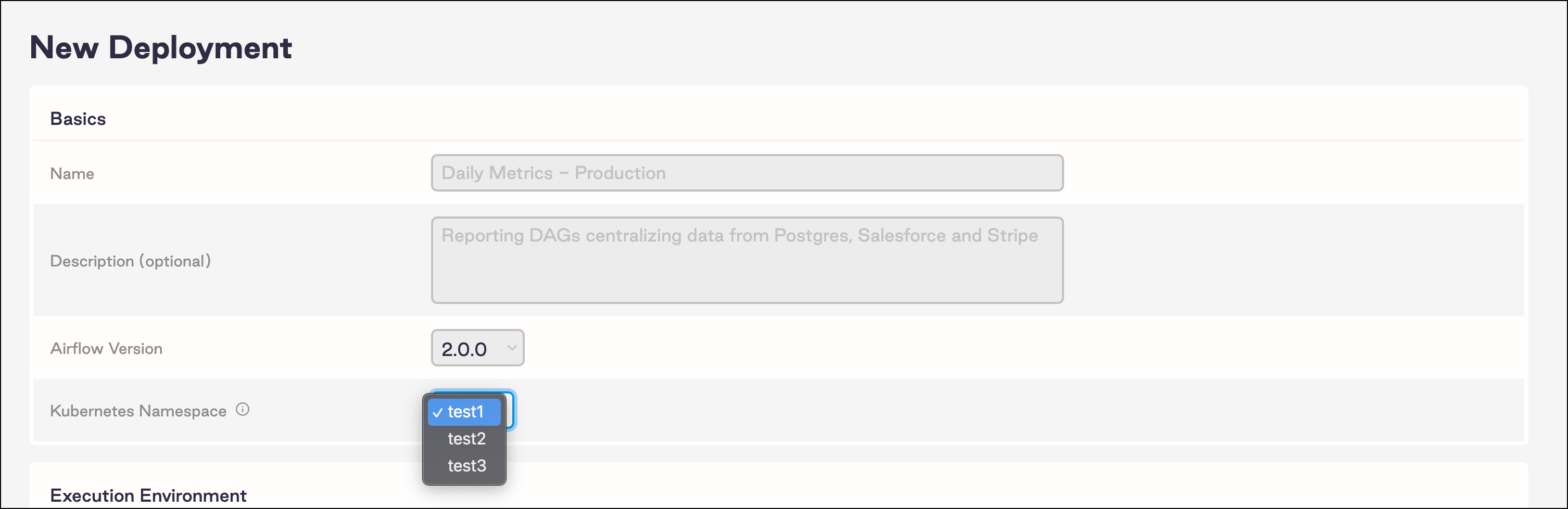 When you create Deployments with the CLI, you are prompted to select one of the available namespaces for your new Deployment.
If no namespaces are available, the UI and CLI show an error message when you try to create a Deployment. Delete the Deployment associated with the namespace to return the namespace to the pool.
## Advanced settings
If your namespace configurations require more granularity, use the following settings in your `values.yaml` file.
Mixing global and advanced settings might result in unexpected behavior. If you use the advanced settings, Astronomer recommends that you set `global.namespaceManagement.namespacePools.enabled` to `false`.
| Setting | Description |
| ---------------------------------------------------------------------------------------- | ---------------------------------------------------------------------------------------------------------------------------------------------------------------------------------------------------------------------------------------------------------------------------------------------------------------------------------- |
| `global.namespaceManagement.manualNamespaceNames.enabled` | Expands the Vector log collector rule to look for Deployment component logs in all namespaces. |
| `global.clusterRoles` | When set to `false`, Astronomer doesn't create a ClusterRole for the deployment orchestrator. |
| `global.manageClusterScopedResources.enabled` | When set to `false`, Astronomer doesn't create or update cluster-scoped resources. |
| `global.rbac.enabled` | When set to `false`, the platform doesn't create roles, rolebindings, or service accounts. You must define default roles for the default Kubernetes service account to continue with the platform installation. See [Bring your own Kubernetes service accounts](/docs/astro-private-cloud/v-2-x/byo-service-accounts) for setup steps. |
| `astronomer.houston.config.deployments.namespaceManagement.manualNamespaceNames.enabled` | When set to `true`, the Astro Private Cloud UI adds a dropdown field for namespace selection to the Deployment settings. |
| `astronomer.houston.config.deployments.namespaceManagement.preCreatedNamespaces` | Lists the namespaces that you manually created for the namespace pool. |
| `astronomer.commander.env` | Injects an environment variable for the deployment orchestrator that prevents namespace creation when a new Deployment starts. Set the name to `COMMANDER_MANUAL_NAMESPACE_NAMES` and the value to `"true"`. |
When using these settings, Astronomer recommends enabling [hard deletion](/docs/astro-private-cloud/v-2-x/configure-deployment#hard-delete-a-deployment) for Deployments.
In the following example `values.yaml` file, these settings are configured so that you don't configure namespace pools at a global level:
```yaml expandable wrap theme={null}
global:
namespaceManagement:
# Configure Vector to gather logs from all available namespaces.
manualNamespaceNames:
enabled: true
namespacePools:
enabled: false
clusterRoles: false
astronomer:
houston:
config:
deployments:
namespaceManagement:
# Enable manual namespace names.
manualNamespaceNames:
enabled: true
# Specify pre-created namespace names.
preCreatedNamespaces:
- name:
- name:
- name:
deploymentLifecycle:
# Allow immediate reuse of a namespace after hard deletion.
hardDeleteDeployment:
enabled: true
commander:
env:
- name: "COMMANDER_MANUAL_NAMESPACE_NAMES"
value: "true"
```
## Troubleshoot namespace pools
### My Deployment is in an unknown state
If a Deployment isn’t active, check the deployment orchestrator Pods to confirm they executed the Deployment commands successfully. When using a pre-created namespace pool with scoped roles, it’s possible that the `astronomer-commander` service account doesn't have the permissions necessary to perform a required action. When the deployment orchestrator succeeds, it shows the following notification:
```text wrap theme={null}
time="2021-07-21T16:30:23Z" level=info msg="releaseName , chart astronomer-ee/airflow, chartVersion 0.20.0, namespace " function=InstallRelease package=helm
time="2021-07-21T16:30:23Z" level=info msg="CHART PATH: /home/commander/.cache/helm/repository/airflow- 0.20.0.tgz\n" function=InstallRelease package=helm
```
When the deployment orchestrator fails, it shows messages like the following:
```text wrap theme={null}
time="2022-02-17T22:52:40Z" level=error msg="serviceaccounts is forbidden: User \"system:serviceaccount:astronomer:astronomer-commander\" cannot create resource \"serviceaccounts\" in API group \"\" in the namespace " function=InstallDeployment package=kubernetes
```
This error shows that the deployment orchestrator couldn’t create the service accounts in the pre-created namespaces, so you need to update the roles.
### My namespace isn't returning to the pool
If you're not using hard deletion, it can take several days for pre-created namespaces to become available after the associated Deployment is deleted. To enable hard deletes, see [Delete a Deployment](/docs/astro-private-cloud/v-2-x/configure-deployment#delete-a-deployment).
### My Deployments using NFS deploys stopped working
[NFS deploys](/docs/astro-private-cloud/v-2-x/deploy-nfs) don't work if you both use namespace pools and set `global.clusterRoles` to `false` in your `values.yaml` file.
When you create Deployments with the CLI, you are prompted to select one of the available namespaces for your new Deployment.
If no namespaces are available, the UI and CLI show an error message when you try to create a Deployment. Delete the Deployment associated with the namespace to return the namespace to the pool.
## Advanced settings
If your namespace configurations require more granularity, use the following settings in your `values.yaml` file.
Mixing global and advanced settings might result in unexpected behavior. If you use the advanced settings, Astronomer recommends that you set `global.namespaceManagement.namespacePools.enabled` to `false`.
| Setting | Description |
| ---------------------------------------------------------------------------------------- | ---------------------------------------------------------------------------------------------------------------------------------------------------------------------------------------------------------------------------------------------------------------------------------------------------------------------------------- |
| `global.namespaceManagement.manualNamespaceNames.enabled` | Expands the Vector log collector rule to look for Deployment component logs in all namespaces. |
| `global.clusterRoles` | When set to `false`, Astronomer doesn't create a ClusterRole for the deployment orchestrator. |
| `global.manageClusterScopedResources.enabled` | When set to `false`, Astronomer doesn't create or update cluster-scoped resources. |
| `global.rbac.enabled` | When set to `false`, the platform doesn't create roles, rolebindings, or service accounts. You must define default roles for the default Kubernetes service account to continue with the platform installation. See [Bring your own Kubernetes service accounts](/docs/astro-private-cloud/v-2-x/byo-service-accounts) for setup steps. |
| `astronomer.houston.config.deployments.namespaceManagement.manualNamespaceNames.enabled` | When set to `true`, the Astro Private Cloud UI adds a dropdown field for namespace selection to the Deployment settings. |
| `astronomer.houston.config.deployments.namespaceManagement.preCreatedNamespaces` | Lists the namespaces that you manually created for the namespace pool. |
| `astronomer.commander.env` | Injects an environment variable for the deployment orchestrator that prevents namespace creation when a new Deployment starts. Set the name to `COMMANDER_MANUAL_NAMESPACE_NAMES` and the value to `"true"`. |
When using these settings, Astronomer recommends enabling [hard deletion](/docs/astro-private-cloud/v-2-x/configure-deployment#hard-delete-a-deployment) for Deployments.
In the following example `values.yaml` file, these settings are configured so that you don't configure namespace pools at a global level:
```yaml expandable wrap theme={null}
global:
namespaceManagement:
# Configure Vector to gather logs from all available namespaces.
manualNamespaceNames:
enabled: true
namespacePools:
enabled: false
clusterRoles: false
astronomer:
houston:
config:
deployments:
namespaceManagement:
# Enable manual namespace names.
manualNamespaceNames:
enabled: true
# Specify pre-created namespace names.
preCreatedNamespaces:
- name:
- name:
- name:
deploymentLifecycle:
# Allow immediate reuse of a namespace after hard deletion.
hardDeleteDeployment:
enabled: true
commander:
env:
- name: "COMMANDER_MANUAL_NAMESPACE_NAMES"
value: "true"
```
## Troubleshoot namespace pools
### My Deployment is in an unknown state
If a Deployment isn’t active, check the deployment orchestrator Pods to confirm they executed the Deployment commands successfully. When using a pre-created namespace pool with scoped roles, it’s possible that the `astronomer-commander` service account doesn't have the permissions necessary to perform a required action. When the deployment orchestrator succeeds, it shows the following notification:
```text wrap theme={null}
time="2021-07-21T16:30:23Z" level=info msg="releaseName , chart astronomer-ee/airflow, chartVersion 0.20.0, namespace " function=InstallRelease package=helm
time="2021-07-21T16:30:23Z" level=info msg="CHART PATH: /home/commander/.cache/helm/repository/airflow- 0.20.0.tgz\n" function=InstallRelease package=helm
```
When the deployment orchestrator fails, it shows messages like the following:
```text wrap theme={null}
time="2022-02-17T22:52:40Z" level=error msg="serviceaccounts is forbidden: User \"system:serviceaccount:astronomer:astronomer-commander\" cannot create resource \"serviceaccounts\" in API group \"\" in the namespace " function=InstallDeployment package=kubernetes
```
This error shows that the deployment orchestrator couldn’t create the service accounts in the pre-created namespaces, so you need to update the roles.
### My namespace isn't returning to the pool
If you're not using hard deletion, it can take several days for pre-created namespaces to become available after the associated Deployment is deleted. To enable hard deletes, see [Delete a Deployment](/docs/astro-private-cloud/v-2-x/configure-deployment#delete-a-deployment).
### My Deployments using NFS deploys stopped working
[NFS deploys](/docs/astro-private-cloud/v-2-x/deploy-nfs) don't work if you both use namespace pools and set `global.clusterRoles` to `false` in your `values.yaml` file.