> ## Documentation Index
> Fetch the complete documentation index at: https://astronomer.io/docs/llms.txt
> Use this file to discover all available pages before exploring further.
# Manage and observe per-deployment migration
This guide covers day-2 operations for per-deployment migration: reading the new UI surfaces, triggering a migration, watching one run, understanding what gets blocked while it runs, and recovering when one fails. Per-deployment migration is available in Astro Private Cloud (APC) 2.1 and later.
It assumes you have already completed the setup in [Configure per-deployment migration](/docs/astro-private-cloud/v-2-x/configure-per-deployment-migration): data plane failover enabled on both clusters, real regions created, and every participating cluster assigned to one. For the lookup tables this guide links to — mission and flight states, skip reasons, and the GraphQL surface — see [Per-deployment migration reference](/docs/astro-private-cloud/v-2-x/per-deployment-migration-reference).
Selecting N Deployments and migrating them creates N independent missions, one per Deployment. There is no batch object on the server. Each mission moves through the same state machine as a cluster failover, and each succeeds or fails on its own. Partial success is normal and expected.
Read this before your first migration: there is no rollback. Per-deployment migration always runs in controlled mode, which means the Deployment is fully removed from the source cluster before it is created on the destination. There is no operation to put it back.
If the destination then fails — insufficient capacity, quota, or an image-pull failure — the mission ends `FAILED`, the Deployment's `clusterId` stays pointed at the source, and the Deployment is installed nowhere. Its database, secrets, and Dag storage are intact, so no data is lost, but the Deployment is down until you act.
Recovery is retry-forward only: re-run the migration. Because the failed mission releases its per-Deployment lock, the Deployment is immediately eligible to migrate again. Fix whatever failed on the destination, then re-run the migration for the same Deployment to the same destination — or to another in-region cluster. Don't try to hand-restore the Deployment on the source; its release there was already purged. See [Recover a failed migration](#recover-a-failed-migration).
Verify destination capacity and image availability before you migrate, and canary a single Deployment before you move a batch.
Migration moves the Deployments you pick, within a region, from a healthy source. Cluster failover moves everything on a cluster, can run in forced mode against a dead source, and is sequenced with your database promotion. If your source cluster is down, migration is the wrong tool — use [data plane failover](/docs/astro-private-cloud/v-2-x/trigger-data-plane-failover).
## Read the migration UI
### Regions page
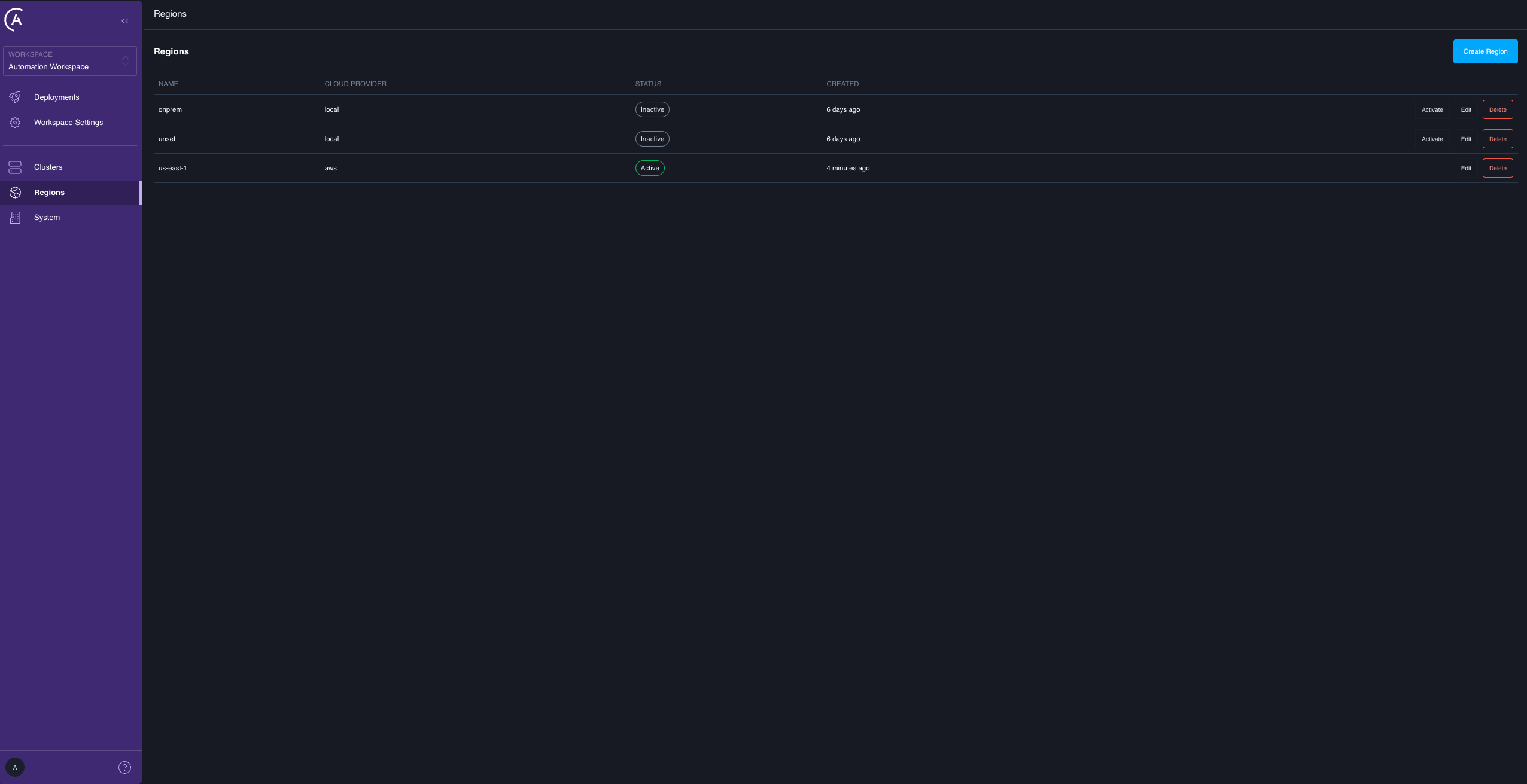
The **Regions** admin page lists every region with its **Name**, **Cloud Provider**, **Status**, and **Created** date, with **Create Region**, **Edit**, and **Delete** actions. For per-deployment migration, only **Name** and **Cloud Provider** matter. The **Status** badge and the **Activate** action belong to control plane high availability and have no effect on data plane migration — the migration gate never reads them. Deleting a region is blocked while any cluster still references it.
 ### Clusters list
A **Failover** column shows a cluster-level failover-readiness shield that mirrors the cluster's **Failover** status on its detail page, separate from the existing health dot:
* Grey **Pending upgrade**: failover-capable but not yet upgraded.
* Amber **Upgrading**: a failover upgrade is in flight.
* Green **Ready**: the cluster is **Enabled**.
* Red **Issues**: failover-capable but not enabled, for example an External Secrets Operator (ESO) secret sync failing on one of its Deployments.
The column is empty only when the cluster isn't failover-capable. For the same status in words, open the cluster detail page's **Failover** field.
### Cluster detail
Two elements matter here:
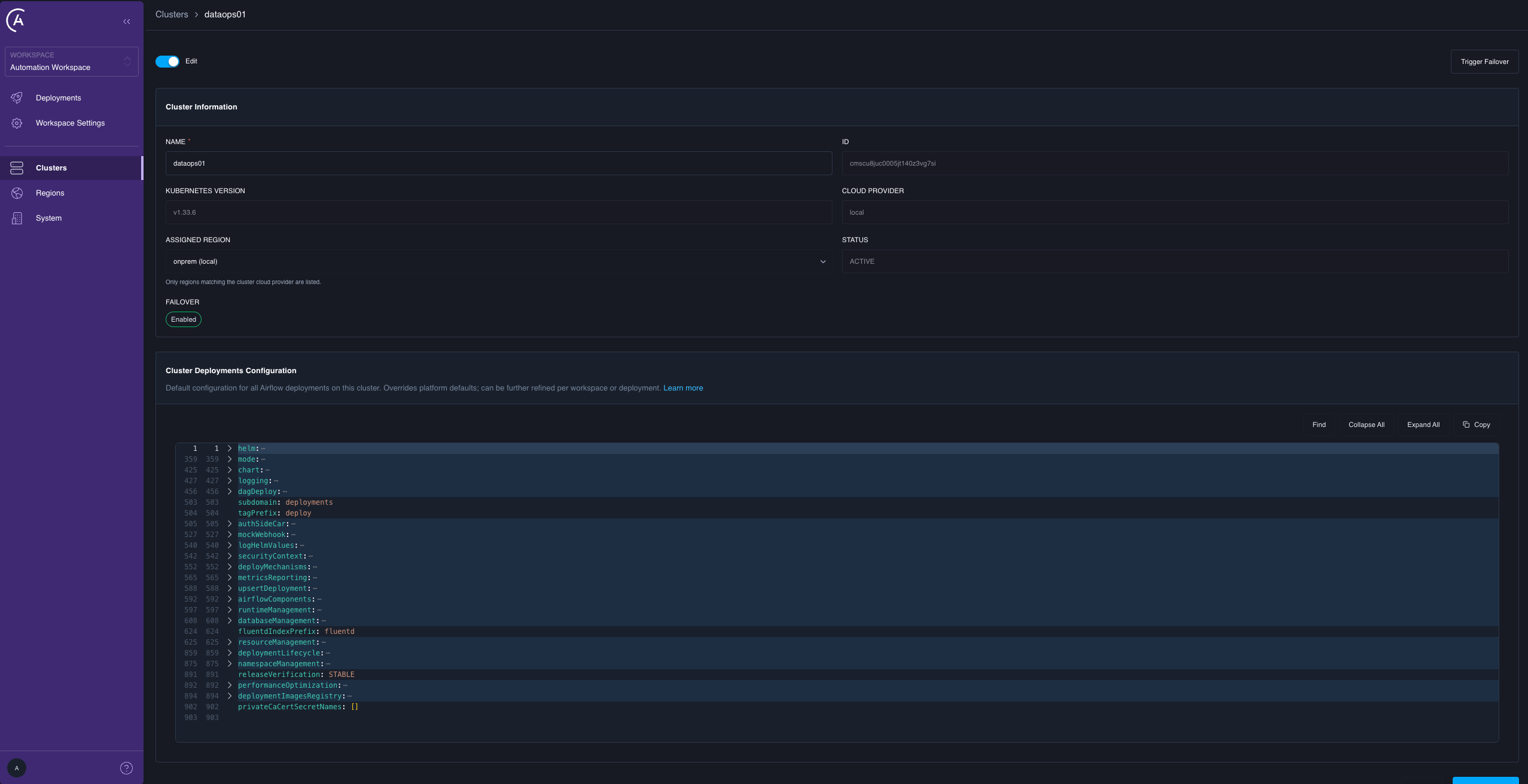
* **Failover** is a status field that replaces the old binary "Failover Enabled": **Not Capable**, **Pending Upgrade**, **Upgrading**, **Enabled**, or **Issues Detected**. Only a cluster reading **Enabled** can be a migration destination. For the full table, see [Cluster failover states](/docs/astro-private-cloud/v-2-x/per-deployment-migration-reference#cluster-failover-states).
* **Trigger Failover** is enabled only when the status is **Enabled**. In any other state it is disabled, with a message explaining why. This triggers a cluster-level failover, not a migration.
For a cluster failover, this page also shows progress across the request's missions and the skipped-Deployments list at reconcile finalization — which is where you find Deployments that a cluster failover passed over because they were already in a migration.
### Clusters list
A **Failover** column shows a cluster-level failover-readiness shield that mirrors the cluster's **Failover** status on its detail page, separate from the existing health dot:
* Grey **Pending upgrade**: failover-capable but not yet upgraded.
* Amber **Upgrading**: a failover upgrade is in flight.
* Green **Ready**: the cluster is **Enabled**.
* Red **Issues**: failover-capable but not enabled, for example an External Secrets Operator (ESO) secret sync failing on one of its Deployments.
The column is empty only when the cluster isn't failover-capable. For the same status in words, open the cluster detail page's **Failover** field.
### Cluster detail
Two elements matter here:
* **Failover** is a status field that replaces the old binary "Failover Enabled": **Not Capable**, **Pending Upgrade**, **Upgrading**, **Enabled**, or **Issues Detected**. Only a cluster reading **Enabled** can be a migration destination. For the full table, see [Cluster failover states](/docs/astro-private-cloud/v-2-x/per-deployment-migration-reference#cluster-failover-states).
* **Trigger Failover** is enabled only when the status is **Enabled**. In any other state it is disabled, with a message explaining why. This triggers a cluster-level failover, not a migration.
For a cluster failover, this page also shows progress across the request's missions and the skipped-Deployments list at reconcile finalization — which is where you find Deployments that a cluster failover passed over because they were already in a migration.
 ### Deployments list
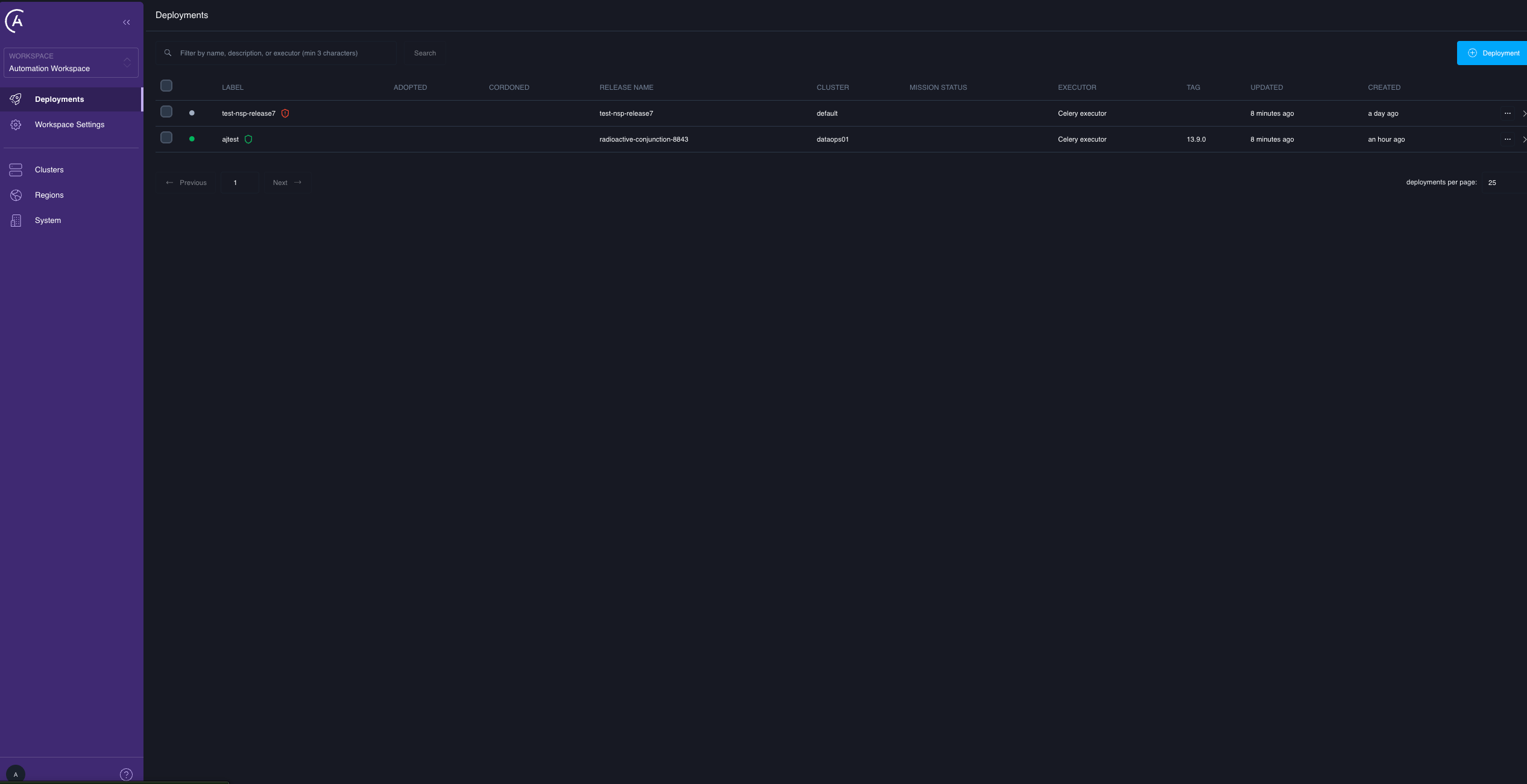
Four elements are new or changed:
| Element | What it does |
| ------------------------- | ------------------------------------------------------------------------------------------------------------------------------------------------------------------------------------------------------------------------------------------------------- |
| Checkbox column | A persistent leading column, one checkbox per Deployment. Selection is the entry point for every Deployment-scoped bulk action. A checkbox is disabled when the Deployment has an active mission of any kind, or when you lack update permission on it. |
| Bulk-actions menu | Appears once one or more Deployments are selected. Contains **Migrate to cluster** and **Upgrade for failover**. |
| Failover-readiness shield | A small shield icon next to the Deployment name, shown only on failover-capable clusters. See the following shield states. |
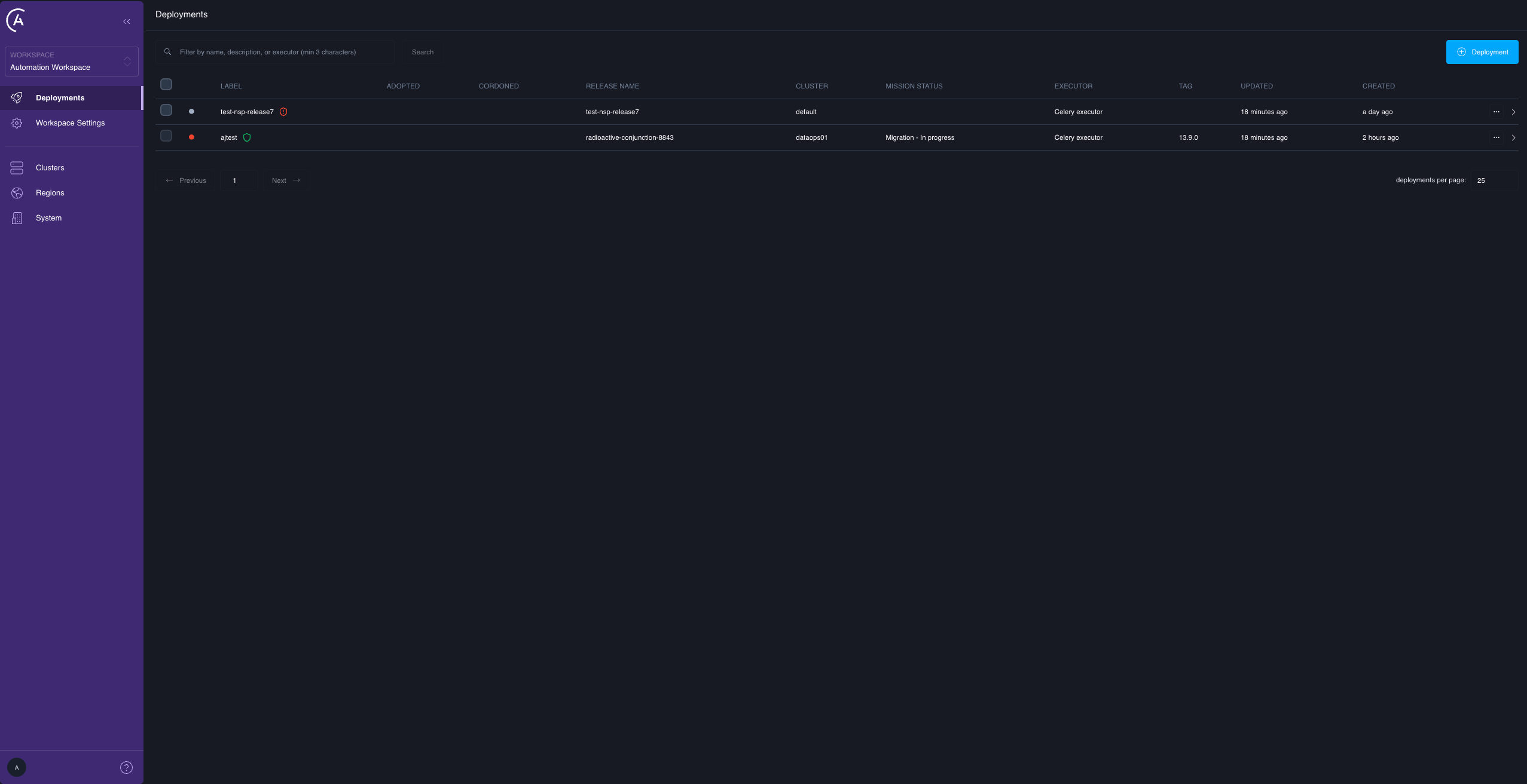
| Mission Status column | A per-Deployment phase indicator reflecting any in-flight mission — migration, failover, or upgrade — rendered as, for example, "Migration - In progress." This is where you watch a migration from the list. |
### Deployments list
Four elements are new or changed:
| Element | What it does |
| ------------------------- | ------------------------------------------------------------------------------------------------------------------------------------------------------------------------------------------------------------------------------------------------------- |
| Checkbox column | A persistent leading column, one checkbox per Deployment. Selection is the entry point for every Deployment-scoped bulk action. A checkbox is disabled when the Deployment has an active mission of any kind, or when you lack update permission on it. |
| Bulk-actions menu | Appears once one or more Deployments are selected. Contains **Migrate to cluster** and **Upgrade for failover**. |
| Failover-readiness shield | A small shield icon next to the Deployment name, shown only on failover-capable clusters. See the following shield states. |
| Mission Status column | A per-Deployment phase indicator reflecting any in-flight mission — migration, failover, or upgrade — rendered as, for example, "Migration - In progress." This is where you watch a migration from the list. |
 The shield uses one outline icon, distinguished by color, plus an exclamation badge for the **Attention** state:
* No shield: failover-incapable cluster.
* Grey **Pending upgrade**: failover-capable but not yet upgraded for failover.
* Amber **In progress**: an upgrade mission is in flight.
* Green **Ready**: upgraded and currently failover-eligible.
* Red **Attention**: the upgrade failed, or the Deployment is upgraded but now ineligible.
The API field behind the shield is `Deployment.failoverReadiness`. See [Per-deployment migration reference](/docs/astro-private-cloud/v-2-x/per-deployment-migration-reference#relevant-fields).
The shield doesn't track migrations. It tracks the one-time failover-upgrade lifecycle only. A Deployment that is mid-migration keeps a green **Ready** shield the entire time — the shield means "this Deployment is failover-capable," not "this Deployment is idle." Use the **Mission Status** column, or `Deployment.activeMission`, to see an in-flight migration.
### Deployment detail
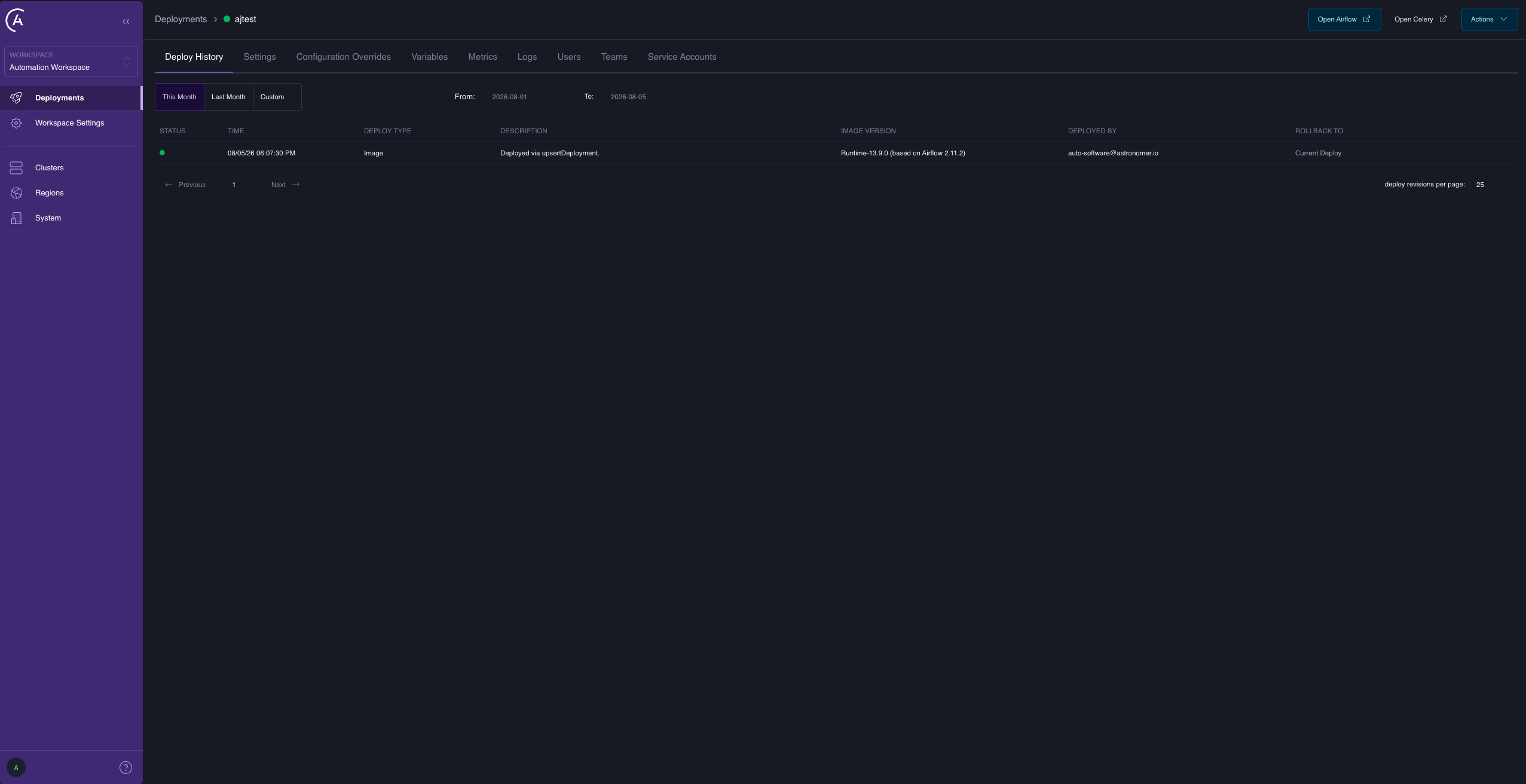
* **Migrate to cluster** is a per-Deployment action in the Deployment header's **Actions** menu, alongside **Upgrade for failover**. It calls the same `migrateDeployments` mutation with a single ID. Use it for canary moves, retries, and one-offs.
* There is no dedicated mission or flight view in the APC UI in 2.1. The durable, per-mission detail is available through the `missionProgress` GraphQL query. The **Mission Status** column on the Deployments list is the at-a-glance UI surface.
The shield uses one outline icon, distinguished by color, plus an exclamation badge for the **Attention** state:
* No shield: failover-incapable cluster.
* Grey **Pending upgrade**: failover-capable but not yet upgraded for failover.
* Amber **In progress**: an upgrade mission is in flight.
* Green **Ready**: upgraded and currently failover-eligible.
* Red **Attention**: the upgrade failed, or the Deployment is upgraded but now ineligible.
The API field behind the shield is `Deployment.failoverReadiness`. See [Per-deployment migration reference](/docs/astro-private-cloud/v-2-x/per-deployment-migration-reference#relevant-fields).
The shield doesn't track migrations. It tracks the one-time failover-upgrade lifecycle only. A Deployment that is mid-migration keeps a green **Ready** shield the entire time — the shield means "this Deployment is failover-capable," not "this Deployment is idle." Use the **Mission Status** column, or `Deployment.activeMission`, to see an in-flight migration.
### Deployment detail
* **Migrate to cluster** is a per-Deployment action in the Deployment header's **Actions** menu, alongside **Upgrade for failover**. It calls the same `migrateDeployments` mutation with a single ID. Use it for canary moves, retries, and one-offs.
* There is no dedicated mission or flight view in the APC UI in 2.1. The durable, per-mission detail is available through the `missionProgress` GraphQL query. The **Mission Status** column on the Deployments list is the at-a-glance UI surface.
 There is deliberately no batch progress page. If you reload after starting a 20-Deployment migration, you haven't lost anything: you can query each Deployment's status individually through its **Mission Status** column or `missionProgress`.
## Trigger a migration
### From the Deployments list
1. Select the Deployments with the checkbox column. Deployments with an active mission aren't selectable.
2. Open the bulk-actions menu and select **Migrate to cluster**.
3. Select the destination cluster from the picker.
4. Confirm.
There is deliberately no batch progress page. If you reload after starting a 20-Deployment migration, you haven't lost anything: you can query each Deployment's status individually through its **Mission Status** column or `missionProgress`.
## Trigger a migration
### From the Deployments list
1. Select the Deployments with the checkbox column. Deployments with an active mission aren't selectable.
2. Open the bulk-actions menu and select **Migrate to cluster**.
3. Select the destination cluster from the picker.
4. Confirm.
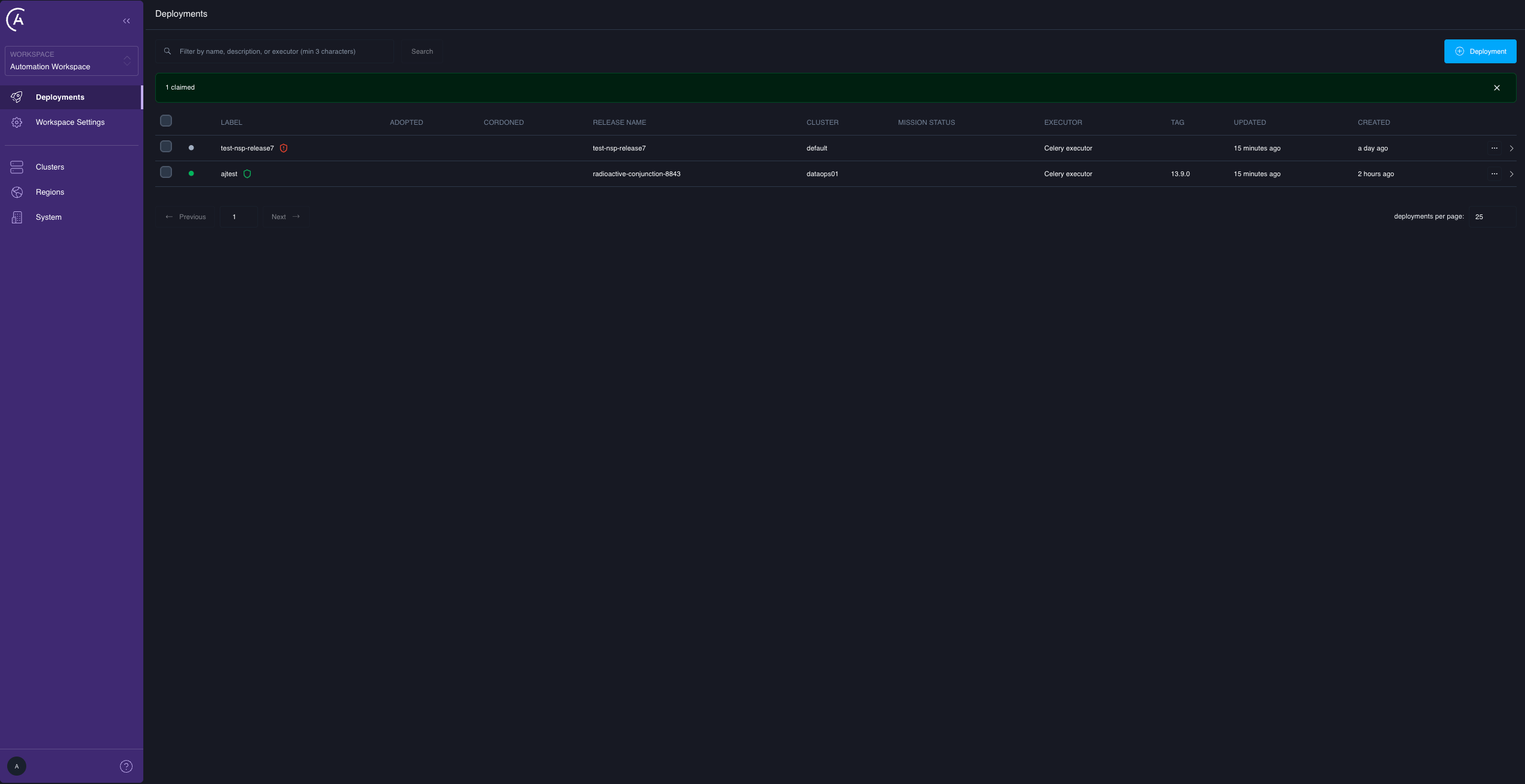
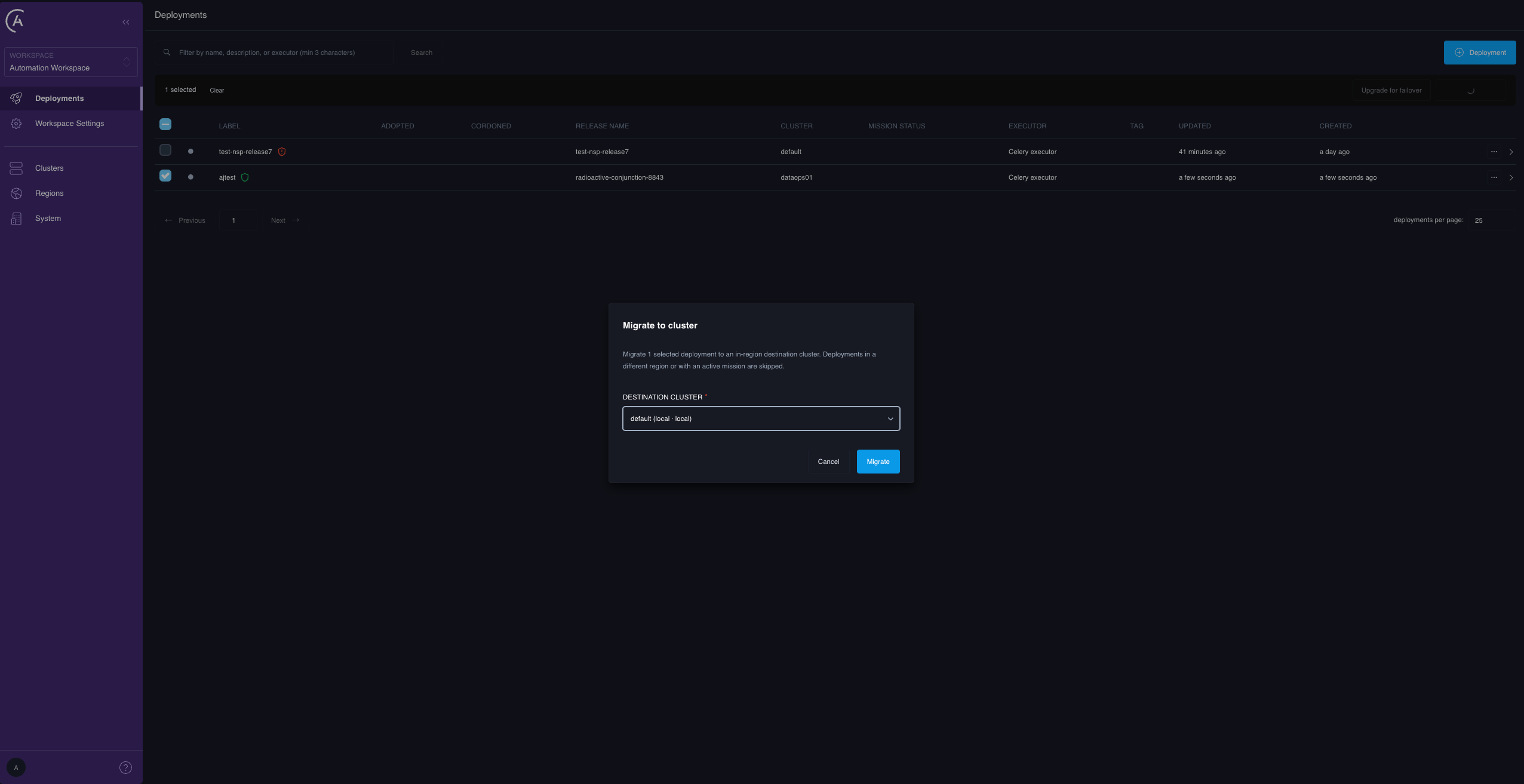 Results come back immediately: successfully claimed Deployments start their missions, and the outcome appears inline as a result banner, for example "47 claimed, 3 skipped (2 current mission conflict, 1 cross region migration not allowed)." The banner is orange when anything was skipped and green when everything was claimed.
Read the skip banner. Skipping is normal and non-fatal, but it means those Deployments didn't move. Every skip reason and its remedy is in [Per-deployment migration reference](/docs/astro-private-cloud/v-2-x/per-deployment-migration-reference#per-deployment-skips).
### From the Deployment detail page
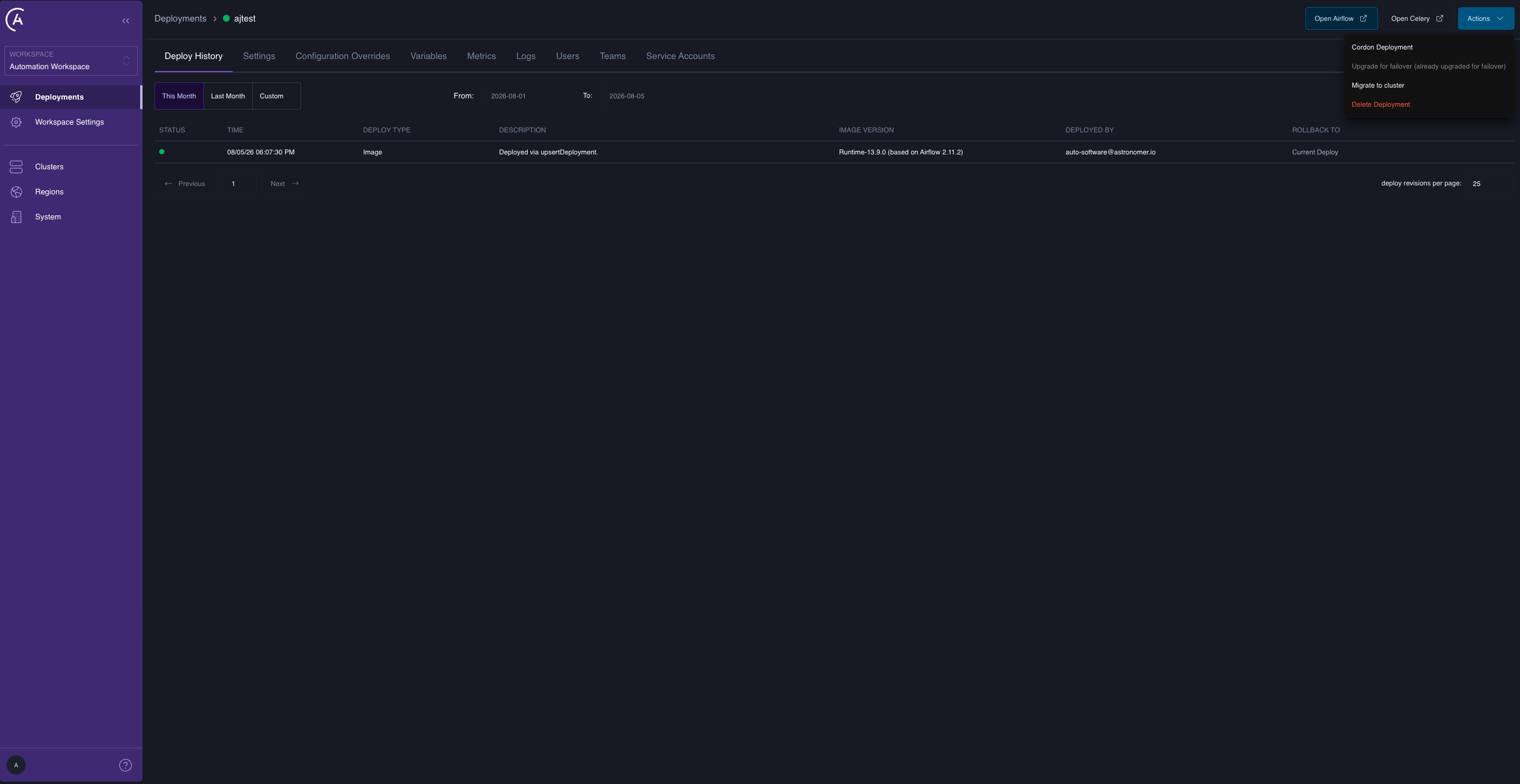
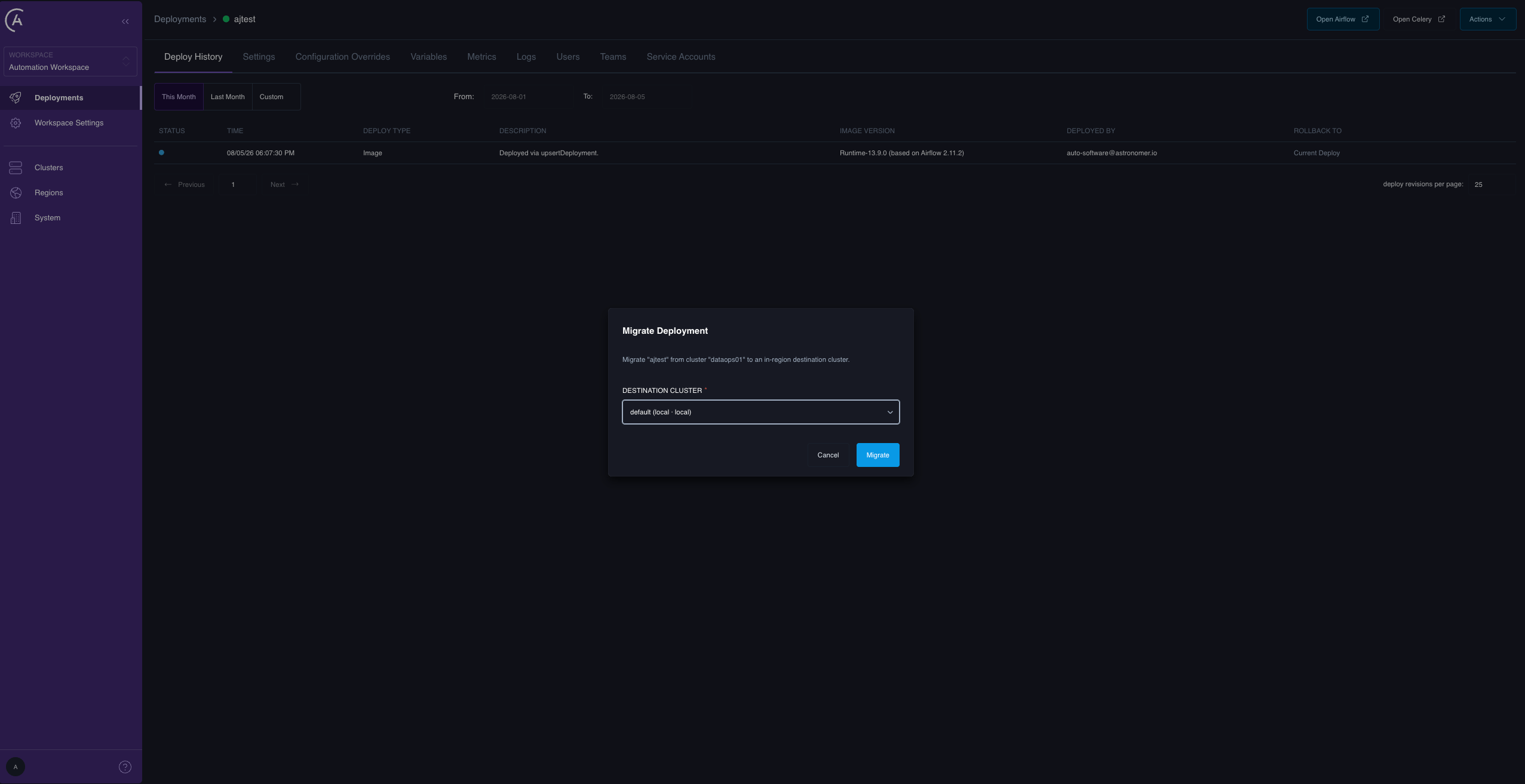
Open the Deployment and select **Migrate to cluster** from the header **Actions** menu, then select a destination. It's the same mutation, the same rules, and one ID. Unlike the list, the result here is a toast: a "Migration started" toast on success, or a "Migration not started" error toast whose text is the raw skip reason when the Deployment is skipped.
Results come back immediately: successfully claimed Deployments start their missions, and the outcome appears inline as a result banner, for example "47 claimed, 3 skipped (2 current mission conflict, 1 cross region migration not allowed)." The banner is orange when anything was skipped and green when everything was claimed.
Read the skip banner. Skipping is normal and non-fatal, but it means those Deployments didn't move. Every skip reason and its remedy is in [Per-deployment migration reference](/docs/astro-private-cloud/v-2-x/per-deployment-migration-reference#per-deployment-skips).
### From the Deployment detail page
Open the Deployment and select **Migrate to cluster** from the header **Actions** menu, then select a destination. It's the same mutation, the same rules, and one ID. Unlike the list, the result here is a toast: a "Migration started" toast on success, or a "Migration not started" error toast whose text is the raw skip reason when the Deployment is skipped.
 ### With the API
```graphql theme={null}
mutation {
migrateDeployments(
deploymentIds: ["", ""]
destinationClusterId: ""
) {
missions { deploymentId missionId }
skipped { deploymentId reason }
}
}
```
* `deploymentIds` takes one or more IDs. Duplicates are de-duplicated. A single-element list is the trivial case; there is no separate single-Deployment mutation.
* `destinationClusterId` is the one cluster all listed Deployments move to. They may come from different source clusters, as long as each source is in the same region as the destination.
* Mode is always `CONTROLLED`. It isn't a parameter. Migration drains a healthy source before bringing the Deployment up elsewhere; if the source is unavailable, you need a cluster failover, not a migration.
Save the returned `missionId` values — they are the handle for `missionProgress`.
The response is synchronous in acceptance, asynchronous in execution. A returned `missionId` means the mission was durably created, not that the Deployment has moved. Watch progress in the APC UI or with `missionProgress`.
### What migration isn't for
* Draining a whole cluster. Use full-cluster failover to decommission a cluster.
* Cross-region or cross-provider moves. The region gate blocks them.
* Moving a Deployment off a dead cluster. Migration requires a healthy source. Use cluster failover.
* Automatic destination selection. You always specify the destination.
## What happens during a migration
Each mission runs the controlled-move sequence:
```text theme={null}
Mission (kind = MOVE, mode = CONTROLLED)
│
├─▶ Scavenger flight — on the SOURCE cluster
│ DRAIN scale down components
│ DELETE uninstall the Helm release and purge its resources. The
│ namespace itself is deleted only when namespace pools
│ are disabled
│
└─▶ Hyperjump flight — on the DESTINATION cluster
(dispatched only after the Scavenger flight SUCCEEDS)
NAMESPACE create the destination namespace
SECRETS ESO pulls the Deployment's secrets from your backend
FENCE disable the source database users and terminate their
connections, enable the destination database users
DEPLOYMENT install the Helm release on the destination
WAIT wait for the Airflow components to become healthy
```
The phase names — `DRAIN`, `DELETE`, `NAMESPACE`, `SECRETS`, `FENCE`, `DEPLOYMENT`, and `WAIT` — are the literal values recorded against each flight and emitted in the data plane logs, which is useful when correlating a stuck migration with data plane output.
Controlled mode drains and deletes the source first, so that no Airflow instance is writing to the metadata database while another is starting. That is what makes a controlled move zero-data-loss — and also what makes it non-reversible, because by the time the Hyperjump flight runs, the source release is gone.
The migration doesn't touch the Airflow metadata database, your secrets backend, Dag storage, or the Deployment's record in the control plane. Only the Kubernetes-side installation moves.
* On success, the mission reaches `COMPLETED`, the Deployment's `clusterId` flips from source to destination, and its active-mission reference clears.
* On failure, the mission reaches `FAILED`, `clusterId` stays on the source, and the active-mission reference clears. See [Recover a failed migration](#recover-a-failed-migration).
## Observe a migration
### In the APC UI
The **Mission Status** column on the Deployments list gives a one-glance phase per Deployment, for example "Migration - In progress." There is no mission or flight detail view in the APC UI in 2.1; for the full per-mission detail, use the `missionProgress` API, which is the durable source of truth.
### With the API
```graphql theme={null}
mutation {
migrateDeployments(
deploymentIds: ["", ""]
destinationClusterId: ""
) {
missions { deploymentId missionId }
skipped { deploymentId reason }
}
}
```
* `deploymentIds` takes one or more IDs. Duplicates are de-duplicated. A single-element list is the trivial case; there is no separate single-Deployment mutation.
* `destinationClusterId` is the one cluster all listed Deployments move to. They may come from different source clusters, as long as each source is in the same region as the destination.
* Mode is always `CONTROLLED`. It isn't a parameter. Migration drains a healthy source before bringing the Deployment up elsewhere; if the source is unavailable, you need a cluster failover, not a migration.
Save the returned `missionId` values — they are the handle for `missionProgress`.
The response is synchronous in acceptance, asynchronous in execution. A returned `missionId` means the mission was durably created, not that the Deployment has moved. Watch progress in the APC UI or with `missionProgress`.
### What migration isn't for
* Draining a whole cluster. Use full-cluster failover to decommission a cluster.
* Cross-region or cross-provider moves. The region gate blocks them.
* Moving a Deployment off a dead cluster. Migration requires a healthy source. Use cluster failover.
* Automatic destination selection. You always specify the destination.
## What happens during a migration
Each mission runs the controlled-move sequence:
```text theme={null}
Mission (kind = MOVE, mode = CONTROLLED)
│
├─▶ Scavenger flight — on the SOURCE cluster
│ DRAIN scale down components
│ DELETE uninstall the Helm release and purge its resources. The
│ namespace itself is deleted only when namespace pools
│ are disabled
│
└─▶ Hyperjump flight — on the DESTINATION cluster
(dispatched only after the Scavenger flight SUCCEEDS)
NAMESPACE create the destination namespace
SECRETS ESO pulls the Deployment's secrets from your backend
FENCE disable the source database users and terminate their
connections, enable the destination database users
DEPLOYMENT install the Helm release on the destination
WAIT wait for the Airflow components to become healthy
```
The phase names — `DRAIN`, `DELETE`, `NAMESPACE`, `SECRETS`, `FENCE`, `DEPLOYMENT`, and `WAIT` — are the literal values recorded against each flight and emitted in the data plane logs, which is useful when correlating a stuck migration with data plane output.
Controlled mode drains and deletes the source first, so that no Airflow instance is writing to the metadata database while another is starting. That is what makes a controlled move zero-data-loss — and also what makes it non-reversible, because by the time the Hyperjump flight runs, the source release is gone.
The migration doesn't touch the Airflow metadata database, your secrets backend, Dag storage, or the Deployment's record in the control plane. Only the Kubernetes-side installation moves.
* On success, the mission reaches `COMPLETED`, the Deployment's `clusterId` flips from source to destination, and its active-mission reference clears.
* On failure, the mission reaches `FAILED`, `clusterId` stays on the source, and the active-mission reference clears. See [Recover a failed migration](#recover-a-failed-migration).
## Observe a migration
### In the APC UI
The **Mission Status** column on the Deployments list gives a one-glance phase per Deployment, for example "Migration - In progress." There is no mission or flight detail view in the APC UI in 2.1; for the full per-mission detail, use the `missionProgress` API, which is the durable source of truth.
 ### With the API
Query the mission IDs the mutation returned:
```graphql theme={null}
query {
missionProgress(missionIds: ["", ""]) {
id
kind # MOVE for a migration
state
originClusterId
destinationClusterId
failoverRequestId # always null for a migration
flights {
id
role # SCAVENGER | HYPERJUMP
state
}
}
}
```
Or ask a Deployment what it is currently doing:
```graphql theme={null}
query {
deployment(where: { id: "" }) {
isBeingFailedOver # true while any mission is active
failoverReadiness # the shield state (upgrade lifecycle, not migration)
activeMission {
id kind state
flights { role state }
}
}
}
```
`activeMission` and `isBeingFailedOver` clear to `null` and `false` as soon as the Hyperjump flight succeeds — for a per-deployment migration the mission is then `COMPLETED` — and on any terminal state. An in-progress cutover has a non-null `activeMission`; a completed one is `null` plus a flipped `clusterId`.
For the mission-state and flight-state enumerations, see [Per-deployment migration reference](/docs/astro-private-cloud/v-2-x/per-deployment-migration-reference#mission-states).
Two API caveats. First, `missionProgress` silently drops missions you lack permission to see rather than returning an error, so a short result list may mean a permissions gap, not a missing mission. Second, `missionProgress` carries no timestamps, no error text, and no percentage — it tells you which flight is where in its state machine, not how long it has been there or why it failed. For failure detail, check the control plane logs for the mission ID.
`missionProgress` requires cluster-admin access — `system.clusters.get` or a cluster-admin role — the same authority needed to run a migration, so the operator who triggers migrations can observe them. A workspace member can't call it. The `deployment` query is available to anyone who can view the Deployment.
## What is blocked during a migration
While a Deployment has an active mission, mutations that would reach the data plane for that Deployment are rejected, because they would tear down or alter resources the Hyperjump flight is provisioning. The blocked mutations are `upsertDeployment` updates, `deleteDeployment`, `updateDeploymentConfig`, `deleteDeploymentConfig`, `updateDeploymentVariables`, `updateDeploymentImage`, `updateDeploymentKedaConfig`, `createDeployRevision`, and `deployRollback`. Creating a new Deployment isn't blocked by an active mission, though it is still blocked by an active cluster failover or a cordoned target cluster.
`updateDeploymentsResources` is gated too, but it silently skips the affected Deployments instead of returning an error — check its response rather than assuming it applied to everything you selected.
The error is explicit:
```text theme={null}
deleteDeployment is disabled while deployment is part of
active mission .
```
The block is per Deployment — other Deployments on either cluster stay fully mutable — and it lifts automatically when the mission reaches a terminal state. There is nothing to unlock manually. In practice, code deploys to a migrating Deployment fail while the move is in flight. Migrations are usually short, but tell the owning team before you start one, and avoid migrating during a team's deploy window.
## Recover a failed migration
A mission in `FAILED` needs your attention. What to do depends on where it failed. Query `missionProgress`, or open the Deployment detail page, and look at the flights:
| Symptom | What it means | State of the Deployment |
| ---------------------------------------------- | --------------------------------------------------------------------------- | ------------------------------------------------ |
| Scavenger `FAILED`, Hyperjump never dispatched | The source drain or uninstall failed. | Still on the source, possibly partially drained. |
| Scavenger `SUCCEEDED`, Hyperjump `FAILED` | The source was purged and the destination couldn't bring the Deployment up. | Installed nowhere. Data intact, workload down. |
| Any flight `AWAITING_DP_HEALTH` | Not a failure — a wait. | Unchanged. It resumes automatically. |
If the Hyperjump flight failed, the Deployment is installed nowhere and needs the following recovery:
1. Diagnose the destination. The usual causes are node capacity, resource quota, and image-pull failure. The destination cluster's events and the control plane logs for that mission ID will say which.
2. Fix the underlying cause on the destination cluster.
3. Retry forward. Re-run `migrateDeployments` for the same Deployment and the same destination. The active-mission reference cleared when the mission reached its terminal state, so the Deployment is claimable again.
4. If the destination can't be fixed quickly, retry forward to a different in-region destination rather than trying to restore the source.
Don't try to hand-restore the Deployment on the source cluster. The Helm release, namespace, and Kubernetes secrets there were deliberately purged. Recreating them out of band bypasses the fencing model and risks two Airflow instances writing to the same metadata database. Always recover by retrying forward through `migrateDeployments`.
The Airflow metadata database, your secrets backend, and Dag storage are untouched by a failed migration. The workload is down, but nothing is lost. Dag runs that were active during the move may need attention once the Deployment is back up.
To avoid this entirely:
* Confirm destination headroom — nodes and quota — before migrating.
* Confirm the Deployment's image is present in a registry the destination can pull from. Replication lag between regional registries is a real cause of Hyperjump failure.
* Canary one Deployment before moving a batch.
* Migrate outside the owning team's deploy window.
## Related documentation
* [Configure per-deployment migration](/docs/astro-private-cloud/v-2-x/configure-per-deployment-migration)
* [Per-deployment migration reference](/docs/astro-private-cloud/v-2-x/per-deployment-migration-reference)
* [Data plane failover](/docs/astro-private-cloud/v-2-x/data-plane-failover)
* [Trigger a data plane failover](/docs/astro-private-cloud/v-2-x/trigger-data-plane-failover)
### With the API
Query the mission IDs the mutation returned:
```graphql theme={null}
query {
missionProgress(missionIds: ["", ""]) {
id
kind # MOVE for a migration
state
originClusterId
destinationClusterId
failoverRequestId # always null for a migration
flights {
id
role # SCAVENGER | HYPERJUMP
state
}
}
}
```
Or ask a Deployment what it is currently doing:
```graphql theme={null}
query {
deployment(where: { id: "" }) {
isBeingFailedOver # true while any mission is active
failoverReadiness # the shield state (upgrade lifecycle, not migration)
activeMission {
id kind state
flights { role state }
}
}
}
```
`activeMission` and `isBeingFailedOver` clear to `null` and `false` as soon as the Hyperjump flight succeeds — for a per-deployment migration the mission is then `COMPLETED` — and on any terminal state. An in-progress cutover has a non-null `activeMission`; a completed one is `null` plus a flipped `clusterId`.
For the mission-state and flight-state enumerations, see [Per-deployment migration reference](/docs/astro-private-cloud/v-2-x/per-deployment-migration-reference#mission-states).
Two API caveats. First, `missionProgress` silently drops missions you lack permission to see rather than returning an error, so a short result list may mean a permissions gap, not a missing mission. Second, `missionProgress` carries no timestamps, no error text, and no percentage — it tells you which flight is where in its state machine, not how long it has been there or why it failed. For failure detail, check the control plane logs for the mission ID.
`missionProgress` requires cluster-admin access — `system.clusters.get` or a cluster-admin role — the same authority needed to run a migration, so the operator who triggers migrations can observe them. A workspace member can't call it. The `deployment` query is available to anyone who can view the Deployment.
## What is blocked during a migration
While a Deployment has an active mission, mutations that would reach the data plane for that Deployment are rejected, because they would tear down or alter resources the Hyperjump flight is provisioning. The blocked mutations are `upsertDeployment` updates, `deleteDeployment`, `updateDeploymentConfig`, `deleteDeploymentConfig`, `updateDeploymentVariables`, `updateDeploymentImage`, `updateDeploymentKedaConfig`, `createDeployRevision`, and `deployRollback`. Creating a new Deployment isn't blocked by an active mission, though it is still blocked by an active cluster failover or a cordoned target cluster.
`updateDeploymentsResources` is gated too, but it silently skips the affected Deployments instead of returning an error — check its response rather than assuming it applied to everything you selected.
The error is explicit:
```text theme={null}
deleteDeployment is disabled while deployment is part of
active mission .
```
The block is per Deployment — other Deployments on either cluster stay fully mutable — and it lifts automatically when the mission reaches a terminal state. There is nothing to unlock manually. In practice, code deploys to a migrating Deployment fail while the move is in flight. Migrations are usually short, but tell the owning team before you start one, and avoid migrating during a team's deploy window.
## Recover a failed migration
A mission in `FAILED` needs your attention. What to do depends on where it failed. Query `missionProgress`, or open the Deployment detail page, and look at the flights:
| Symptom | What it means | State of the Deployment |
| ---------------------------------------------- | --------------------------------------------------------------------------- | ------------------------------------------------ |
| Scavenger `FAILED`, Hyperjump never dispatched | The source drain or uninstall failed. | Still on the source, possibly partially drained. |
| Scavenger `SUCCEEDED`, Hyperjump `FAILED` | The source was purged and the destination couldn't bring the Deployment up. | Installed nowhere. Data intact, workload down. |
| Any flight `AWAITING_DP_HEALTH` | Not a failure — a wait. | Unchanged. It resumes automatically. |
If the Hyperjump flight failed, the Deployment is installed nowhere and needs the following recovery:
1. Diagnose the destination. The usual causes are node capacity, resource quota, and image-pull failure. The destination cluster's events and the control plane logs for that mission ID will say which.
2. Fix the underlying cause on the destination cluster.
3. Retry forward. Re-run `migrateDeployments` for the same Deployment and the same destination. The active-mission reference cleared when the mission reached its terminal state, so the Deployment is claimable again.
4. If the destination can't be fixed quickly, retry forward to a different in-region destination rather than trying to restore the source.
Don't try to hand-restore the Deployment on the source cluster. The Helm release, namespace, and Kubernetes secrets there were deliberately purged. Recreating them out of band bypasses the fencing model and risks two Airflow instances writing to the same metadata database. Always recover by retrying forward through `migrateDeployments`.
The Airflow metadata database, your secrets backend, and Dag storage are untouched by a failed migration. The workload is down, but nothing is lost. Dag runs that were active during the move may need attention once the Deployment is back up.
To avoid this entirely:
* Confirm destination headroom — nodes and quota — before migrating.
* Confirm the Deployment's image is present in a registry the destination can pull from. Replication lag between regional registries is a real cause of Hyperjump failure.
* Canary one Deployment before moving a batch.
* Migrate outside the owning team's deploy window.
## Related documentation
* [Configure per-deployment migration](/docs/astro-private-cloud/v-2-x/configure-per-deployment-migration)
* [Per-deployment migration reference](/docs/astro-private-cloud/v-2-x/per-deployment-migration-reference)
* [Data plane failover](/docs/astro-private-cloud/v-2-x/data-plane-failover)
* [Trigger a data plane failover](/docs/astro-private-cloud/v-2-x/trigger-data-plane-failover)