> ## Documentation Index
> Fetch the complete documentation index at: https://astronomer.io/docs/llms.txt
> Use this file to discover all available pages before exploring further.
# Deregister a data plane cluster
Use this guide to remove a data plane cluster from your Astro Private Cloud (APC) control plane.
Only a *System Admin* can deregister a data plane cluster.
## Prerequisites
* Make sure there are no running Airflow Deployments in the data plane cluster.
* Check that your automation configurations and scripts, such as your CI/CD or IaC, don't reference this cluster.
## Deregister using the UI
1. In the Astro Private Cloud UI, go to the **Clusters** page.
2. Click **See More \[...]** on the cluster that you want to deregister.
3. Click **Deregister Cluster**.
4. Click **Deregister**.
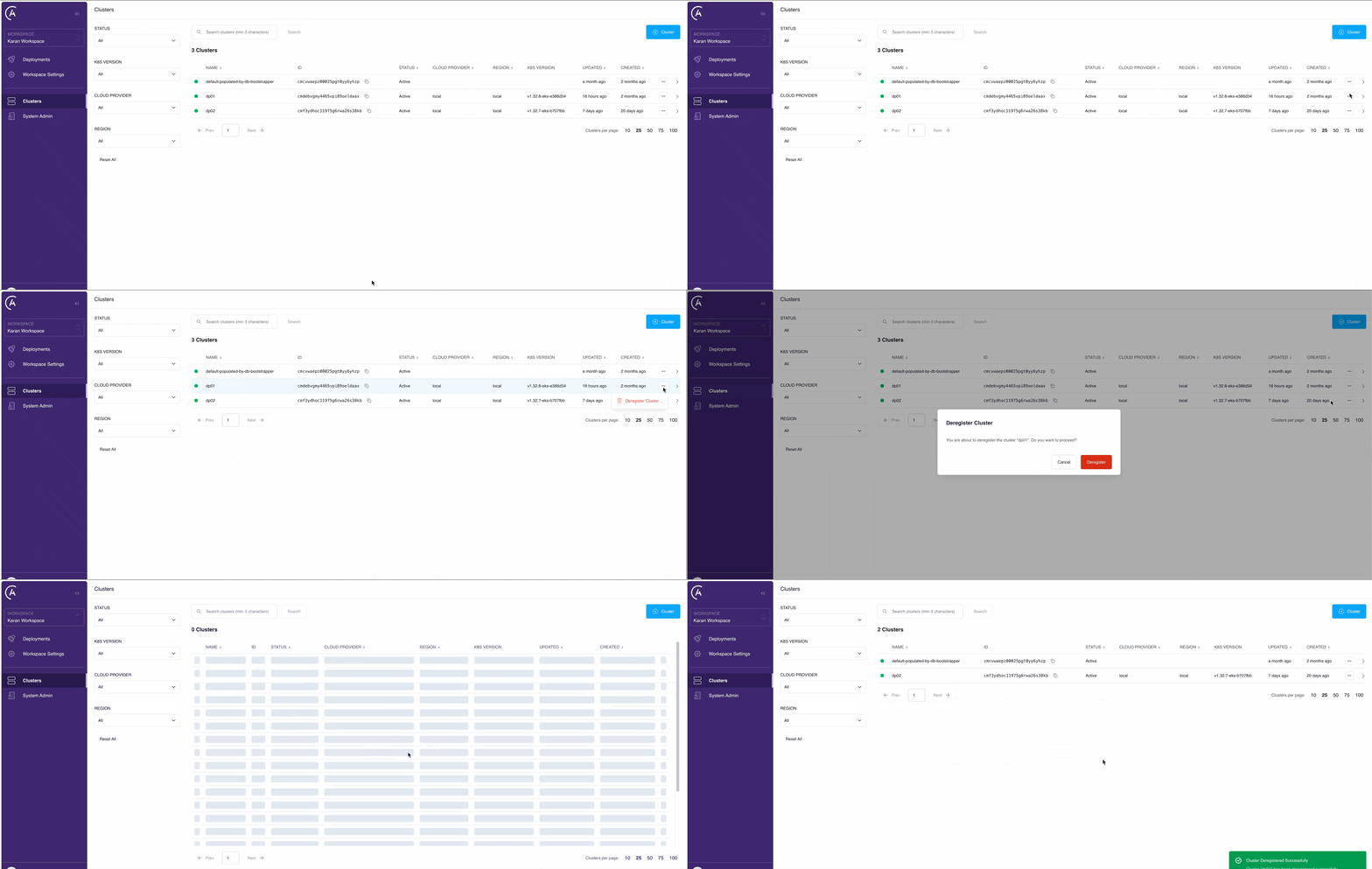 This removes the control plane association. Now, platform services no longer target this data plane cluster.
Deregistering a data plane cluster doesn't delete existing platform resources such as namespaces, services, or persistent volumes in your cloud environment. If you want to fully remove these resources, you must manually delete the Helm release.
## Deregister through the APC API
You can also deregister a data plane cluster by calling the `deregisterCluster` mutation on the APC API.
Send the request to `https://houston./v1` with a system service account or System Admin user token in the `Authorization` header. For details, see [Authenticate to the APC API](/docs/astro-private-cloud/v-2-x/houston-api-authenticate).
```graphql wrap theme={null}
mutation {
deregisterCluster(id: "") {
id
name
}
}
```
Argument reference:
| Argument | Type | Required | Description |
| -------- | ------ | -------- | ----------------------------------------------------------------------------------------------- |
| `id` | `Uuid` | Yes | The unique identifier of the cluster to deregister. Find it with the `paginatedClusters` query. |
This permanently deletes the cluster record from the control plane. Deregistration doesn't delete platform resources running in the data plane Kubernetes cluster (namespaces, services, persistent volumes). Remove those by uninstalling the data plane Helm release.
## Re-register a cluster
If you deregistered your data plane cluster by mistake, you can [register the same data plane cluster](/docs/astro-private-cloud/v-2-x/register-data-plane) again.
## Related
* [Clusters overview](/docs/astro-private-cloud/v-2-x/overview-data-plane-cluster)
* [Register a cluster](/docs/astro-private-cloud/v-2-x/register-data-plane)
* [Update cluster configurations](/docs/astro-private-cloud/v-2-x/override-data-plane-cluster)
* [Manage cluster status](/docs/astro-private-cloud/v-2-x/cluster-status-management)
* [Authenticate to the APC API](/docs/astro-private-cloud/v-2-x/houston-api-authenticate)
This removes the control plane association. Now, platform services no longer target this data plane cluster.
Deregistering a data plane cluster doesn't delete existing platform resources such as namespaces, services, or persistent volumes in your cloud environment. If you want to fully remove these resources, you must manually delete the Helm release.
## Deregister through the APC API
You can also deregister a data plane cluster by calling the `deregisterCluster` mutation on the APC API.
Send the request to `https://houston./v1` with a system service account or System Admin user token in the `Authorization` header. For details, see [Authenticate to the APC API](/docs/astro-private-cloud/v-2-x/houston-api-authenticate).
```graphql wrap theme={null}
mutation {
deregisterCluster(id: "") {
id
name
}
}
```
Argument reference:
| Argument | Type | Required | Description |
| -------- | ------ | -------- | ----------------------------------------------------------------------------------------------- |
| `id` | `Uuid` | Yes | The unique identifier of the cluster to deregister. Find it with the `paginatedClusters` query. |
This permanently deletes the cluster record from the control plane. Deregistration doesn't delete platform resources running in the data plane Kubernetes cluster (namespaces, services, persistent volumes). Remove those by uninstalling the data plane Helm release.
## Re-register a cluster
If you deregistered your data plane cluster by mistake, you can [register the same data plane cluster](/docs/astro-private-cloud/v-2-x/register-data-plane) again.
## Related
* [Clusters overview](/docs/astro-private-cloud/v-2-x/overview-data-plane-cluster)
* [Register a cluster](/docs/astro-private-cloud/v-2-x/register-data-plane)
* [Update cluster configurations](/docs/astro-private-cloud/v-2-x/override-data-plane-cluster)
* [Manage cluster status](/docs/astro-private-cloud/v-2-x/cluster-status-management)
* [Authenticate to the APC API](/docs/astro-private-cloud/v-2-x/houston-api-authenticate)