> ## Documentation Index
> Fetch the complete documentation index at: https://astronomer.io/docs/llms.txt
> Use this file to discover all available pages before exploring further.
# Pause and resume APC management of a Deployment
Cordoning a Deployment tells Astro Private Cloud (APC) to stop applying changes to it. The Deployment keeps running exactly as it is: its schedulers, workers, and other components stay up, and Airflow keeps scheduling and running tasks. Only APC's ability to change the Deployment is paused.
Uncordon it to resume normal management.
Cordoning applies to any Deployment, whether it is Helm-managed or operator-managed, and whether APC created it or [adopted](/docs/astro-private-cloud/v-2-x/adopt-operator-deployments) it.
## When to cordon
* **During maintenance on the Deployment**, when you are changing something out of band and don't want APC applying changes at the same time.
* **During a change freeze**, to guarantee that nobody's configuration edit reaches a production Deployment.
* **Before a platform upgrade**, for any Deployment you don't want the platform to act on while it upgrades.
* **While the operator is being replaced**, so that nothing is applied during the window when no operator is reconciling. See [Move the operator under APC](/docs/astro-private-cloud/v-2-x/transition-operator-to-apc).
## What a cordon blocks
While a Deployment is cordoned, APC refuses these operations on it:
* Deployment configuration updates, including resources and configuration overrides
* Environment variable changes
* KEDA autoscaling configuration changes
* Code deploys and image updates
* Deploy rollbacks
* Migrating the Deployment to another cluster
* Deleting the Deployment. In the Astro UI the delete action is disabled and labeled **uncordon to delete**
Attempts through the Astro UI or the APC API are rejected with an error saying the Deployment is cordoned. Background work is skipped rather than queued, so nothing you attempt during a cordon is applied later when you uncordon: reapply it yourself afterwards.
Everything else is unaffected. Your Airflow keeps running, Dags keep being scheduled, tasks keep executing, and logs and metrics keep flowing.
A whole cluster can also be cordoned, which blocks every Deployment on it regardless of each Deployment's own cordon state. If a Deployment refuses changes and its own cordon is off, check whether its cluster is cordoned.
## Cordon a Deployment
In the Deployments list, open the Deployment's actions menu and select **Cordon Deployment**. You can optionally give a reason.
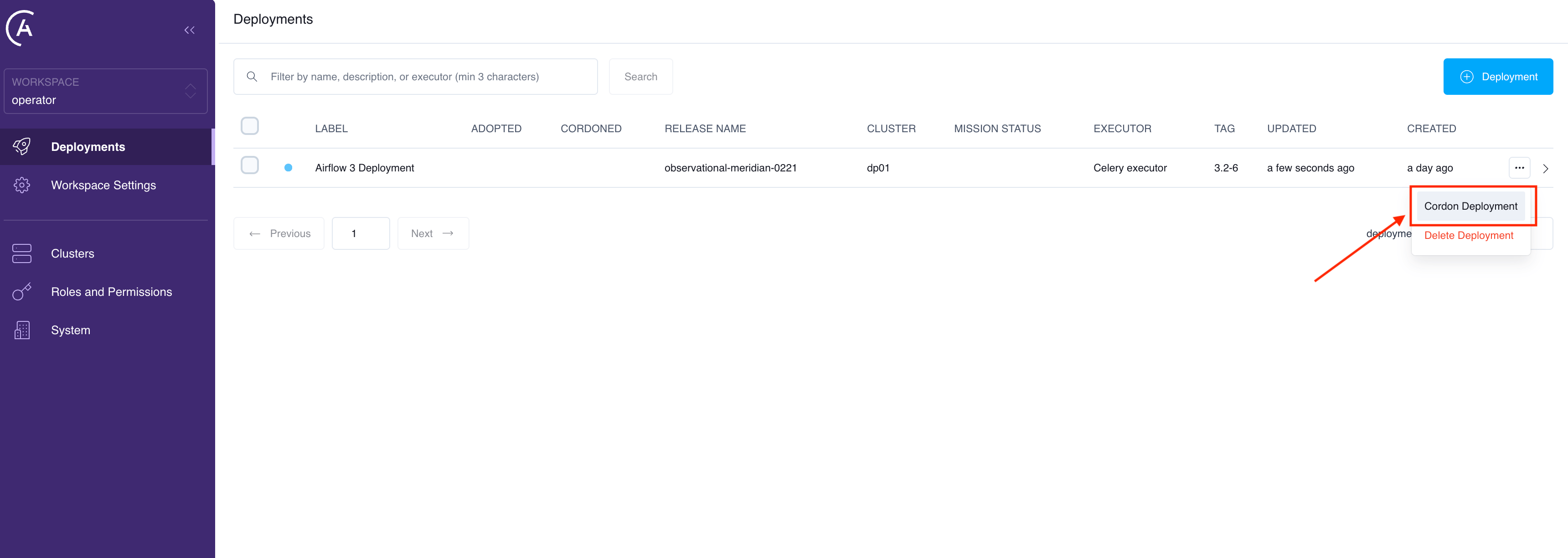 The Deployment then shows a **Cordoned** badge in the **Cordoned** column of the Deployments list, and its editable pages show a banner explaining that configuration changes can't be applied until it's uncordoned.
```graphql theme={null}
mutation {
cordonDeployment(deploymentUuid: "", reason: "Maintenance window") {
id
isCordoned
cordonedAt
cordonedReason
}
}
```
`reason` is optional and is recorded with the cordon so other people can see why it was paused.
Cordoning is idempotent. Cordoning a Deployment that is already cordoned changes nothing and is not recorded again.
There is no Astro CLI command for cordoning. Use the Astro UI or the APC API.
## Uncordon a Deployment
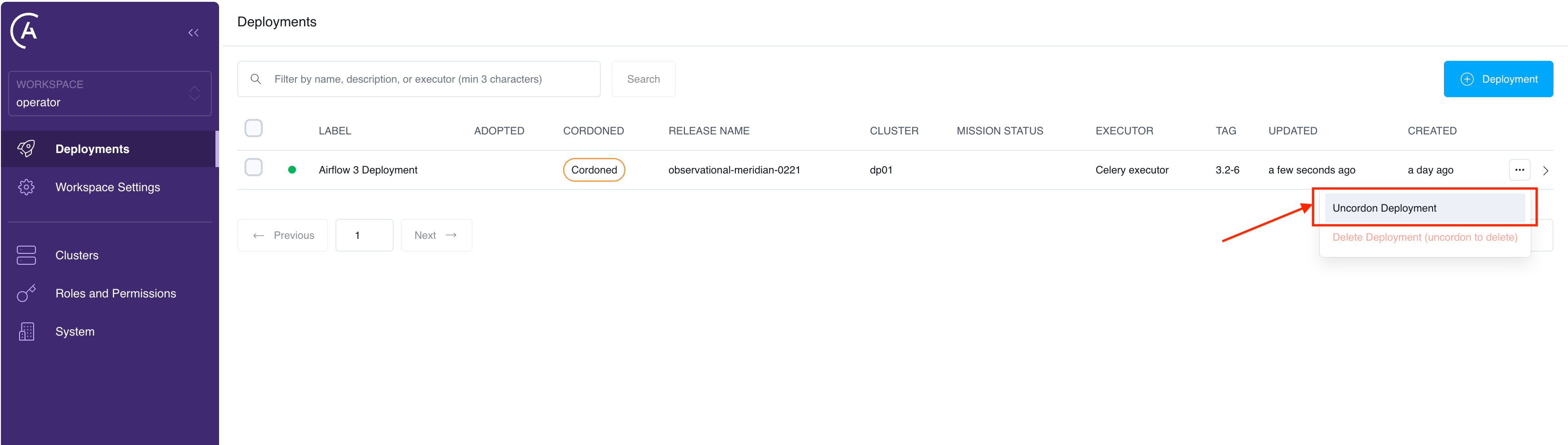
In the Deployments list, open the Deployment's actions menu and select **Uncordon Deployment**.
The Deployment then shows a **Cordoned** badge in the **Cordoned** column of the Deployments list, and its editable pages show a banner explaining that configuration changes can't be applied until it's uncordoned.
```graphql theme={null}
mutation {
cordonDeployment(deploymentUuid: "", reason: "Maintenance window") {
id
isCordoned
cordonedAt
cordonedReason
}
}
```
`reason` is optional and is recorded with the cordon so other people can see why it was paused.
Cordoning is idempotent. Cordoning a Deployment that is already cordoned changes nothing and is not recorded again.
There is no Astro CLI command for cordoning. Use the Astro UI or the APC API.
## Uncordon a Deployment
In the Deployments list, open the Deployment's actions menu and select **Uncordon Deployment**.
 ```graphql theme={null}
mutation {
uncordonDeployment(deploymentUuid: "") {
id
isCordoned
}
}
```
Uncordoning is also idempotent, and APC resumes applying changes immediately. Changes you attempted while it was cordoned are not replayed, so make them again.
## Who can cordon and uncordon
Cordoning and uncordoning require permission to update the Deployment, so anyone who can change a Deployment's configuration can also pause and resume its management. See [Manage permissions](/docs/astro-private-cloud/v-2-x/manage-permissions) and the [role and permission reference](/docs/astro-private-cloud/v-2-x/role-permission-reference).
## Cordons set by Astronomer
A cordon records why it was applied. Most cordons are user-initiated, and appear as such. Astronomer tooling can also cordon a Deployment as part of remediating an adoption, in which case the in-product banner says so. Treat an Astronomer-initiated cordon as deliberate and check with Astronomer before uncordoning it.
## Related documentation
* [Configure a Deployment](/docs/astro-private-cloud/v-2-x/configure-deployment)
* [Adopt operator Deployments](/docs/astro-private-cloud/v-2-x/adopt-operator-deployments)
* [Move the operator under APC](/docs/astro-private-cloud/v-2-x/transition-operator-to-apc)
* [Manage permissions](/docs/astro-private-cloud/v-2-x/manage-permissions)
```graphql theme={null}
mutation {
uncordonDeployment(deploymentUuid: "") {
id
isCordoned
}
}
```
Uncordoning is also idempotent, and APC resumes applying changes immediately. Changes you attempted while it was cordoned are not replayed, so make them again.
## Who can cordon and uncordon
Cordoning and uncordoning require permission to update the Deployment, so anyone who can change a Deployment's configuration can also pause and resume its management. See [Manage permissions](/docs/astro-private-cloud/v-2-x/manage-permissions) and the [role and permission reference](/docs/astro-private-cloud/v-2-x/role-permission-reference).
## Cordons set by Astronomer
A cordon records why it was applied. Most cordons are user-initiated, and appear as such. Astronomer tooling can also cordon a Deployment as part of remediating an adoption, in which case the in-product banner says so. Treat an Astronomer-initiated cordon as deliberate and check with Astronomer before uncordoning it.
## Related documentation
* [Configure a Deployment](/docs/astro-private-cloud/v-2-x/configure-deployment)
* [Adopt operator Deployments](/docs/astro-private-cloud/v-2-x/adopt-operator-deployments)
* [Move the operator under APC](/docs/astro-private-cloud/v-2-x/transition-operator-to-apc)
* [Manage permissions](/docs/astro-private-cloud/v-2-x/manage-permissions)