> ## Documentation Index
> Fetch the complete documentation index at: https://astronomer.io/docs/llms.txt
> Use this file to discover all available pages before exploring further.
# Config governance
Astro Private Cloud (APC) 2.0 uses *config governance* to describe how platform operators and, where allowed, workspace and deployment admins control and change platform and deployment-level settings. If you are choosing which layer to edit first (Helm, cluster, workspace, or deployment), start with the shorter guide, [Configure Astro Private Cloud](/docs/astro-private-cloud/v-2-x/configure-astro-private-cloud), then return here for rules, blocklists, and API detail. For tabular defaults and allowed values under `astronomer.houston.config.deployments`, see [Helm configuration reference](/docs/astro-private-cloud/v-2-x/helm-config-reference#apc-api-configuration).
Config governance in Astro Private Cloud enables settings under the deployments section of the Helm values file to be overridden at the Cluster, Workspace, or Deployment level, allowing for fine-grained control over the configuration of each Apache Airflow Deployment.
Config governance uses a layered deep merge of deployments (cluster, workspace, and deployment layers on top of the platform default), so effective values for those keys resolve predictably. Settings outside the deployments section (such as the astronomer, global, webserver, and nats sections) can only be changed in the Helm values files, and not in the three deployment override layers.
## Overview
For settings under the `deployments` section, config governance resolves values by merging four tiers, where each subsequent tier overrides the previous for keys it sets:
```text wrap theme={null}
Platform (Helm / values.yaml default) → Cluster → Workspace → Deployment
```
| Tier | Scope | Who sets it | How it's set |
| ---------- | ------------------------------------------------ | ------------------------------- | --------------------------------------------------------------------------------------------------------------- |
| Platform | All Deployments across all clusters | Platform operator | `values.yaml` and a Helm upgrade |
| Cluster | All Deployments in a specific data plane cluster | System Admin | Astro UI or GraphQL API ([Override data plane cluster](/docs/astro-private-cloud/v-2-x/override-data-plane-cluster)) |
| Workspace | All Deployments in a specific workspace | Workspace Admin or System Admin | Astro UI or GraphQL API |
| Deployment | A single Deployment | Workspace Admin or System Admin | Astro UI or GraphQL API |
When APC resolves a configuration value for a Deployment, it starts with the platform defaults, merges in any cluster-level overrides, then workspace-level overrides, and finally deployment-level overrides. Later tiers always win for any key they set.
In the Astro UI, configuration overrides at the workspace or deployment level show the override you saved for that scope, not a full preview of the effective merged deployments result. The platform computes the final values when a Deployment is created or updated.
## What can be configured
Config governance applies to all settings under the `deployments.*` part of the platform config in your `values.yaml` (under `astronomer.houston.config`). This includes:
| Configuration domain | Example settings |
| ------------------------------ | ------------------------------------------------------------------- |
| Runtime management | Airflow 3 enablement, custom image SHA, minimum runtime versions |
| Dag deployment mechanisms | Dag-only deployment, git-sync, NFS mount |
| Airflow components | Triggerer, Dag processor enablement |
| Deployment lifecycle | Deploy rollback, hard delete, Airflow DB cleanup |
| Resource management | Executor configuration, component resources, max pod/extra capacity |
| Database management | Manual connection strings, PgBouncer strategy |
| Metrics and reporting | Grafana UI, task usage metrics |
| Deployment images and registry | Docker webhook endpoint, update deployment image endpoint |
The four override tiers in this model (platform default, then cluster, workspace, and deployment) apply only to configuration under the `deployments` section. Keys elsewhere in the platform configuration, for example `global`, `webserver`, and `nats`, aren't changed through those tiers; the platform operator updates them in the values file and with a Helm upgrade.
## Blocklisted keys
Certain configuration keys can't be overridden at the workspace or deployment level because they are tightly coupled to platform or cluster infrastructure.
### Workspace-level blocklist
The following keys can't be set in workspace-level overrides:
| Blocklisted key | Reason |
| --------------- | ----------------------------------------------------------------------------- |
| `authSideCar` | Platform/cluster-level auth proxy; per-workspace override would break routing |
| `logging` | Includes Vector sidecar configuration; platform-level dependency |
### Deployment-level blocklist
The following keys can't be set in deployment-level overrides (superset of workspace blocklist):
| Blocklisted key | Reason |
| --------------------- | -------------------------------------------------------------- |
| `authSideCar` | Platform/cluster-level auth proxy |
| `logging` | Platform-level Vector sidecar dependency |
| `namespaceManagement` | Namespace configuration is immutable after Deployment creation |
If you attempt to set a blocklisted key, the API returns a `BlocklistedDeploymentConfigKeysError` with the offending key names.
## `DELETE_KEY` and strict schema validation
The string `"DELETE_KEY"` is a merge sentinel for cluster, workspace, and deployment `deploymentsConfigOverride` objects. When you set a key’s value to `"DELETE_KEY"`, the control plane removes that key from the stored override (or a whole subtree, if you set a parent to `"DELETE_KEY"`), so the effective value falls back to the next tier. Use it with the `updateCluster`, `updateWorkspaceDeploymentsConfig`, and `updateDeploymentConfig` GraphQL mutations. See [Override data plane cluster configurations](/docs/astro-private-cloud/v-2-x/override-data-plane-cluster) for the cluster case. You can't use `"DELETE_KEY"` to remove keys that are required in the platform’s default `deployments` object.
The `astronomer.houston.strictSchemaCheck.enabled` value in your platform values file controls whether deployment override payloads are validated against a JSON schema. When this is `true` (the default in the 2.0 [Astronomer Helm chart](https://github.com/astronomer/astronomer)), unknown top-level domain keys and invalid types are rejected. When `false`, that validation is skipped, which is useful in edge cases such as [Git-Sync relay metrics](/docs/astro-private-cloud/v-2-x/git-sync-relay-metrics) where you need `helm` keys the schema doesn't list yet. After you change the flag, apply it with a Helm upgrade of the control plane.
## Cluster-level configuration
Cluster-level overrides apply to all Deployments within a specific data plane cluster. This is useful for setting cluster-specific defaults like resource limits, executor configurations, or feature flags that should apply uniformly to all Deployments in a given cluster.
For instructions on configuring cluster-level overrides, see [Override data plane cluster configurations](/docs/astro-private-cloud/v-2-x/override-data-plane-cluster).
## Workspace-level configuration
Workspace-level overrides apply to all Deployments within a specific workspace. This allows Workspace Admins to customize settings for their team without affecting other Workspaces.
### Add or update workspace configuration
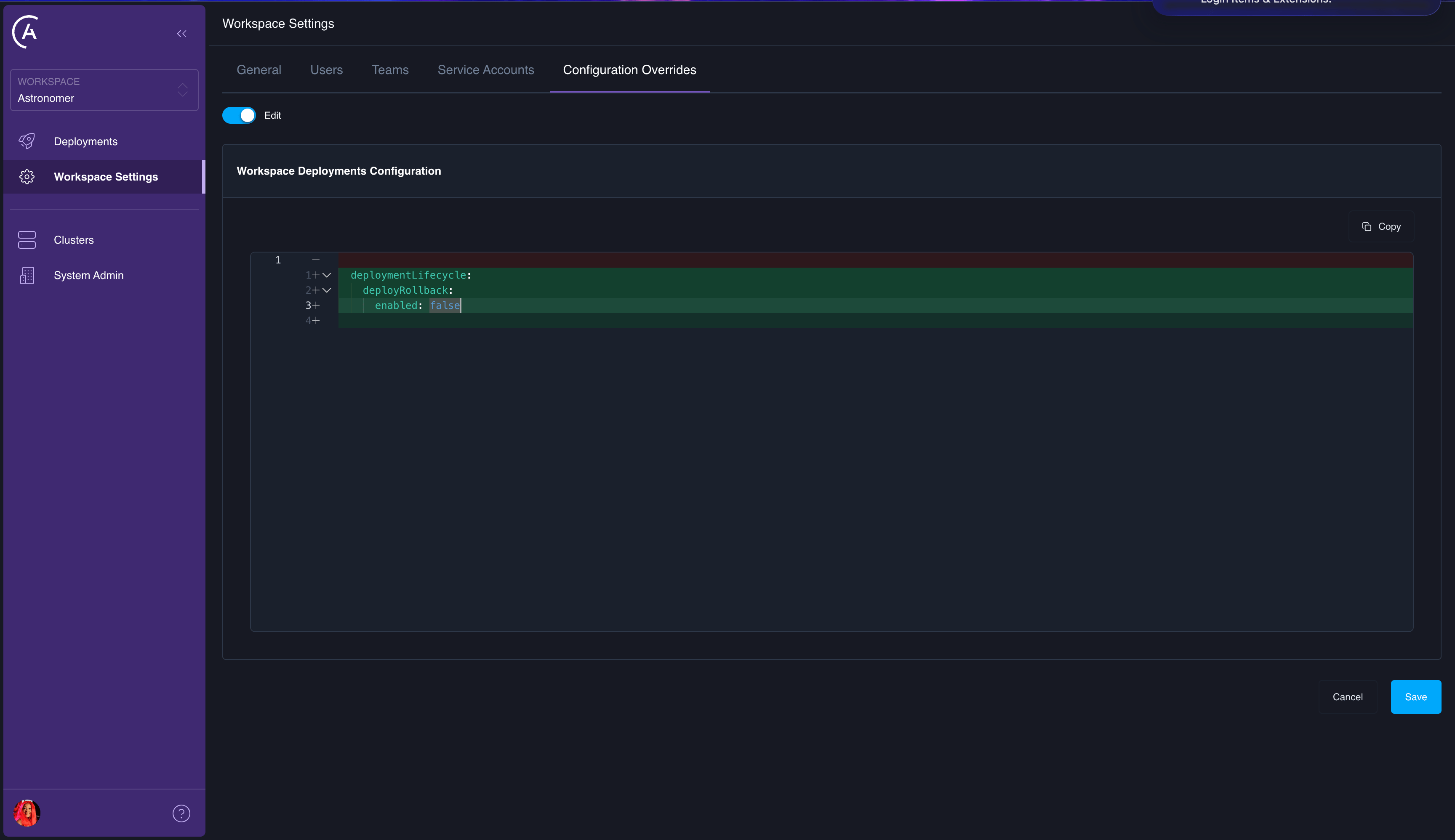 You can set workspace configuration overrides using the Astro UI or the APC API.
Use the `updateWorkspaceDeploymentsConfig` mutation to add or update workspace-level overrides:
```graphql wrap theme={null}
mutation {
updateWorkspaceDeploymentsConfig(
workspaceUuid: ""
deploymentsConfigOverride: {
deploymentLifecycle: {
deployRollback: {
enabled: true
}
}
}
reason: "Enable deploy rollback for all deployments in this workspace"
) {
id
config
}
}
```
The `deploymentsConfigOverride` argument accepts a partial JSON object. Keys you provide are merged into the existing workspace override. Keys you omit are left unchanged. To remove a specific key from the stored override, set its value to the string `"DELETE_KEY"`:
```graphql wrap theme={null}
mutation {
updateWorkspaceDeploymentsConfig(
workspaceUuid: ""
deploymentsConfigOverride: {
deploymentLifecycle: {
deployRollback: {
enabled: "DELETE_KEY"
}
}
}
reason: "Remove deploy rollback override, revert to cluster/platform default"
) {
id
config
}
}
```
You can set workspace configuration overrides using the Astro UI or the APC API.
Use the `updateWorkspaceDeploymentsConfig` mutation to add or update workspace-level overrides:
```graphql wrap theme={null}
mutation {
updateWorkspaceDeploymentsConfig(
workspaceUuid: ""
deploymentsConfigOverride: {
deploymentLifecycle: {
deployRollback: {
enabled: true
}
}
}
reason: "Enable deploy rollback for all deployments in this workspace"
) {
id
config
}
}
```
The `deploymentsConfigOverride` argument accepts a partial JSON object. Keys you provide are merged into the existing workspace override. Keys you omit are left unchanged. To remove a specific key from the stored override, set its value to the string `"DELETE_KEY"`:
```graphql wrap theme={null}
mutation {
updateWorkspaceDeploymentsConfig(
workspaceUuid: ""
deploymentsConfigOverride: {
deploymentLifecycle: {
deployRollback: {
enabled: "DELETE_KEY"
}
}
}
reason: "Remove deploy rollback override, revert to cluster/platform default"
) {
id
config
}
}
```
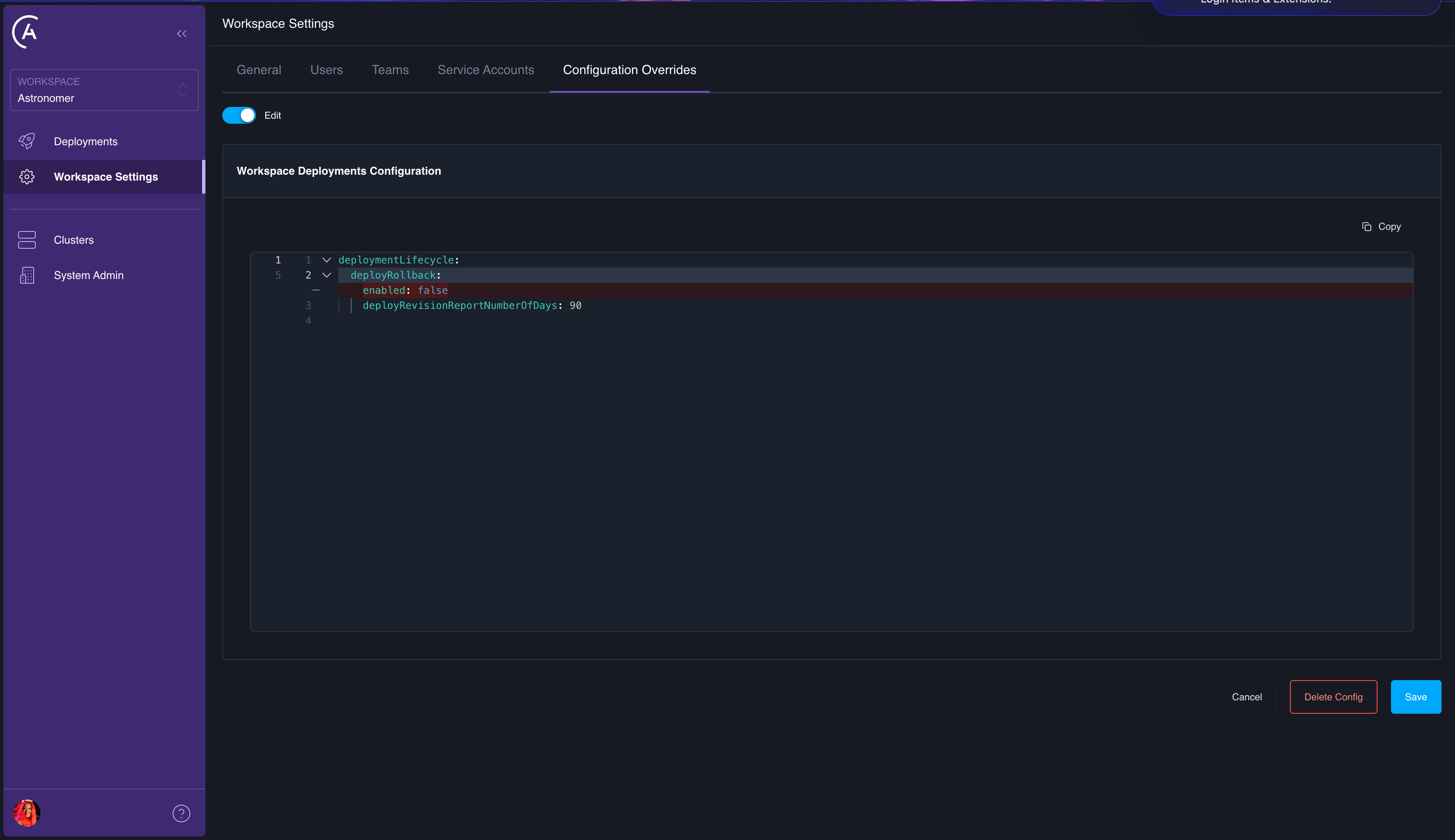 In the Astro UI, navigate to the workspace where you want to configure overrides.
Open the **Deployment Configuration** section.
Click **Edit**.
Add, modify, or remove the configuration keys you need.
Click **Update**.
### Delete workspace configuration
Deleting workspace configuration removes all workspace-level overrides, reverting all Deployments in the workspace to use cluster-level and platform-level defaults.
Use the `deleteWorkspaceDeploymentsConfig` mutation:
```graphql wrap theme={null}
mutation {
deleteWorkspaceDeploymentsConfig(
workspaceUuid: ""
reason: "Revert workspace to cluster defaults"
) {
id
config
deletedAt
}
}
```
In the Astro UI, navigate to the workspace where you want to configure overrides.
Open the **Deployment Configuration** section.
Click **Edit**.
Add, modify, or remove the configuration keys you need.
Click **Update**.
### Delete workspace configuration
Deleting workspace configuration removes all workspace-level overrides, reverting all Deployments in the workspace to use cluster-level and platform-level defaults.
Use the `deleteWorkspaceDeploymentsConfig` mutation:
```graphql wrap theme={null}
mutation {
deleteWorkspaceDeploymentsConfig(
workspaceUuid: ""
reason: "Revert workspace to cluster defaults"
) {
id
config
deletedAt
}
}
```
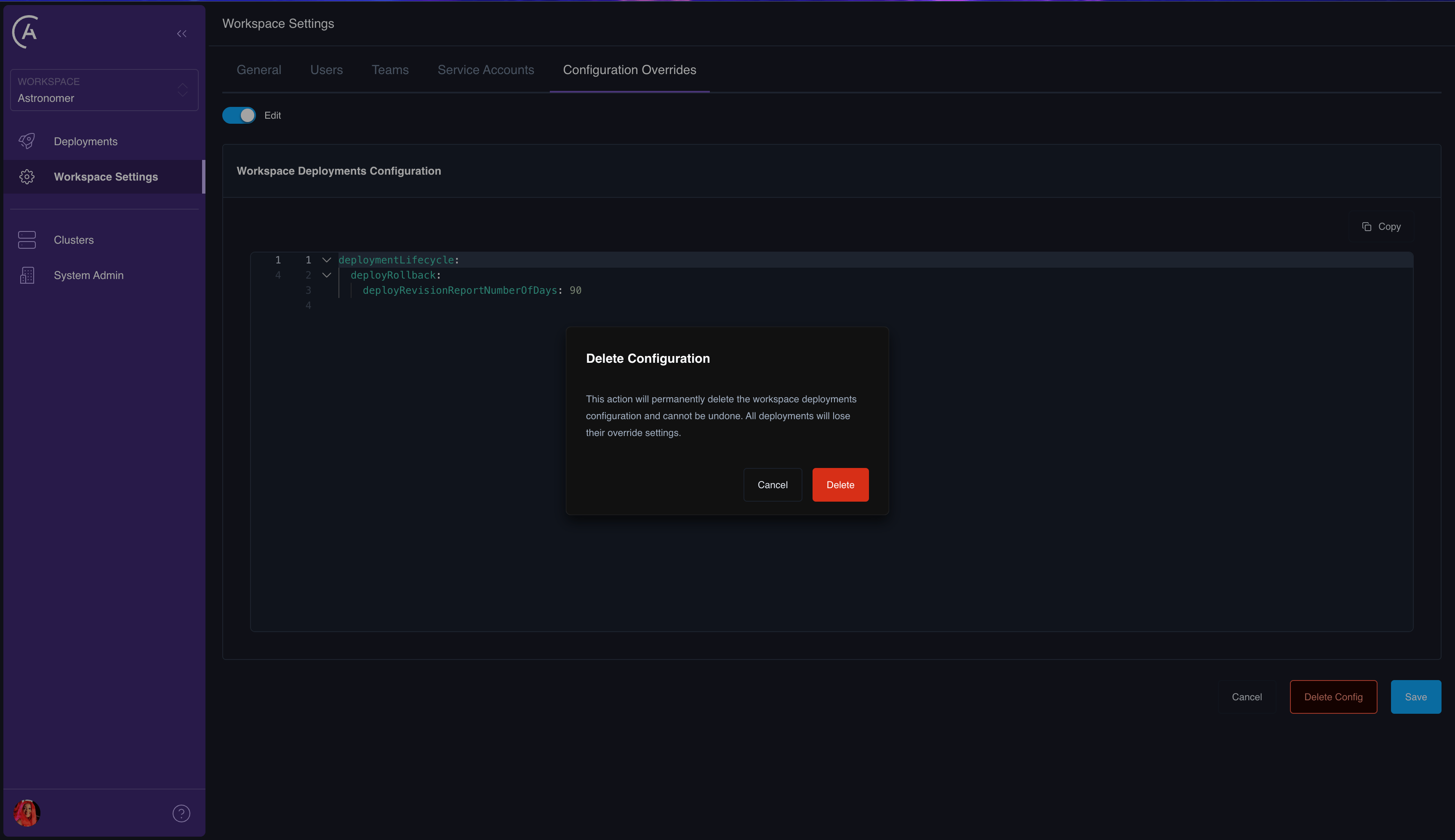 In the Astro UI, navigate to the workspace where you want to remove overrides, then open the **Deployment Configuration** section.
Click **Delete** to remove all workspace-level overrides.
## Deployment-level configuration
Deployment-level overrides apply to a single Deployment. This is the most granular tier and takes the highest precedence. Use this to customize a specific Deployment's behavior without affecting other Deployments in the same workspace.
### Add or update deployment configuration
In the Astro UI, navigate to the workspace where you want to remove overrides, then open the **Deployment Configuration** section.
Click **Delete** to remove all workspace-level overrides.
## Deployment-level configuration
Deployment-level overrides apply to a single Deployment. This is the most granular tier and takes the highest precedence. Use this to customize a specific Deployment's behavior without affecting other Deployments in the same workspace.
### Add or update deployment configuration
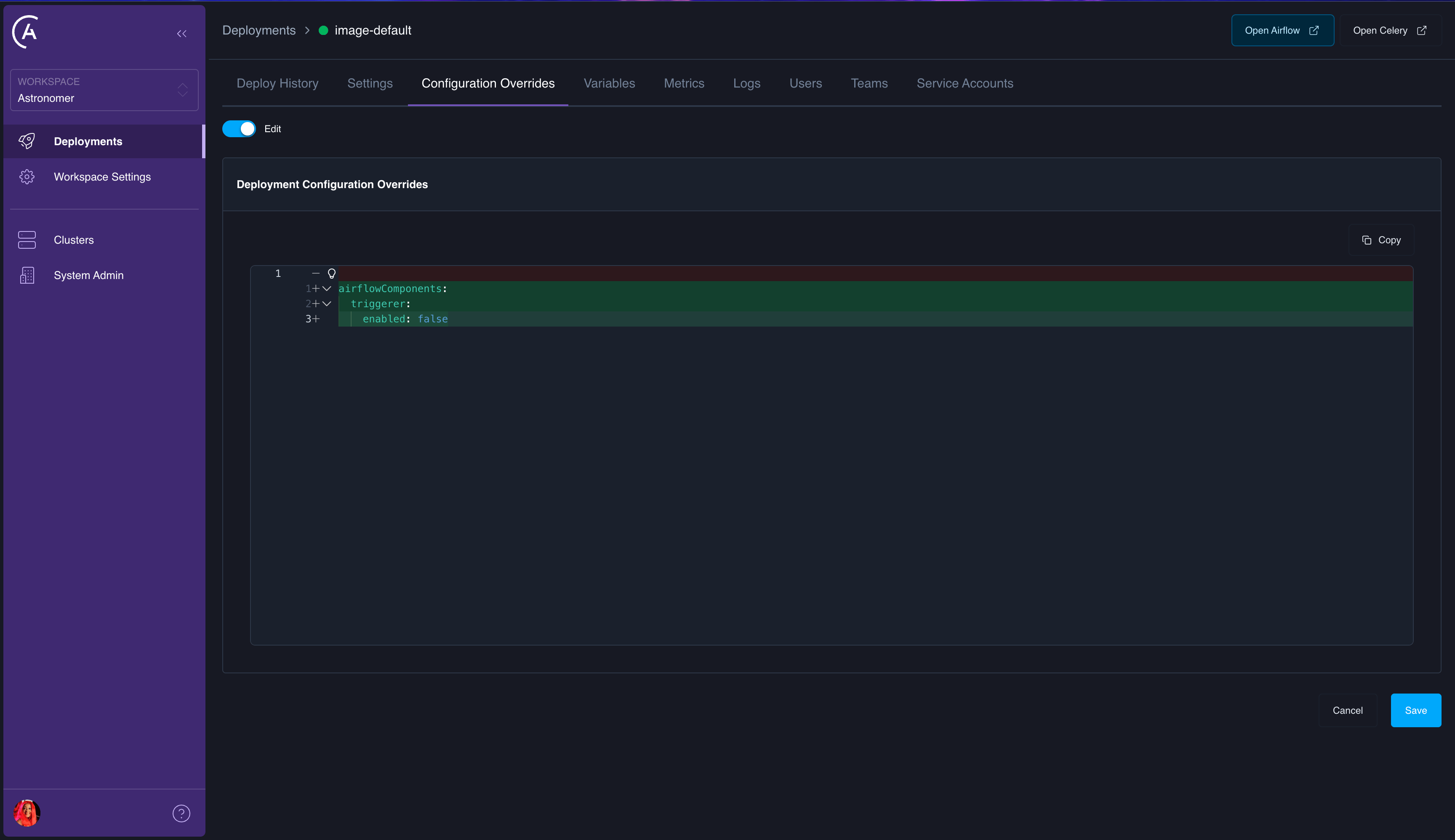 You can set deployment configuration overrides using the Astro UI or the APC API.
Use the `updateDeploymentConfig` mutation to add or update deployment-level overrides:
```graphql wrap theme={null}
mutation {
updateDeploymentConfig(
deploymentUuid: ""
deploymentsConfigOverride: {
airflowComponents: {
triggerer: {
enabled: false
}
}
}
reason: "Disable triggerer for this specific deployment"
) {
id
config
}
}
```
The same `DELETE_KEY` mechanism applies — set a key's value to `"DELETE_KEY"` to remove it from the stored override:
```graphql wrap theme={null}
mutation {
updateDeploymentConfig(
deploymentUuid: ""
deploymentsConfigOverride: {
airflowComponents: {
triggerer: {
enabled: "DELETE_KEY"
}
}
}
reason: "Remove triggerer override, revert to workspace/cluster default"
) {
id
config
}
}
```
You can set deployment configuration overrides using the Astro UI or the APC API.
Use the `updateDeploymentConfig` mutation to add or update deployment-level overrides:
```graphql wrap theme={null}
mutation {
updateDeploymentConfig(
deploymentUuid: ""
deploymentsConfigOverride: {
airflowComponents: {
triggerer: {
enabled: false
}
}
}
reason: "Disable triggerer for this specific deployment"
) {
id
config
}
}
```
The same `DELETE_KEY` mechanism applies — set a key's value to `"DELETE_KEY"` to remove it from the stored override:
```graphql wrap theme={null}
mutation {
updateDeploymentConfig(
deploymentUuid: ""
deploymentsConfigOverride: {
airflowComponents: {
triggerer: {
enabled: "DELETE_KEY"
}
}
}
reason: "Remove triggerer override, revert to workspace/cluster default"
) {
id
config
}
}
```
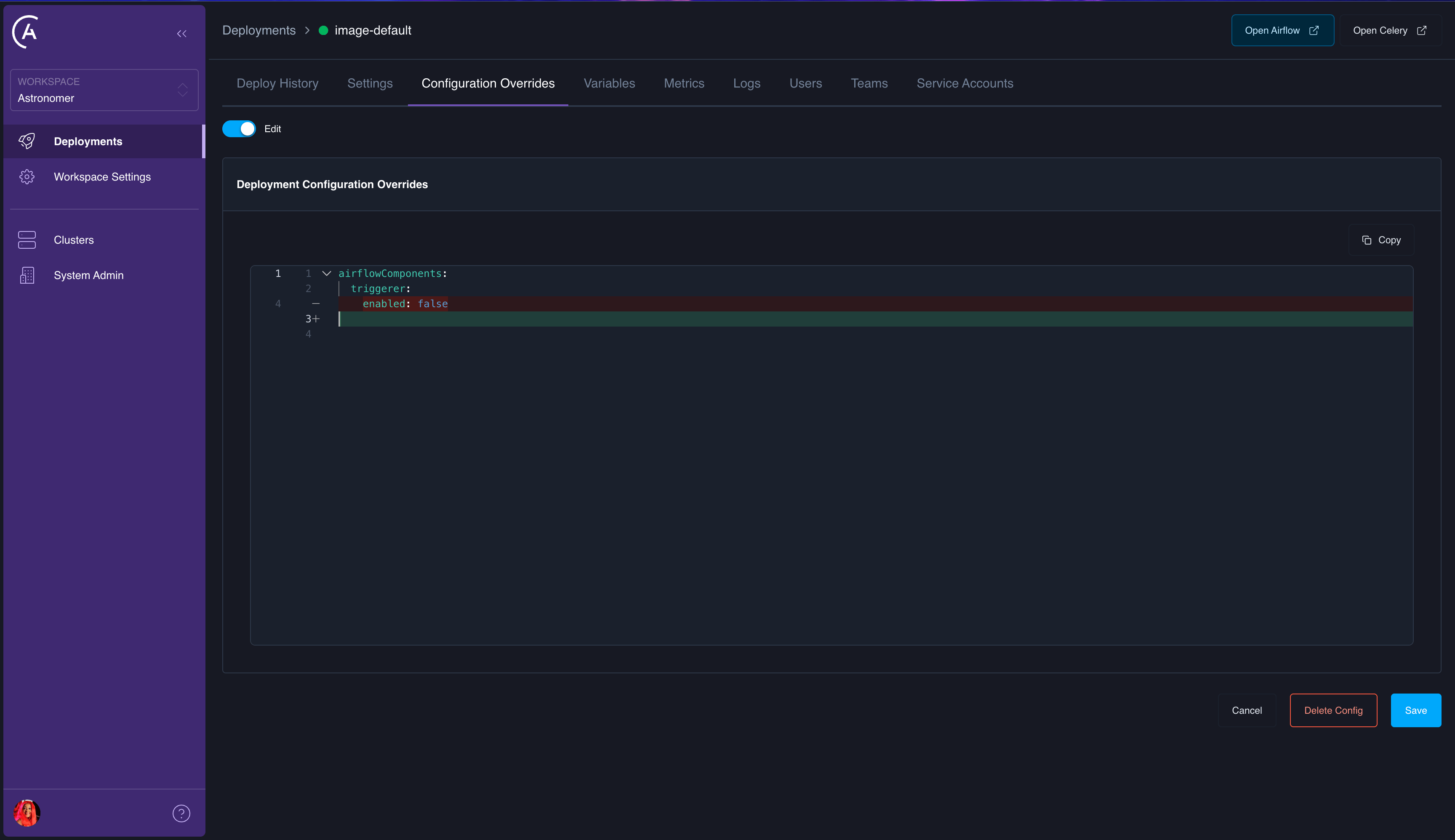 In the Astro UI, navigate to the Deployment you want to configure.
Open the **Configuration** tab.
Click **Edit** in the **Configuration Override** section.
Add, modify, or remove the configuration keys you need.
Click **Update**.
### Delete deployment configuration
Deleting deployment configuration removes all deployment-level overrides, reverting the Deployment to use workspace-level, cluster-level, and platform-level defaults.
Use the `deleteDeploymentConfig` mutation:
```graphql wrap theme={null}
mutation {
deleteDeploymentConfig(
deploymentUuid: ""
reason: "Revert to workspace/cluster defaults"
) {
id
config
deletedAt
}
}
```
In the Astro UI, navigate to the Deployment you want to configure.
Open the **Configuration** tab.
Click **Edit** in the **Configuration Override** section.
Add, modify, or remove the configuration keys you need.
Click **Update**.
### Delete deployment configuration
Deleting deployment configuration removes all deployment-level overrides, reverting the Deployment to use workspace-level, cluster-level, and platform-level defaults.
Use the `deleteDeploymentConfig` mutation:
```graphql wrap theme={null}
mutation {
deleteDeploymentConfig(
deploymentUuid: ""
reason: "Revert to workspace/cluster defaults"
) {
id
config
deletedAt
}
}
```
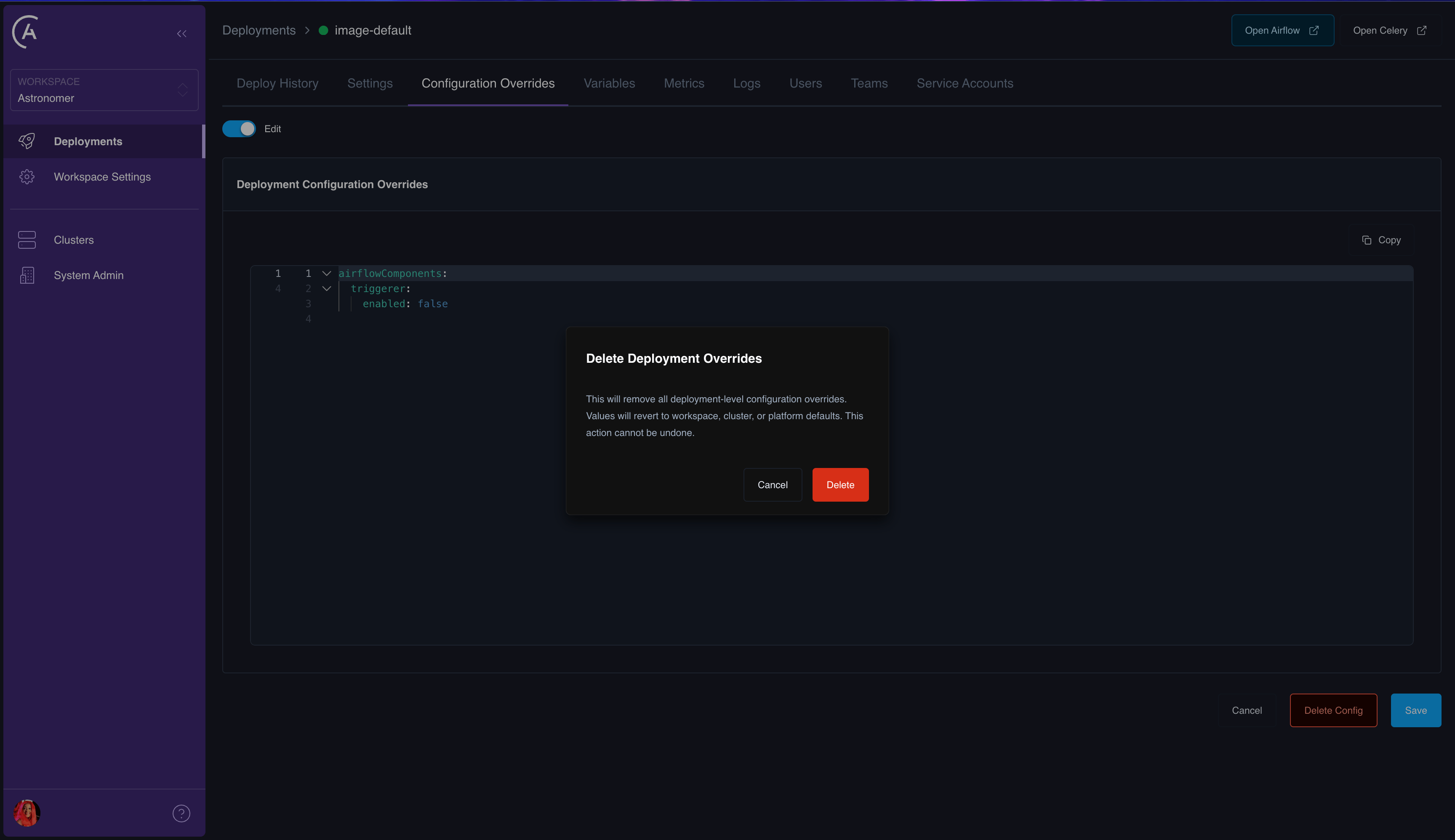 In the Astro UI, navigate to the Deployment where you want to remove overrides, then open the **Configuration** tab.
Click **Delete** in the **Configuration Override** section to remove all deployment-level overrides.
## Effective configuration
The *effective configuration* for a Deployment is the result of merging all four tiers. The Astro UI doesn't include a dedicated screen for the fully merged result or a per-key source tier readout (Platform, Cluster, Workspace, or Deployment). You retrieve that from the GraphQL API instead.
The `Deployment` type exposes the merged `deployments` object on `effectiveConfig` (the final value after the Platform through Deployment merge). It also exposes `configOverrides` for the deployment tier only, when you need the fourth layer in isolation. For cluster- and workspace-level override payloads, use the corresponding GraphQL queries or fields on those objects in your client.
The `Deployment` type exposes the merged `deployments` object on `effectiveConfig` (the final value after the Platform through Deployment merge). It also exposes `configOverrides` for the deployment tier only, when you need the fourth layer in isolation.
For example, `workspaceDeployment` can return the merged result alongside deployment-level overrides:
```graphql wrap theme={null}
query {
workspaceDeployment(
releaseName: ""
workspaceUuid: ""
) {
id
label
effectiveConfig
configOverrides {
config
}
}
}
```
To work out the source tier for a given key, compare the merged `effectiveConfig` to each tier’s contribution (platform defaults, cluster and workspace override records, and `configOverrides` as appropriate). The API doesn't label each key with a tier, but the underlying data is all available for inspection with GraphQL.
See also [Example GraphQL API queries](/docs/astro-private-cloud/v-2-x/houston-api-example-queries#query-deployment-details) for `workspaceDeployment` request parameters and related patterns.
## How merge works
Configuration merging uses a *deep merge* strategy:
1. Start with the platform’s default `deployments` object from your control plane `values.yaml` (`astronomer.houston.config`).
2. Deep-merge cluster-level overrides (if the Deployment's cluster has overrides).
3. Deep-merge workspace-level overrides (if the Deployment's workspace has overrides).
4. Deep-merge deployment-level overrides (if the Deployment has its own overrides).
For any key that appears at multiple tiers, the lowest tier wins (Deployment > Workspace > Cluster > Platform). For nested objects, the merge is recursive — you only need to specify the keys you want to override, and all other keys at that level are preserved from the parent tier.
### Example
Given the following configuration at each tier:
**Platform default**:
```yaml wrap theme={null}
deployments:
deploymentLifecycle:
deployRollback:
enabled: false
deployRevisionReportNumberOfDays: 90
dagTarballVersionValidation:
enabled: true
```
**Cluster override**:
```yaml wrap theme={null}
deploymentLifecycle:
deployRollback:
enabled: true
```
**Workspace override**:
```yaml wrap theme={null}
deploymentLifecycle:
deployRollback:
deployRevisionReportNumberOfDays: 30
```
The effective configuration for Deployments in this workspace and cluster would be:
```yaml wrap theme={null}
deploymentLifecycle:
deployRollback:
enabled: true # from Cluster
deployRevisionReportNumberOfDays: 30 # from Workspace
dagTarballVersionValidation: # from Platform; not set at Cluster or Workspace
enabled: true
```
## Configurable domains reference
The following table lists the top-level configuration domains under `deployments` and their availability at each override tier.
| Domain | Cluster | Workspace | Deployment | Description |
| -------------------------- | ------- | --------- | ---------- | -------------------------------------------------------- |
| `runtimeManagement` | Yes | Yes | Yes | Airflow 3, custom image SHA, runtime version constraints |
| `deployMechanisms` | Yes | Yes | Yes | Dag-only, git-sync, NFS mount deployment |
| `airflowComponents` | Yes | Yes | Yes | Triggerer, Dag processor enablement |
| `deploymentLifecycle` | Yes | Yes | Yes | Deploy rollback, hard delete, Airflow DB cleanup |
| `resourceManagement` | Yes | Yes | Yes | Executors, component resources, capacity limits |
| `databaseManagement` | Yes | Yes | Yes | Database settings, manual connection strings |
| `metricsReporting` | Yes | Yes | Yes | Grafana UI, task usage metrics |
| `deploymentImagesRegistry` | Yes | Yes | Yes | Docker webhook, update image endpoint |
| `dagDeploy` | Yes | Yes | Yes | Dag deploy server settings |
| `performanceOptimization` | Yes | Yes | Yes | Performance optimization mode |
| `mode` | Yes | Yes | Yes | Helm or operator deployment mode |
| `authSideCar` | Yes | No | No | Auth sidecar proxy (platform/cluster only) |
| `logging` | Yes | No | No | Logging sidecar configuration (platform/cluster only) |
| `namespaceManagement` | Yes | Yes | No | Namespace settings (immutable at deployment level) |
## Best practices
* **Keep overrides minimal**: Only set values that need to differ from the parent tier. Fewer overrides mean less configuration drift and easier debugging.
* **Use workspace-level overrides for team defaults**: If all Deployments in a workspace need a common setting (like enabling deploy rollback), set it at the workspace level rather than on each Deployment individually.
* **Use deployment-level overrides for exceptions**: Reserve deployment-level overrides for cases where a single Deployment needs to deviate from workspace defaults.
* **Use the `DELETE_KEY` mechanism**: Remove individual keys from an override without deleting the entire configuration. This is more precise than deleting and recreating the override.
* **Review effective configuration**: In the GraphQL API (for example `Deployment.effectiveConfig` on `workspaceDeployment`), compare the merged result after making changes to confirm that the merge produced the expected result.
In the Astro UI, navigate to the Deployment where you want to remove overrides, then open the **Configuration** tab.
Click **Delete** in the **Configuration Override** section to remove all deployment-level overrides.
## Effective configuration
The *effective configuration* for a Deployment is the result of merging all four tiers. The Astro UI doesn't include a dedicated screen for the fully merged result or a per-key source tier readout (Platform, Cluster, Workspace, or Deployment). You retrieve that from the GraphQL API instead.
The `Deployment` type exposes the merged `deployments` object on `effectiveConfig` (the final value after the Platform through Deployment merge). It also exposes `configOverrides` for the deployment tier only, when you need the fourth layer in isolation. For cluster- and workspace-level override payloads, use the corresponding GraphQL queries or fields on those objects in your client.
The `Deployment` type exposes the merged `deployments` object on `effectiveConfig` (the final value after the Platform through Deployment merge). It also exposes `configOverrides` for the deployment tier only, when you need the fourth layer in isolation.
For example, `workspaceDeployment` can return the merged result alongside deployment-level overrides:
```graphql wrap theme={null}
query {
workspaceDeployment(
releaseName: ""
workspaceUuid: ""
) {
id
label
effectiveConfig
configOverrides {
config
}
}
}
```
To work out the source tier for a given key, compare the merged `effectiveConfig` to each tier’s contribution (platform defaults, cluster and workspace override records, and `configOverrides` as appropriate). The API doesn't label each key with a tier, but the underlying data is all available for inspection with GraphQL.
See also [Example GraphQL API queries](/docs/astro-private-cloud/v-2-x/houston-api-example-queries#query-deployment-details) for `workspaceDeployment` request parameters and related patterns.
## How merge works
Configuration merging uses a *deep merge* strategy:
1. Start with the platform’s default `deployments` object from your control plane `values.yaml` (`astronomer.houston.config`).
2. Deep-merge cluster-level overrides (if the Deployment's cluster has overrides).
3. Deep-merge workspace-level overrides (if the Deployment's workspace has overrides).
4. Deep-merge deployment-level overrides (if the Deployment has its own overrides).
For any key that appears at multiple tiers, the lowest tier wins (Deployment > Workspace > Cluster > Platform). For nested objects, the merge is recursive — you only need to specify the keys you want to override, and all other keys at that level are preserved from the parent tier.
### Example
Given the following configuration at each tier:
**Platform default**:
```yaml wrap theme={null}
deployments:
deploymentLifecycle:
deployRollback:
enabled: false
deployRevisionReportNumberOfDays: 90
dagTarballVersionValidation:
enabled: true
```
**Cluster override**:
```yaml wrap theme={null}
deploymentLifecycle:
deployRollback:
enabled: true
```
**Workspace override**:
```yaml wrap theme={null}
deploymentLifecycle:
deployRollback:
deployRevisionReportNumberOfDays: 30
```
The effective configuration for Deployments in this workspace and cluster would be:
```yaml wrap theme={null}
deploymentLifecycle:
deployRollback:
enabled: true # from Cluster
deployRevisionReportNumberOfDays: 30 # from Workspace
dagTarballVersionValidation: # from Platform; not set at Cluster or Workspace
enabled: true
```
## Configurable domains reference
The following table lists the top-level configuration domains under `deployments` and their availability at each override tier.
| Domain | Cluster | Workspace | Deployment | Description |
| -------------------------- | ------- | --------- | ---------- | -------------------------------------------------------- |
| `runtimeManagement` | Yes | Yes | Yes | Airflow 3, custom image SHA, runtime version constraints |
| `deployMechanisms` | Yes | Yes | Yes | Dag-only, git-sync, NFS mount deployment |
| `airflowComponents` | Yes | Yes | Yes | Triggerer, Dag processor enablement |
| `deploymentLifecycle` | Yes | Yes | Yes | Deploy rollback, hard delete, Airflow DB cleanup |
| `resourceManagement` | Yes | Yes | Yes | Executors, component resources, capacity limits |
| `databaseManagement` | Yes | Yes | Yes | Database settings, manual connection strings |
| `metricsReporting` | Yes | Yes | Yes | Grafana UI, task usage metrics |
| `deploymentImagesRegistry` | Yes | Yes | Yes | Docker webhook, update image endpoint |
| `dagDeploy` | Yes | Yes | Yes | Dag deploy server settings |
| `performanceOptimization` | Yes | Yes | Yes | Performance optimization mode |
| `mode` | Yes | Yes | Yes | Helm or operator deployment mode |
| `authSideCar` | Yes | No | No | Auth sidecar proxy (platform/cluster only) |
| `logging` | Yes | No | No | Logging sidecar configuration (platform/cluster only) |
| `namespaceManagement` | Yes | Yes | No | Namespace settings (immutable at deployment level) |
## Best practices
* **Keep overrides minimal**: Only set values that need to differ from the parent tier. Fewer overrides mean less configuration drift and easier debugging.
* **Use workspace-level overrides for team defaults**: If all Deployments in a workspace need a common setting (like enabling deploy rollback), set it at the workspace level rather than on each Deployment individually.
* **Use deployment-level overrides for exceptions**: Reserve deployment-level overrides for cases where a single Deployment needs to deviate from workspace defaults.
* **Use the `DELETE_KEY` mechanism**: Remove individual keys from an override without deleting the entire configuration. This is more precise than deleting and recreating the override.
* **Review effective configuration**: In the GraphQL API (for example `Deployment.effectiveConfig` on `workspaceDeployment`), compare the merged result after making changes to confirm that the merge produced the expected result.