> ## Documentation Index
> Fetch the complete documentation index at: https://astronomer.io/docs/llms.txt
> Use this file to discover all available pages before exploring further.
# Deploy Airflow with the Airflow Operator
Astro Private Cloud (APC) manages Airflow Deployments with Helm by default. Operator mode is an alternative that manages a Deployment through the Airflow Kubernetes Operator — a kubebuilder-based controller that reconciles Airflow Deployments from a custom resource definition (CRD) — instead of a Helm release. You choose the mode for each Deployment. Helm remains the default and is fully supported.
**Astro Private Cloud 2.1**
This feature was introduced in Astro Private Cloud 2.1. To access this feature, upgrade your Astro Private Cloud installation to 2.1 or later.
Airflow operator support is under active development for Astro Private Cloud. Several Helm-mode features aren't available in operator mode yet. See [Feature support](#feature-support).
If your cluster already runs the Astro Runtime Operator, you can bring its existing Airflow Deployments under APC management with [Adopt Astro Runtime Operator managed Deployments](/docs/astro-private-cloud/v-2-x/adopt-operator-deployments), and hand the operator itself over with [Move the operator under APC](/docs/astro-private-cloud/v-2-x/transition-operator-to-apc).
## Concepts
* Deployment mode: each APC Deployment is either Helm (a Helm release, the default) or operator (an Airflow CRD reconciled by the operator).
* Reconciliation: the control plane builds the Airflow custom resource (CR) spec from the Deployment configuration, and the data plane applies the CR and monitors the operator's reconciliation, rather than managing a Helm release.
* Mixed mode: a single APC installation can run Helm and operator Deployments side by side, and you can enable operator support for each data plane.
* Cluster-scoped resources: the operator requires cluster-level CRDs, mutating and validating webhooks, and cert-manager. Review these with your security team before you enable operator support. See [Security and governance](#security-and-governance).
## Prerequisites
* An APC 2.1 or later installation running in [split mode](/docs/astro-private-cloud/v-2-x/data-plane-architecture) or [unified mode](/docs/astro-private-cloud/v-2-x/unified-architecture).
* Permission to update the Helm values for the data plane, or for the unified installation.
* Cluster-level permission to install CRDs and to configure mutating and validating webhooks.
* Either [cert-manager](https://cert-manager.io/) in the cluster, or a serving certificate you generate yourself. See [Provide the webhook TLS certificate](#provide-the-webhook-tls-certificate).
## Enable operator support
Operator support is off by default, and it installs with the data plane, which hosts operator Deployments. In [split mode](/docs/astro-private-cloud/v-2-x/data-plane-architecture), enable it in the Helm configuration for the data plane. In [unified mode](/docs/astro-private-cloud/v-2-x/unified-architecture), where the control plane and data plane run in the same cluster, enable it in that installation's Helm configuration:
```yaml theme={null}
global:
airflowOperator:
enabled: true
```
Enabling operator support installs the operator CRDs, configures the mutating and validating webhooks, adds the Prometheus label filters for operator Deployments, and grants the data plane the role-based access control (RBAC) it needs for `airflow.apache.org` CRD resources.
### Provide the webhook TLS certificate
The Kubernetes API server calls the operator's mutating and validating webhooks over TLS, so the webhooks need a serving certificate and the CA bundle that signed it. Choose one of the following methods based on whether cert-manager is available in your cluster.
Configure exactly one of these methods. The operator sub-chart uses cert-manager by default; if you disable cert-manager without providing your own certificate, the chart fails to render with an error instead of installing a broken webhook.
#### Use cert-manager
cert-manager is enabled for the operator sub-chart by default. If [cert-manager](https://cert-manager.io/) is available in your cluster, keep it enabled: it generates the serving certificate with the correct DNS names and injects the CA bundle into the webhook configurations automatically:
```yaml theme={null}
airflow-operator:
certManager:
enabled: true
```
This is the recommended method. It requires no manual certificate management, and cert-manager renews the certificate before it expires.
#### Provide your own certificate
If cert-manager isn't available, generate a serving certificate yourself and pass it to the operator sub-chart. The webhook Service is named `-airflow-operator-webhook-service`.
Set the DNS names as shell variables. The certificate must be valid for both, or the API server rejects the webhook connection:
```bash theme={null}
export NAMESPACE=
export SERVICE=-airflow-operator-webhook-service
export DNS1="${SERVICE}.${NAMESPACE}.svc"
export DNS2="${SERVICE}.${NAMESPACE}.svc.cluster.local"
```
Generate a CA and a serving certificate whose Subject Alternative Names (SANs) cover both DNS names:
```bash theme={null}
# Generate a CA key and self-signed CA certificate. This becomes the caBundle.
openssl genrsa -out ca.key 2048
openssl req -x509 -new -nodes -key ca.key -sha256 -days 3650 \
-subj "/CN=airflow-operator-webhook-ca" -out ca.crt
# Generate the serving key and certificate signing request.
openssl genrsa -out tls.key 2048
openssl req -new -key tls.key -subj "/CN=${DNS1}" -out tls.csr
# Sign the request with the CA, embedding the required SANs.
cat > san.ext <
Create a `kubernetes.io/tls` secret in the release namespace from the serving certificate and key:
```bash theme={null}
kubectl -n "${NAMESPACE}" create secret tls airflow-operator-webhook-tls \
--cert=tls.crt --key=tls.key
```
Point the operator sub-chart at the secret and provide the CA bundle. Set `certManager.enabled` to `false`, `webhooks.useCustomTlsCerts` to `true`, `webhooks.customCertsSecretName` to the secret name, and `webhooks.caBundle` to the raw contents of `ca.crt`:
```yaml theme={null}
airflow-operator:
certManager:
enabled: false
webhooks:
useCustomTlsCerts: true
customCertsSecretName: airflow-operator-webhook-tls
caBundle: |
-----BEGIN CERTIFICATE-----
...
-----END CERTIFICATE-----
```
Provide `caBundle` as raw PEM text, not base64. When `webhooks.useCustomTlsCerts` is `true`, both `webhooks.customCertsSecretName` and `webhooks.caBundle` are required — the chart fails to render if either is missing.
Certificates you provide yourself don't renew automatically. Before `tls.crt` expires, regenerate it, update the secret, and redeploy. If the CA changes, update `caBundle` as well.
## Create an operator Deployment
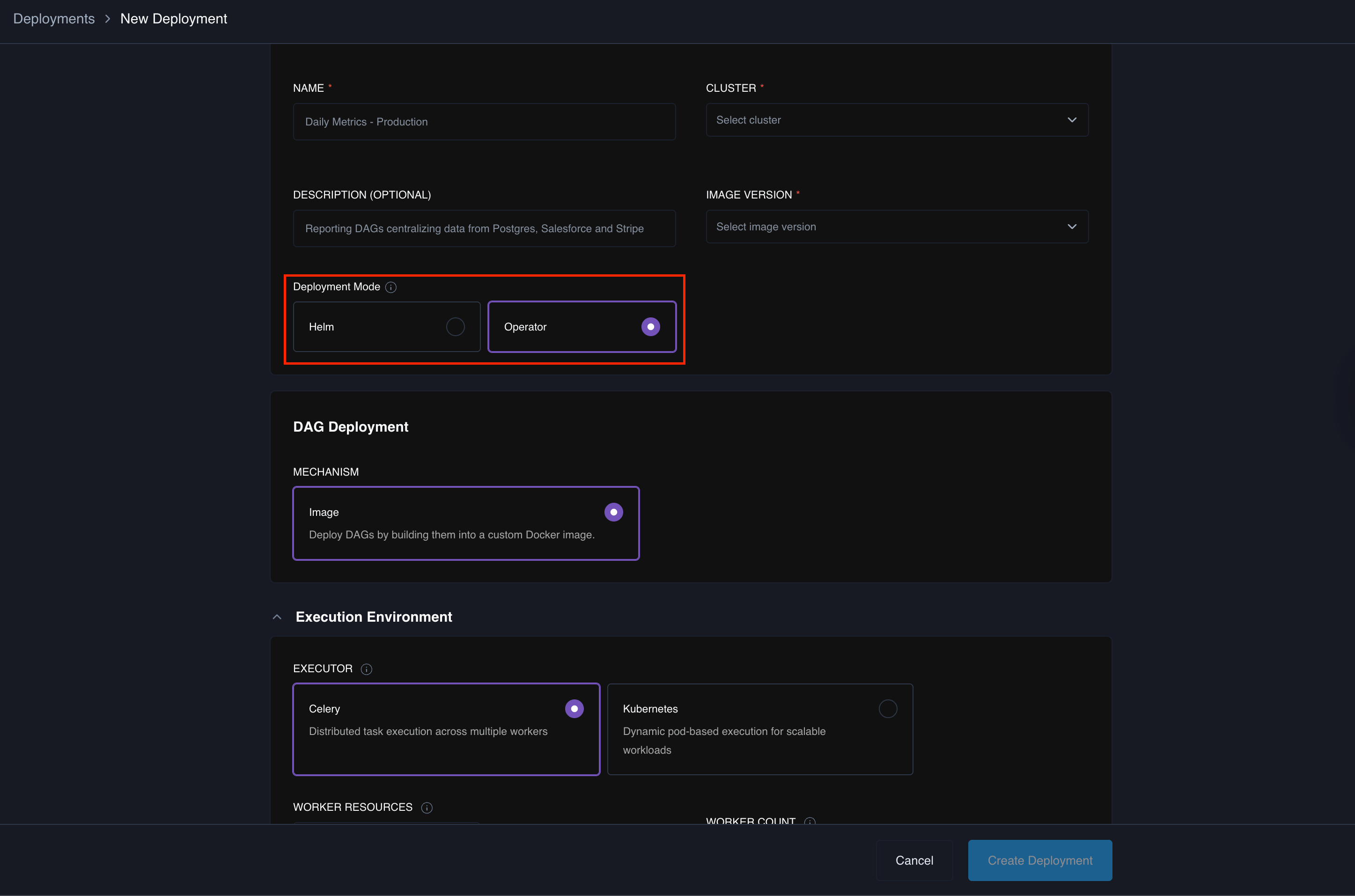
After you enable operator support, a **Deployment Mode** selector appears when you create a Deployment. To create an operator-managed Deployment, set **Deployment Mode** to **Operator**, then complete the rest of the Deployment configuration as usual.
**Helm** is the default, and the selector doesn't appear when operator support is off.
 ## Feature support
Operator mode reaches most Helm capabilities, but not all. Use Helm mode for a Deployment that needs a feature in the second of the following lists.
Available in operator mode in APC 2.1:
* Celery executor and Kubernetes executor
* Airflow 2 and Airflow 3
* PostgreSQL-backed Deployments
* Private registry
* Auth sidecar and bring-your-own ingress
* Network policies for Airflow components and platform-level network policy
* Custom resource configuration (CPU and memory)
* Manual release name
* DaemonSet logging
* In-cluster and external Elasticsearch logging
* Airflow rollback
* OpenShift support
Not yet available in operator mode — use Helm mode:
* Dag-only deploy, Network File System (NFS) volume and git-sync Dag Deployment
* Namespace pools
* Sidecar logging
* MySQL-backed Deployments
* Resource-quota enforcement
* Enabling or disabling the triggerer independently
* Celery Flower UI
* Disaster-recovery (DR) failover and control-plane high availability (HA)
## Security and governance
Operator mode installs cluster-scoped resources:
* The Airflow CRDs
* A mutating and validating webhook
* cert-manager integration, when you use cert-manager to issue the webhook certificate
Because these are cluster-level, review them with your security team before you enable operator support.
If your change-control process requires it, you can manage the CRDs out-of-band — for example, install them separately as a cluster admin or through GitOps — so the platform chart doesn't create them. Set `crd.create` to `false` on the operator sub-chart:
```yaml theme={null}
airflow-operator:
crd:
create: false
```
The default is `true`, which lets the chart create the CRDs. When you set it to `false`, install the operator CRDs yourself before you create any operator Deployment.
The operator CRDs carry a `helm.sh/resource-policy: keep` annotation, so Helm never deletes them, even when you set `crd.create` to `false` on an existing installation. This prevents an upgrade from removing the CRDs, which would delete every operator Deployment. Remove the CRDs manually only after you delete all operator Deployments.
## Known limitations
* Several Helm-mode features aren't available in operator mode. See [Feature support](#feature-support). Helm remains the default and the fuller-featured mode.
* Operator mode isn't a migration path between modes. You set the mode when you create a Deployment, and you can't convert an existing Deployment from Helm to operator or from operator to Helm. To change modes, create a new Deployment in the target mode.
## Feature support
Operator mode reaches most Helm capabilities, but not all. Use Helm mode for a Deployment that needs a feature in the second of the following lists.
Available in operator mode in APC 2.1:
* Celery executor and Kubernetes executor
* Airflow 2 and Airflow 3
* PostgreSQL-backed Deployments
* Private registry
* Auth sidecar and bring-your-own ingress
* Network policies for Airflow components and platform-level network policy
* Custom resource configuration (CPU and memory)
* Manual release name
* DaemonSet logging
* In-cluster and external Elasticsearch logging
* Airflow rollback
* OpenShift support
Not yet available in operator mode — use Helm mode:
* Dag-only deploy, Network File System (NFS) volume and git-sync Dag Deployment
* Namespace pools
* Sidecar logging
* MySQL-backed Deployments
* Resource-quota enforcement
* Enabling or disabling the triggerer independently
* Celery Flower UI
* Disaster-recovery (DR) failover and control-plane high availability (HA)
## Security and governance
Operator mode installs cluster-scoped resources:
* The Airflow CRDs
* A mutating and validating webhook
* cert-manager integration, when you use cert-manager to issue the webhook certificate
Because these are cluster-level, review them with your security team before you enable operator support.
If your change-control process requires it, you can manage the CRDs out-of-band — for example, install them separately as a cluster admin or through GitOps — so the platform chart doesn't create them. Set `crd.create` to `false` on the operator sub-chart:
```yaml theme={null}
airflow-operator:
crd:
create: false
```
The default is `true`, which lets the chart create the CRDs. When you set it to `false`, install the operator CRDs yourself before you create any operator Deployment.
The operator CRDs carry a `helm.sh/resource-policy: keep` annotation, so Helm never deletes them, even when you set `crd.create` to `false` on an existing installation. This prevents an upgrade from removing the CRDs, which would delete every operator Deployment. Remove the CRDs manually only after you delete all operator Deployments.
## Known limitations
* Several Helm-mode features aren't available in operator mode. See [Feature support](#feature-support). Helm remains the default and the fuller-featured mode.
* Operator mode isn't a migration path between modes. You set the mode when you create a Deployment, and you can't convert an existing Deployment from Helm to operator or from operator to Helm. To change modes, create a new Deployment in the target mode.