> ## Documentation Index
> Fetch the complete documentation index at: https://astronomer.io/docs/llms.txt
> Use this file to discover all available pages before exploring further.
# Register a data plane cluster
After you install a data plane cluster, you must register it with the Astro Private Cloud control plane so that the Houston API can schedule Airflow Deployments.
Only a system admin can register a data plane cluster.
## Prerequisites
* The data plane Kubernetes cluster is up and reachable from the control plane network.
* Astronomer data plane components are installed and healthy on the data plane, including Commander.
* You know the base domain for the data plane ingress. For example, `finance-dataplane-us-east-1.example.company.com`.
## Required fields
* **Name**: A unique identifier for the data plane cluster across the control plane. Names must be unique; pick a stable, human‑readable value. For example, `finance-dataplane-us-east-1`.
* **Base domain**: The base DNS domain served by the data plane ingress, in the format `https://.`. For example, `finance-dataplane-us-east-1.example.company.com`. This domain resolves to the data plane’s ingress endpoints.
* **Cluster override**: (Optional) Provide initial overrides to customize the cluster’s Deployment configuration. See [Cluster override](/docs/astro-private-cloud/v-1-x/override-data-plane-cluster).
## Register in the UI
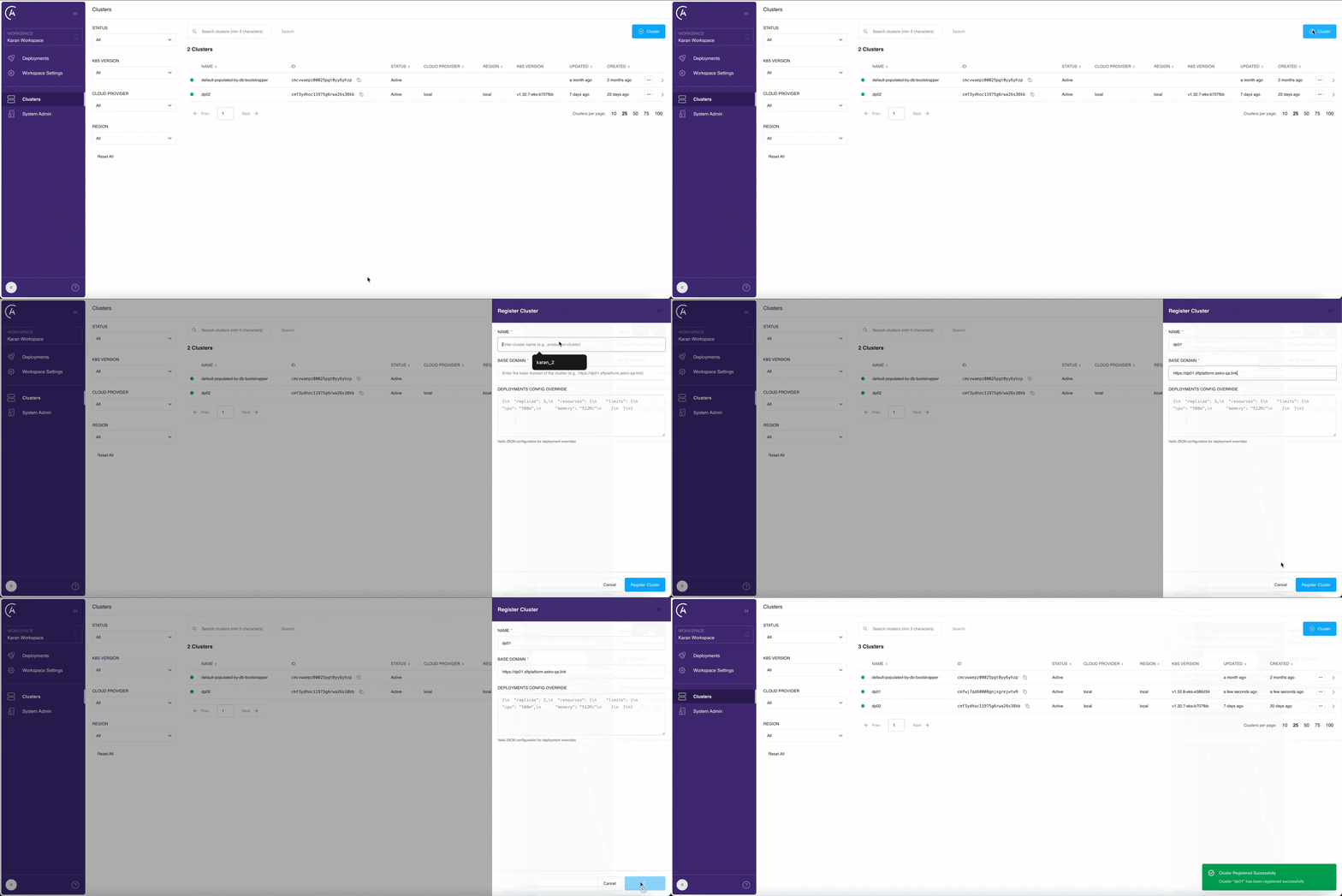 In the APC UI, open the **Clusters** page.
Click **+ Cluster** to start registering your cluster.
Enter a unique **Name**, the data plane **Base domain** in the `https://.` format, and optionally set **Cluster override**.
Click **Register Cluster** to save your cluster information. The control plane validates connectivity to the data plane Commander.
Check the list of clusters on the **Clusters** page. If you successfully registered your cluster, it appears in the list with a Healthy status.
Now you can proceed to create Airflow Deployments in this data plane.
## Register through the Houston API
You can also register a data plane cluster by calling the `registerCluster` mutation on the Houston API. Send the request to `https://houston./v1` with a system service account or System Admin user token in the `Authorization` header. For details, see [Authenticate to the Houston API](/docs/astro-private-cloud/v-1-x/houston-api-authenticate).
```graphql wrap theme={null}
mutation {
registerCluster(
name: ""
metadataUrl: "https://"
) {
id
name
status
healthStatus
}
}
```
Argument reference:
| Argument | Type | Required | Description |
| --------------------------- | ------ | -------- | -------------------------------------------------------------------------------------------------- |
| `name` | String | Yes | A unique, human-readable identifier for the cluster. |
| `metadataUrl` | String | Yes | The HTTP(S) URL where Commander's `/metadata` endpoint is reachable from the control plane. |
| `deploymentsConfigOverride` | JSON | No | Initial overrides to merge with the deployment defaults Houston derives from Commander's metadata. |
When you call this mutation, Houston:
1. Validates that the `name` and `metadataUrl` are unique across registered clusters.
2. Calls `GET /metadata` on the supplied URL to fetch cluster details from Commander.
3. On success, creates the cluster row with status `ACTIVE` and stores Commander's response under `config` and `healthStatus`.
4. On failure (network error, non-2xx response, TLS error), returns an error and persists no cluster row. Resolve the connectivity issue and retry.
After the mutation succeeds, monitor the cluster with the queries documented in [Manage cluster status](/docs/astro-private-cloud/v-1-x/cluster-status-management).
## Related
* [Clusters overview](/docs/astro-private-cloud/v-1-x/overview-data-plane-cluster)
* [Deregister a cluster](/docs/astro-private-cloud/v-1-x/deregister-data-plane)
* [Update cluster configs with overrides](/docs/astro-private-cloud/v-1-x/override-data-plane-cluster)
* [Manage cluster status](/docs/astro-private-cloud/v-1-x/cluster-status-management)
* [Authenticate to the Houston API](/docs/astro-private-cloud/v-1-x/houston-api-authenticate)
In the APC UI, open the **Clusters** page.
Click **+ Cluster** to start registering your cluster.
Enter a unique **Name**, the data plane **Base domain** in the `https://.` format, and optionally set **Cluster override**.
Click **Register Cluster** to save your cluster information. The control plane validates connectivity to the data plane Commander.
Check the list of clusters on the **Clusters** page. If you successfully registered your cluster, it appears in the list with a Healthy status.
Now you can proceed to create Airflow Deployments in this data plane.
## Register through the Houston API
You can also register a data plane cluster by calling the `registerCluster` mutation on the Houston API. Send the request to `https://houston./v1` with a system service account or System Admin user token in the `Authorization` header. For details, see [Authenticate to the Houston API](/docs/astro-private-cloud/v-1-x/houston-api-authenticate).
```graphql wrap theme={null}
mutation {
registerCluster(
name: ""
metadataUrl: "https://"
) {
id
name
status
healthStatus
}
}
```
Argument reference:
| Argument | Type | Required | Description |
| --------------------------- | ------ | -------- | -------------------------------------------------------------------------------------------------- |
| `name` | String | Yes | A unique, human-readable identifier for the cluster. |
| `metadataUrl` | String | Yes | The HTTP(S) URL where Commander's `/metadata` endpoint is reachable from the control plane. |
| `deploymentsConfigOverride` | JSON | No | Initial overrides to merge with the deployment defaults Houston derives from Commander's metadata. |
When you call this mutation, Houston:
1. Validates that the `name` and `metadataUrl` are unique across registered clusters.
2. Calls `GET /metadata` on the supplied URL to fetch cluster details from Commander.
3. On success, creates the cluster row with status `ACTIVE` and stores Commander's response under `config` and `healthStatus`.
4. On failure (network error, non-2xx response, TLS error), returns an error and persists no cluster row. Resolve the connectivity issue and retry.
After the mutation succeeds, monitor the cluster with the queries documented in [Manage cluster status](/docs/astro-private-cloud/v-1-x/cluster-status-management).
## Related
* [Clusters overview](/docs/astro-private-cloud/v-1-x/overview-data-plane-cluster)
* [Deregister a cluster](/docs/astro-private-cloud/v-1-x/deregister-data-plane)
* [Update cluster configs with overrides](/docs/astro-private-cloud/v-1-x/override-data-plane-cluster)
* [Manage cluster status](/docs/astro-private-cloud/v-1-x/cluster-status-management)
* [Authenticate to the Houston API](/docs/astro-private-cloud/v-1-x/houston-api-authenticate)