---
title: 'Understanding Airflow Trigger Rules: A Comprehensive Visual Guide'
description: >-
Discover the intricacies of Airflow trigger rules with visual examples and
practical applications. Learn how to define and use various trigger rules to
optimize your DAGs efficiently in Airflow. Essential reading for Airflow users
working with version 2.9.2.
date: 2024-07-26T00:00:00.000Z
authors:
- author: src/content/people/tamara-fingerlin.md
tags: []
categories: []
canonical_url: >-
https://www.astronomer.io/blog/understanding-airflow-trigger-rules-comprehensive-visual-guide/
---
## Introduction to Airflow Trigger Rules
The core purpose of Airflow is to orchestrate tasks and every single task
in Airflow has a trigger rule assigned. By default, Airflow runs a task
when all directly upstream tasks are successful using the trigger rule
on\_success. This works for many simple pipelines but as soon as DAG
structures become more complex you might want to run a task if only one of
its upstream tasks succeeded, or even in the case of upstream task
failure. This can be achieved by changing the trigger\_rule parameter of a
task, which determines when a task runs in relation to the previous tasks
it [depends
on](https://www.astronomer.io/docs/learn/managing-dependencies).
In this blog post you will learn everything you need to know about all
Airflow trigger rules as of Airflow version 2.9.2. For each trigger rule
one or more screenshots of a typical scenario of using it is shown to help
you pick and remember the right trigger rule for every DAG-situation.
## What are Airflow trigger rules?
### How to define a trigger rule in Airflow
You can explicitly set the trigger rule of a task by setting its
`trigger_rule` parameter.
## List of available Airflow trigger rules
The following trigger rules are available:
* `all_success`: (default) The task runs only when all upstream tasks have
succeeded.
* `all_failed`: The task runs only when all upstream tasks are in a failed
or upstream\_failed state.
* `all_done`: The task runs once all upstream tasks are done with their
execution.
* `all_skipped`: The task runs only when all upstream tasks have been
skipped.
* `one_failed`: The task runs when at least one upstream task has failed.
* `one_success`: The task runs when at least one upstream task has
succeeded.
* `one_done`: The task runs when at least one upstream task has either
succeeded or failed.
* `none_failed`: The task runs only when all upstream tasks have succeeded
or been skipped.
* `none_failed_min_one_success`: The task runs only when all upstream
tasks have not failed or upstream\_failed, and at least one upstream task
has succeeded.
* `none_skipped`: The task runs only when no upstream task is in a skipped
state.
* `always`: The task runs at any time.
## Special cases related to Airflow trigger rules
There are several special cases where trigger rules play an important
role:
1. [Branching](/docs/learn/airflow-branch-operator): The @task.branch decorator or the BranchPythonOperator allow
you to use custom logic to decide which of a set of downstream tasks
should run next and which should be skipped. It is important to adjust
downstream trigger rules to allowed for skipped upstream tasks. See
[Branching and trigger
rules](https://www.astronomer.io/docs/learn/airflow-trigger-rules).
2. fail\_stop: You can define a DAG in which any task failure stops the
DAG execution by setting the [DAG
parameter](https://www.astronomer.io/docs/learn/airflow-dag-parameters)
`fail_stop` to `True`. This will set all tasks that are still running to
`failed` and mark any tasks that have not run yet as `skipped`. In a DAG
using fail\_stop you cannot have any trigger rules other than
all\_success.
3. Setup and teardown tasks are a special type of task to create and
delete resources that also influence trigger rules. See [Use setup and
teardown tasks in
Airflow](https://www.astronomer.io/docs/learn/airflow-setup-teardown).
## Visual examples of Airflow trigger rules
### Trigger rule `all_success`
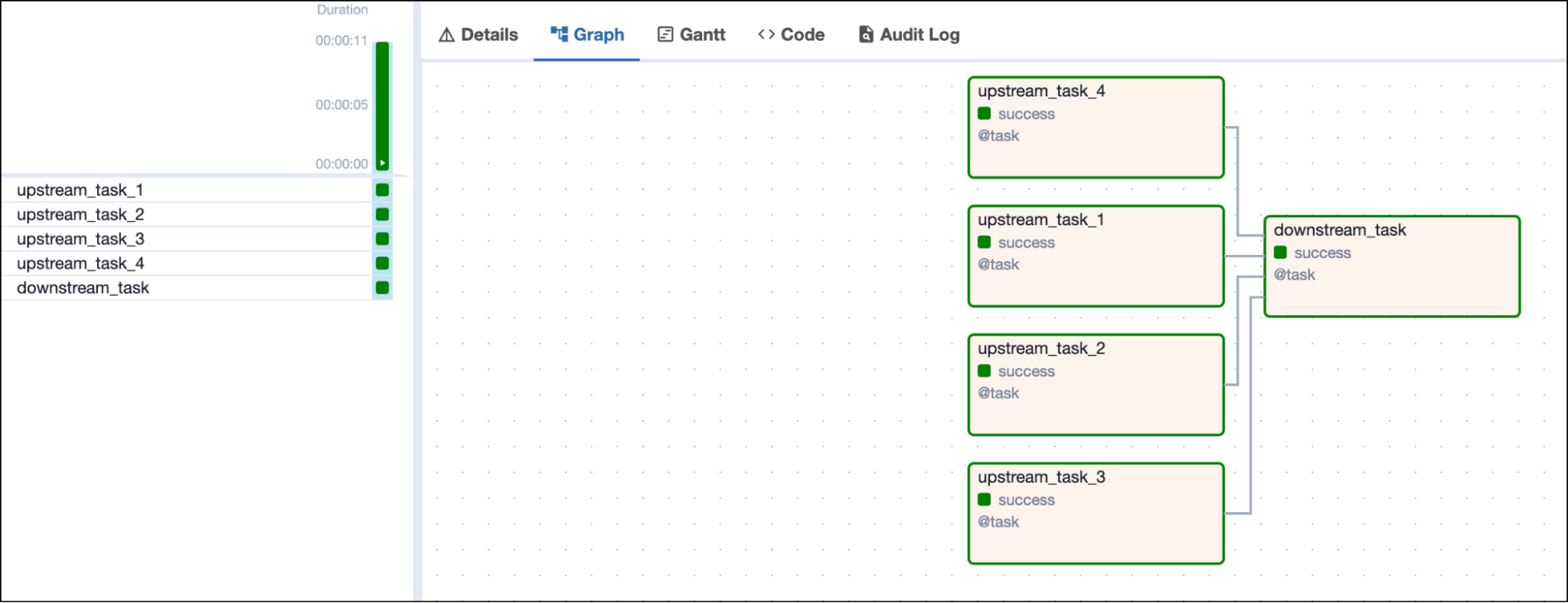
A task with the trigger rule `all_success` only runs when all upstream
tasks have succeeded.
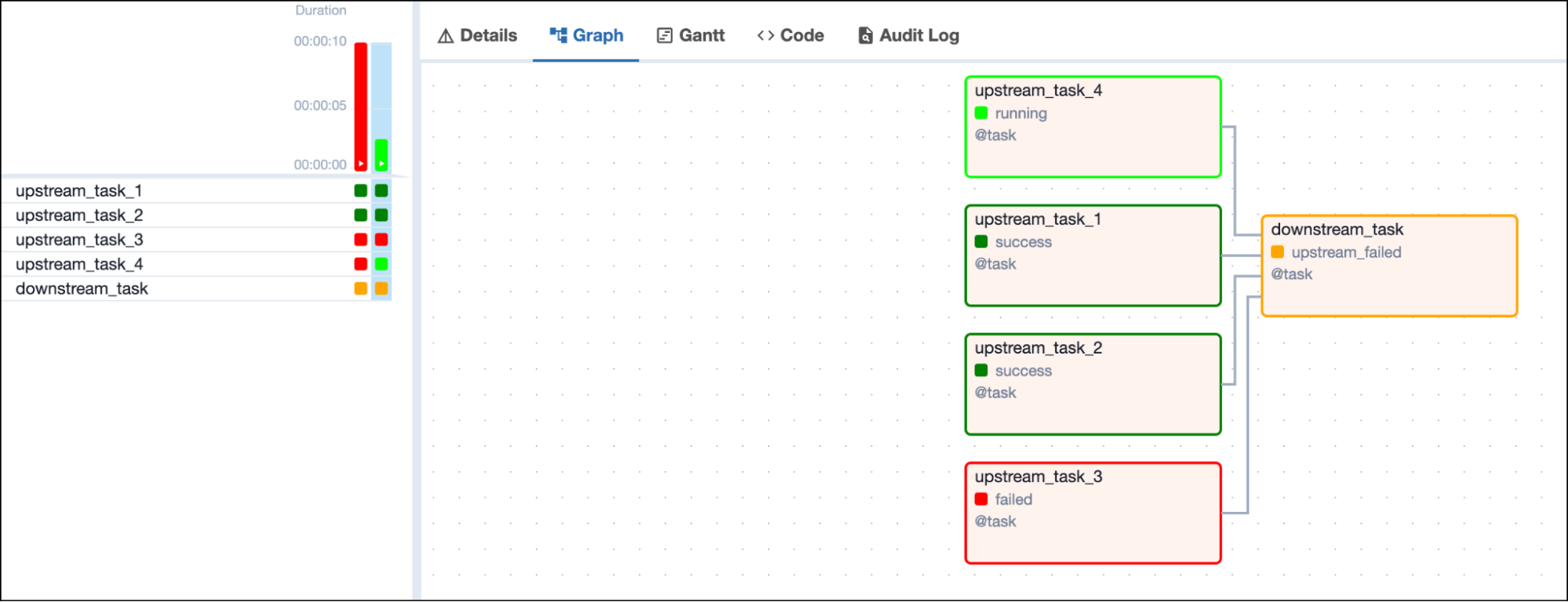
 As soon as any upstream tasks are in the state of `failed` or
`upstream_failed`, the downstream task is set to the state
`upstream_failed` and does not run.
As soon as any upstream tasks are in the state of `failed` or
`upstream_failed`, the downstream task is set to the state
`upstream_failed` and does not run.
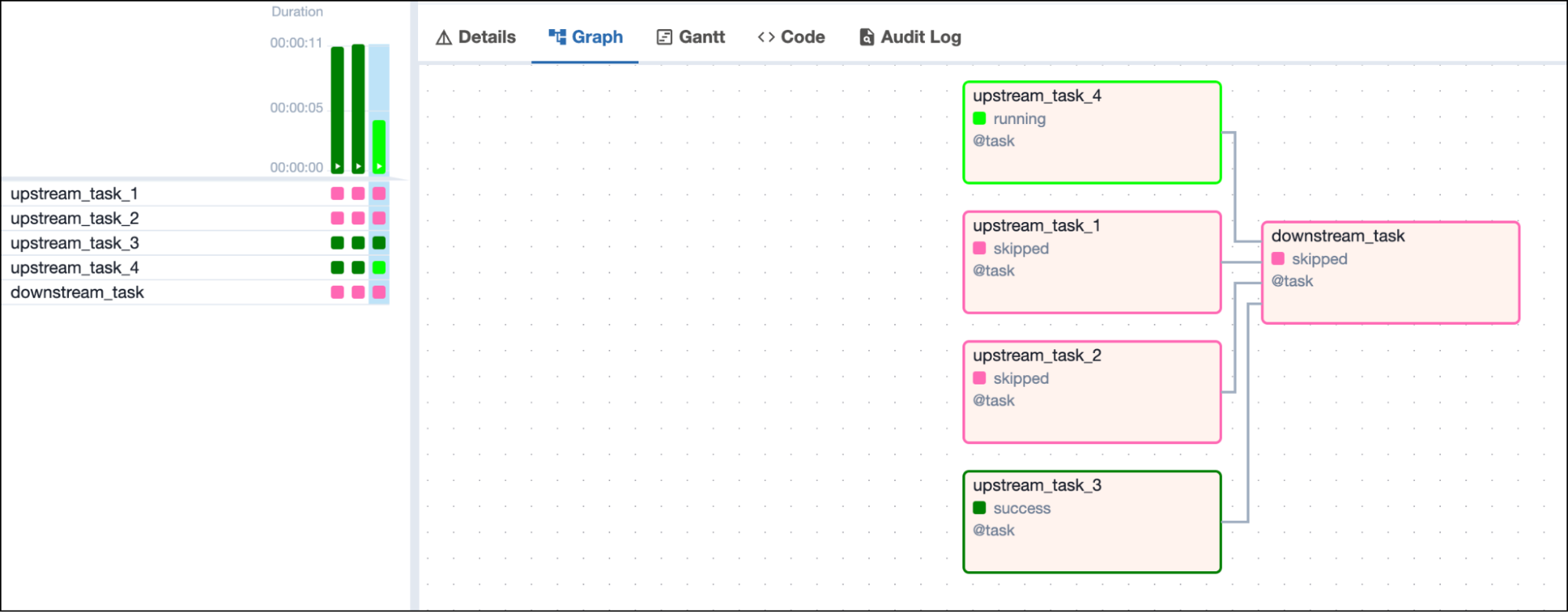
 Similarly, as soon as any upstream task is in the state `skipped`, the
downstream task is set to the state `skipped` and does not run.
Similarly, as soon as any upstream task is in the state `skipped`, the
downstream task is set to the state `skipped` and does not run.
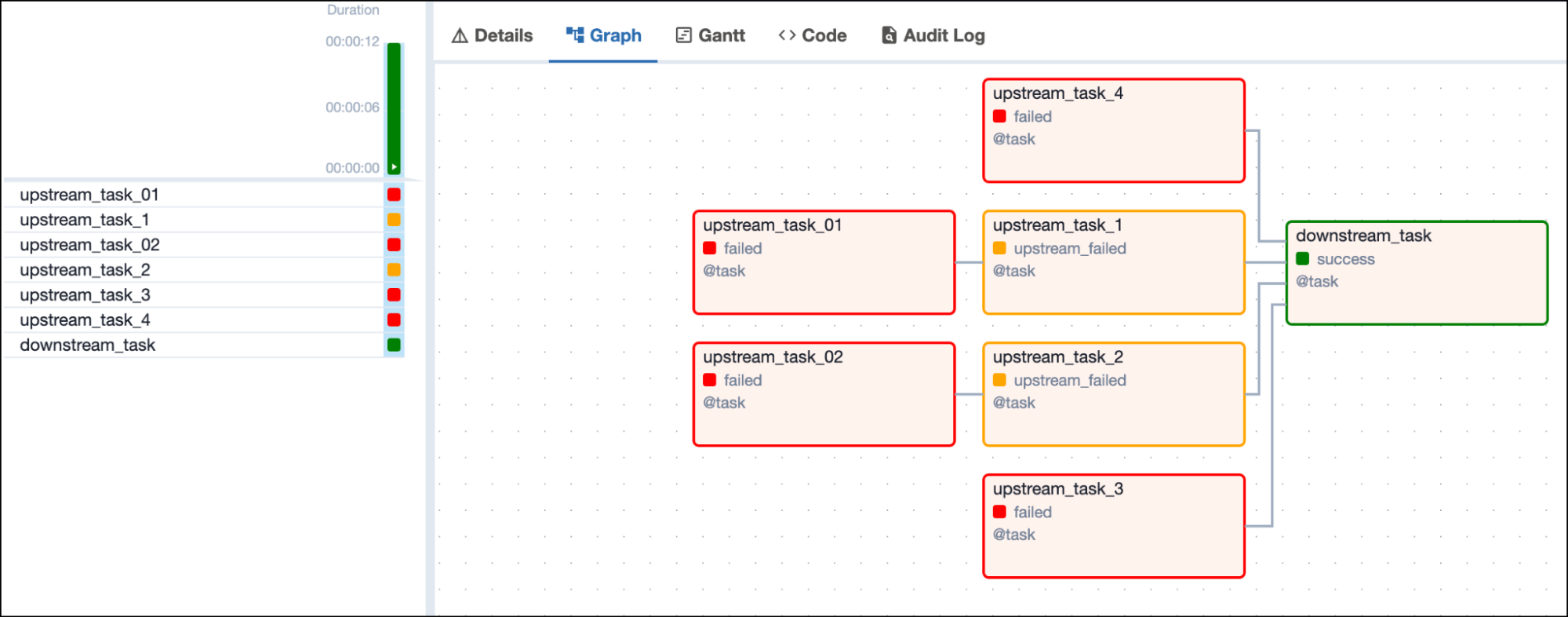
 If a task with the trigger rule `all_success` has one upstream task that
is skipped and one that is failed, whether the downstream task is set to
`skipped` or `upstream_failed` depends on which of the upstream tasks
finishes first.
### Trigger rule `all_failed`
A task with the trigger rule `all_failed` only runs when all upstream
tasks are in a failed or upstream\_failed state.
If a task with the trigger rule `all_success` has one upstream task that
is skipped and one that is failed, whether the downstream task is set to
`skipped` or `upstream_failed` depends on which of the upstream tasks
finishes first.
### Trigger rule `all_failed`
A task with the trigger rule `all_failed` only runs when all upstream
tasks are in a failed or upstream\_failed state.
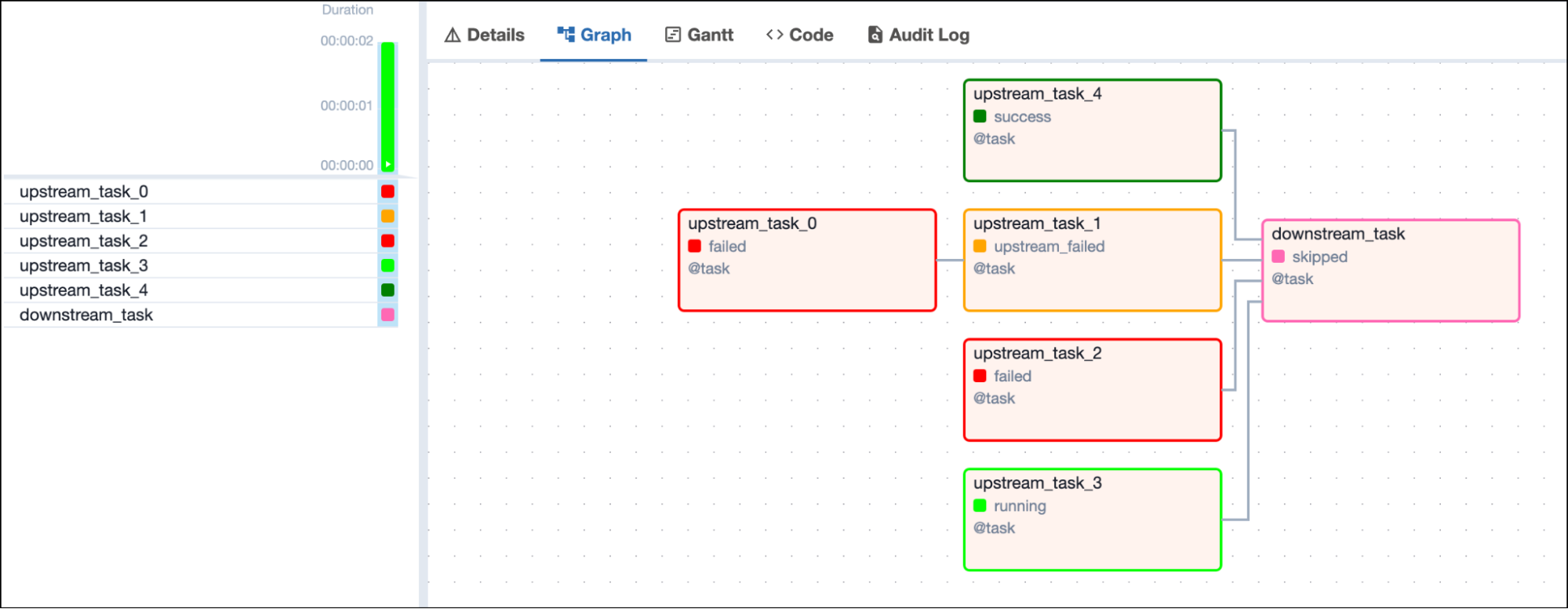
 As soon as any upstream task is in the state `success`, the downstream
task is set to the state `skipped` and does not run.
As soon as any upstream task is in the state `success`, the downstream
task is set to the state `skipped` and does not run.
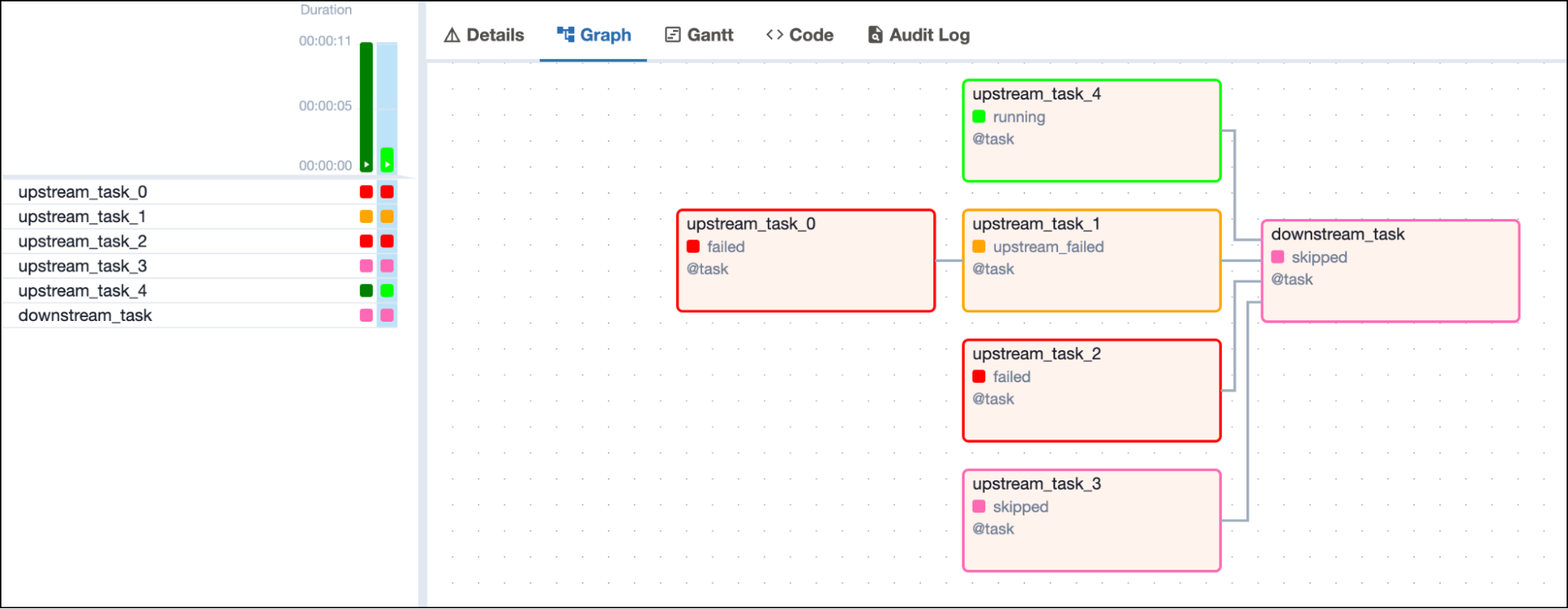
 Analogously, as soon as any upstream task is in the state `skipped`, the
downstream task is set to the state `skipped` and does not run.
Analogously, as soon as any upstream task is in the state `skipped`, the
downstream task is set to the state `skipped` and does not run.
 ### Trigger rule `all_done`
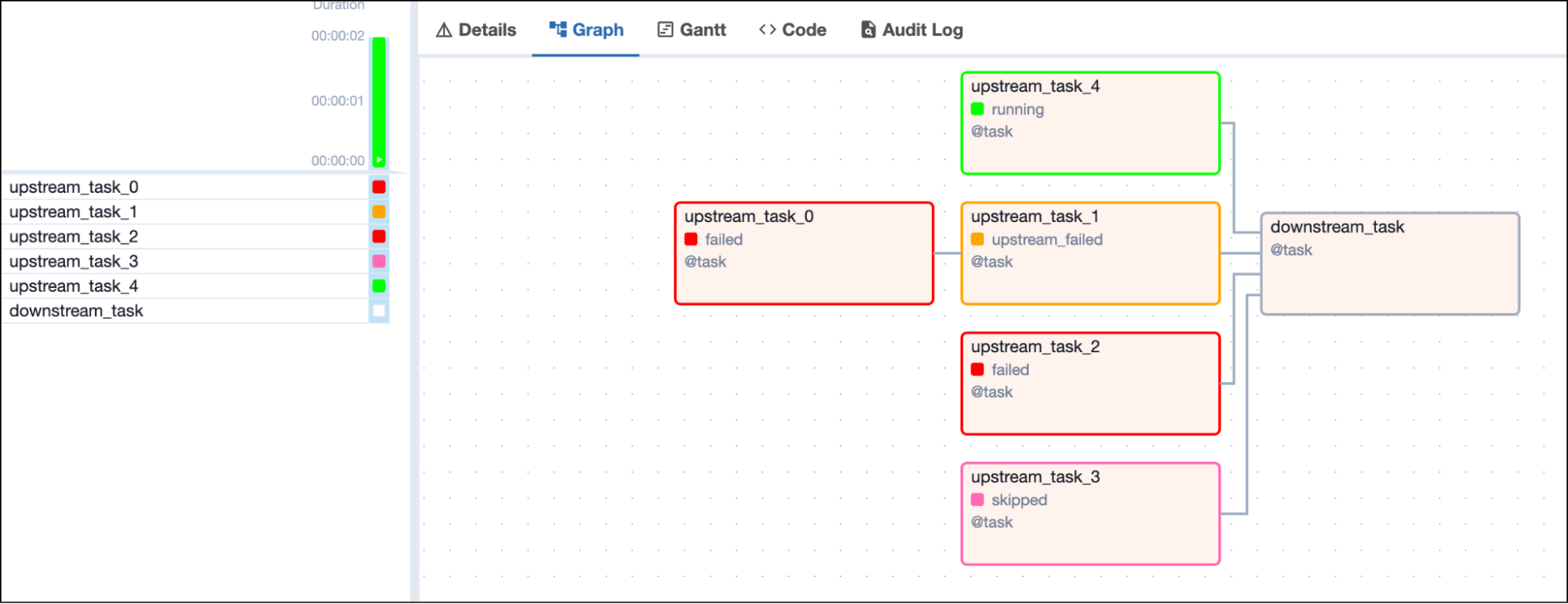
The `all_done` trigger rule will make a task wait until all upstream tasks
are done with their execution.
### Trigger rule `all_done`
The `all_done` trigger rule will make a task wait until all upstream tasks
are done with their execution.
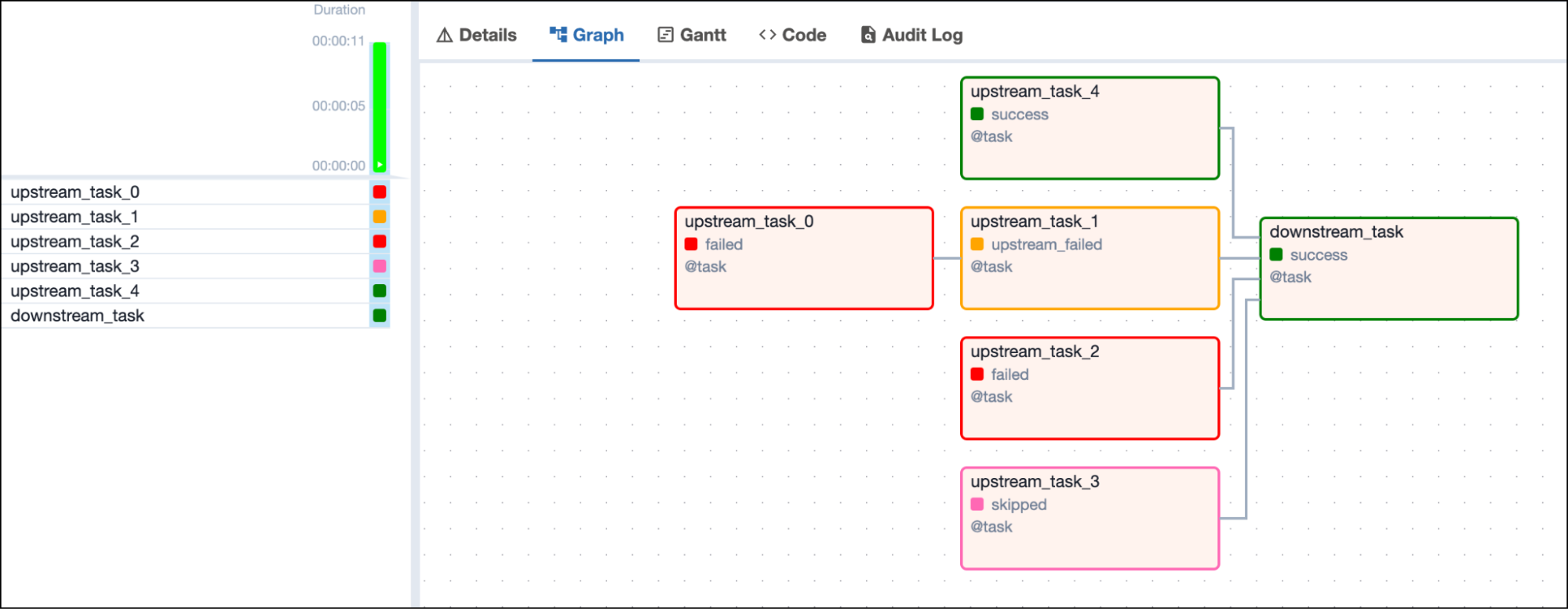
 As soon as all tasks finish, no matter what their state is, the downstream
task will run.
As soon as all tasks finish, no matter what their state is, the downstream
task will run.
 ### Trigger rule `all_skipped`
A task with the trigger rule `all_skipped` only runs when all upstream
tasks have been skipped.
### Trigger rule `all_skipped`
A task with the trigger rule `all_skipped` only runs when all upstream
tasks have been skipped.
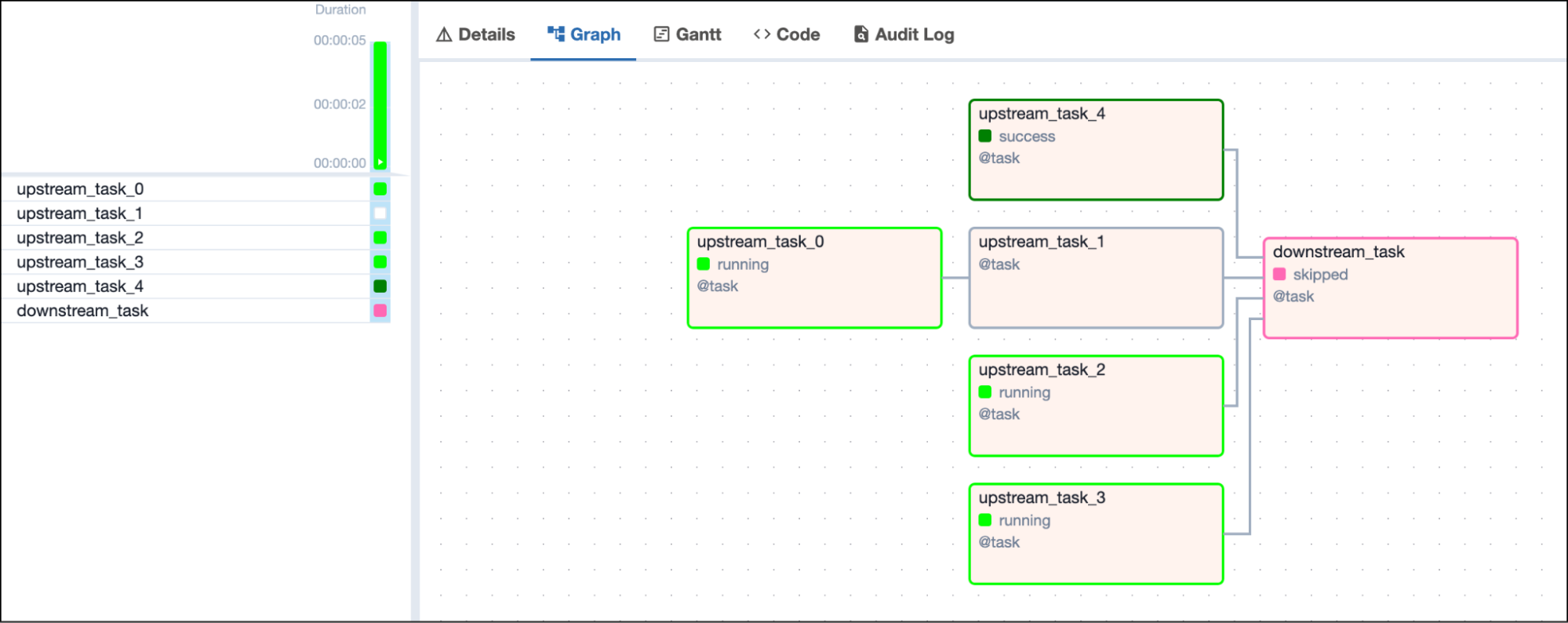
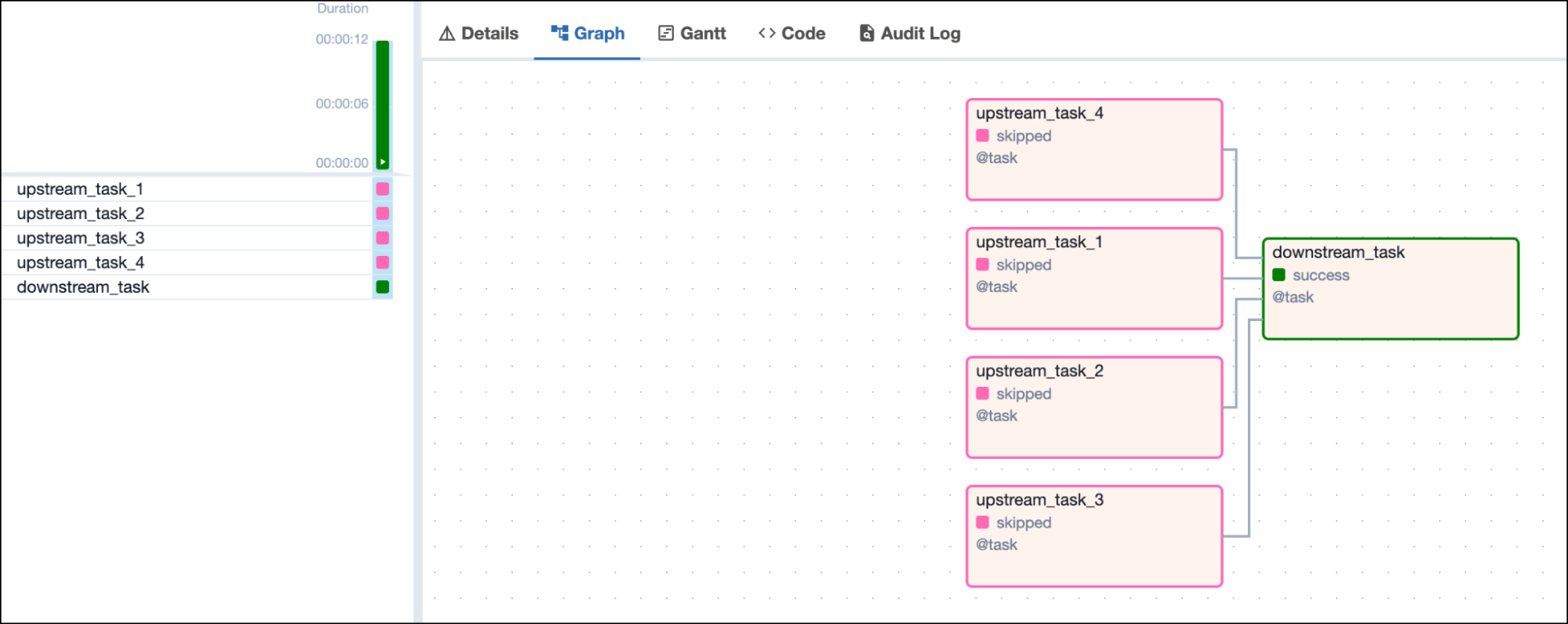 As soon as any upstream task is in the state `success`, `failed`, or
`upstream_failed`, the downstream task with the trigger rule `all_skipped`
is set to the state `skipped` and does not run.
As soon as any upstream task is in the state `success`, `failed`, or
`upstream_failed`, the downstream task with the trigger rule `all_skipped`
is set to the state `skipped` and does not run.
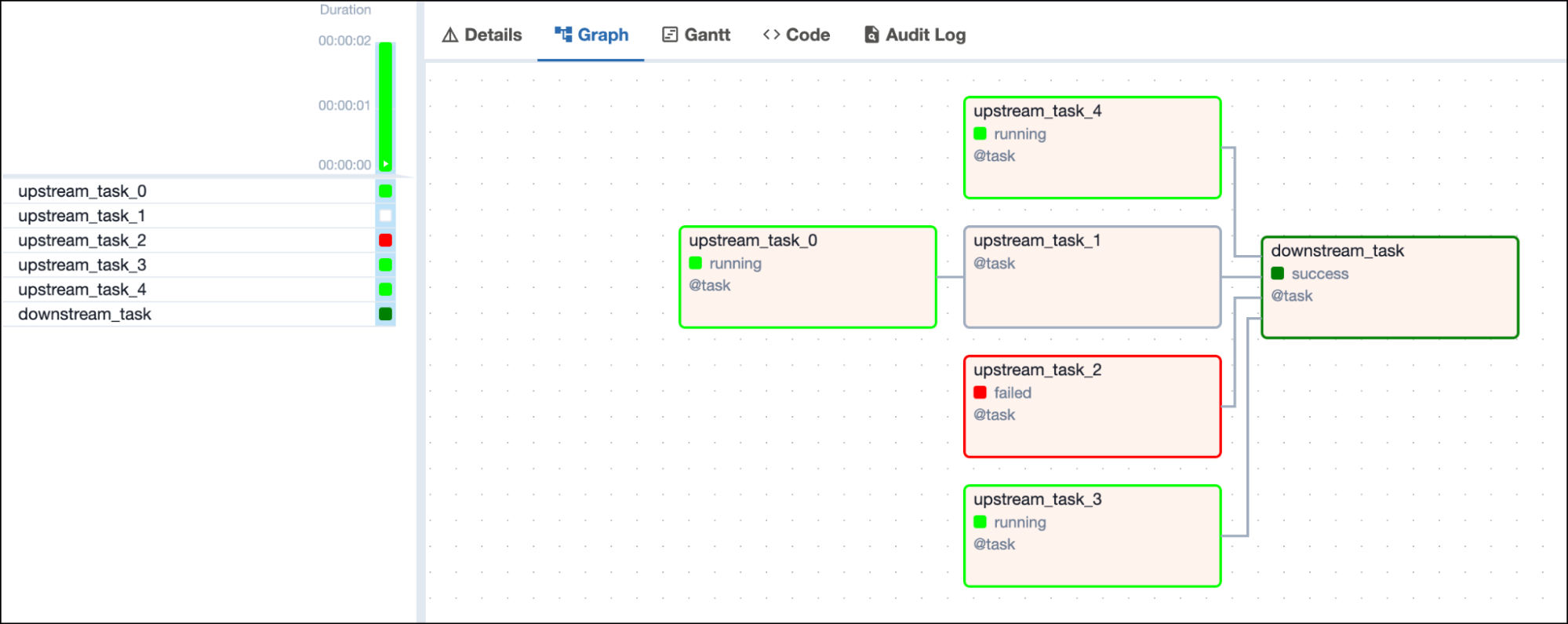
 ### Trigger rule `one_failed`
The `one_failed` trigger rule will make a task run as soon as at least one
of its upstream tasks is in either the `failed` or `upstream_failed`
state.
### Trigger rule `one_failed`
The `one_failed` trigger rule will make a task run as soon as at least one
of its upstream tasks is in either the `failed` or `upstream_failed`
state.
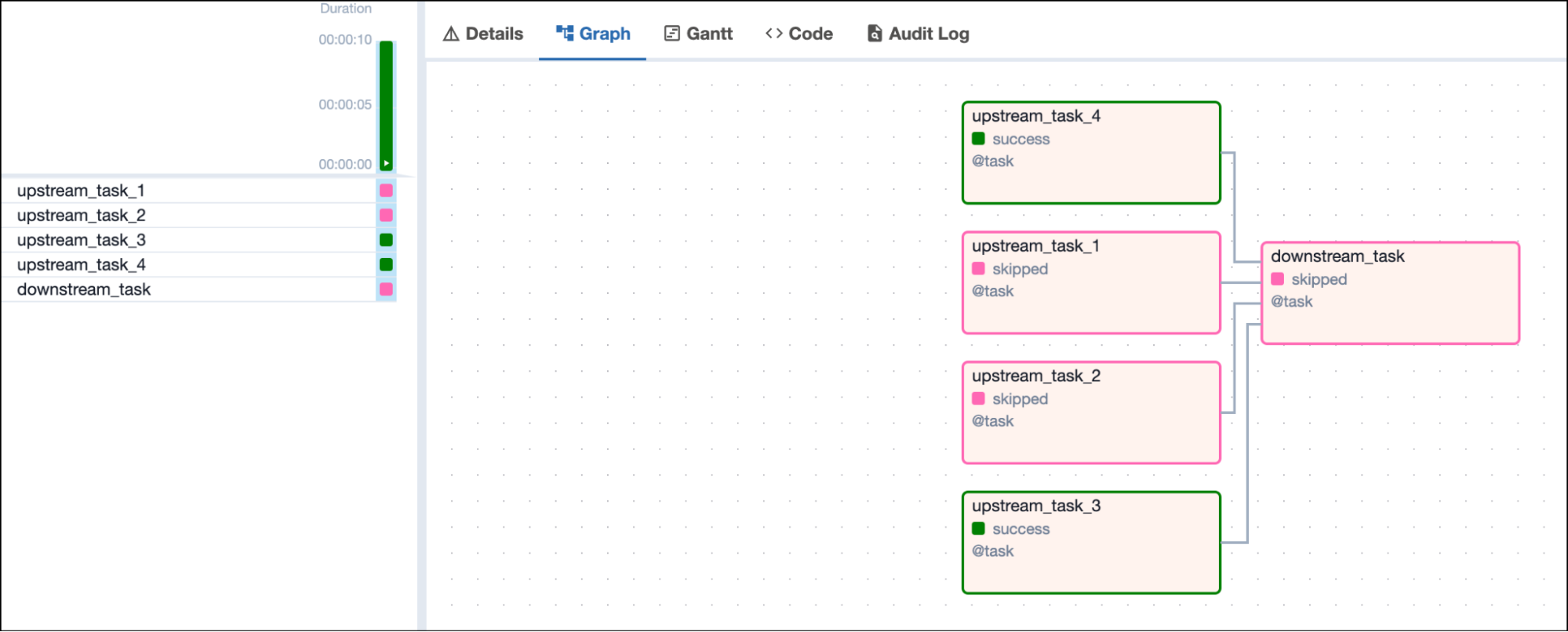
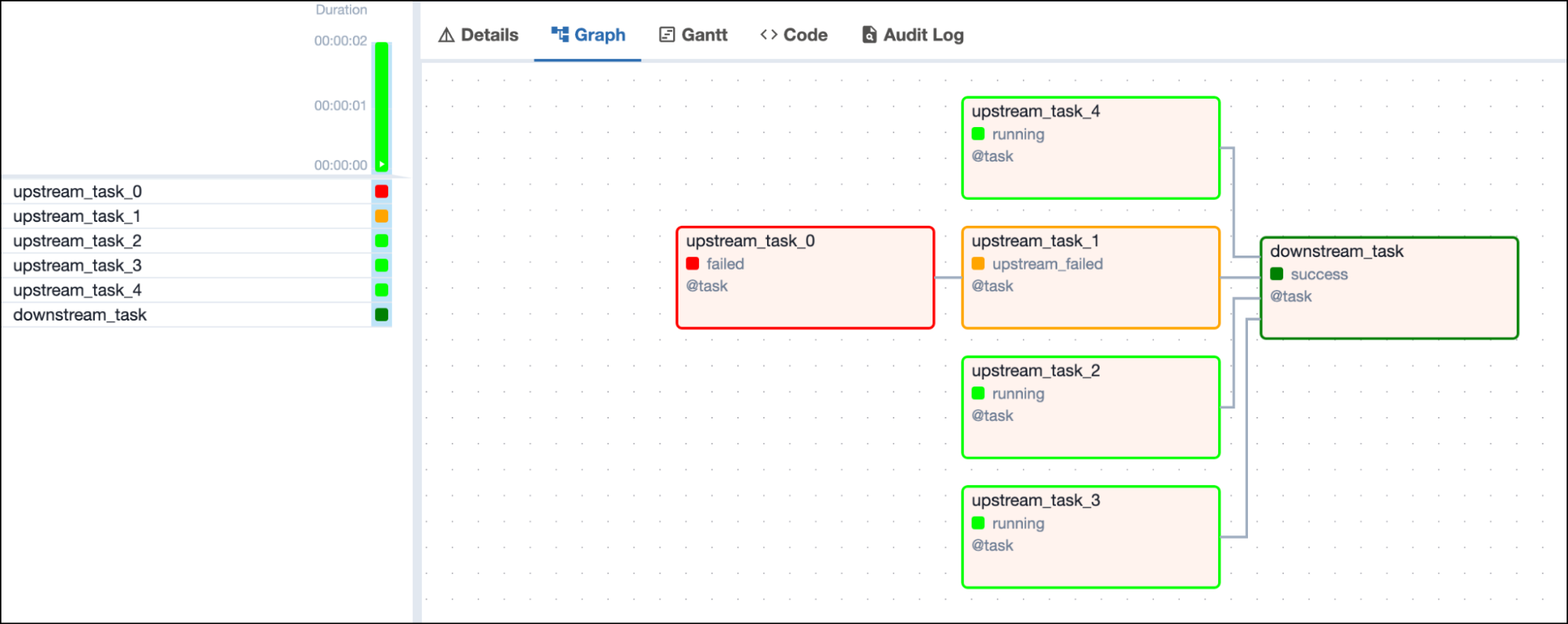 If all upstream tasks have completed and none of them are in the `failed`
or `upstream_failed` state, the downstream task will be set to the state
`skipped`.
If all upstream tasks have completed and none of them are in the `failed`
or `upstream_failed` state, the downstream task will be set to the state
`skipped`.
 ### Trigger rule `one_success`
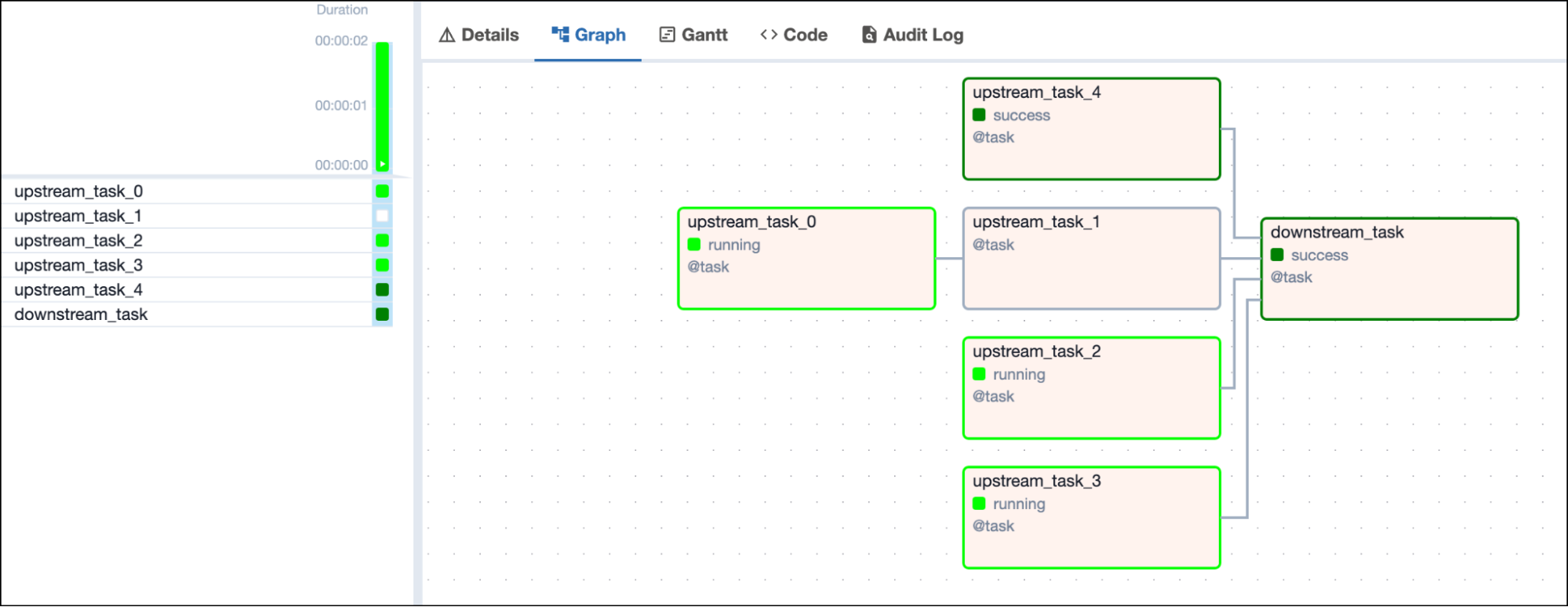
The `one_success` trigger rule will make a task run as soon as at least
one of its upstream tasks is in the `success` state.
### Trigger rule `one_success`
The `one_success` trigger rule will make a task run as soon as at least
one of its upstream tasks is in the `success` state.
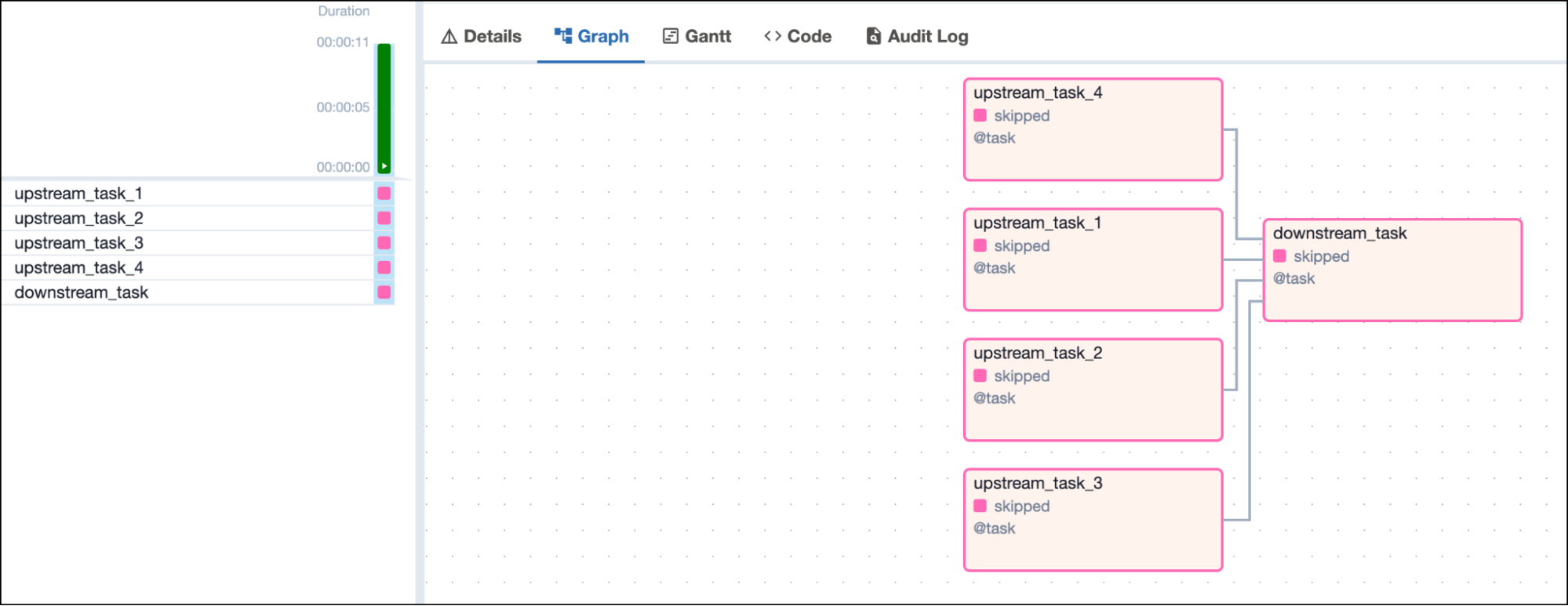
 If all upstream tasks have been skipped, the downstream task with the
`one_success` trigger rule is set to the state `skipped` as well.
If all upstream tasks have been skipped, the downstream task with the
`one_success` trigger rule is set to the state `skipped` as well.
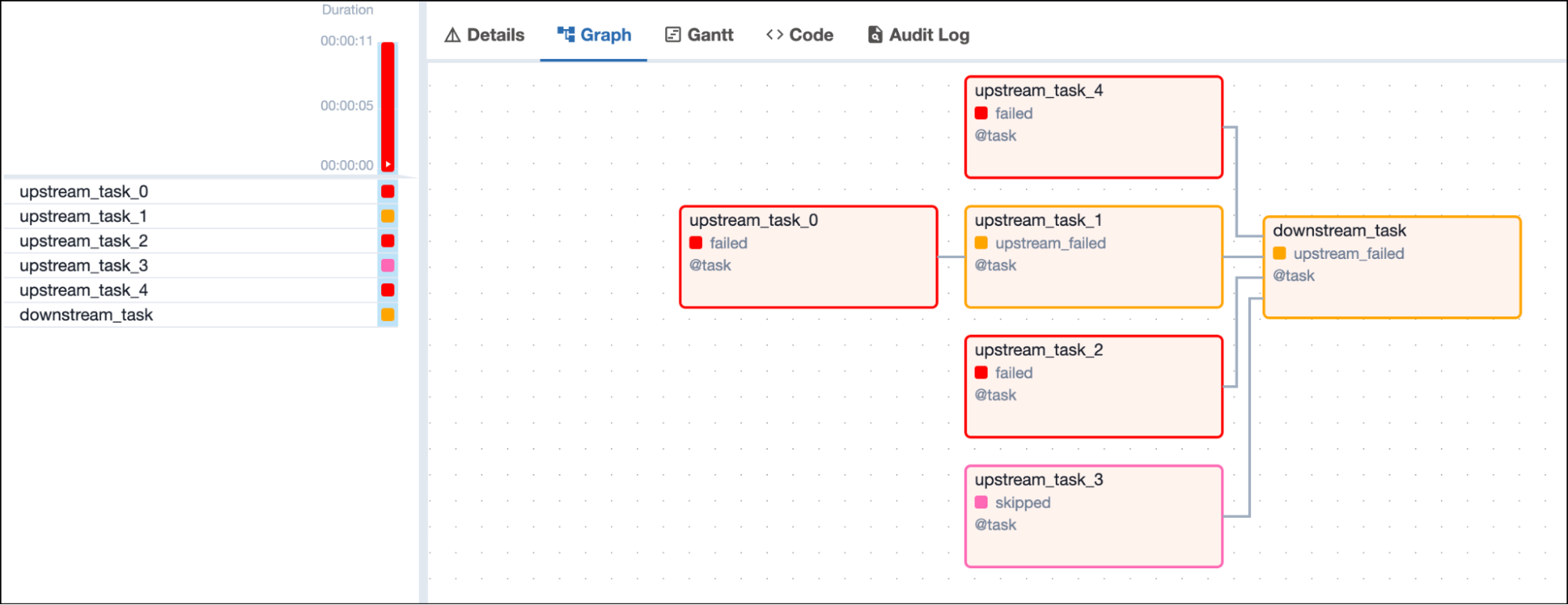
 If all upstream tasks have completed and at least one of them is in the
`failed` or `upstream_failed` state, the downstream task will be set to
the state `upstream_failed`.
If all upstream tasks have completed and at least one of them is in the
`failed` or `upstream_failed` state, the downstream task will be set to
the state `upstream_failed`.
 ### Trigger rule `one_done`
The `one_done` trigger rule makes a task run as soon as at least one of
its upstream tasks is in either the `success` or `failed` state. Upstream
tasks with `skipped` or `upstream_failed` states are not considered.
### Trigger rule `one_done`
The `one_done` trigger rule makes a task run as soon as at least one of
its upstream tasks is in either the `success` or `failed` state. Upstream
tasks with `skipped` or `upstream_failed` states are not considered.
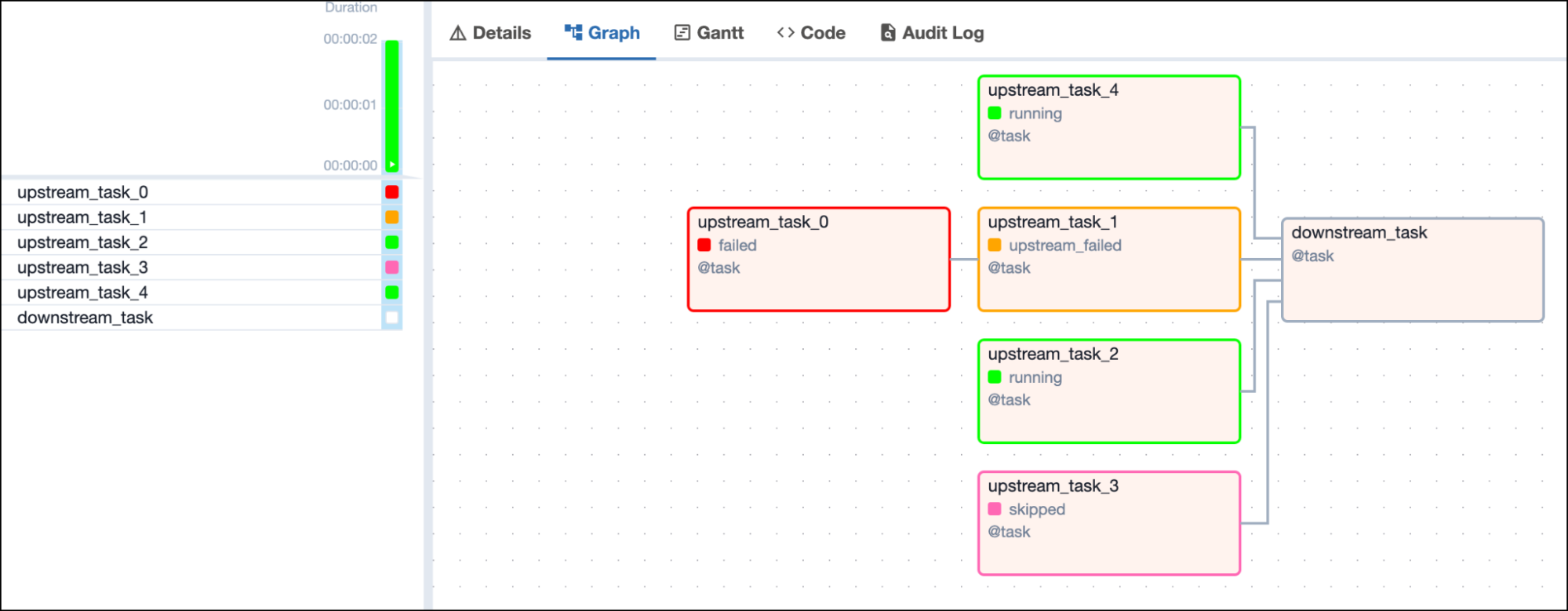 Once one upstream task finishes (either in the `success` or `failed`
state), the downstream task runs.
Once one upstream task finishes (either in the `success` or `failed`
state), the downstream task runs.
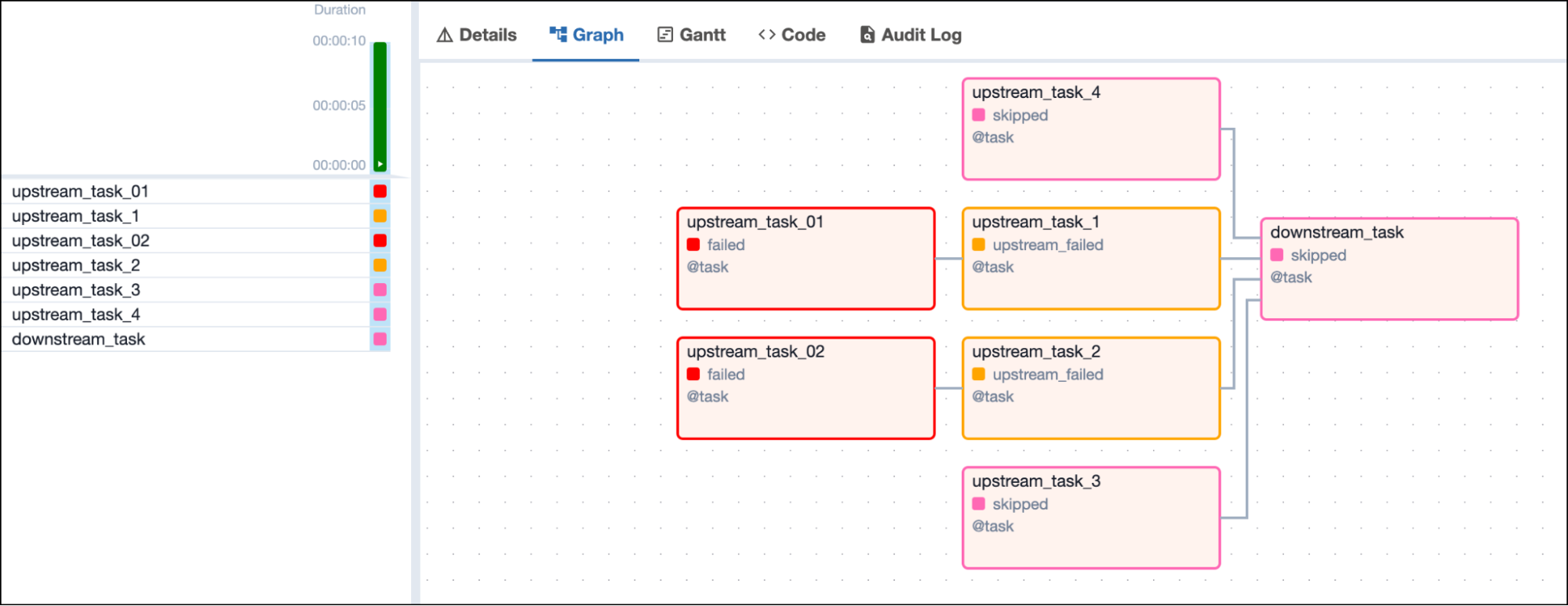
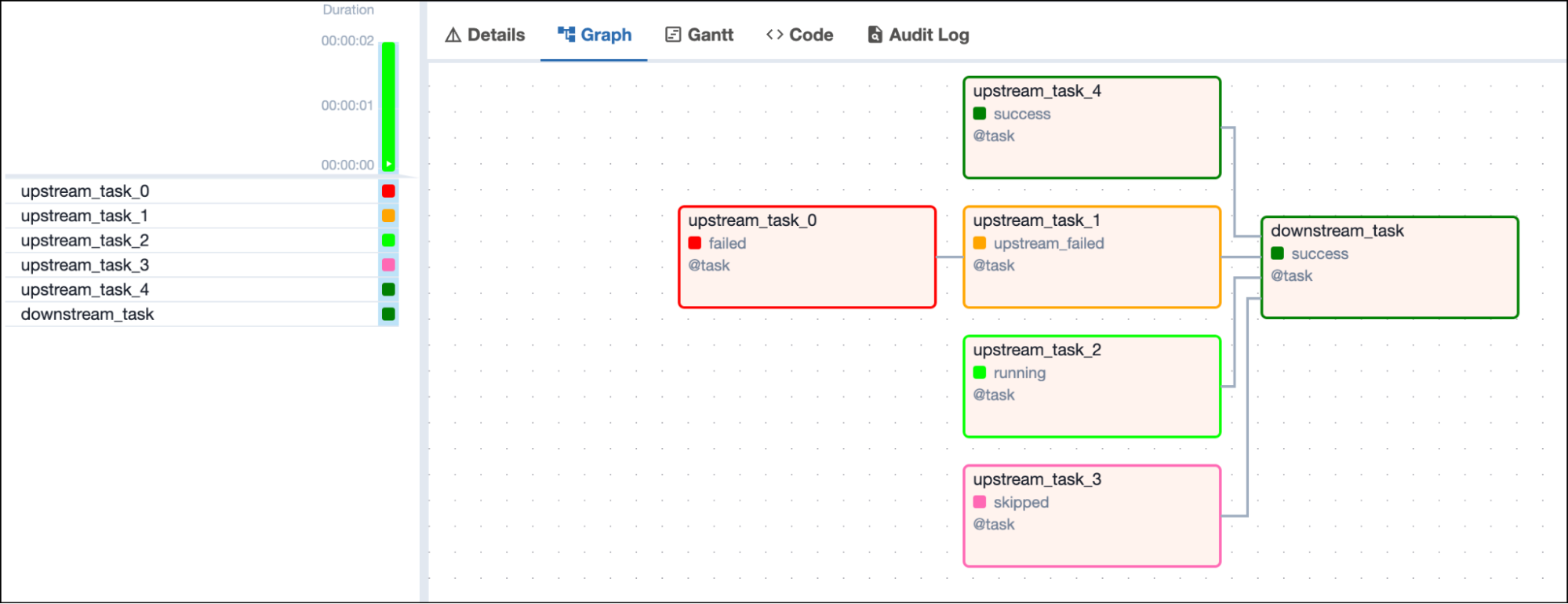 If all upstream tasks are either in `skipped` or `upstream_failed` states,
the downstream task with the `one_done` trigger rule is set to the state
`skipped`.
If all upstream tasks are either in `skipped` or `upstream_failed` states,
the downstream task with the `one_done` trigger rule is set to the state
`skipped`.
 ### Trigger rule `none_failed`
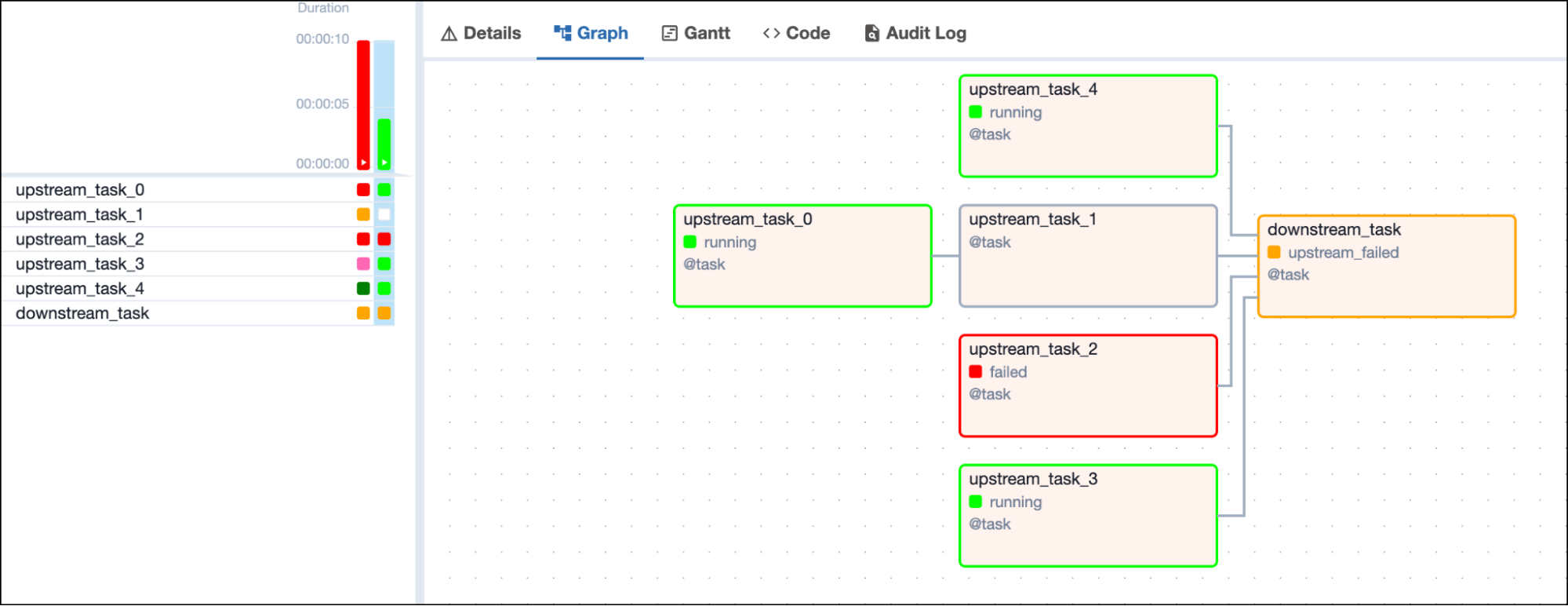
The `none_failed` trigger rule makes a task run only when all upstream
tasks have either succeeded or been skipped.
### Trigger rule `none_failed`
The `none_failed` trigger rule makes a task run only when all upstream
tasks have either succeeded or been skipped.
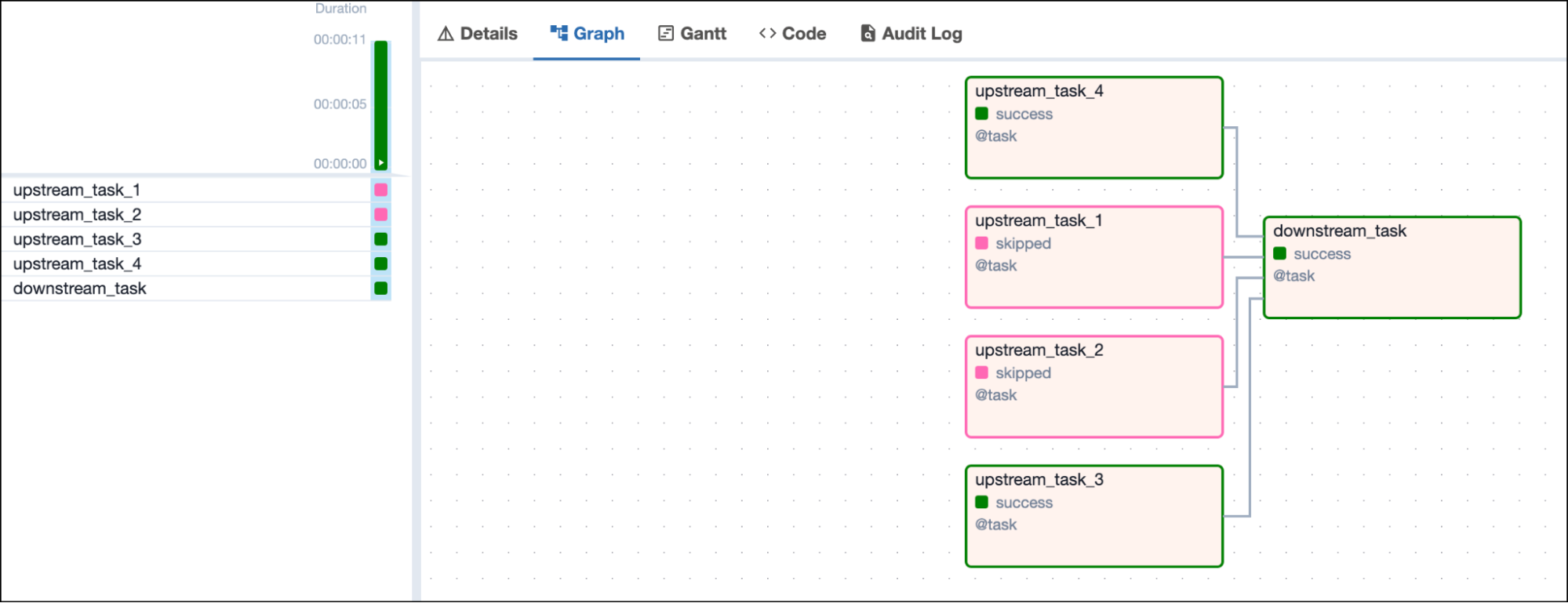 As soon as any upstream task is in the state `failed` or
`upstream_failed`, the downstream task is set to the state
`upstream_failed` and does not run.
As soon as any upstream task is in the state `failed` or
`upstream_failed`, the downstream task is set to the state
`upstream_failed` and does not run.
 ### Trigger rule `none_failed_min_one_success`
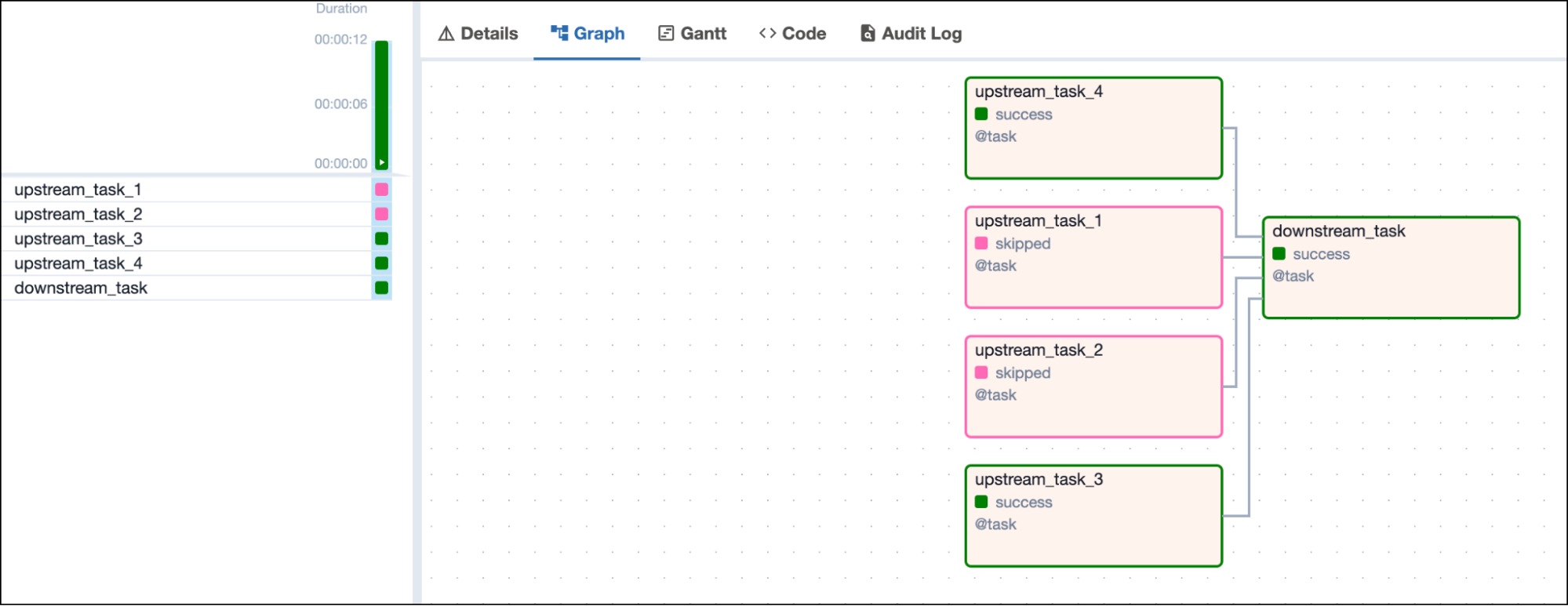
Tasks using the `none_failed_min_one_success` trigger rule run only when
three conditions are met:
1. All upstream tasks are finished.
2. No upstream tasks are in the `failed` or `upstream_failed` state.
3. At least one upstream task is in the `success` state.
### Trigger rule `none_failed_min_one_success`
Tasks using the `none_failed_min_one_success` trigger rule run only when
three conditions are met:
1. All upstream tasks are finished.
2. No upstream tasks are in the `failed` or `upstream_failed` state.
3. At least one upstream task is in the `success` state.
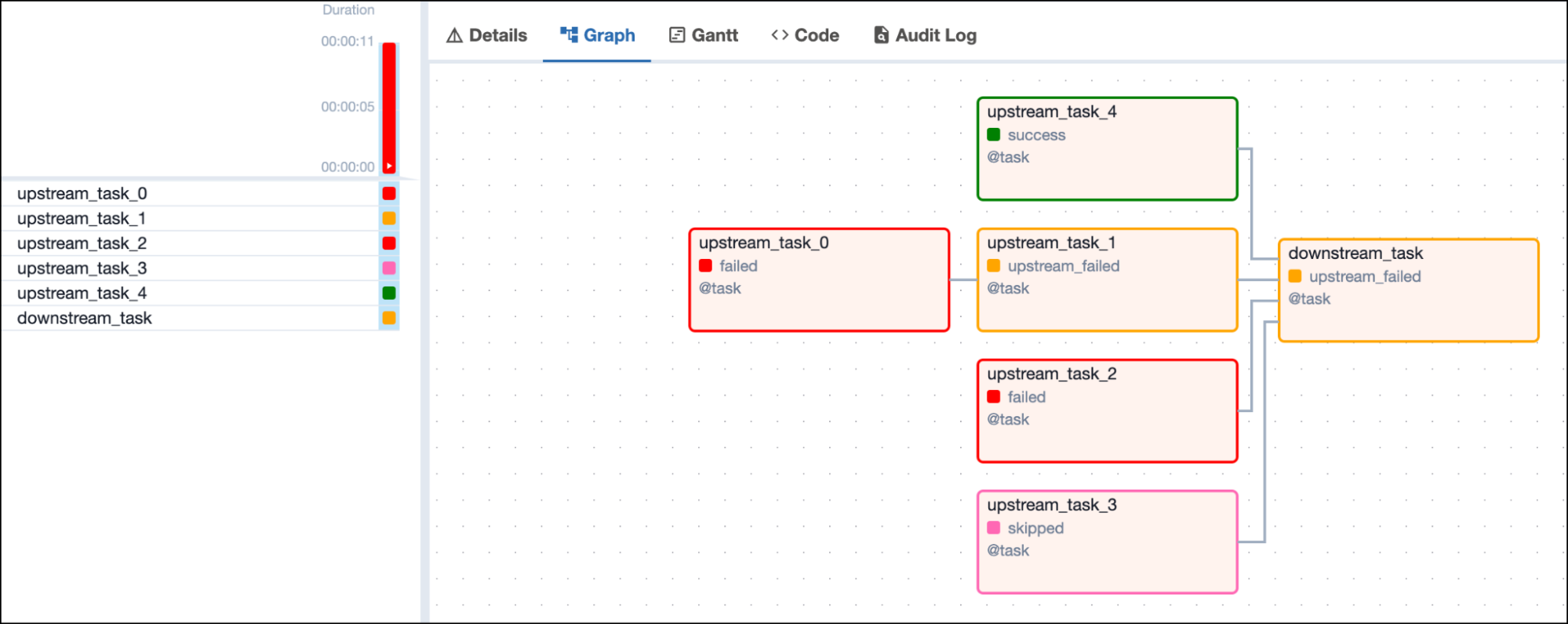
 If any upstream task is in the `failed` or `upstream_failed` state, the
downstream task is set to the state `upstream_failed` and does not run.
If any upstream task is in the `failed` or `upstream_failed` state, the
downstream task is set to the state `upstream_failed` and does not run.
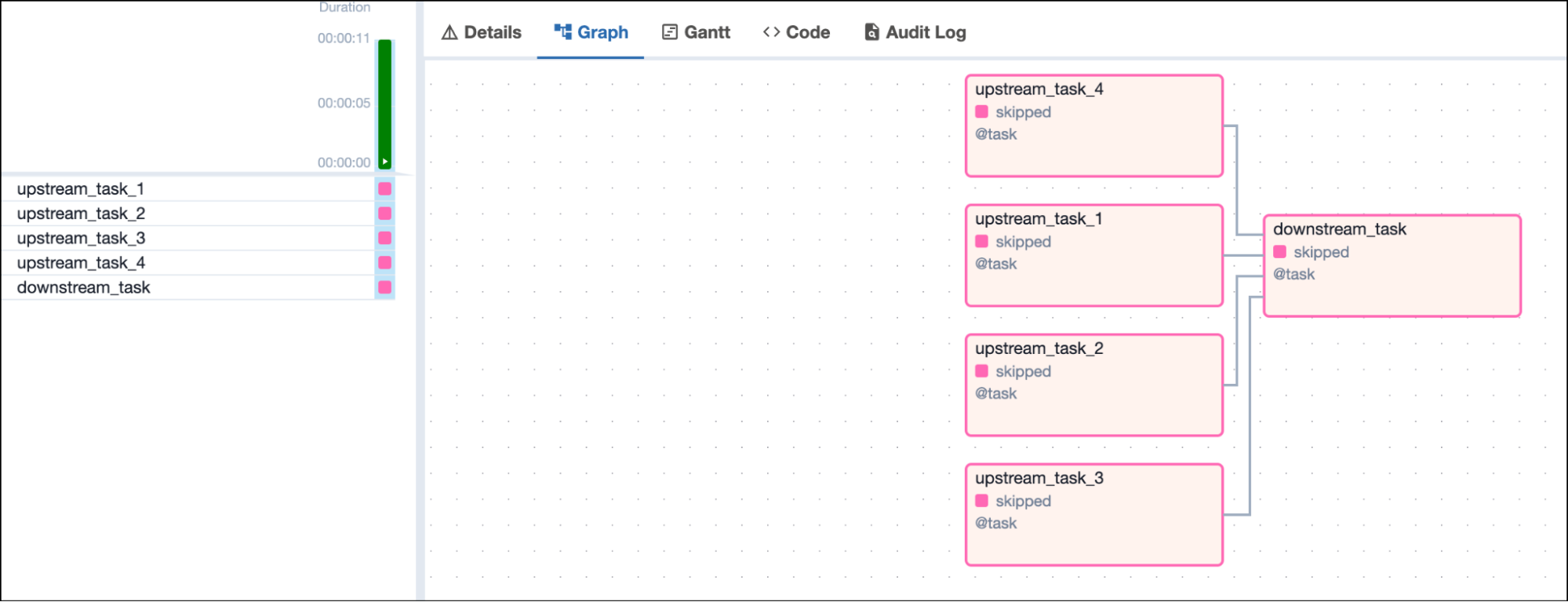
 If all upstream tasks are in the `skipped` state, the downstream task is
set to the state `skipped` and does not run.
If all upstream tasks are in the `skipped` state, the downstream task is
set to the state `skipped` and does not run.
 ### Trigger rule `none_skipped`
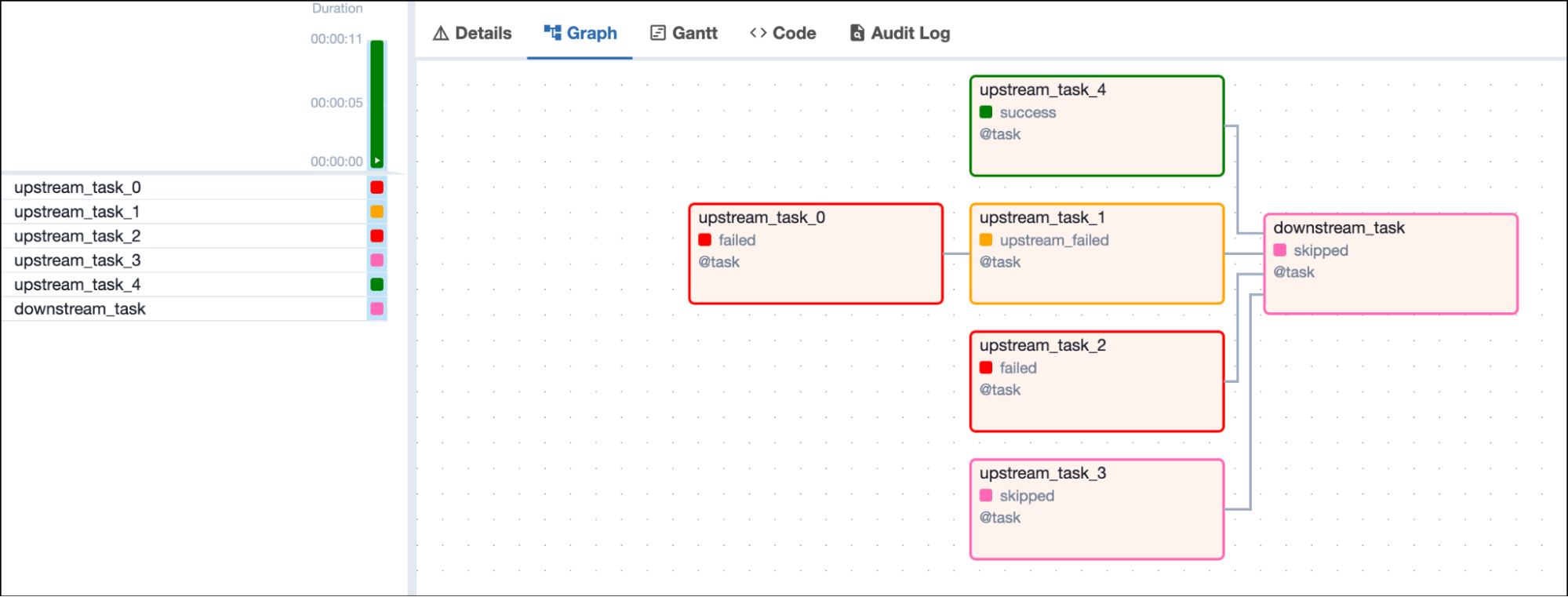
Tasks using the `none_skipped` trigger rule run only when no upstream task
is in the `skipped` state. Upstream tasks can be in any other state:
`success`, `failed`, or `upstream_failed`.
### Trigger rule `none_skipped`
Tasks using the `none_skipped` trigger rule run only when no upstream task
is in the `skipped` state. Upstream tasks can be in any other state:
`success`, `failed`, or `upstream_failed`.
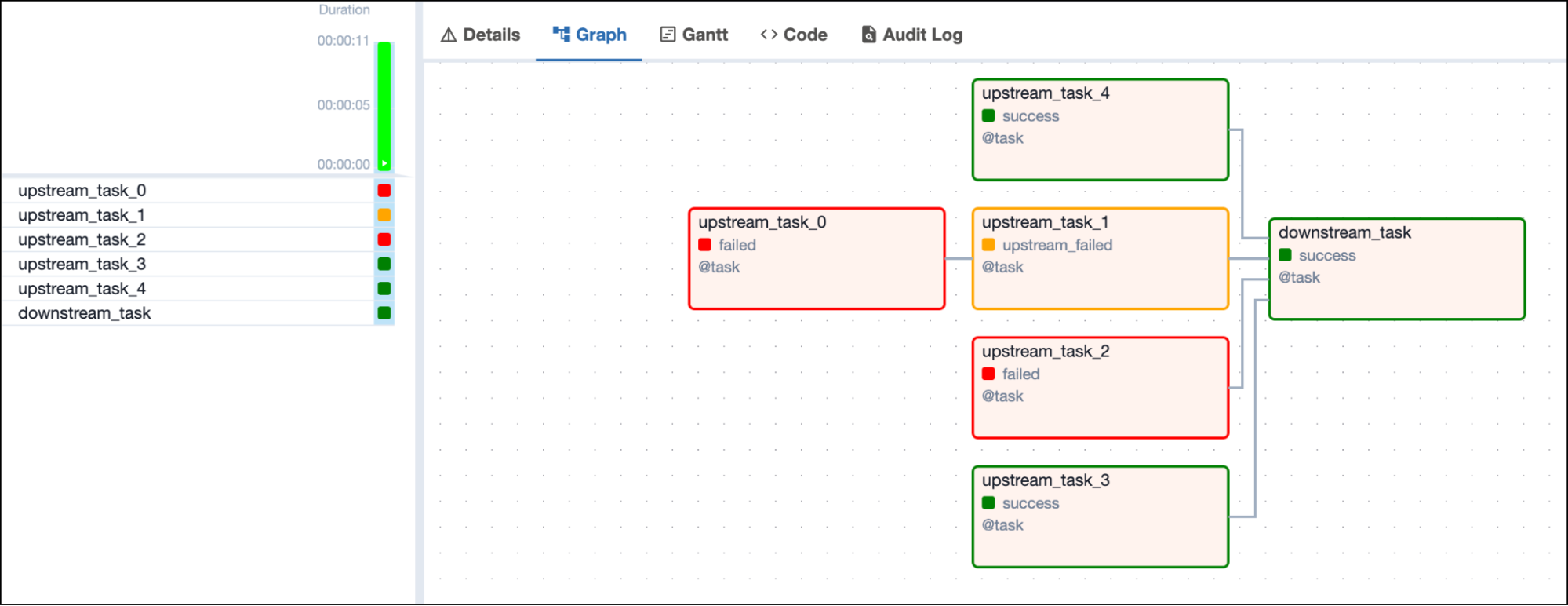 If any upstream task is in the `skipped` state, the downstream task is set
to the state `skipped` and does not run.
If any upstream task is in the `skipped` state, the downstream task is set
to the state `skipped` and does not run.
 ### Trigger rule `always`
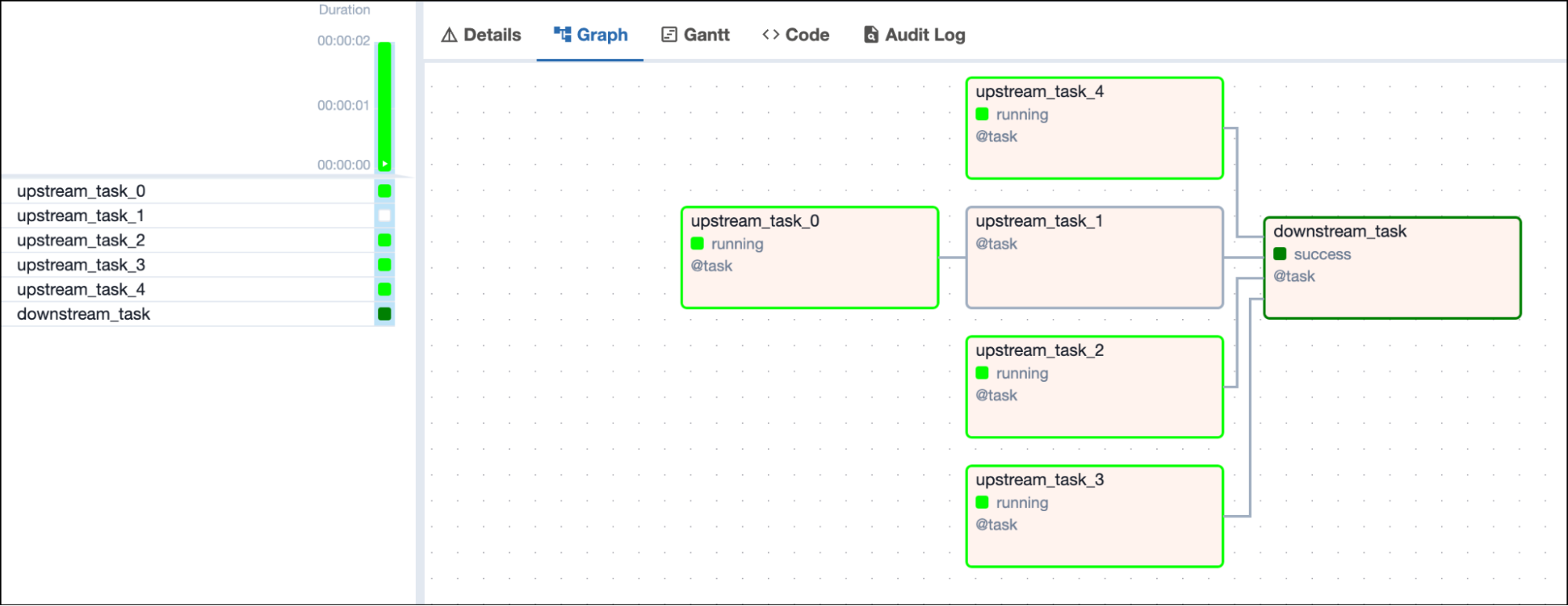
A task with the trigger rule `always` runs as soon as the DAG run is
started, regardless of the state of its upstream tasks.
### Trigger rule `always`
A task with the trigger rule `always` runs as soon as the DAG run is
started, regardless of the state of its upstream tasks.
 ## Conclusion and Next steps
Congrats! Now you know all about Airflow trigger rules and are ready to
use them in your DAGs! To experience how easy it is to run these DAGs in
production, sign up now for [a free Astro
trial](https://www.astronomer.io/lp/signup/).
## Conclusion and Next steps
Congrats! Now you know all about Airflow trigger rules and are ready to
use them in your DAGs! To experience how easy it is to run these DAGs in
production, sign up now for [a free Astro
trial](https://www.astronomer.io/lp/signup/).